
1. Okwu mmalite
Daalụ maka ịzụrụasing. Moukey MAMP1 220W Bluetooth Dual Channel Power Amponye ndu. Nke a amplifier is designed to provide powerful and versatile audio amplification for various applications, including karaoke, home theater systems, and general audio playback. It features multiple input options, Bluetooth 5.0 connectivity, and intuitive controls for an enhanced audio experience. Please read this manual thoroughly before use to ensure proper operation and to maximize the product's performance.
2. Ntuziaka nchekwa
Iji gbochie ujo eletriki, ọkụ, ma ọ bụ mmebi na unit ahụ, biko soro ntuziaka nchekwa ndị a:
- Ekpughena akụkụ a na mmiri ozuzo ma ọ bụ mmiri.
- Emeghela casing. Enweghị akụkụ ndị ọrụ ga-arụ ọrụ n'ime. Kpọtụrụ ndị ọrụ ruru eru ọrụ niile.
- Gbaa mbọ hụ na ọkọnọ ọkụ voltage dakọtara ihe ndị achọrọ kpọmkwem na unit ahụ.
- Place the unit on a stable, flat surface with adequate ventilation. Do not block ventilation openings.
- Keep the unit away from heat sources, direct sunlight, and excessive dust.
- Disconnect the power plug from the outlet if the unit will not be used for an extended period.
- Ejila aka mmiri rụọ ọrụ ahụ.
3. Ihe ngwugwu
Chọpụta na ihe niile dị na ngwugwu:
- Moukey MAMP1 Ike AmpNgalaba na-ebuli elu
- Njikwa anya
- Antenna FM
- Akwụkwọ ntuziaka onye ọrụ (Akwụkwọ a)
4. Ngwaahịa gafereview
4.1 Front Panel Controls and Functions
The front panel provides access to all primary controls and input ports for easy operation.

Image: Detailed diagram of the Moukey MAMP1 front panel, highlighting each control and port with corresponding numbers.
- Ike mgba ọkụ: Gbanyụọ ma ọ bụ gbanyụọ unit ahụ.
- USB / SD Slot: Maka ịkpọ ụda files from USB drives (max 32GB) or SD cards (max 16GB).
- Bọtịnụ ụkpụrụ: Cycles through input modes (Bluetooth, USB, SD, AUX, FM).
- bọtịnụ BT: Directly switches to Bluetooth mode.
- Prev Button: Skips to the previous track/station.
- Bọtịnụ Kwụsị/ Kwụsị: Na-egwu ma ọ bụ kwụsịtụ ịkpọghachi ọdịyo.
- Bọtịnụ na-esote: Skips to the next track/station.
- Ikanam Display: Shows current mode, track information, or frequency.
- Folder / Track: Navigates through folders or tracks on USB/SD.
- Mpịakọta olu ukwu: Na-edozi olu mmepụta n'ozuzu ya.
- Jack ekweisi: 3.5mm output for monitor headphones.
- Microphone 1 Input: 6.35mm jack for microphone connection.
- Microphone 2 Input: 6.35mm jack for a second microphone connection.
- Igwe Igwe Igwe okwu: Adjusts the volume of connected microphones.
- Echo Knob: Controls the echo effect for microphones.
- Bass Knob: Na-agbanwe mmepụta ụda olu dị ala.
- Knob Treble: Na-agbanwe mmepụta ọdịyo ugboro ugboro.
- Igwe nguzozi: Adjusts the left/right channel balance.
- Jack ntinye AUX: Ntinye 3.5mm maka ngwaọrụ ọdịyo mpụga.
- Ntinye Nhọrọ: Rotary switch to select between CD, AUX, DVD, and MP3/W inputs.
4.2 Njikọ azụ azụ
The rear panel houses the main audio input and output connections.

Foto: N'azụ view nke Moukey MAMP1 amplifier, showing all input and output ports.

Image: Detailed diagram of the Moukey MAMP1 rear panel, highlighting each connection point.
- Audio Input for DVD (RCA): Connect DVD players or other audio sources.
- Audio Input for CD (RCA): Connect CD players or other audio sources.
- Line Out Jack (RCA): For connecting to another amplifier ma ọ bụ ngwaọrụ ndekọ.
- Njikọ Antenna FM: Jikọọ antenna FM etinyere maka nnata redio.
- Speaker Output Jacks: Connect passive speakers (4-16 Ohm impedance).
- Ntinye eriri ọkụ: Jikọọ eriri ọkụ AC.
5. Nhazi
5.1 Ntinye
Debe ya amplifier on a flat, stable surface. Ensure there is sufficient space around the unit for proper ventilation to prevent overheating.
5.2 Njikọ ike
Connect the power cable to the Power Cable Input on the rear panel of the amplifier, then plug the other end into a suitable AC power outlet (115V AC).
5.3 Njikọ Ọkà Okwu
Ihe MAMP1 amplifier supports two sets of passive speakers with an impedance of 4-16 Ohms. Use appropriate speaker wire to connect your speakers to the Speaker Output Jacks on the rear panel.

Image: Diagram illustrating how to connect speakers to the amplifier's binding posts.
- Rotate and loosen the speaker knob on the binding post.
- Insert the bare wire (remove approximately 10mm of insulation) into the hole. Ensure correct polarity (+ to + and - to -).
- Tighten the knobs to secure the wires firmly.
5.4 Input Device Connection
Connect your audio sources (CD player, DVD player, tuner, etc.) to the corresponding RCA Audio Input jacks on the rear panel. For microphones, use the 6.35mm jacks on the front panel. For 3.5mm AUX devices, use the front panel AUX Input Jack.
6. Ntuziaka ọrụ
6.1 Gbanyụọ ma ọ bụ gbanyụọ
Pịa Mgbanwe ọkụ n'ihu panel iji tụgharịa ampma ọ bụ gbanyụọ ihe na-eme ka ihe na-enwu ọkụ. Ngosipụta LED ga-enwu mgbe a gbanyere ngwaọrụ ahụ.
6.2 Nhọrọ ntinye
Jiri ihe Bọtịnụ ọnọdụ on the front panel or the remote control to cycle through available input sources (Bluetooth, USB, SD, AUX, FM). Alternatively, use the Ntinye Ntinye knob on the front panel for RCA inputs (CD, AUX, DVD, MP3/W).
6.3 Njikwa olu
- Nke ukwu: Tugharia ihe Master olu Knob to adjust the overall output level of the ampna -emegharị ihe.
- Olu igwe okwu: Jiri ihe Mpempe ụda igwe okwu to control the volume of connected microphones independently.
6.4 Njikwa ụda
Adjust the audio characteristics using the Bass Knob na Treple akpu to suit your preference. The Itule akpu allows adjustment of the left and right channel output levels.

Image: Close-up of the Moukey MAMP1 showing the Bass and Treble adjustment knobs.
6.5 Echo Control
Tụgharịa Echo Knob to add or reduce the echo effect on the microphone inputs, suitable for karaoke applications.
6.6 Njikọ Bluetooth
Iji jikọọ ngwaọrụ Bluetooth:
- Pịa bọtịnụ BT or cycle through modes until "BLUE" appears on the LED display.
- Enable Bluetooth on your smartphone, tablet, or computer.
- Chọọ maka "Moukey MAMP1" in your device's Bluetooth settings and select it to pair.
- Once paired, you can stream audio wirelessly. Playback will temporarily pause during phone calls to protect privacy.
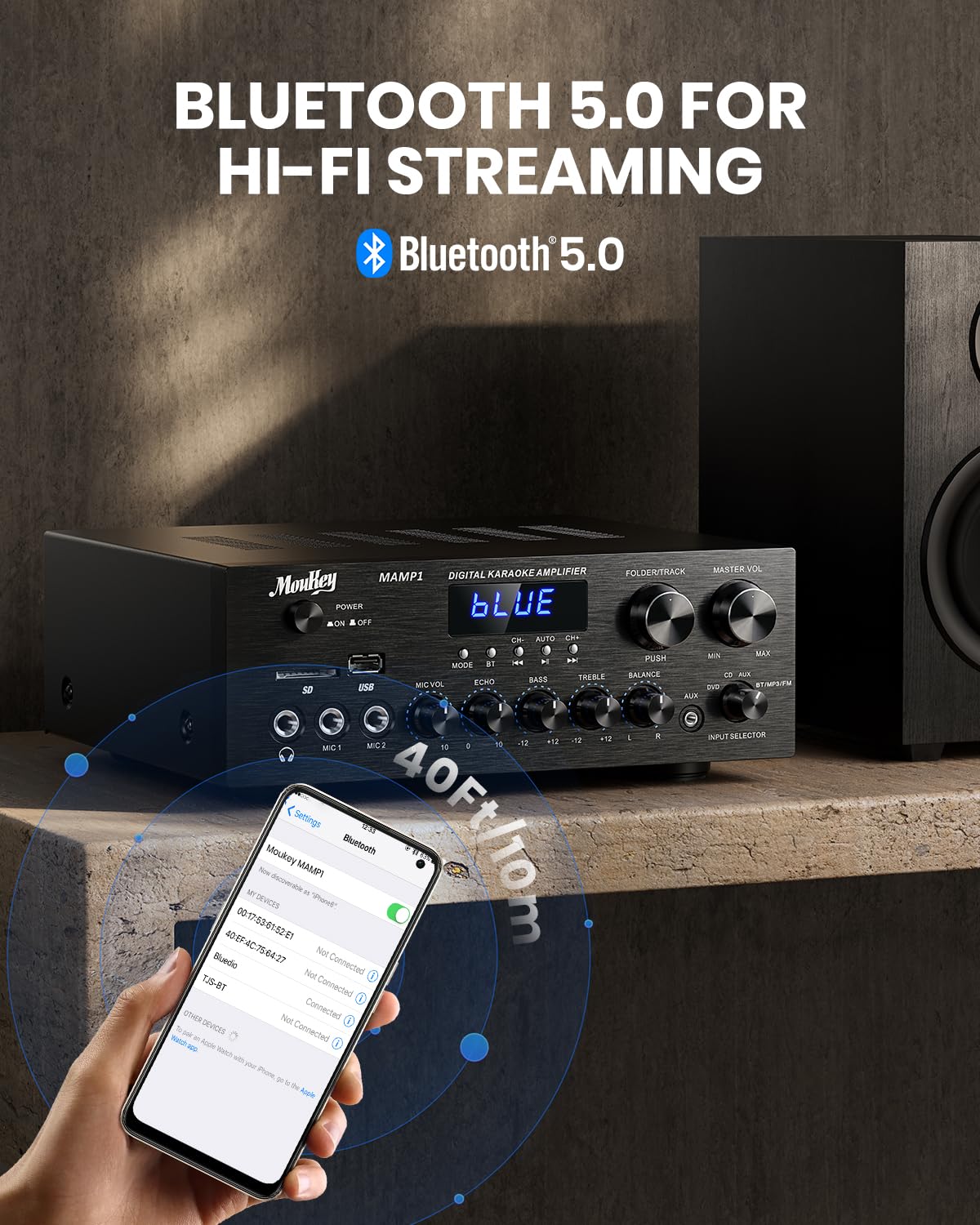
Foto: Moukey MAMP1 amplifier displaying "BLUE" on its screen, indicating Bluetooth mode, with a smartphone showing pairing options.
6.7 Igwe ọkpụkpọ USB/SD
Insert a USB drive (max 32GB) or SD card (max 16GB) into the respective slot on the front panel. The amplifier will automatically switch to USB/SD mode and begin playback. Use the Nke gara aga, Gwuo/kwụsịtụ, Osote, na Folder/Track bọtịnụ iji jikwaa ịkpọghachi.
Igwe redio FM 6.8
Ensure the FM antenna is connected to the rear panel. Select FM mode using the Bọtịnụ ọnọdụ. Jiri ihe Nke gara aga na Osote buttons to tune to radio stations. The LED display will show the current frequency.
7. Nlekọta
To maintain the performance and appearance of your ampntughari:
- Nhicha: Use a soft, dry cloth to wipe the exterior of the unit. Do not use liquid cleaners or abrasive chemicals.
- Igwe ikuku: Ensure ventilation openings are clear of dust and debris.
- Nchekwa: Ọ bụrụ na ị na-echekwa unit ahụ ruo ogologo oge, kwụpụ ya na ike ma chekwaa ya n'ebe dị jụụ na nkụ.
8. Nchọpụta nsogbu
If you encounter issues with your Moukey MAMP1 amplifier, refer to the following table for common problems and solutions:
| Nsogbu | Ihe nwere ike ime | Ngwọta |
|---|---|---|
| Enweghị ike | Power cable not connected; Power outlet faulty; Power switch off. | Ensure power cable is securely connected. Try a different power outlet. Press the power switch to ON. |
| Enweghị mmepụta ụda | Incorrect input selected; Volume too low; Speakers not connected; Speaker wires loose; Mute function active. | Select the correct input source. Increase Master Volume. Check speaker connections and polarity. Ensure mute is off. |
| Bluetooth anaghị ejikọ | Amplifier not in Bluetooth mode; Device too far; Device already paired to another unit. | Gbaa mbọ hụ amplifier is in Bluetooth mode ("BLUE" on display). Move device closer to amplifier. Disconnect from other devices. |
| Igwe okwu anaghị arụ ọrụ | Microphone not connected; Mic volume too low; Echo knob set to minimum. | Connect microphone securely. Increase Microphone Volume. Adjust Echo knob. |
| Nsogbu ọkpụkpọ USB/SD | Enweghị nkwado file format; USB drive/SD card corrupted; Capacity exceeded. | Gbaa mbọ hụ na ọdịyo files are in supported formats (e.g., MP3). Try a different USB drive/SD card. Check capacity limits (USB max 32G, SD max 16G). |
Ọ bụrụ na nsogbu ahụ dịgidere mgbe ịnwale azịza ndị a, biko kpọtụrụ nkwado ndị ahịa.
9. Nkọwapụta
| Njirimara | Nkọwapụta |
|---|---|
| Ụdị | Moukey |
| Nlereanya | MAMP1 |
| Ike mmepụta | 220 Watt |
| Ọwa | 2 |
| Voltage | 115 volts (AC) |
| Mmetụta Ọkà Okwu | 4-16 ohms |
| Ụdị Bluetooth | 5.0 |
| Oke Bluetooth | Over 12 meters (40 feet) |
| Nkwado Kaadị USB/SD | USB: Max 32GB, SD: Max 16GB |
| Akụkụ (L x W x H) | 25cm x 21.3cm x 9.5cm (ihe dị ka 10in x 8in x 4in) |
| UPC | 715802779039 |
| Mba onye si | China |

Foto: Moukey MAMP1 amplifier with its dimensions labeled.
10. Akwụkwọ ikike na nkwado
This Moukey MAMP1 Ike Amplifier na-abịa na a 1-afọ akwụkwọ ikike site na ụbọchị ịzụrụ. Akwụkwọ ikike a na-ekpuchi ntụpọ nrụpụta na arụ ọrụ n'okpuru ojiji nkịtị.
Akwụkwọ ikike anaghị ekpuchi:
- Damage caused by accident, abuse, misuse, flood, fire, or other natural causes.
- Damage caused by unauthorized modification or repair.
- Damage caused by improper installation or connection.
- Cosmetic damage, such as scratches, dents, and broken plastic on ports.
For warranty claims or technical support, please contact the retailer where you purchased the product or visit the official Moukey website for contact information. Please have your purchase receipt and product model number (MAMP1) ready when contacting support.