
1. Okwu mmalite
Thank you for choosing the Silvergear Lollipop Kids Camera. This digital camera is designed for children, featuring a durable silicone case, 5.0-megapixel photo resolution, and video recording capabilities. It also includes built-in games for entertainment. This manual provides essential information for the safe and effective use of your camera.
2. Ngwaahịa gafereview
Familiarize yourself with the components of your Silvergear Lollipop Kids Camera.
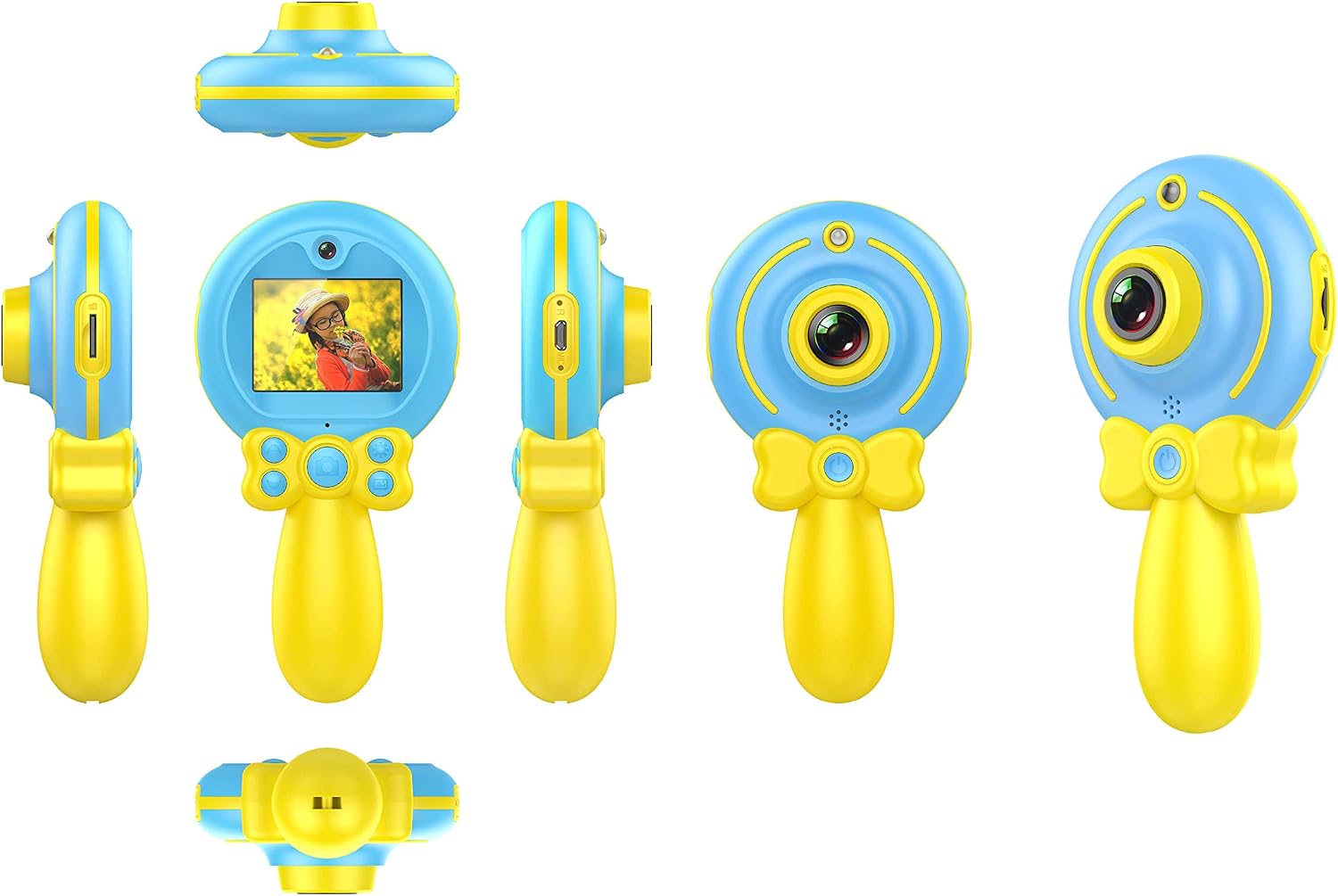
Foto nke 2.1: Dị iche iche views of the Silvergear Lollipop Kids Camera, illustrating its compact design, front and rear lenses, 2-inch display, and control buttons. The camera features a yellow handle and blue body with a silicone protective case.
- Lensi ihu: Maka ise foto na vidiyo.
- Lens azụ: For selfies.
- 2-inch Display Screen: Maka viewing photos, videos, and navigating menus.
- bọtịnụ njikwa: For power, navigation, and selection.
- Micro USB Port: Maka ịchaji na ịnyefe data.
- Oghere kaadị Micro SD: For expandable storage.
- Wrist Strap Attachment Point: For securing the camera.
3. Nhazi
3.1 Ịchaji batrị
The camera is equipped with a built-in rechargeable Lithium-polymer battery. Before first use, fully charge the camera.
- Connect the included Micro USB cable to the camera's Micro USB port.
- Jikọọ nsọtụ nke ọzọ nke eriri na ihe nkwụnye ọkụ USB (anaghị etinye ya) ma ọ bụ ọdụ ụgbọ USB nke kọmputa.
- Ọkụ na-egosi ịchaji ga-enwu. Ozugbo chajịchara zuru oke, ọkụ ahụ nwere ike ịgbanwe agba ma ọ bụ gbanyụọ.
3.2 Ịtinye kaadị Micro SD
A Micro SD card (not included) is required to save photos and videos. The camera supports cards up to 32GB.
- Locate the Micro SD card slot on the camera.
- Gently insert the Micro SD card into the slot with the metal contacts facing down until it clicks into place.
- Iji wepụ, gbanye kaadị ahụ ntakịrị ruo mgbe ọ pụtara.
3.3 Gbanyụọ/ gbanyụọ
- Iji gbanye: Press and hold the Power button for a few seconds until the screen illuminates.
- Iji gbanyụọ: Press and hold the Power button for a few seconds until the screen turns off.
4. Ntuziaka ọrụ
4.1 Ịse foto
The camera features a 5.0-megapixel resolution for still images.

Foto nke 4.1: A child demonstrating the use of the Silvergear Lollipop Kids Camera for taking photographs.
- Ensure the camera is powered on and in photo mode. Use the navigation buttons to select photo mode if necessary.
- Frame your shot using the 2-inch display screen.
- Press the Shutter button to capture the photo. The camera has autofocus for clear images.
4.2 Ndekọ vidiyo
The camera can record videos at 640 x 480 pixels resolution at 30 frames per second in MP4 format.
- Switch the camera to video recording mode using the mode selection button.
- Press the Record button to start recording. A timer or indicator will appear on the screen.
- Pịa bọtịnụ Dekọọ ọzọ ka ịkwụsị ndekọ.
4.3 Egwuregwu Egwuregwu
The camera includes three built-in games for entertainment.

Foto nke 4.2: A child interacting with the Silvergear Lollipop Kids Camera, viewing content on its screen.
- Navigate to the 'Games' menu option using the navigation buttons.
- Select one of the three available games.
- Use the camera's control buttons to play the game.
4.4 Nyefee Files
Iji bufee foto na vidiyo na kọmputa:
- Connect the camera to a computer using the Micro USB cable.
- The camera should appear as a removable disk drive on your computer.
- Mepee folda igwefoto ahụ iji nweta ma detuo nke gị files.
5. Nlekọta
- Nhicha: Use a soft, dry cloth to clean the camera body and screen. Do not use liquid cleaners or abrasive materials.
- Nchekwa: Debe igwefoto ahụ n'ebe dị jụụ ma kpọọ nkụ, ebe anwụ na-anaghị apụta kpọmkwem na oke okpomọkụ.
- Nlekọta batrị: For optimal battery life, avoid fully discharging the battery frequently. Charge the camera regularly, even if not in use for extended periods.
- Nguzogide mmiri: Igwefoto a bụ ọ bụghị waterproofZere ka mmiri ghara iru gị ala ma ọ bụ oke iru mmiri.
6. Nchọpụta nsogbu
- Igwefoto anaghị agbanwu: Ensure the battery is charged. Connect the camera to a power source and try again.
- Cannot take photos/videos: Check if a Micro SD card is inserted correctly and has sufficient free space.
- Ogo onyonyo adịghị mma: Hụ na enyo ahụ dị ọcha ma ghara inwe ihe ruru unyi. Lelee ọnọdụ ọkụ.
- Igwefoto na-ajụ oyi: Press and hold the Power button to force a shutdown, then restart the camera.
- Computer does not recognize camera: Ensure the USB cable is properly connected. Try a different USB port or cable.
7. Nkọwapụta
| Njirimara | Nkọwapụta |
|---|---|
| Nọmba nlereanya | 1087-B |
| Ụdị | Ngwa ọlaọcha |
| Akụkụ (L x W x H) | 9 x 5 x 15 cm |
| Ibu | 140 grams |
| Mkpebi onyonyo | 5 megapixels |
| Mkpebi vidiyo | 640 x 480 pixels (30 FPS) |
| Usoro vidiyo | MP4 |
| Usoro onyonyo | JPEG |
| Nha ihuenyo | 2 sentimita asatọ |
| Nchekwa | Micro SD card support up to 32 GB |
| Batrị | 1 Lithium-polymer (included) |
| Njikọta | USB |
| Nchekwa onwe | Ee |
| Mmiri Nguzogide | Ọ bụghị ihe mgbochi mmiri |
| Atụmatụ pụrụ iche | Video recording, filters, 3 built-in games |
8. Igbe dị na ya
- Silvergear Lollipop Kids Camera (Blue)
- Silicone Nchedo Ikpe
- Igwe chaja USB Micro
- Eriri aka
9. Akwụkwọ ikike na nkwado
Information regarding product warranty and customer support is not available in the provided product data. Please refer to the product packaging or the manufacturer's official website for details on warranty coverage and how to contact customer support.