
1. Okwu mmalite na gafereview
The Escort EDM 1111A is a versatile digital multimeter designed for accurate measurement of various electrical parameters. This device is essential for electricians, technicians, and hobbyists for testing circuits, components, and power sources. It features a clear digital display and a rotary dial for selecting different measurement functions.

The Escort EDM 1111A Digital Multimeter with red and black test leads connected, ready for use.
Ọrụ ndị dị mkpa gụnyere:
- DC Voltage (DCV) measurement
- AC Voltage (ACV) measurement
- DC Current (DCA) measurement
- AC Current (ACA) measurement
- Nleta mgbochi (Ω).
- Capacitance (CX) measurement
- Diode and Transistor (hFE) testing
2. Nhazi
2.1 Ntinye batrị
The Escort EDM 1111A requires a DC 9V 006P battery for operation. To install or replace the battery:
- Hụ na agbanyụrụla multimeter ahụ.
- Chọta ebe batrị dị n'azụ unit ahụ.
- Carefully slide open or unscrew the battery cover.
- Insert a new 9V 006P battery, observing the correct polarity (+/-).
- Dochie mkpuchi batrị nke ọma.

Azu view of the Escort EDM 1111A Digital Multimeter, showing the battery compartment cover and the product label.
2.2 Njikọ Ndị Nnwale Nlele
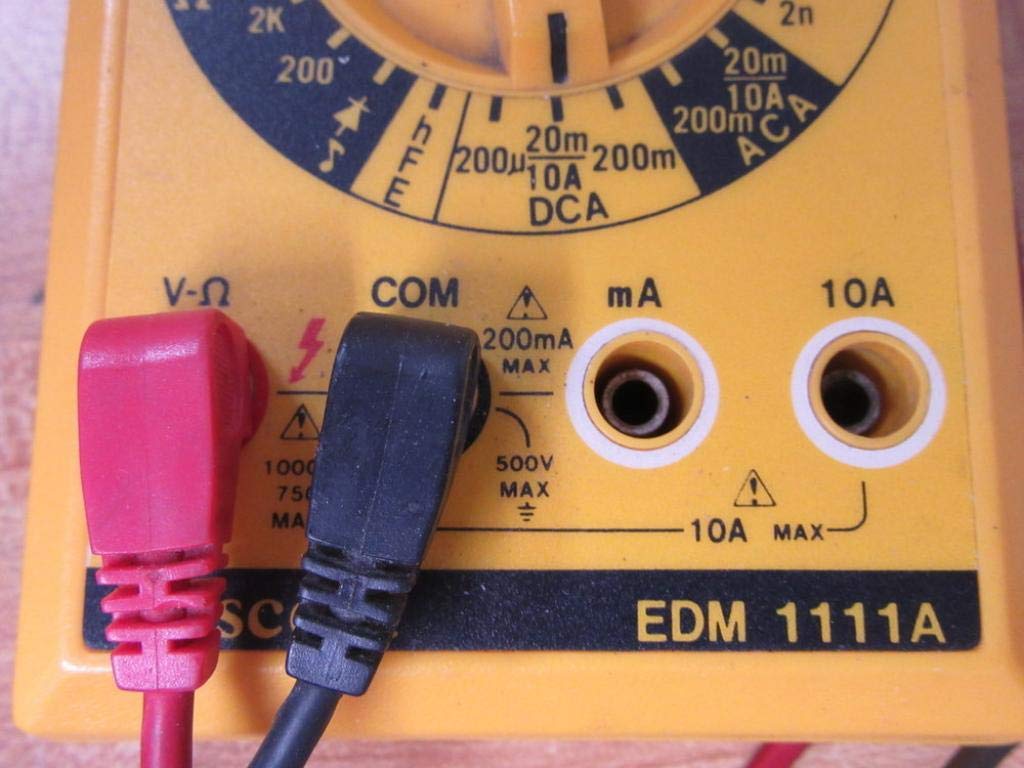
The multimeter comes with two test leads, typically one red (positive) and one black (negative/common). Proper connection is crucial for accurate and safe measurements.
- Maka ọtụtụ voltage, resistance, and low current measurements, connect the black lead to the 'COM' (Common) jack.
- Connect the red lead to the 'V-Ω-mA' jack for voltage, resistance, and milliampnha ndị dị ugbu a.
- For high current measurements (up to 10A), connect the red lead to the '10A' jack. Always ensure the correct jack is used to prevent damage to the meter or circuit.

A closer look at the input jacks (V-Ω, COM, mA, 10A) and the lower portion of the rotary dial, indicating current measurement ranges.

The red and black test probes (leads) used with the Escort EDM 1111A Digital Multimeter, featuring pointed tips for electrical contact.
3. Ntuziaka ọrụ
Before taking any measurements, ensure the test leads are correctly connected and the rotary dial is set to the appropriate function and range.

Zuru ezu view of the rotary selector dial on the Escort EDM 1111A Digital Multimeter, displaying various measurement functions such as DCV, ACV, Ω, DCA, ACA, and CX.
3.1 Na-atụ DC Voltage (DCV)
- Set the rotary dial to the desired DCV range (e.g., 200m, 2, 20, 200, 1000). Choose a range higher than the expected voltage.
- Connect the red lead to the positive (+) side of the circuit and the black lead to the negative (-) side.
- Gụọ voltage uru na ngosi.
3.2 Na-atụ AC Voltage (ACV)
- Set the rotary dial to the desired ACV range (e.g., 200m, 2, 20, 200, 750). Choose a range higher than the expected voltage.
- Jikọọ ụzọ ule n'ofe AC voltage source. Polarity does not matter for AC voltage.
- Gụọ voltage uru na ngosi.
3.3 Measuring Resistance (Ω)
- Hụ na sekit ma ọ bụ akụkụ ahụ anaghị arụ ọrụ nke ọma tupu ị tụọ ihe ndị na-eguzogide ya.
- Set the rotary dial to the desired Ω range (e.g., 200, 2K, 20K, 200K, 2M, 20M, 200M).
- Jikọọ ihe nlele ndị a ga-eji tụọ.
- Gụọ uru ndị na-eguzogide na ngosipụta.
3.4 Measuring DC Current (DCA)
- Jide n'aka na sekit ahụ anaghị arụ ọrụ nke ọma.
- Set the rotary dial to the desired DCA range (e.g., 200µ, 2m, 20m, 200m, 10A).
- Ihe dị mkpa: For currents up to 200mA, use the 'V-Ω-mA' jack for the red lead. For currents up to 10A, use the '10A' jack.
- Break the circuit and connect the multimeter in series with the load. The current must flow through the multimeter.
- Re-energize the circuit and read the current value.
3.5 Measuring AC Current (ACA)
- Jide n'aka na sekit ahụ anaghị arụ ọrụ nke ọma.
- Set the rotary dial to the desired ACA range (e.g., 200µ, 2m, 20m, 200m, 10A).
- Ihe dị mkpa: For currents up to 200mA, use the 'V-Ω-mA' jack for the red lead. For currents up to 10A, use the '10A' jack.
- Gbajie sekit ahụ ma jikọọ multimeter n'usoro na ibu ahụ.
- Re-energize the circuit and read the current value.
3.6 Measuring Capacitance (CX)
- Ensure the capacitor is fully discharged before testing.
- Set the rotary dial to the CX range (e.g., 2n, 20n, 200n, 2µ, 20µ).
- Jikọọ ndị na-enye ule n'ofe ọdụ capacitor ahụ.
- Gụọ uru capacitance na ngosipụta.
3.7 Diode and Transistor (hFE) Testing
Refer to the specific markings on the dial for diode and transistor testing functions. Typically, diode test mode allows checking the forward voltage drop of a diode, and hFE mode is used for measuring the DC current gain of transistors.
4. Nlekọta
4.1 nnọchi batrị
Replace the 9V 006P battery when the low battery indicator appears on the display or if the multimeter fails to power on. Follow the instructions in Section 2.1.
4.2 Nhicha
Iji hichaa multimeter, jiri ihe dị nro, damp cloth. Do not use abrasive cleaners or solvents, as they may damage the casing or display. Ensure the device is turned off and disconnected from any circuits before cleaning.
4.3 Nchekwa
When not in use for extended periods, store the multimeter in a cool, dry place, away from direct sunlight and extreme temperatures. Consider removing the battery to prevent leakage, which could damage the internal components.
5. Nchọpụta nsogbu
| Nsogbu | Ihe nwere ike ime | Ngwọta |
|---|---|---|
| Enweghị ngosipụta ma ọ bụ ngosipụta dị jụụ | Batrị dị ala ma ọ bụ nwụrụ anwụ | Replace the 9V 006P battery. |
| Ọgụgụ na-ezighi ezi | Incorrect range selected Poor lead connection Damaged test leads Incorrect input jack used | Họrọ oke kwesịrị ekwesị. Ensure leads are firmly connected. Inspect and replace damaged leads. Verify leads are in the correct V-Ω-mA or 10A jack. |
| Egosipụtara "OL" (Oke ibu) | Measurement exceeds selected range | Gbanwee n'ogo dị elu. |
| Enweghị ụda na-aga n'ihu | Continuity function not selected Mepee sekit | Ensure dial is on continuity/diode test. Check the circuit for breaks. |
6. Nkọwapụta
| Oke | Uru |
|---|---|
| Nlereanya | EDM 1111A |
| Akụkụ ngwaahịa (L x W x H) | 8 x 4 x 2 sentimita asatọ |
| Ibu Ibu | 1.84 pound |
| Isi Iyi Ike | DC 9V 006P Battery |
| Ụdị nha | Multimeter |
| Onye nrụpụta | Eso |
| Ụbọchị mbụ dị | Nọvemba 21, 2019 |
| DC Voltage nso | 200mV, 2V, 20V, 200V, 1000V |
| AC Voltage nso | 200mV, 2V, 20V, 200V, 750V |
| DC Current Ranges | 200µA, 2mA, 20mA, 200mA, 10A |
| AC Current Ranges | 200µA, 2mA, 20mA, 200mA, 10A |
| Oke mgbochi | 200Ω, 2KΩ, 20KΩ, 200KΩ, 2MΩ, 20MΩ, 200MΩ |
| Capacitance Ranges | 2nF, 20nF, 200nF, 2µF, 20µF |
7. Akwụkwọ ikike Ozi
For specific warranty details regarding your Escort EDM 1111A Digital Multimeter, please refer to the documentation provided at the time of purchase or contact the manufacturer directly. Warranty terms typically cover defects in materials and workmanship under normal use.
8. Nkwado ndị ahịa
If you encounter any issues or have questions not covered in this manual, please contact Escort customer support. Have your product model number (EDM 1111A) and serial number (if applicable, found on the back label) ready when contacting support for faster assistance.
The product label on the back of the Escort EDM 1111A, indicating 'DIGITAL MULTIMETER DC 9V 006P BATTERY', serial number, and 'MADE IN TAIWAN R.O.C.'.