
Okwu mmalite
The Divoom Ditoo Pro is a versatile mini Bluetooth speaker featuring a 16x16 LED app-controlled pixel art screen. It functions as a portable speaker, a customizable display for pixel art, a clock, and a mood light. This device is designed to enhance your desk or bedside environment with both audio and visual functionality.
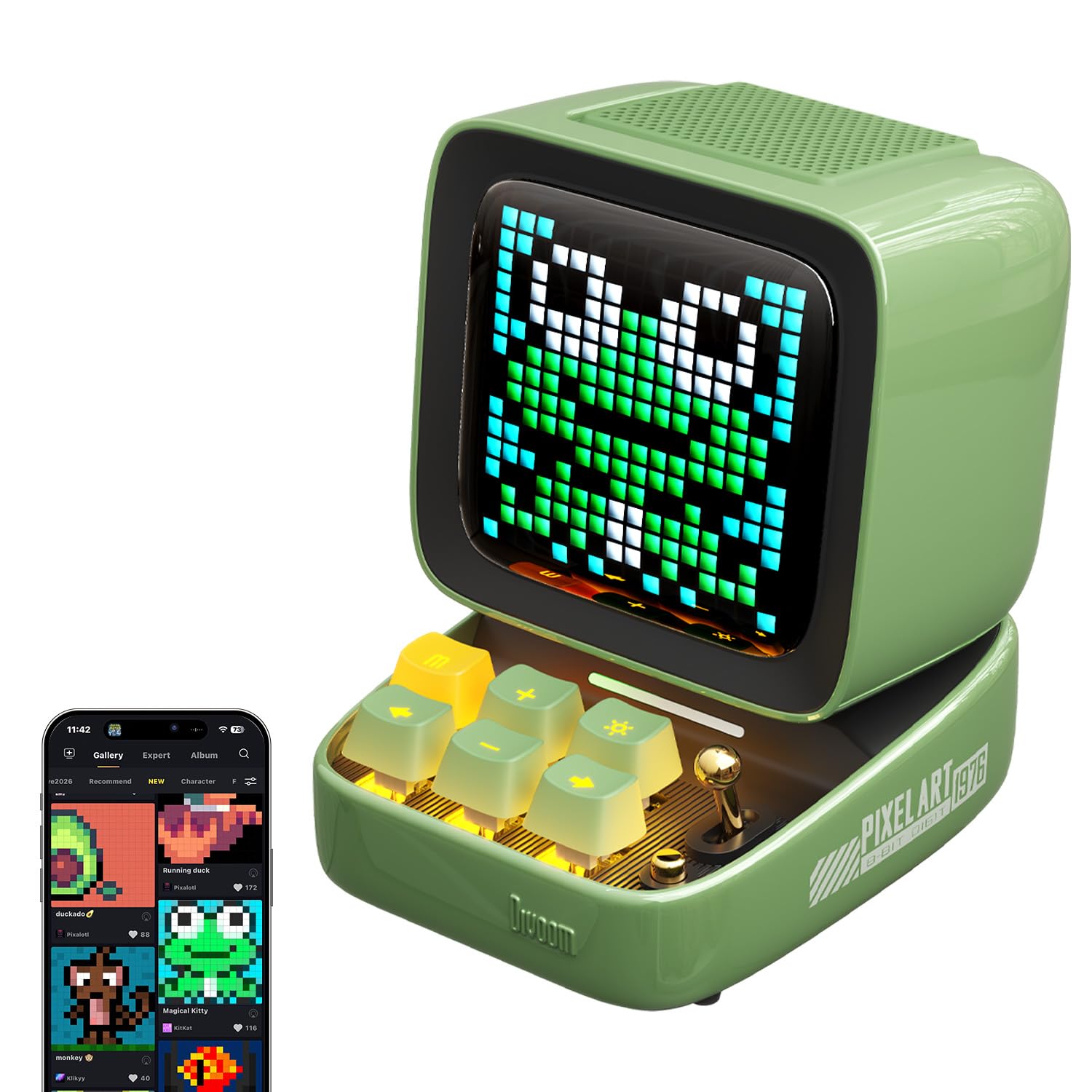
Image: The Divoom Ditoo Pro speaker in green, showcasing its retro computer design with a pixel art display.
Kedu ihe dị na Igbe ahụ
Gbaa mbọ hụ na ihe niile dị mgbe ị na-ewepụ igbe:
- Divoom Ditoo Pro Speaker
- USB-C eriri USB
- Akwụkwọ ntuziaka onye ọrụ
- Igwe igwe ikuku Obere
Melite
1. Na-agbanye ike
To power on the Ditoo Pro, press and hold the power button located on the device until the screen illuminates.
2. Njikọ Bluetooth
- Mee ka Bluetooth rụọ ọrụ na ekwentị mkpanaaka gị.
- Chọọ maka 'Ditoo Pro' in the list of available Bluetooth devices and select it to pair.
- Download and install the official Divoom app from your device's app store.
- Open the Divoom app and follow the on-screen instructions to connect to your Ditoo Pro speaker. This step is crucial for accessing all smart features and customization options.
Video: An official Divoom video demonstrating the product's functions and app connectivity.
Ntuziaka ọrụ
1. Pixel Art Customization
Utilize the Divoom app to create and display custom pixel art. You can draw your own designs, send personalized messages, or select from a vast online gallery of community-created pixel art and seasonal themes.

Image: A user interacting with the Divoom app on a smartphone to customize pixel art displayed on the Ditoo Pro speaker.

Image: The Divoom Ditoo Pro displaying a pixel art frog, illustrating the vibrant community designs available through the app.
2. Ngwugharị ọdịyo
Connect your device via Bluetooth to stream music. The Ditoo Pro delivers rich, clear audio suitable for various listening environments. It also supports music playback via TF card and USB-C audio input.

Image: An internal diagram of the Divoom Ditoo Pro, highlighting its 15W driver and passive radiators for enhanced sound quality.
3. Smart Ọrụ
The Divoom app unlocks several smart features:
- Elekere mkpu: Set gentle alarms with customizable sounds.
- Ụda Ọcha: Access built-in white noise options for relaxation or sleep.
- Oge Pomodoro: Utilize the Pomodoro-style focus timer for productivity.
- Ihe ncheta: Set hydration or break reminders.
- Oge elekere: A built-in stopwatch function is available.
- Egwuregwu Obere: Play retro pixel games directly on the screen.

Image: The Divoom Ditoo Pro showcasing its multi-functional capabilities with icons for games, notifications, alarms, voice memos, white noise, time planner, and RGB lighting.
4. Physical Controls
The device features mechanical-style keys and a joystick for direct interaction. These controls allow for navigation through menus, adjusting volume, changing display modes, and playing games without needing the app.
Nlekọta
- Nhicha: Jiri ákwà dị nro ma kpọọ nkụ hichaa ngwaọrụ ahụ. Zere ihe nhicha ma ọ bụ ihe mgbaze.
- Nchekwa: Store the Ditoo Pro in a cool, dry place when not in use.
- Nlekọta batrị: For optimal battery life, avoid fully discharging the device frequently. Recharge with the provided USB-C cable.
Nchọpụta nsogbu
- Ngwaọrụ anaghị agba ọkụ: Ensure the device is charged. Connect it to a power source using the USB-C cable.
- Okwu njikọta Bluetooth: Make sure Bluetooth is enabled on your mobile device and the Ditoo Pro is within range. Try restarting both devices.
- Enweghị ụda: Check the volume levels on both the Ditoo Pro and your connected device. Ensure the speaker is not muted.
- Nsogbu Njikọta Ngwa: Verify that the Divoom app is updated to the latest version. Restart the app and the Ditoo Pro.
Nkọwapụta
| Ụdị | Divoom |
| Aha Nlereanya | Ditoo Pro |
| Ụdị Ọkà Okwu | Subwoofer |
| Teknụzụ Njikọta | Bluetooth |
| Teknụzụ nzikọrịta ozi ikuku | Bluetooth |
| Njirimara Pụrụ Iche | Display, Smart APP Control |
| Isi Iyi Ike | Akwanyere batrị |
| Ike batrị | 5000 ndeamp Oge awa |
| Oge Nchaji | Awa 4 |
| Ike Nwepu kacha elu | 15 Watt |
| Nzaghachi ugboro ugboro | 30 Hz |
| Signgbaàmà-na-Noise ruru | 80 dB |
| Oke Bluetooth | 10 mita |
| Akụkụ ngwaahịa | 4.49"D x 3.54"W x 4.76"H |
| Ibu Ibu | 1.18 pound (gram 533) |
| Ihe onwunwe | Plastic |
| Agba | Akwụkwọ ndụ akwụkwọ ndụ |

Image: The Divoom Ditoo Pro speaker with its key dimensions indicated.
Akwụkwọ ikike & Nkwado
The Divoom Ditoo Pro comes with a limited warranty. For detailed warranty information, product support, or service inquiries, please refer to the official Divoom website or contact their customer service directly. Our support team is available to assist with any questions or issues you may encounter.