
EARISE M37
EARISE M37 Wooden Box PA System User Manual
Ụdị: M37
1. Ngwaahịa gafereview
The EARISE M37 is a portable 100W PA system designed for various audio applications, including home parties, small events, and karaoke. It features a wooden cabinet for enhanced acoustics, built-in Bluetooth connectivity, and comes with two wireless microphones for immediate use. The system supports multiple audio inputs including AUX and USB, offering versatile playback options.

Image: The EARISE M37 PA system, showcasing its wooden box design and two included wireless microphones.
2. Ozi nchekwa
- Ewepụla unit ahụ na mmiri ozuzo ma ọ bụ mmiri iji gbochie ọkụ ma ọ bụ ujo eletrik.
- Do not open the cabinet. There are no user-serviceable parts inside. Refer all servicing to qualified personnel.
- Hụ na ikuku dị mma gburugburu ebe ahụ. Ekpuchila oghere ikuku.
- Zere idobe otu ahụ n'akụkụ ebe okpomọkụ dị ka radiators, ndekọ okpomọkụ, stovu, ma ọ bụ ngwa ndị ọzọ (gụnyere amplifiers) nke na-emepụta okpomọkụ.
- Chebe eriri ọkụ ka ị ghara ịgagharị ma ọ bụ tuo ya, ọkachasị na plọg, ebe nchekwa dị mma, na ebe ha si na ngwa ahụ pụta.
- Kwupu ngwa a n'oge oke mmiri ozuzo ma ọ bụ mgbe ejighi ya ogologo oge.
3. Ihe ngwugwu
Biko lelee ngwungwu maka ihe ndị a:
- EARISE M37 PA System Unit
- 2 x Igwe okwu ikuku
- Onye njikwa anya
- Ihe nkwụnye ọkụ
- Akwụkwọ ntuziaka (akwụkwọ a)

Image: A visual representation of key features and included accessories: wireless microphone, Bluetooth 4.2, USB auto-play, and remote controller.
4. Njirimara ngwaahịa na akụrụngwa
Familiarize yourself with the main components and controls of your EARISE M37 PA System.

Image: The control panel of the EARISE M37, showing various inputs and adjustment knobs. Key controls include: Mode, Previous/Next Track, Play/Pause, Record, EQ, Light, Mic 1/2 inputs, AUX In/Out, USB, TF card slot, DC Power In, ON/OFF switch, Charging indicator, ECHO, DELAY, MIC VOL, MASTER VOL, TREBLE, EXTRA BASS, and BASS.
Ọrụ Panel Control:
- Edị: Na-agbanwe n'etiti ụdị ntinye (Bluetooth, AUX, USB, TF Card).
- Egwu gara aga/ na-esote: Navigates tracks during media playback.
- Gwuo/kwụsịtụ: Na -ejikwa ọkpụkpọ mgbasa ozi.
- Ndekọ: Initiates or stops recording (requires USB/TF storage).
- EQ: Adjusts equalization settings.
- Ìhè: Controls the integrated LED lighting.
- MIC 1 / MIC 2: Inputs for wired microphones (if used).
- AUX IN / AUX OUT: Audio input and output jacks for external devices.
- USB: USB port for media playback or recording.
- TF: TF (MicroSD) card slot for media playback or recording.
- DC Power IN: Power input for charging and operation.
- ON / Gbanyụọ: Power switch for the unit.
- Ngosipụta chaja: Light indicating charging status.
- ECHO: Na-agbanwe mmetụta echo maka igwe okwu.
- EGWU: Adjusts the delay effect for microphones.
- MIC VOL: Adjusts the volume of the microphones.
- Mpịakọta Nna-ukwu: Controls the overall master volume of the system.
- AH: Na-agbanwe mmepụta ọdịyo ugboro ugboro.
- ỌKWU BASS: Na-eme ka mmepụta ọdịyo dị obere oge.
- IHE: Na-agbanwe mmepụta ụda olu dị ala.
5. Nhazi
5.1 Charging the PA System
Before first use, fully charge the PA system. Connect the provided power adapter to the "DC Power IN" port on the unit and plug it into a standard wall outlet. The charging indicator light will show the charging status. A full charge provides up to 7 hours of play time.

Image: Illustration highlighting the 3600mAh battery capacity, providing up to 7 hours of continuous play time.
Ntọala Igwe okwu ikuku 5.2
The two wireless microphones are pre-paired with the PA system. Insert AA batteries (not included) into each microphone. Turn on the microphones using their respective power switches. They should automatically connect to the PA system.
5.3 Ijikọ isi iyi ọdịyo
Njikọ Bluetooth:
- Turn on the EARISE M37 PA system.
- Pịa MODE button until the display shows "Bluetooth" or a Bluetooth icon.
- Na ngwaọrụ mkpanaaka gị (smartphone, tabletị, wdg), gbanye Bluetooth wee chọọ ngwaọrụ dịnụ.
- Select "EARISE M37" from the list. Once connected, you will hear a confirmation sound.

Image: A hand holding a smartphone displaying a Bluetooth connection screen, indicating the ease of pairing with the EARISE M37 PA system.
USB/TF Kaadị ịkpọghachi:
Fanye draịvụ USB ma ọ bụ kaadị TF (MicroSD) nke nwere ọdịyo MP3 files into the respective port. The system will automatically detect and begin playing music. Use the Previous/Next Track and Play/Pause buttons to control playback.
Ntinye AUX:
Connect an external audio device (e.g., MP3 player, computer) to the ỌXụ IN site na iji eriri ọdịyo 3.5mm (anaghị etinye ya). MODE button until AUX input is selected.
6. Ntuziaka ọrụ
6.1 Gbanyụọ ma ọ bụ gbanyụọ
To turn the unit on or off, use the Gbanye/ Gbanyụọ mgba ọkụ dị na njikwa njikwa.
6.2 Adjusting Volume and Effects
- Mpịakọta Nna-ukwu: Rotate this knob to adjust the overall volume of the PA system.
- MIC VOL: Na-agbanwe olu nke igwe okwu ejikọtara.
- ECHO / DELAY: Use these knobs to add or reduce echo and delay effects to the microphone sound.
- TREBLE / BASS / EXTRA BASS: Adjust these knobs to fine-tune the high and low frequencies of the audio output.
6.3 Using Microphones
Once the wireless microphones are powered on and connected, speak into them. Adjust the MIC VOL, ECHO, na gbu oge knobs on the PA system to achieve the desired sound. For optimal performance, hold the microphone a few inches from your mouth.

Image: Two individuals enjoying karaoke with the EARISE M37 PA system and its wireless microphones, demonstrating typical usage.
6.4 Ọrụ ndekọ
To record audio (e.g., microphone input or music playback), ensure a USB flash drive or TF card is inserted into the corresponding slot. Press the Dekọọ button to start recording. Press it again to stop. Recorded files will be saved to the inserted storage device.
7. Nlekọta
- Jiri akwa dị nro hichaa otu ahụ. Ejila ihe nchacha abrasive ma ọ bụ ihe mgbaze.
- Store the PA system in a cool, dry place away from direct sunlight and extreme temperatures.
- If the unit will not be used for an extended period, fully charge the battery before storage and recharge it every few months to maintain battery health.
8. Nchọpụta nsogbu
| Nsogbu | Ihe nwere ike ime | Ngwọta |
|---|---|---|
| Enweghị ike | Akwụsịla batrị; Ejikọghị eriri ọkụ. | Charge the unit; Ensure power cable is securely connected. |
| Enweghị ụda sitere na igwe okwu | Microphones off; Batteries low/dead; MIC VOL too low. | Turn on microphones; Replace batteries; Increase MIC VOL. |
| Bluetooth anaghị ejikọ | PA system not in Bluetooth mode; Device too far; Interference. | Press MODE button to select Bluetooth; Move device closer; Restart both devices. |
| Kaadị USB/TF anaghị egwu egwu | ezighi ezi file usoro; Etinyeghị kaadị/draịva nke ọma; Emebiwo files. | Gbaa mbọ hụ files are MP3; Reinsert card/drive; Try different files/device. |
9. Nkọwapụta
| Njirimara | Nkọwa |
|---|---|
| Ụdị | ỤLỌ |
| Nlereanya | M37 |
| Mpụta Wattage | 100 Watt |
| Isi Iyi Ike | Akwanyere batrị |
| Teknụzụ Njikọta | Bluetooth, USB, AUX |
| Ụdị Bluetooth | 4.2 (from image) |
| Ntinye ọdịyo | Wireless Microphone, AUX |
| Ọnụọgụ nke ọwa | 2 |
| Ibu Ibu | 11.62 pound |
| Akụkụ ngwugwu | 18.7 x 12 x 11.9 sentimita asatọ |
| Akụkụ ngwaahịa (ihe dị ka.) | 32.5 cm (12.8 in) H x 25.5 cm (10 in) W x 23.8 cm (9.4 in) D |
| Agba | Nwa |
| Ụdị nkwụnye | N'elu tebụl |
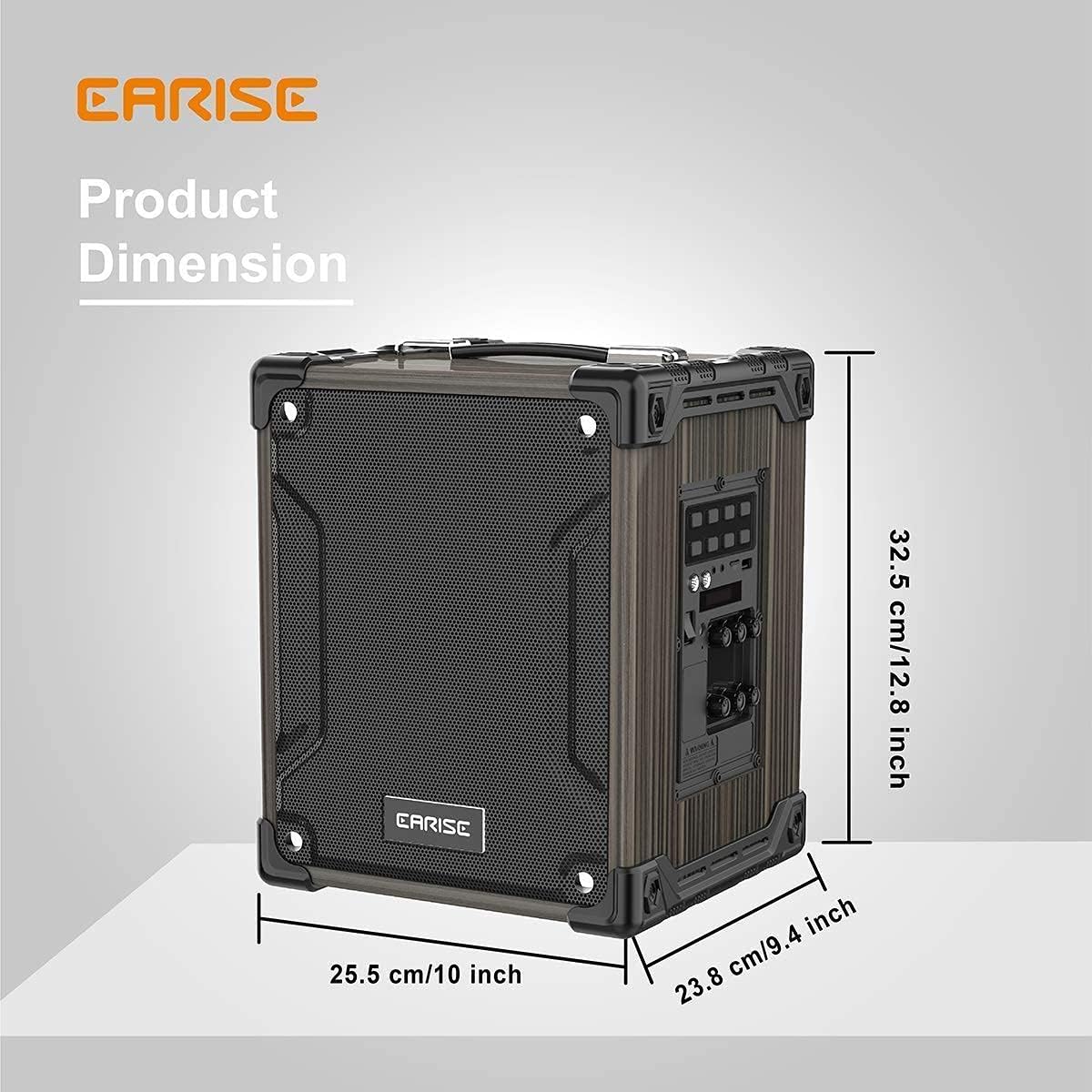
Image: Product dimensions of the EARISE M37, measuring approximately 32.5 cm (12.8 inches) in height, 25.5 cm (10 inches) in width, and 23.8 cm (9.4 inches) in depth.
10. Akwụkwọ ikike na nkwado
For warranty information or technical support, please refer to the contact details provided with your purchase or visit the official EARISE websaịtị. Debe ihe akaebe nke ịzụrụ maka akwụkwọ ikike.
Ask a question about this manual
Ask about setup, troubleshooting, compatibility, parts, safety, or missing instructions. Manuals+ will review the question and use this page’s manual context to help answer it.