
HSH 765390180793
HSH L-Shaped Computer Desk Instruction Manual
Ụdị: 765390180793
1. Okwu mmalite
Thank you for choosing the HSH L-Shaped Computer Desk. This manual provides essential information for the safe assembly, operation, and maintenance of your new desk. Please read these instructions carefully before beginning assembly and retain them for future reference.
Ịdọ aka ná ntị nchekwa
- Soro ntuziaka mgbakọ enyere mgbe niile.
- Ensure the desk is fully assembled and stable before placing any items on it or using it.
- Agafela ikike ịdị arọ kacha nke 158 n'arọ (ihe dị ka 350 lbs). Ibubiga ibu nwere ike ibute mmebi ma ọ bụ mmerụ ahụ.
- Debe obere akụkụ na ihe nkwakọba ihe n'ebe ụmụaka nọ iji gbochie ihe egwu ịkpagbu.
2. Ntọala na Mgbakọ
The HSH L-Shaped Computer Desk is designed for straightforward assembly. All necessary tools and instructions are included in the package. It is recommended to assemble the desk with two people for ease and safety.
Mgbakọ Agafeeview
- Wepụ ihe niile dị na ngwugwu ahụ ma lelee ya anya na ndepụta ihe ndị dị na ya.
- Identify the main desk sections and the cabinet unit.
- Assemble the metal frame components according to the diagrams.
- Attach the desktop panels to the assembled frame.
- Assemble and attach the cabinet and drawer storage unit.
- Gbaa mbọ hụ na akpọchiri skru na ihe nkedo niile nke ọma.
Mara: Pay close attention to the specific bolt sizes and component orientation during assembly to prevent damage, as incorrect parts can affect stability and appearance.
Configurable Design
The L-shaped design offers flexibility, allowing the cabinet and shorter desk section to be configured on either the left or right side to best suit your space and needs.
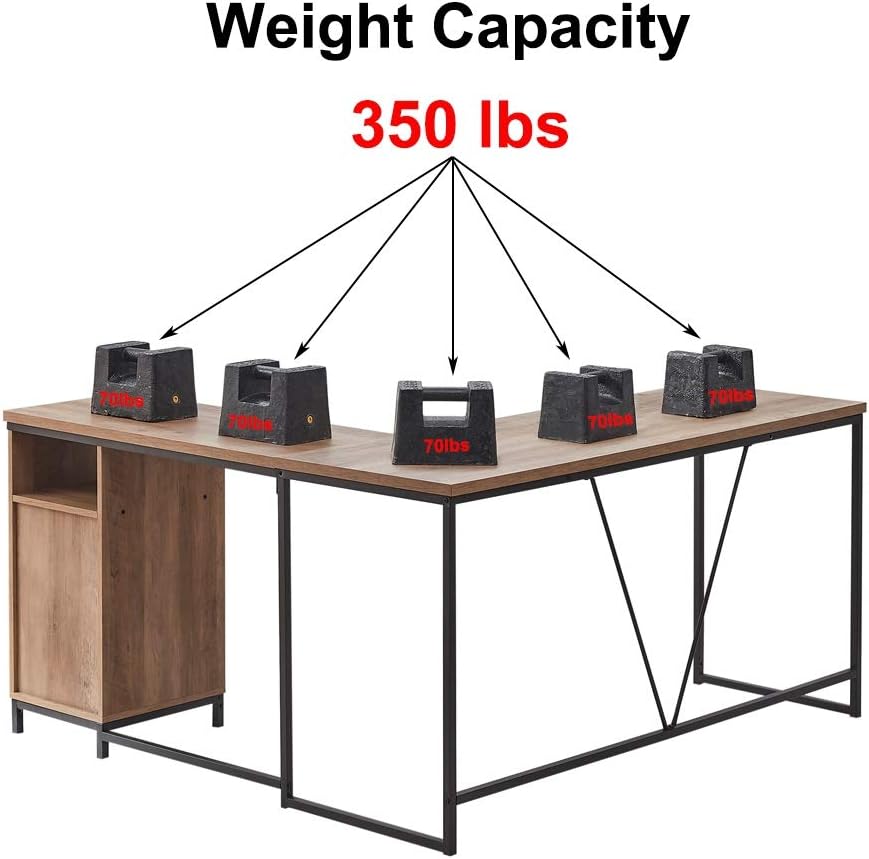
Figure 2.1: The desk can be assembled with the cabinet on either the right-hand or left-hand side.
Akụkụ

Figure 2.2: Detailed dimensions of the HSH L-Shaped Computer Desk.
3. Ịrụ ọrụ na ojiji
Your HSH L-Shaped Computer Desk provides ample surface area and integrated storage for an efficient workspace.
Workspace Utilization
- The L-shape design maximizes corner space, offering distinct areas for computer work, writing, or other tasks.
- The main desk surface (approximately 19.7 inches deep) provides sufficient room for monitors, keyboards, and other peripherals.
- The shorter desk section (approximately 15.7 inches deep) allows for flexible movement and additional workspace.

Figure 3.1: The HSH L-Shaped Computer Desk in a typical home office setup.
Njirimara nchekwa
The integrated cabinet and open shelf provide convenient storage solutions:
- Shelf mepere emepe: Ideal for frequently accessed items like stationery, books, or small decorative pieces.
- Kabọd nwere ọnụ ụzọ: Offers concealed storage for files, supplies, or other items you wish to keep out of sight.

Figure 3.2: Detail of the cabinet and open shelf storage.
Ike ibu
The desk is designed to support a total weight of up to 158 n'arọ (350 lbs). Distribute weight evenly across the desk surface to maintain stability and prevent damage.

Figure 3.3: Illustration of the desk's weight capacity.
4. Nlekọta
Proper care will ensure the longevity and appearance of your HSH L-Shaped Computer Desk.
- Nhicha: Jiri nwayọ hichaa elu ala, damp akwa . Zere kemịkalụ siri ike ma ọ bụ ihe nhicha abrasive, nke nwere ike imebi njedebe.
- Mwụfu: Clean up spills immediately to prevent staining or damage to the wood-fiberboard surface.
- Nyocha: Na-elele skru na ngwa ngwa niile kwa oge iji hụ na ha kwụgidere. Tinyegharịa ma ọ bụrụ na ọ dị mkpa.
- Nchedo: Use coasters for drinks and protective pads under hot items to prevent marks on the desktop.
5. Nchọpụta nsogbu
Okwu Mgbakọ
- Parts don't align: Double-check the orientation of each component against the assembly diagrams. Ensure you are using the correct screws for each step.
- Desk na-ama jijiji: Verify that all fasteners are fully tightened. Ensure the desk is on a level surface. If not, use shims under the feet to stabilize.
- Akụkụ na-efu ma ọ bụ mebiri emebi: Kpọtụrụ ndị ahịa ozugbo maka enyemaka.
6. Nkọwapụta
| Njirimara | Nkọwa |
|---|---|
| Ụdị | HSH |
| Nọmba nlereanya | 765390180793 |
| Akụkụ ngwaahịa | 149.86 cm (W) x 49.78 cm (D) x 75.95 cm (H) / 59 x 19.6 x 29.9 inches |
| Ibu | 26.4 n'arọ (ihe dị ka 58.2 lbs) |
| Ihe onwunwe | Engineered Wood (MDF), Alloy Steel (Metal Frame) |
| Agba | Oak |
| Ụdị | Ụlọ ọrụ mmepụta ihe |
| Nhazi oche | L-Shape Computer Desk with Cabinet Storage |
| Ike ibu | 158 n'arọ (350 lbs) |
7. Akwụkwọ ikike na nkwado
HSH is committed to providing high-quality products and customer satisfaction.
- Ntụkwasị obi ịdị mma: Ngwaahịa a na-abịa na a 3-afọ mma nkwa.
- na-alaghachi: Anyị na-enye a Nlaghachi n'efu ụbọchị 30 amụma.
- Ndị ọrụ nlekọta ndị ahịa: For any questions, concerns, or assistance, please contact our customer service team. We strive to provide the best possible solution within 24 hours.
For support, please refer to the contact information provided with your purchase or visit the official HSH websaịtị.
Ask a question about this manual
Ask about setup, troubleshooting, compatibility, parts, safety, or missing instructions. Manuals+ will review the question and use this page’s manual context to help answer it.