
1. Okwu mmalite
Welcome to the Argon Audio FORTE A5 powered speaker system. This manual provides essential information for setting up, operating, and maintaining your speakers to ensure optimal performance and longevity. Please read this manual thoroughly before using your speakers.
2. Ntuziaka nchekwa
To prevent fire or electric shock, do not expose this appliance to rain or moisture. Do not open the cabinet. Refer servicing to qualified personnel only.
- Igwe ikuku: Ensure adequate ventilation around the speakers. Do not block any ventilation openings.
- Isi mmalite ike: Connect the speakers only to the specified power supply.
- Mmiri na mmiri: Do not expose the speakers to dripping or splashing water. Do not place objects filled with liquids, such as vases, on the speakers.
- Nhicha: Jiri akwa kpọrọ nkụ hichaa naanị. Ejila ihe nhicha mmiri ma ọ bụ ihe nhicha ikuku.
- Okpomọkụ: Awụnyela n'akụkụ ebe okpomọkụ ọ bụla dị ka radiators, ndekọ okpomọkụ, stovu, ma ọ bụ ngwa ndị ọzọ (gụnyere amplifiers) nke na-emepụta okpomọkụ.
- Nkwanye: Debe igwe okwu n'elu ebe kwụsiri ike ma dị larịị iji gbochie ha ịda.
3. Ihe ngwugwu
Biko lelee ma ihe niile dị na ngwugwu ahụ:
- Argon Audio FORTE A5 Powered Speakers (1 pair)
- Special Speaker Cable (3 meters)
- Njikwa anya
- Igwe ọkụ ọkụ
- Akwụkwọ ntuziaka (akwụkwọ a)
4. Ngwaahịa gafereview
4.1 Ogwe ihu
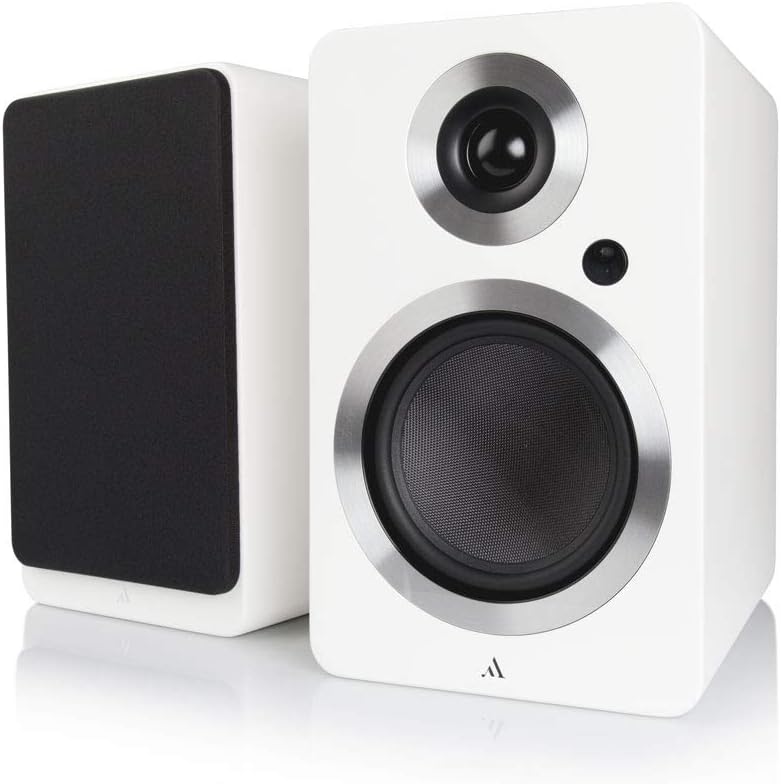
Foto: N'ihu view of the Argon Audio FORTE A5 speakers. The image displays two white bookshelf speakers with black speaker cones and metallic rings around the drivers. The left speaker is shown from the side, while the right speaker is shown from the front, highlighting its clean design.
- Tweeter: High-frequency driver.
- Mid/Bass Driver: Handles mid-range and bass frequencies.
- Ikanam ọnọdụ: Indicates power status and selected input.
4.2 Ogwe azụ

Foto: N'azụ view of the Argon Audio FORTE A5 speakers. The image shows the back panel of the active speaker with various connection ports including RCA, optical, USB, and speaker terminals. The passive speaker's rear panel is also visible, showing only the speaker terminals.
- RCA Inputs (L/R): For connecting analog audio sources like CD players or turntables.
- Optical Inputs (OPT1, OPT2): For connecting digital audio sources like TVs or game consoles.
- Wepụ: For connecting an external subwoofer.
- USB Charge (5V/1A): For charging mobile devices.
- Speaker Cable Output: Na-ejikọ na ọkà okwu na-anaghị arụ ọrụ.
- Ntinye ike: Jikọọ na ọkụ ọkụ AC.
5. Nhazi
5.1 Ntinye
Place the speakers on a stable surface, such as a bookshelf or speaker stands. For optimal stereo imaging, position the speakers equidistant from your listening position and angle them slightly towards you (toe-in). Ensure there is sufficient space behind the speakers for proper ventilation and cable connections.
5.2 Njikọ
- Jikọọ ndị ọkà okwu: Use the provided speaker cable to connect the active speaker (with all the inputs) to the passive speaker. Ensure correct polarity (+ to + and - to -).
- Jikọọ isi iyi ọdịyo:
- RCA: Connect your analog audio device (e.g., CD player, turntable with pre-amp) to the RCA inputs.
- Ngwa anya: Connect your digital audio device (e.g., TV, game console) to either OPT1 or OPT2.
- Bluetooth: For wireless connection, see section 6.3.
- Njikọ Ike: Plug the power cable into the active speaker's power input, then plug the other end into a wall outlet.
6. Ọrụ
6.1 Gbanyụọ ma ọ bụ gbanyụọ
The speakers will automatically enter standby mode when no audio signal is detected for a period. They will wake up automatically when an audio signal is received on the selected input. To manually power off, use the remote control or the power button on the active speaker (if available).
6.2 Nhọrọ ntinye
Use the input selection buttons on the remote control or the active speaker to cycle through the available audio inputs (RCA, Optical 1, Optical 2, Bluetooth). The Status LED will change color to indicate the currently selected input.
6.3 Njikọ Bluetooth
- Select the Bluetooth input on your speakers. The Status LED will blink, indicating pairing mode.
- On your Bluetooth device (smartphone, tablet, laptop), enable Bluetooth and search for new devices.
- Select "Argon Audio FORTE A5" from the list of available devices.
- Once connected, the Status LED on the speaker will turn solid, and you can now play audio wirelessly.
6.4 Ọrụ njikwa anya
The included remote control allows you to:
- Adjust Volume (Up/Down)
- Ogbi/Kụpụ okwu
- Họrọ Isi mmalite ntinye
- Gbanyụọ/ Gbanyụọ (Njikere)
7. Nlekọta
To keep your Argon Audio FORTE A5 speakers in optimal condition:
- Nhicha: Use a soft, dry, lint-free cloth to clean the cabinet surfaces. Do not use abrasive cleaners, waxes, or solvents.
- Grilles: The speaker grilles can be carefully removed for cleaning, but ensure they are reattached securely to protect the drivers.
- Uzuzu: Regularly dust the speakers to prevent accumulation, especially around the drivers and ventilation ports.
8. Nchọpụta nsogbu
If you experience issues with your speakers, please refer to the following table:
| Nsogbu | Ihe nwere ike ime | Ngwọta |
|---|---|---|
| Enweghị ụda | Power not connected; Incorrect input selected; Volume too low; Cables loose. | Check power connection; Select correct input; Increase volume; Reconnect all cables securely. |
| Ụda agbagọ | Volume too high; Source audio quality poor; Cables damaged. | Reduce volume; Try a different audio source; Check and replace cables if necessary. |
| Bluetooth anaghị ejikọ | Speakers not in pairing mode; Device too far; Previously paired device connected. | Ensure speakers are in Bluetooth pairing mode; Move device closer; Disconnect from other Bluetooth devices. |
| Njikwa anya anaghị arụ ọrụ | Batteries dead; Obstruction between remote and speaker. | Dochie batrị; Wepu ihe mgbochi ọ bụla. |
If the problem persists, please contact Argon Audio customer support.
9. Nkọwapụta
| Njirimara | Nkọwapụta |
|---|---|
| Nlereanya | FORTE A5 |
| Ibu Ibu | 6.7 kilogram |
| Akụkụ ngwaahịa (W x D x H) | 16.5 x 23 x 27 cm |
| Ike Mmepụta Ọkà Okwu Kachasị Elu | 80 Watt |
| Teknụzụ Njikọta | Bluetooth |
| Ọnọdụ mmepụta ọdịyo | Stereo |
| Ụdị nkwụnye | Ugwu Shelf |
| Ụdị Ọkà Okwu | Subwoofer (Note: This refers to the capability to connect a subwoofer, as these are bookshelf speakers) |
| Ngwa dakọtara | Smartphone, Tablet, Laptop, TV, Desktop, Turntable, MP3 Player |
| Nhazi ụda gburugburu | 2.0 |
10. Akwụkwọ ikike na nkwado
Argon Audio products are designed and manufactured to the highest quality standards. For information regarding warranty terms and conditions, please refer to the warranty card included with your product or visit the official Argon Audio website. For technical support or service inquiries, please contact your local dealer or Argon Audio customer service.
Websaịtị: www.argonaudio.com