
1. Okwu mmalite
This manual provides essential information for the installation, operation, maintenance, and troubleshooting of your Chieftec Polaris 650W 80Plus Certified Power Supply Unit (PSU). Please read this manual thoroughly before installing and using the product to ensure proper function and safety. The Chieftec Polaris 650W PSU is designed to provide stable and efficient power to your personal computer system.
2. Ozi nchekwa
Na-edebe ihe nchekwa nchekwa ndị a mgbe niile ka igbochi mmerụ ahụ ma ọ bụ mebie akụrụngwa gị:
- Emela mepee PSU casing. Akwa voltages inside can cause electric shock. There are no user-serviceable parts inside.
- Emela insert any objects into the PSU's ventilation openings.
- Emela kpughee PSU na mmiri, mmiri, ma ọ bụ oke iru mmiri.
- Ensure the PSU is installed in a well-ventilated area, free from obstructions to airflow.
- Always disconnect the AC power cord from the wall outlet before installing, removing, or cleaning the PSU.
- Use only the modular cables provided with your Chieftec Polaris 650W PSU. Using incompatible cables may damage the PSU or connected components.
- Gbaa mbọ hụ na echekwabara njikọ eriri USB niile tupu ịgbanye na sistemụ.
3. Ihe ngwugwu
Chọpụta na ihe niile dị na ngwugwu gị:
- Chieftec Polaris 650W Power Supply Unit
- Modular Cable Set (e.g., 24-pin ATX, 8-pin EPS/CPU, PCIe, SATA, Molex)
- Igwe ọkụ AC
- Ịkwanye kposara
- Akwụkwọ ntuziaka (akwụkwọ a)
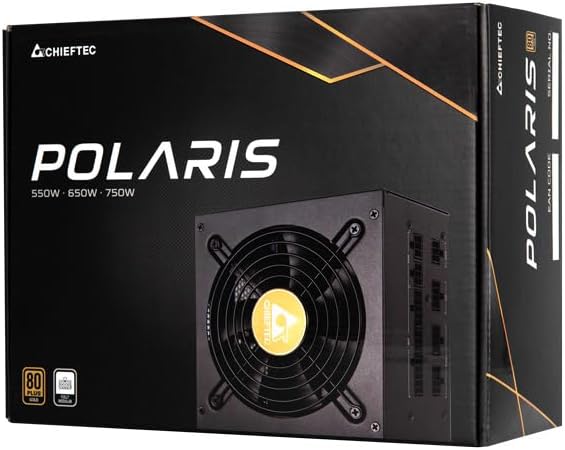
Image: The Chieftec Polaris 650W Power Supply Unit and its retail packaging.
4. Ntọala na nwụnye
Follow these steps to install your Chieftec Polaris 650W PSU into your personal computer system:
- Kwadebe Sistemu gị: Ensure your computer is completely powered off and unplugged from the wall outlet. Open your computer case to access the PSU mounting area.
- Wepu Old PSU (ọ bụrụ na ọdabara): If replacing an existing PSU, disconnect all cables from the components and motherboard, then unscrew and remove the old PSU.
- Ugwu PSU ọhụrụ: Carefully slide the Chieftec Polaris 650W PSU into the designated PSU bay in your computer case. Ensure the fan faces the correct direction (typically downwards for bottom-mounted PSUs, or as per case design for optimal airflow). Secure the PSU with the provided mounting screws.
- Jikọọ eriri modular: Identify the necessary modular cables for your system components (motherboard, CPU, graphics card, storage drives). Connect these cables to the corresponding ports on the back of the PSU. Refer to the image below for connector identification.
- Jikọọ na akụrụngwa: Connect the other end of the modular cables to your motherboard (24-pin ATX and 8-pin EPS/CPU), graphics card(s) (PCIe), and storage devices (SATA/Molex). Ensure all connections are firm and fully seated.
- Njikwa USB: Jiri waya ndị ahụ mee ka ikuku na-efegharị nke ọma ma na-eme ka mma dị n'ime akpa gị.
- Nyocha ikpeazụ: Double-check all connections. Ensure no loose cables are obstructing fans. Close your computer case.
- Jikọọ ike AC: Plug the AC power cord into the PSU's power inlet and then into a wall outlet.

Foto: N'azụ view of the Chieftec Polaris 650W PSU showing modular cable connection ports for M/B, SATA, PCIe, and CPU.

Image: The Chieftec Polaris 650W Power Supply Unit with its modular cables connected, ready for installation.
5. Ntuziaka ọrụ
Once the Chieftec Polaris 650W PSU is correctly installed and all connections are secure:
- Ike Na: Locate the power switch on the back of the PSU (next to the AC power inlet). Ensure it is in the 'I' (On) position.
- Mmalite sistemụ: Press the power button on your computer case. The system should power on, and the PSU fan will begin to spin, indicating normal operation.
- Ọrụ Fan: The PSU features an air cooling method. The fan will operate to dissipate heat generated by the power supply components. Its speed may vary depending on the load and temperature to maintain optimal cooling and noise levels.
- Gbanyụọ: To shut down your system, use the operating system's shutdown procedure. For a complete power cut, switch the PSU's power switch to the 'O' (Off) position and unplug the AC power cord.
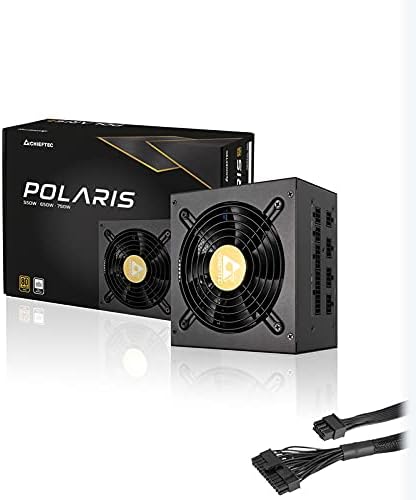
Foto: N'elu-ala view of the Chieftec Polaris 650W Power Supply, highlighting the cooling fan and protective grille.
6. Nlekọta
Mmezi kwesịrị ekwesị na-eme ka PSU gị dị ogologo ndụ na arụmọrụ kachasị mma:
- Nhicha uzuzu: Periodically (e.g., every 3-6 months), power off your computer, unplug the AC cord, and open the case. Use compressed air to gently blow dust out of the PSU's fan and ventilation grilles. Emela use a vacuum cleaner directly on the PSU as it can generate static electricity.
- Ọnọdụ gburugburu: Ensure the computer operates in a clean, dry, and well-ventilated environment. Avoid extreme temperatures and direct sunlight.
- Ịdị n'ezi nke eriri USB: Occasionally check that all modular cables are securely connected and not frayed or damaged.
7. Nchọpụta nsogbu
If you encounter issues with your Chieftec Polaris 650W PSU, consider the following troubleshooting steps:
- Enweghị ike:
- Gbaa mbọ hụ na etinyere eriri ike AC na nchekwa PSU na oghere mgbidi.
- Check that the PSU's power switch on the back is in the 'I' (On) position.
- Chọpụta na oghere mgbidi ahụ na-arụ ọrụ site na itinye na ngwaọrụ ọzọ.
- Confirm all internal power cables (24-pin ATX, 8-pin EPS/CPU) are firmly connected to the motherboard.
- Sistemu anaghị akwụsi ike/Mgbochi enweghị usoro:
- Ensure the PSU is adequately ventilated and not overheating.
- Check all power connections to components (graphics card, storage) for looseness.
- If possible, test the PSU with a different set of components or in another system to rule out other hardware issues.
- Mkpọtụ na-adịghị ahụkebe:
- A rattling or grinding noise may indicate a fan issue. Power off the system and inspect the PSU fan for obstructions (e.g., loose cables).
- If the noise persists and is not due to an obstruction, contact support.
Ọ bụrụ na usoro ndị a akwụsịghị nsogbu a, biko rụtụ aka na ngalaba akwụkwọ ikike na nkwado.
8. Nkọwapụta
| Njirimara | Nkọwapụta |
|---|---|
| Ụdị | Chieftec |
| Aha Nlereanya | Polaris |
| Nọmba Nlereanya ihe | IN-ACT-ZDLCHFOBU0087 |
| Mpụta Wattage | 650 Watt |
| Ụdị Ihe | ATX |
| Usoro jụrụ oyi | Ikuku |
| Ụdị njikọ | ATX |
| Ngwa dakọtara | Kọmputa nkeonwe |
| Akụkụ ngwaahịa (L x W x H) | 8.66 x 3.15 x 1.18 sentimita (22 x 8 x 3 cm) |
| Ibu Ibu | 4.4 pound (2 Kilogram) |
| Asambodo | 80Plus enwetara asambodo |
9. Akwụkwọ ikike na nkwado
Chieftec products are manufactured to high-quality standards. For specific warranty terms and conditions, please refer to the warranty card included with your product or visit the official Chieftec website. Warranty periods and coverage may vary by region and product.
For technical support, product inquiries, or warranty claims, please contact Chieftec customer service through their official website or the contact information provided in your product documentation. When contacting support, please have your product model number (IN-ACT-ZDLCHFOBU0087) and proof of purchase readily available.