
Groov-e GV-CR01-WE
Ntuziaka Onye Ọrụ Elekere Mkpu Igwe Ọkụ Groov-e nke Redio FM
Model: GV-CR01-WE
1. Okwu mmalite
This manual provides detailed instructions for the operation and maintenance of your Groov-e Light Curve Touch Control FM Radio Alarm Clock. Please read this manual thoroughly before using the product to ensure proper function and safety.
The Groov-e Light Curve is a versatile light alarm clock featuring an FM radio, multiple alarm sounds, and light simulation functions for both sunrise and sunset. It is designed to provide a natural and gentle wake-up experience and a relaxing environment for sleep.
2. Ozi nchekwa
- Ewepụla ngwaọrụ ahụ na mmiri ma ọ bụ oke iru mmiri.
- Zere oke okpomọkụ.
- Emela ka ngwaọrụ ahụ gbawaa ma ọ bụ gbalịa ịrụzi ya n'onwe gị. Gaa na ndị ọrụ ruru eru.
- Jiri naanị ihe nkwụnye ọkụ enyere.
- Debe ebe ụmụaka na-apụghị iru.
- Clean the device with a soft, dry cloth. Do not use abrasive cleaners.
3. Ihe ngwugwu
Biko lelee ngwungwu maka ihe ndị a:
- Groov-e Light Curve Alarm Clock Unit
- Ihe nkwụnye ọkụ
- Akwụkwọ ntuziaka (akwụkwọ a)

Figure 3.1: Groov-e Light Curve unit with included power adapter and cable.
4. Ngwaahịa gafereview
Familiarize yourself with the various parts and controls of your Groov-e Light Curve alarm clock.
4.1 N'ihu View
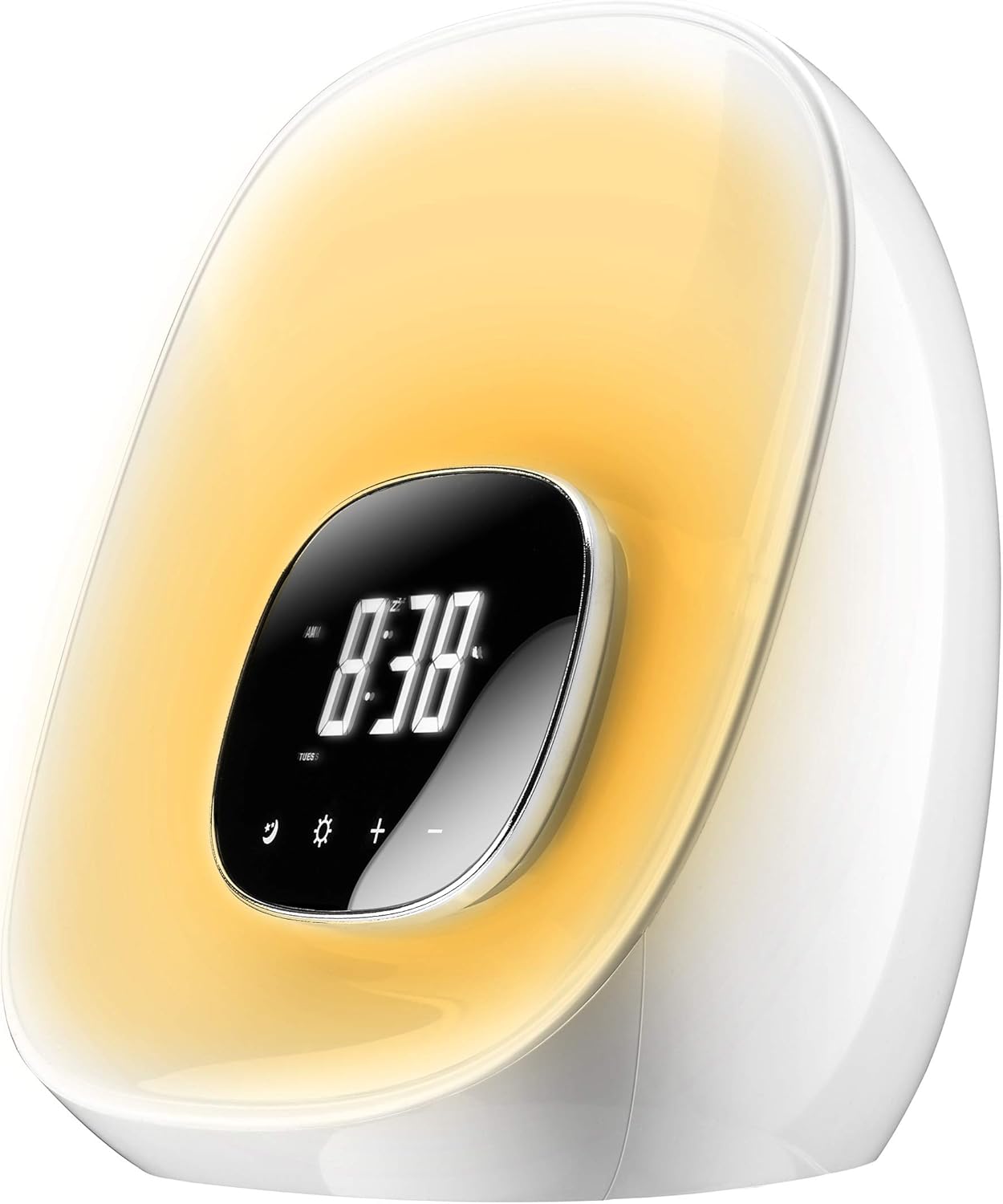
Foto 4.1: N'ihu view of the Groov-e Light Curve.
- A. Digital Display: Shows time, alarm status, and other indicators.
- B. Touch Controls: Icons for various functions (e.g., alarm, light, brightness, volume).
- C. Light Panel: Emits light for sunrise/sunset simulation and mood lighting.
4.2 kacha View

Foto 4.2: Top view of the Groov-e Light Curve with control buttons.
- D. Playback Controls: Buttons for radio tuning, volume, and alarm settings.
- E. Snooze/Sleep Button: Activates snooze or sleep function.
- F. Speaker Grille: Maka mmepụta ọdịyo.
4.3 N'azụ View

Ọgụgụ 4.3: N'azụ view of the Groov-e Light Curve.
- G. DC 12V/1A Power Input: Jikọọ ihe nkwụnye ọkụ ebe a.
- H. Rear Speaker: Additional speaker for audio output.
5. Nhazi
- Njikọ ike: Connect the provided power adapter to the DC 12V/1A input port on the back of the unit (G) and plug it into a wall outlet. The display will light up.
- Ntọala Oge Mmalite:
- Pịa Nhazi oge button (usually indicated by a clock icon) to enter time setting mode.
- Jiri ihe +/- buttons to adjust the hour. Press the Nhazi oge button again to confirm and move to minutes.
- Jiri ihe +/- buttons to adjust the minutes. Press the Nhazi oge button one more time to confirm and exit.
- Batrị ndabere: The device has a backup battery function that maintains timing for up to 3 months in case of power failure, though the clock display will not be active during an outage.
6. Ntuziaka ọrụ
6.1 Ọrụ mkpu
The Groov-e Light Curve offers a unique wake-up experience with sunrise simulation and various alarm sounds.
- Ịtọ ntọala mkpu:
- Pịa Oti mkpu na Set button (usually indicated by a bell icon) to enter alarm setting mode.
- Jiri ihe +/- buttons to adjust the alarm hour. Press Oti mkpu na Set again to confirm and move to minutes.
- Jiri ihe +/- buttons to adjust the alarm minutes. Press Oti mkpu na Set ọzọ iji gosi.
- Wake-up Light Period: Select the duration for the wake-up light to start before the alarm time (OFF/10/20/30 minutes). This is displayed as "0:10/0:20/0:30". Use +/- ịhọrọ.
- Nhọrọ ụda mkpu: Choose from 8 alarm sounds (1-6 natural sounds, 7 beep, 8 FM radio). Use +/- ịhọrọ.
- Oti mkpu na ọnọdụ: Select "wake-up light + alarm" or "wake-up light only".
- Pịa Oti mkpu na Set one last time to save and activate the alarm.
- Simulation nke ọwụwa anyanwụ: The light will gradually brighten through ten levels, mimicking a sunrise, reaching its brightest point at the set alarm time.
- Ọrụ Sooze: Mgbe oti mkpu dara, pịa Tie mkpu button (E) to activate a 10-minute snooze. The alarm will sound again after 10 minutes. During snooze, other functions are paused.
- Ịkwụsị Mkpu: To turn off the alarm for the day, press any button other than the Snooze button. The alarm will sound for 1 hour if not turned off.
- Na-edozi olu mkpu: During the alarm, the volume gradually increases. You can adjust the maximum volume using the volume controls.
6.2 Ọrụ ọkụ
The device features versatile lighting options for various moods and purposes.
- Adjusting Brightness (White Light):
- When no alarm or wake-up light is active, briefly press the Akara ngosi Sun (light function button).
- Jiri ihe +/- buttons to cycle through 10 levels of brightness.
- RGB Mood Lighting:
- Pịa ogologo Akara ngosi Sun to activate the RGB mood light cycle. The light will cycle through different colors.
- Pịa nkenke Akara ngosi Sun again to pause the cycle on the current color.
- Jiri ihe +/- buttons to manually select your preferred color from the available options.
- Sunset Simulation (Sleep Function):
- Pịa Ụra button (often combined with Snooze or a moon icon).
- Select the desired sleep duration (OFF/10/20/30 minutes). The light will slowly dim over this period and then turn off, simulating a sunset.

Figure 6.1: The Groov-e Light Curve offers a range of mood lighting colors.
Igwe redio FM 6.3
The built-in FM radio allows you to listen to your favorite stations.
- Ịgbanye/Mgbanyụọ Redio: Pịa Redio button (often indicated by a radio icon or FM).
- Ụlọ ntugharị:
- Jiri ihe Gaba/Azu buttons (D) to manually tune to a station.
- Pịa ogologo Gaba/Azu buttons to auto-scan for the next available station.
- Na-agbanwe olu: Jiri ihe Mpịakọta +/- buttons (D) to adjust the radio volume.
7. Nlekọta
- Nhicha: Wipe the surface of the device with a soft, dry, lint-free cloth. Do not use liquid or aerosol cleaners.
- Nchekwa: Ọ bụrụ na ị na-echekwa ngwaọrụ ahụ ruo ogologo oge, kwụpụ ya na ike wee chekwaa ya n'ebe dị jụụ na nkụ.
8. Nchọpụta nsogbu
| Nsogbu | Ihe nwere ike ime | Ngwọta |
|---|---|---|
| Ngwaọrụ anaghị agbanwu. | Not connected to power or power outlet is faulty. | Ensure the power adapter is securely connected and the outlet is working. |
| Oti mkpu anaghị ada ụda. | Adọghị mkpu, olu mkpu dị ala nke ukwuu, ma ọ bụ ọnọdụ mkpu adịghị mma. | Verify alarm settings, ensure alarm is enabled, and check volume. |
| Light does not brighten/dim. | Light function not activated or incorrect mode. | Ensure sunrise/sunset simulation is enabled or adjust brightness manually. |
| Nnabata redio adịghị mma. | Mgbama ma ọ bụ nnyonye anya adịghị ike. | Adjust the position of the device or try auto-scanning for stronger signals. |
| Buttons are unresponsive during alarm. | This is normal behavior during the alarm/wake-up process (except snooze). | Press the bell symbol to prevent light from brightening further, or press any other button to stop the alarm. |
9. Nkọwapụta
| Njirimara | Nkọwa |
|---|---|
| Ụdị | Groov-e |
| Nọmba nlereanya | GV-CR01-WE |
| Agba | Ọcha |
| Akụkụ ngwaahịa (L x W x H) | 40 x 20 x 20 cm (approx. 20.4L x 18H cm for main unit) |
| Ibu | 910 grams |
| Ihe onwunwe | Plastic |
| Atụmatụ pụrụ iche | Snooze, Mood Light, Adjustable Brightness, Radio, Alarm, Illuminated |
| Ụdị ngosi | Dijitalụ |
| Isi Iyi Ike | Battery Powered (backup) / Mains Powered (primary) |
| Oti mkpu | 8 types (6 natural, 1 beep, 1 FM radio) |
| Wake-up Light Levels | 10 ọkwa nchapụta |
10. Akwụkwọ ikike na nkwado
Your Groov-e Light Curve alarm clock is covered by a standard return policy. For specific details regarding warranty coverage and returns, please refer to your point of purchase or the retailer's policy.
For technical support or further assistance, please contact Groov-e customer service or visit their official websaịtị. Debe nnata nzụta gị ka ihe akaebe nke ịzụrụ.
Akụrụngwa dị n'ịntanetị:
- Groov-e Official Websaịtị: www.groov-e.co.uk (Mara: Nke a bụ njikọ izugbe, ibe nkwado akọwapụtara nwere ike ịdị iche.)
Akwụkwọ ndị emetụtara - GV-CR01-WE
 |
Groov-e GV-CR01 Light Curve User Manual User manual for the Groov-e GV-CR01 Light Curve, a wake-up light alarm clock with radio. This guide provides instructions on setup, features, and safety information. |
 |
Groov-e GV-CR02 Radio Curve: Ntuziaka Mmalite Dị Mfe Nduzi zuru oke maka redio elekere mkpu Groov-e GV-CR02 Radio Curve nke a na-agbanye ike, nkọwapụta atụmatụ ngwaahịa, ntuziaka ntọala, ọrụ, nchekwa nchekwa, na ozi nkwa. |
 |
Akwụkwọ ntuziaka onye ọrụ nke Groov-e GV-SB04 Soundbar 110W All-in-One Bluetooth Soundbar. Akwụkwọ ntuziaka zuru oke maka Groov-e GV-SB04 110W All-in-One Bluetooth Soundbar, atụmatụ zuru ezu, nkọwapụta, ntuziaka ntọala, ntuziaka ọrụ, ndụmọdụ nchọpụta nsogbu, na ozi nkwa. |
 |
Groov-e GV-WC06 Atlas User Manual: Alarm Clock Radio with Wireless Charging & FM Radio Comprehensive user manual for the Groov-e GV-WC06 Atlas alarm clock radio. Learn about features, setup, operation, safety, and guarantee for this digital alarm clock with FM radio, wireless charging, and USB charging. |
 |
Ntuziaka Onye Ọrụ Groov-e GV-CR02 Elekere Mkpu A Na-achaji A Na-ejigharị Redio Ntuziaka zuru oke maka Groov-e GV-CR02 Rechargeable Alarm Clock Radio Curve, ntọala zuru ezu, ọrụ, atụmatụ, nchekwa nchekwa, ozi nkwa, na nkọwapụta teknụzụ. |
 |
Groov-e GV-WC01 Athena Oti mkpu na chaja ikuku na akwụkwọ ntuziaka onye ọrụ ìhè abalị. Akwụkwọ ntuziaka onye ọrụ zuru oke maka elekere mkpu Groov-e GV-WC01 Athena, na-akọwapụta atụmatụ dị ka chaja ikuku, ọkụ abalị na ọrụ mkpu. Gụnyere nhazi, ọrụ, ozi nchekwa na nkọwa akwụkwọ ikike. |
Ask a question about this manual
Ask about setup, troubleshooting, compatibility, parts, safety, or missing instructions. Manuals+ will review the question and use this page’s manual context to help answer it.