
1. Okwu mmalite
This manual provides essential information for the safe and efficient operation of your Eurom DryBest 30 WiFi dehumidifier. Please read these instructions carefully before use and retain them for future reference. This appliance is designed to reduce humidity levels in indoor environments, improving air quality and preventing issues related to excessive moisture.
2. Ntuziaka nchekwa
Na-agbaso ihe ndị a dị mkpa mgbe niile iji belata ihe egwu nke ọkụ, ọkụ eletrik, ma ọ bụ mmerụ ahụ.
- Gbaa mbọ hụ na ọkọnọ ọkụ voltage dakọtara na akara ọkwa dị na nkeji ahụ.
- Ejila eriri ma ọ bụ plọg mebiri emebi rụọ ọrụ dehumidifier.
- Debe ngwa ahụ pụọ na ebe okpomọkụ, ìhè anyanwụ kpọmkwem, na ihe ndị na-ere ọkụ.
- Do not block the air inlet or outlet. Maintain at least 20 cm clearance around the unit.
- etinyela ihe n'ime ikuku ikuku.
- Unplug the unit before cleaning, maintenance, or when not in use.
- Do not use the appliance in bathrooms or other excessively wet environments where it could come into contact with water.
- Ezubere ngwa a maka iji ndị mmadụ (gụnyere ụmụaka) nwere ike anụ ahụ, mmetụta uche ma ọ bụ nke uche, ma ọ bụ enweghị ahụmịhe na ihe ọmụma, ma ọ bụrụ na enyereghị ha nlekọta ma ọ bụ ntụziaka gbasara iji ngwa ahụ site n'aka onye na-ahụ maka nchekwa ha.
- Ekwesịrị ilekọta ụmụaka ka ha hụ na ha ejighi ngwa eji egwu egwu egwu.
- Ọ bụrụ na eriri ọkọnọ mebiri emebi, onye nrụpụta, onye na-ahụ maka ọrụ ya, ma ọ bụ ndị tozuru oke ga-anọchi ya iji zere ihe egwu.
3. Ngwaahịa gafereview
The Eurom DryBest 30 WiFi is a powerful and efficient dehumidifier designed for domestic use. It features a quiet operation and can be controlled via WiFi for convenience.
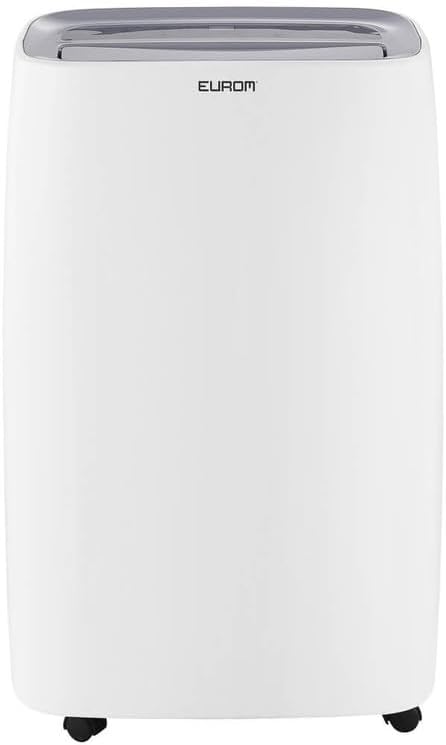
Foto 3.1: N'ihu view of the Eurom DryBest 30 WiFi dehumidifier. This image displays the unit's overall appearance, highlighting its modern white casing and integrated handles for portability.
3.1 Isi ihe
- Ogwe njikwa: Located on the top of the unit for easy access to settings and indicators.
- Ọpụpụ ikuku: Top-mounted grille for expelling dry air.
- Air Inlet/Filter: Rear-mounted for drawing in humid air, equipped with a removable air filter.
- tank mmiri: Removable tank for collecting condensed water.
- Ọpụpụ mmiri na-aga n'ihu: Port for connecting a hose for continuous drainage.
- Mmepe: Wheels at the base for easy movement.
4. Nhazi
4.1 Nwepu
- Jiri nlezianya wepụ ihe mgbapụta na nkwakọ ngwaahịa ya.
- Remove all packing materials, including any tape or protective films.
- Inspect the unit for any signs of damage. If damaged, do not operate and contact your retailer.
4.2 Ntinye
- Place the dehumidifier on a firm, level surface to prevent vibration and water leakage.
- Ensure there is at least 20 cm (8 inches) of space around the unit for proper airflow. Do not place it against a wall or furniture that could obstruct the air inlets or outlets.
- For optimal performance, place the unit in the center of the room or area requiring dehumidification.
- Zere idobe otu n'akụkụ ngwa ọkụ na-emepụta okpomọkụ ma ọ bụ na ìhè anyanwụ.
4.3 Njikọ ike
- Tinye eriri ọkụ n'ime oghere eletrik gbadoro ụkwụ.
- Ensure the outlet meets the electrical requirements of the unit (230V, 50Hz).
4.4 Nhọrọ igbapu
The dehumidifier offers two drainage methods: manual tank emptying or continuous drainage.
4.4.1 Mgbapu akwụkwọ ntuziaka (Take mmiri)
- When the water tank is full, the "FULL" indicator light will illuminate, and the unit will automatically stop operating.
- Jiri nlezianya wepụ tank mmiri ahụ n'ihu nke unit ahụ.
- Gbanyụọ mmiri ahụ anakọtara.
- Slide the empty water tank back into its position until it clicks securely. The unit will resume operation.
4.4.2 Mgbapu na-aga n'ihu
- For continuous operation without emptying the tank, connect a suitable drain hose (not included) to the continuous drain outlet at the back of the unit.
- Ensure the hose is sloped downwards to allow gravity to drain the water into a floor drain or larger container.
- Verify that the hose connection is secure to prevent leaks.
4.5 WiFi Setup
The DryBest 30 WiFi can be controlled remotely via a smartphone app.
- Download the "Eurom Smart" app (or similar specified app) from your device's app store.
- Follow the in-app instructions to register an account and add your dehumidifier.
- Ensure your dehumidifier is powered on and the WiFi indicator light is blinking, indicating pairing mode.
- Once connected, the WiFi indicator light will become solid.
5. Ntuziaka ọrụ

Foto 5.1: Control Panel of the Eurom DryBest 30 WiFi. This image details the various buttons and indicators for operating the dehumidifier.
5.1 Ogwe njikwa gafereview
- Bọtịnụ IKE: Gbanyụọ ma ọ bụ gbanyụọ unit ahụ.
- Bọtịnụ MODE: Cycles through operating modes (e.g., Auto, Continuous, Laundry).
- Bọtịnụ elu/ala: Adjust desired humidity level or timer settings.
- Bọtịnụ Ọsọ: Selects fan speed (High, Low).
- Bọtịnụ TIMER: Na-edobe oge ịgbanwuo ma ọ bụ gbanyụọ akpaaka.
- Bọtịnụ SWING: Activates or deactivates the oscillating air outlet.
- PUMP Button: Activates the internal pump for continuous drainage (if applicable and hose connected).
- Bọtịnụ Mkpọchi: Child lock function to prevent accidental changes.
- Ihe ngosi WIFI: Shows WiFi connection status.
- FULL Indicator: Na-enwu mgbe tank mmiri jupụtara.
- LAUNDRY Indicator: Illuminates when Laundry mode is active.
- FAN Indicator: Illuminates when fan is operating.
5.2 Basic Arụmọrụ
- Ike Na: Pịa IKE button. The unit will start in its default or last-used mode.
- Tọọ iru mmiri achọrọ: Jiri ihe UP na N'ala buttons to set the target humidity level (e.g., 40% - 60% relative humidity is generally recommended). The unit will operate until this level is reached, then cycle on and off to maintain it.
- Họrọ Ụdị: Pịa MODE button to choose between different operating modes.
- Nchekwa onwe na ọnọdụ: The unit automatically adjusts operation based on the ambient humidity.
- Ụkpụrụ na-aga n'ihu: The unit runs continuously regardless of humidity level. Ideal for very damp conditions or for use with continuous drainage.
- Ụdị ịsa ákwà: Designed to quickly dry clothes indoors. The unit operates at high fan speed and continuous dehumidification.
- Gbanwee ọsọ onye ofufe: Pịa Ọsọ button to toggle between High and Low fan speeds.
- Nịm Oge: Pịa TIMER bọtịnụ, wee jiri UP na N'ala to set the desired operating duration (e.g., 2 hours, 4 hours).
- Ọrụ Swing: Pịa INGTỌ button to activate the oscillating louvers, distributing dry air more evenly.
- Mkpọchi nwa: Pịa ma jide Mkpọchi button for a few seconds to activate/deactivate the child lock.
- Gbanyụọ: Pịa IKE bọtịnụ ọzọ ka gbanyụọ unit.

Foto 5.2: Dehumidifier in use, illustrating its application for drying laundry. The image shows the unit positioned near a clothes rack, indicating its effectiveness in reducing drying times indoors.
6. Nlekọta
Ndozi mgbe niile na-eme ka arụ ọrụ kacha mma na-agbatịkwu ogologo ndụ nke dehumidifier gị.
6.1 Na-ehicha ihe nzacha ikuku
Ekwesịrị ịsacha ihe nzacha ikuku kwa izu abụọ ma ọ bụ karịa karịa dabere na ojiji na ogo ikuku.
- Kpupu ihe dehumidifier na ntinye ọkụ.
- Wepu ihe nzacha ikuku n'azụ otu ahụ.
- Gently vacuum any dust or debris from the filter. For heavy dirt, wash the filter with lukewarm water and a mild detergent.
- Rinse thoroughly and allow the filter to air dry completely before reinstalling. Do not expose to direct sunlight or high heat.
- Tinyegharịa nzacha akọrọ n'ime nkeji.
6.2 Ichacha tank mmiri
Na-asachapụ tank mmiri mgbe niile iji gbochie ebu na ibu ibu.
- Kwụpụ unit ahụ.
- Wepu ma kpochaa tank mmiri ahụ.
- Jiri mmiri ọkụ na ihe nhicha dị nro saa tank ahụ. Sachaa ya nke ọma.
- Dry the tank completely before placing it back into the unit.
6.3 Nchekwa
Ọ bụrụ na agaghị eji dehumidifier mee ihe ruo ogologo oge:
- Unplug the unit and empty the water tank.
- Hichaa ihe nzacha ikuku na mpụta nke ngwaọrụ ahụ.
- Allow the unit to dry for at least 24 hours in a well-ventilated area to prevent mold growth inside.
- Store the dehumidifier upright in a cool, dry place, away from direct sunlight and extreme temperatures.
7. Nchọpụta nsogbu
Tupu ịkpọtụrụ nkwado ndị ahịa, biko rụtụ aka na ntuziaka nchọpụta nsogbu ndị a maka okwu nkịtị.
| Nsogbu | Ihe nwere ike ime | Ngwọta |
|---|---|---|
| Unit anaghị agbanwuo. | No power, power cord loose, water tank full. | Lelee njikọ ike, hụ na tank ahụ tọgbọ chakoo ma etinyere ya nke ọma. |
| No water collected / Low dehumidification. | Humidity level too low, air filter clogged, room temperature too low, unit size too small for area. | Increase desired humidity setting, clean air filter, ensure room temperature is above 5°C (41°F), close doors/windows. |
| Ngalaba na-eme mkpọtụ. | Unit abụghị n'elu larịị, ihe nzacha ikuku mechiri. | Place on a flat, stable surface. Clean air filter. |
| Mmiri na-agbapụta site na unit. | Water tank not inserted correctly, continuous drain hose loose or blocked. | Reinsert water tank properly. Check continuous drain hose for secure connection and obstructions. |
| Nsogbu njikọ WiFi. | Incorrect app, poor WiFi signal, incorrect pairing procedure. | Ensure correct app is used, check router and signal strength, repeat WiFi setup steps. |
8. Nkọwapụta
| Njirimara | Nkọwapụta |
|---|---|
| Aha Nlereanya | DryBest 30 WiFi |
| Nọmba ntụaka | 1052 |
| Ụdị | Euro |
| Dehumidification ikike | 30 Liters/24 hours |
| Oriri ike | 580 W |
| Ike ikuku | 350m³ / elekere |
| Ọkwa mkpọtụ | <47 dBA |
| Akụkụ (L x W x H) | 64.2 x 43.1 x 30.1 cm |
| Ibu | 15.5 n'arọ |
| Olu tank mmiri | 6 Liters / 10 Liters (depending on mode/configuration) |
| Atụmatụ pụrụ iche | Silent operation, Adjustable humidity control, WiFi connectivity |
| Akwadoro ojiji | Ụlọ |
| Agba | Ọcha |
9. Akwụkwọ ikike na nkwado
For warranty information, please refer to the terms and conditions provided at the time of purchase or contact your retailer. If you encounter any issues not covered in the troubleshooting section, or require further assistance, please contact Eurom customer support or your authorized dealer.
Debe akwụkwọ nnata ịzụrụ ihe gị dị ka ihe akaebe nke ịzụrụ ihe maka akwụkwọ ikike ọ bụla.