
Prtukyt 6S
Prtukyt 6S Wireless Headphones User Manual
Model: 6S | Brand: Prtukyt
Okwu mmalite
Thank you for choosing the Prtukyt 6S Wireless Headphones. This manual provides detailed instructions on how to set up, operate, and maintain your headphones to ensure optimal performance and longevity. Please read this manual thoroughly before using the product.

Image: Prtukyt 6S Wireless Headphones in black and red, showcasing nhazi zuru oke.
Atụmatụ igodo
- HI-FI Stereo Sound: High-definition audio with deep bass and crystal-clear treble, powered by a 57mm driver for precise sound reproduction.
- Bluetooth 5.0 dị elu: Ensures fast, stable connections and low latency for audio/video streaming.
- Ogologo ndụ batrị: Up to 40 hours of continuous playtime on a single charge, thanks to a 500mAh lithium-polymer battery.
- Nhazi dị mma: Features super soft, skin-texture simulating ear cushions and an adjustable, padded headband for extended wear comfort.
- Enwere ike ijikọ na mbugharị: Ergonomic, foldable design for easy storage and transport, ideal for travel and daily use.
- Multi-Mode Playback: Supports wireless Bluetooth, wired 3.5mm audio connection, Micro SD/TF card playback, and FM radio.
- Igwe okwu arụnyere n'ime ya: High-quality microphone for clear, hands-free calls.

Foto: Ofeview of the headphones' key features, including Hi-Fi sound, comfortable earmuffs, radio receiver, long battery life, foldable design, and HD call capability.

Image: Close-up of the headphone earcup highlighting the Bluetooth 5.0 chip, Hi-Fi sound, 57mm driver, and extra bass capabilities.
Ihe ngwugwu
Biko lelee igbe maka ihe ndị a:
- Prtukyt 6S Wireless Headphones
- Igwe nchaji USB
- 3.5mm Audio USB
- Akwụkwọ ntuziaka onye ọrụ

Image: Visual representation of the items included in the product packaging: the headphones, a USB charging cable, and a 3.5mm audio cable.
Melite
1. Ịchaji ekweisi
Before first use, fully charge the headphones. A full charge takes approximately 3 hours and provides up to 40 hours of playtime.
- Connect the small end of the USB charging cable to the charging port on the headphone earcup.
- Jikọọ akụkụ ka ukwuu nke eriri chaja USB na ihe nkwụnye ike USB (anaghị etinye ya) ma ọ bụ ọdụ USB kọmputa.
- The LED indicator light will show charging status (e.g., red for charging, off when fully charged).

Image: Visual representation of the headphones' long battery life, indicating up to 40 hours of playtime on a single charge.
2. Njikọ Bluetooth
Pair your headphones with your Bluetooth-enabled device (smartphone, tablet, PC).
- Gbaa mbọ hụ na agbanyụrụ ekweisi ma gbanyụọ ya.
- Press and hold the Power/Multi-function button until the LED indicator flashes blue and red alternately, indicating pairing mode.
- Na ngwaọrụ gị, gbanye Bluetooth ma chọọ ngwaọrụ dịnụ.
- Select "6S" from the list of found devices.
- Once paired, the LED indicator will flash blue slowly, and you will hear a confirmation tone.
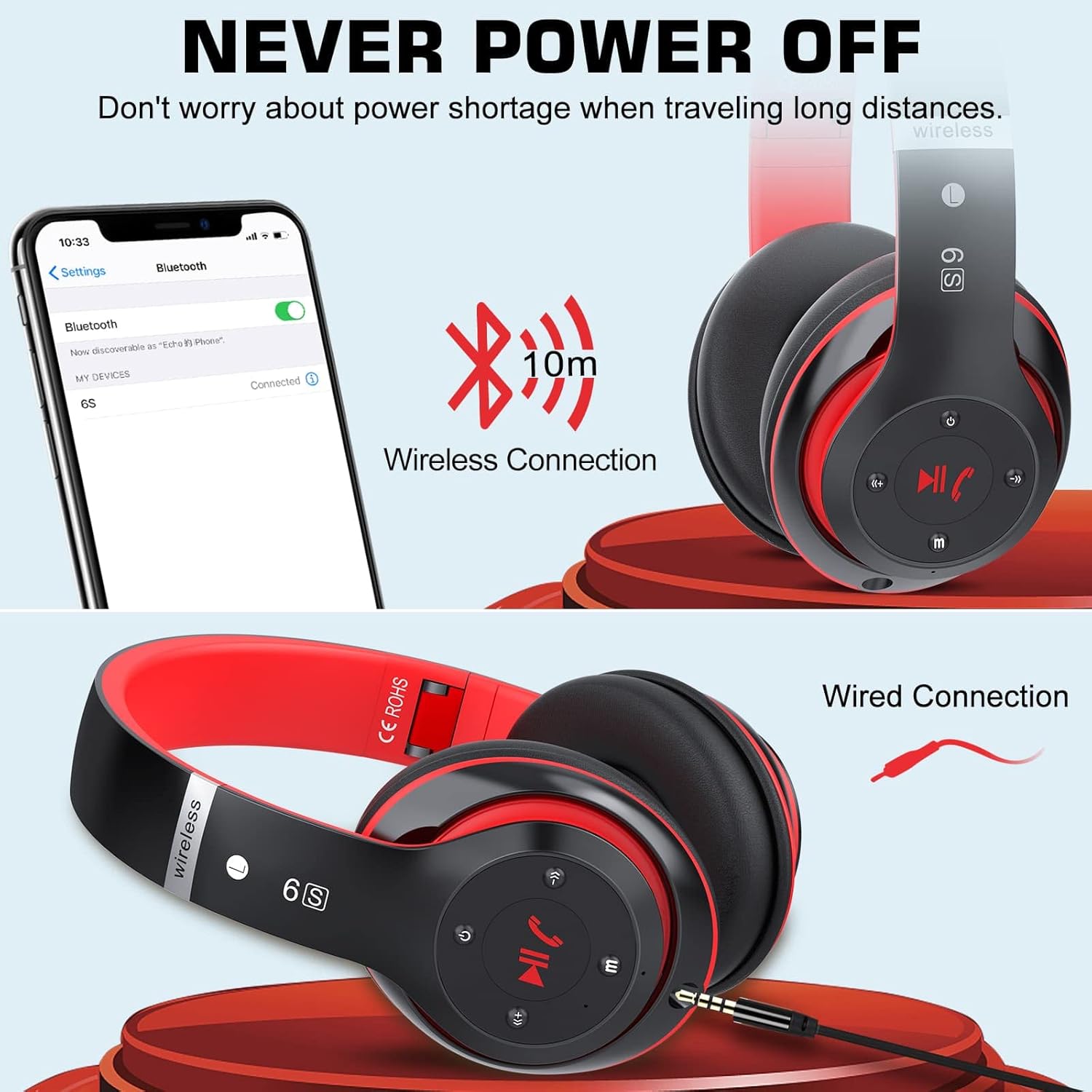
Image: Demonstrates both wireless Bluetooth connection (up to 10m range) and wired connection options for the headphones.
3. Wired Connection (Aux Mode)
Use the included 3.5mm audio cable for a wired connection, especially when the battery is low or for non-Bluetooth devices.
- Plug one end of the 3.5mm audio cable into the audio input port on the headphone earcup.
- Tinye nsọtụ nke ọzọ n'ime jakị ọdịyo 3.5mm nke ngwaọrụ gị.
- Igwe ekweisi ga-agbanwe na-akpaghị aka na ọnọdụ wired.
4. Micro SD/TF Card Playback
Insert a Micro SD/TF card loaded with MP3 audio files into the designated slot on the headphones.
- Locate the Micro SD/TF card slot on the headphone earcup.
- Gently insert the Micro SD/TF card until it clicks into place.
- The headphones will automatically switch to TF card playback mode. Use the control buttons to navigate tracks.
5. Ọnọdụ redio FM
The headphones can receive FM radio signals. For best reception, ensure the 3.5mm audio cable is plugged in, as it acts as an antenna.
- Gbanwuo ekweisi.
- Pịa bọtịnụ "M" (Ụdị) iji gbanwee gaa na ọnọdụ redio FM.
- Press the Play/Pause button to auto-scan and save available FM stations.
- Use the Previous/Next track buttons to switch between saved stations.
Ntuziaka ọrụ
Familiarize yourself with the control buttons located on the earcup for easy operation.

Image: Detailed diagram showing the location and function of each button on the headphone earcup, including power, track control, volume, mode, and call handling.
| Bọtịnụ/Ihe omume | Ọrụ |
|---|---|
| Bọtịnụ ọkụ (gbanyụọ ma ọ bụ gbanyụọ) | Pịa ma jide ka ịgbanwuo/ gbanyụọ. |
| Play/Pause / Answer/Hang Up | Press once to play/pause music. Press once to answer/end a call. Press and hold to reject a call. |
| Previous Song / Volume Down (-) | Short press for previous song. Long press to decrease volume. |
| Next Song / Volume Up (+) | Short press for next song. Long press to increase volume. |
| Bọtịnụ ọnọdụ (M) | Press to switch between Bluetooth, TF Card, and FM Radio modes. |
| Audio Cable Link Hole | Connect 3.5mm audio cable for wired playback. |
Nlekọta
- Nhicha: Jiri akwa dị nro dị nro hichaa ekweisi. Ejila ihe nchacha abrasive ma ọ bụ ihe mgbaze.
- Nchekwa: Mgbe ejighị ya, chekwaa ekweisi n'ebe dị jụụ, kpọrọ nkụ, pụọ na ìhè anyanwụ kpọmkwem na oke okpomọkụ. Nhazi a na-agbanwe agbanwe na-enye ohere maka nchekwa kọmpat.
- Nlekọta batrị: To prolong battery life, avoid fully discharging the headphones frequently. Charge them regularly, even if not in use for extended periods.
- Zere mmiri mmiri: Ekwela ka mmiri ma ọ bụ oke mmiri kpuo isi ekwe ntị.

Image: The headphones in their folded state, illustrating their compact and portable design for easy carrying and storage.
Nchọpụta nsogbu
| Nsogbu | Ihe nwere ike ime | Ngwọta |
|---|---|---|
| Igwe ekweisi anaghị agba ọkụ. | Batrị dị ala. | Chajie ekweisi nke ọma. |
| Enweghị ike ijikọ na ngwaọrụ Bluetooth. | Igwe ekweisi adịghị na ọnọdụ njikọta; gbanyụọ ngwaọrụ Bluetooth; tere aka site na ngwaọrụ. | Ensure headphones are in pairing mode (flashing blue/red). Turn on Bluetooth on your device. Move headphones closer to the device (within 10m). |
| Enweghị ụda na ọnọdụ Bluetooth. | Volume too low; not properly paired; wrong audio output selected on device. | Increase headphone and device volume. Re-pair the headphones. Select "6S" as the audio output on your device. |
| Nnabata redio FM na-adịghị mma. | No antenna connected; weak signal. | Plug in the 3.5mm audio cable (acts as antenna). Try auto-scanning again. Move to an area with better signal. |
| Micro SD/TF card not recognized. | Card not inserted correctly; unsupported format. | Re-insert the card firmly. Ensure card contains MP3 files. |
Nkọwapụta
| Njirimara | Nkọwa |
|---|---|
| Aha Nlereanya | 6S |
| Ụdị | Prtukyt |
| Teknụzụ Njikọta | Ikuku (Bluetooth 5.0) |
| Teknụzụ nzikọrịta ozi ikuku | Bluetooth |
| Ntinye ọdịyo | 3.5mm Jack |
| Ụdị Ihe | Ntị karịrị (Over-Auricular) |
| Ụdị batrị | Lithium-polymer (500mAh) |
| Oge egwuregwu | Ruo awa iri abụọ |
| Oge Nchaji | Ihe ruru. awa 3 |
| Ikuku iche | Ruo mita 10 (ụkwụ 33) |
| Ihe onwunwe | Akpụkpọ anụ, Plastik |
| Agba | Oji/Uhie |

Image: Illustration of a 40mm stereo driver, emphasizing its role in delivering sound purity and precision.
Akwụkwọ ikike na nkwado
Prtukyt provides a 12-month warranty for this product. If you encounter any issues or have questions regarding your Prtukyt 6S Wireless Headphones, please contact our customer support for assistance. We are committed to ensuring your satisfaction.
Contact information for support is typically found on the product packaging or the brand's official websaịtị.
Ask a question about this manual
Ask about setup, troubleshooting, compatibility, parts, safety, or missing instructions. Manuals+ will review the question and use this page’s manual context to help answer it.