
APIELE GQ19AF-10EZ
APIELE 10 Amp 19mm Latching Push Button Switch User Manual
Model: GQ19AF-10EZ
Okwu mmalite
This user manual provides detailed instructions for the installation, operation, and maintenance of the APIELE 10 Amp 19mm Latching Push Button Switch. This high-quality metal switch is designed for various applications, including automotive, motorcycle modification, and control equipment.
Ozi nchekwa
- Ensure power is disconnected before installation or maintenance to prevent electrical shock.
- Nyochaa voltage and current ratings match your application to avoid damage to the switch or connected devices.
- Do not exceed the specified 10 Amp current rating or 12V operating voltage.
- Handle with care to avoid damaging internal components.
- If you are unsure about any installation steps, consult a qualified electrician.
Ngwaahịa gafereview
The APIELE 10 Amp 19mm Latching Push Button Switch features a durable metal construction and an integrated LED ring. It is designed for reliable performance in various environments.
Akụkụ ndị bụ isi:
- Latching Operation: Push once for ON, push again for OFF.
- Ọkwa dị ugbu a: 10 Amps.
- Ọkụ LED: 12V LED ring for status indication.
- Ihe owuwu na-adịgide adịgide: High-quality metal material.
- Ihe mgbochi mmiri IP65: Suitable for wet or dusty environments.
- Ogologo ndụ: Electrical life of 200,000 times, mechanical life of 1,000,000 cycles.
Ngwa:
The product includes the push button switch and a connector for wiring.
- 1 x Latching Push Button Switch
- 1 x Connector with pre-attached wires

Figure 1: APIELE 10 Amp 19mm Latching Push Button Switch (Red LED, Silver Stainless Steel).

Figure 2: Various angles of the APIELE push button switch, showcasing ya siri ike imewe.

Figure 3: Comparison highlighting the larger press part and stronger contact terminals of the new design (right) compared to the old design (left).

Figure 4: Illustration of the switch's durability, rated for 200,000 press times and 40,000 hours of lamp ndu.

Figure 5: Visual representation of the IP65 waterproof protection, indicating suitability for wet or dusty environments.
Nkọwapụta
| Nkọwapụta | Uru |
|---|---|
| Nọmba nlereanya | GQ19AF-10EZ |
| Nha oghere mgbakwasa | 19mm (3/4 inch) |
| Ụdị ọrụ | Latching (ON-OFF) |
| Nhazi kọntaktị | 1NO (Normally Open) |
| Ogo dị ugbu a | 10 Amps |
| Nrụ ọrụ Voltage | 12 Volts (for LED) |
| Degree Nchekwa | Ihe mgbochi mmiri IP65 |
| Ndụ Eletriki | ugboro 200,000 |
| Ndụ Mechanical | 1,000,000 okirikiri |
| Ihe onwunwe Shell | Stainless Steel (Silver) |
| Ụdị njedebe | Ịghasa |
| Akụkụ ngwaahịa | 1.57 x 0.39 x 1.18 sentimita asatọ |

Figure 6: Detailed technical specifications and dimensions of the switch.
Ntọala na nwụnye
Follow these steps for proper installation of your APIELE Latching Push Button Switch.
Eserese waya:
The switch comes with a pre-wired connector for ease of installation. Refer to the diagram below for pin assignments:
- Waya uhie: Positive LED Pin "+"
- waya ojii: Negative LED Pin "-"
- waya na-acha anụnụ anụnụ: Normal Open Pin

Figure 7: Wiring diagram showing the function of each colored wire on the connector.
Nzọụkwụ nwụnye:
- Kwadebe Oghere Ịwụnye: Drill a 19mm (3/4 inch) diameter hole in the desired mounting surface.
- Fanye Mgbanwe: Insert the switch body into the prepared hole from the front.
- Chekwaa na Nut: Thread the securing nut onto the switch body from the back and tighten it to hold the switch firmly in place.
- Jikọọ Wiring: Attach the provided connector to the switch terminals. Ensure correct polarity for the LED function.

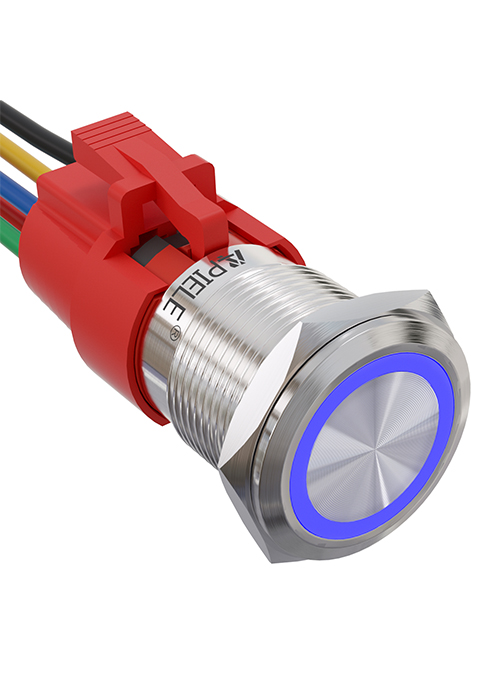
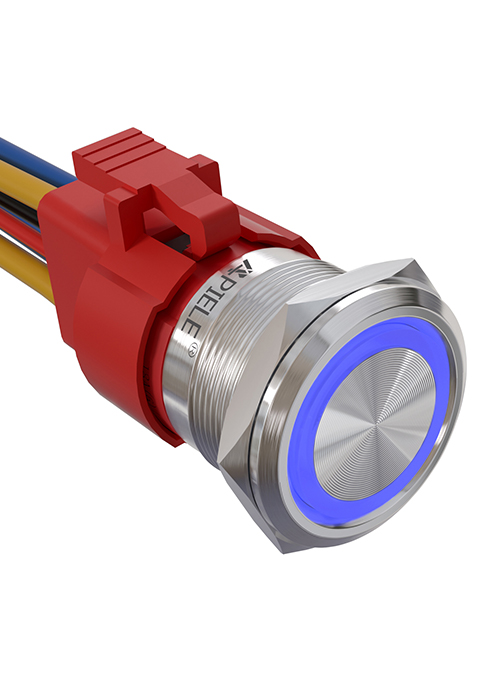

Figure 8: Visual guide for the installation process of the push button switch.
Video 1: This video demonstrates the features and installation of the 10 Amp Latching Push Button switch, including its waterproof capabilities and various applications.
Ntuziaka ọrụ
The APIELE Latching Push Button Switch operates with a simple ON-OFF mechanism.
- To turn on the connected device, press the button once. The LED ring will illuminate, indicating the switch is in the ON state.
- To turn off the connected device, press the button again. The LED ring will turn off, indicating the switch is in the OFF state.
Video 2: This video showcases the functionality of the 10 Amp 19mm Latching/Momentary Push Button Switch, demonstrating its use in various applications like automotive dashboards and coffee machines.
Ngwa:
This versatile switch is suitable for a wide range of applications, including but not limited to:
- Automobile and motorcycle modifications
- Control equipment switch modifications
- Doorbell buttons
- SOS buttons
- Elevator buttons
- Ngwa ụlọ

Ọgụgụ 9: Ọpụamples of common applications for the APIELE push button switch, including doorbell, car, and elevator buttons.
Nlekọta
The APIELE Latching Push Button Switch is designed for minimal maintenance due to its durable construction and IP65 waterproof rating.
- Nhicha: Wipe the switch surface with a soft, damp cloth. Avoid using abrasive cleaners or solvents that could damage the finish or internal components.
- Nyocha: Periodically check the wiring connections to ensure they are secure and free from corrosion.
- Nchekwa gburugburu: While waterproof, prolonged submersion is not recommended. Ensure the mounting area is properly sealed if exposed to extreme moisture.
Nchọpụta nsogbu
| Nsogbu | Ihe nwere ike ime | Ngwọta |
|---|---|---|
| Switch does not activate/deactivate device. | Incorrect wiring; Loose connection; No power to circuit; Faulty device. | Check wiring against diagram (Figure 7); Ensure all connections are secure; Verify power supply to the circuit; Test the connected device independently. |
| LED anaghị agba ọkụ. | Incorrect LED wiring polarity; No power to LED circuit; Damaged LED. | Check LED wire polarity (Red for +, Black for -); Verify 12V power supply to LED pins; If LED is damaged, the switch may need replacement. |
| Switch feels loose after installation. | Mounting nut not tightened sufficiently. | Tighten the securing nut on the back of the switch. |
Akwụkwọ ikike na nkwado
APIELE products are manufactured to high standards. For any issues or support inquiries, please contact APIELE Electric directly through their official channels or the retailer from whom the product was purchased.
Gaa leta APIELE Store on Amazon maka ozi ndị ọzọ na kọntaktị nhọrọ.
Ask a question about this manual
Ask about setup, troubleshooting, compatibility, parts, safety, or missing instructions. Manuals+ will review the question and use this page’s manual context to help answer it.