
Okwu mmalite
This manual provides comprehensive instructions for the setup, operation, and maintenance of your Zerone Universal Remote Control. This remote is designed to function with various Pioneer DVD player models, offering a convenient replacement or secondary control unit.
Ndakọrịta
The Zerone Universal Remote Control is compatible with the following Pioneer DVD player models:
- Onye ọsụ ụzọ VXX2811
- Onye ọsụ ụzọ VXX2914
- Onye ọsụ ụzọ VXX3218
- Onye ọsụ ụzọ VXX2801
- Onye ọsụ ụzọ VXX2800
- Onye ọsụ ụzọ VXX2913
For optimal performance, ensure your DVD player model is listed above.
Melite
1. Ntinye batrị
- Chọta ebe batrị dị n'azụ nke njikwa anya.
- Mia mkpuchi batrị ala ma ọ bụ pịa eriri ma welie ya ka imepee.
- Insert two (2) AA 1.5V batteries, ensuring the positive (+) and negative (-) terminals align correctly with the markings inside the compartment.
- Dochie mkpuchi batrị ahụ site n'ịdọghachi ya n'ọnọdụ ya ruo mgbe ọ pịrị aka nke ọma.
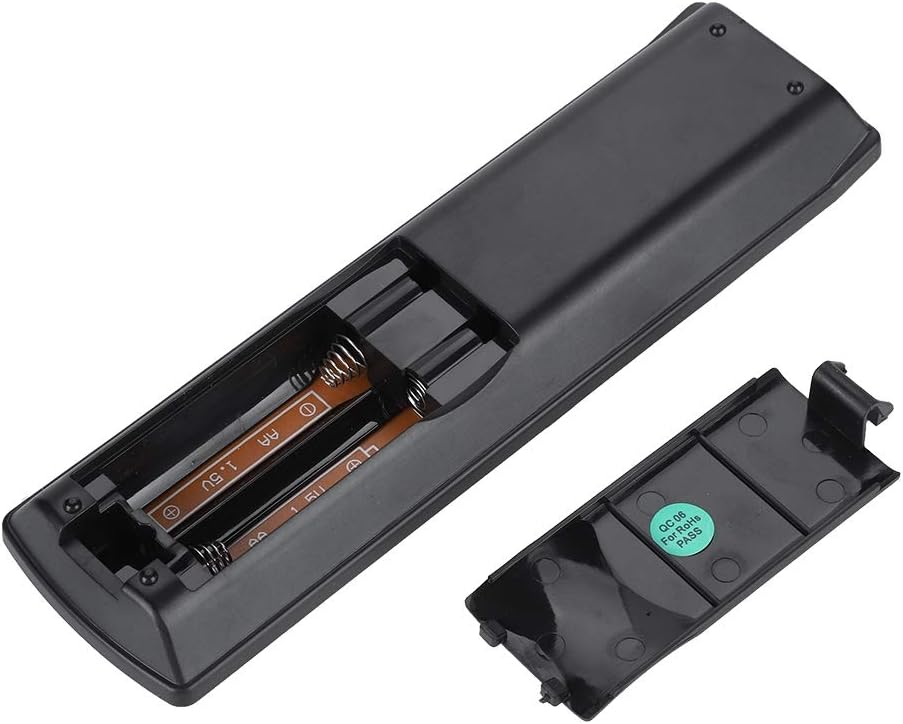
Foto: N'azụ view of the Zerone remote control, showing the battery compartment cover.

Image: The battery compartment of the remote control with two AA batteries correctly inserted.
No programming or setup is required. Once batteries are installed, the remote is ready for use with compatible Pioneer DVD players.
Ntuziaka ọrụ
Point the remote control directly at your Pioneer DVD player. The effective control distance is typically over 8 meters (approximately 26 feet), though this may vary based on environmental factors and the specific DVD player model.

Foto: N'ihu view of the Zerone Universal Remote Control, displaying all buttons and their labels.
Ọrụ ndị dị mkpa:
- NKWUKWU/NA: Powers the DVD player on or off.
- Mepee/mechie: Mepee ma ọ bụ mechie traị diski.
- AUDIO: Selects audio tracks or languages.
- Isiokwu: Toggles or selects subtitle options.
- UGWU: Na-agbanwe viewing angle if supported by the DVD.
- Igodo ọnụọgụ (0-9): Direct track selection or input.
- Kpochapụ: Clears numerical input.
- Tinye: Na-akwado nhọrọ.
- NRI Accesses the main menu of the DVD.
- NchNhr: Accesses the disc menu.
- HOME MENU: Navigates to the home menu of the DVD player.
- Nlaghachi: Na-alaghachi na ihuenyo gara aga ma ọ bụ menu.
- Directional Pad (Up, Down, Left, Right) & ENTER: Na-agagharị menu ma na-akwado nhọrọ.
- Playback Controls (Play, Pause, Stop, Fast Forward, Rewind, Skip Forward, Skip Backward): Standard media playback functions.
- GỌỌ egwuregwu: Selects playback modes (e.g., repeat, shuffle).
- Gburugburu: Adjusts surround sound settings.
- Mbugharị: Zooms in or out on the video.
- Ngosi: Shows on-screen display information.

Image: A hand holding the Zerone remote control, demonstrating its ergonomic design and ease of use.

Image: The remote control positioned in front of a television displaying content, illustrating its intended use.

Image: A visual representation of the remote control's effective operating distance, indicating a range of over 8 meters.
Nlekọta
- Nhicha: Jiri akwa dị nro hichaa ihe dịpụrụ adịpụ. Ejila ihe na-ehicha mmiri mmiri ma ọ bụ ihe abrasive.
- Ngbanwe batrị: Replace batteries when the remote's response becomes sluggish or stops working. Always replace both batteries at the same time with new ones.
- Nchekwa: Debe ihe eji emechi ihe n'ebe dị jụụ ma kpọọ nkụ, ebe anwụ na-anaghị anwụ kpọmkwem na oke okpomọkụ dị oke njọ.
- Zenarị mmebi: Do not drop the remote or expose it to water.
Nchọpụta nsogbu
- Remote anaghị aza:
- Ensure batteries are correctly installed with the correct polarity.
- Dochie batrị ochie na batrị AA ọhụrụ.
- Check for any obstructions between the remote control and the DVD player's infrared sensor.
- Ensure you are within the effective operating range (typically within 8 meters).
- Ọrụ ụfọdụ anaghị arụ ọrụ:
- Verify that your Pioneer DVD player model is listed in the compatibility section.
- Some advanced functions may be specific to the original remote or not supported by all DVD player models.
Nkọwapụta
| Ihe onwunwe Shell | High-grade ABS |
| Anya njikwa | > 8 meters (316 inches) |
| Ụdị batrị | 2 x AA 1.5V Batteries (Not included) |
| Akụkụ | Ihe dị ka 174 x 49 x 20 mm (6.85 x 1.93 x 0.79 sentimita asatọ) |
| Ibu | Ihe dị ka 75g (2.46 ounces) |
| Nọmba nlereanya | 743562180017 |
Akwụkwọ ikike na nkwado
For warranty information or technical support, please refer to the documentation provided with your purchase or contact the manufacturer, Zerone, directly through their official channels. Keep your purchase receipt as proof of purchase.