
Okwu mmalite
This manual provides instructions for the Extreme Networks Summit X460-24p, a high-performance, managed Layer 3 Ethernet switch designed for enterprise and data center environments. It features 24 Gigabit Ethernet ports with Power over Ethernet (PoE) capabilities, along with additional SFP and shared Gigabit SFP ports for flexible connectivity.
Ozi nchekwa
Ntuziaka nchekwa
- Always disconnect all power supply inputs before removing any panel for servicing.
- This device contains a Class 1 Laser product. Avoid direct eye exposure to beam.
- Gbaa mbọ hụ na ntọ ala kwesịrị ekwesị n'oge echichi.
- Refer to the installation manual for power cord selection and additional compliance markings.
Ihe ngwugwu
Kedu ihe dị na Igbe ahụ
- Extreme Networks Summit X460-24p Switch
- eriri ọkụ (mpaghara-kpọmkwem)
- Ngwa ihe na-ebunye ogbe
- Akwụkwọ (akwụkwọ ntuziaka a)
Ngwaahịa gafereview
The Summit X460-24p switch is designed for efficient network management and high-speed data transfer.
Ogwe azụ

This image displays the rear panel of the Summit X460-24p switch, highlighting the power input, fan modules, and the SummitStack ports. The overall chassis is purple.

A zuru ezu view of the SummitStack ports (Stack Port 1 and Stack Port 2) located on the rear of the switch, used for stacking multiple switches.
Akara ngwaahịa
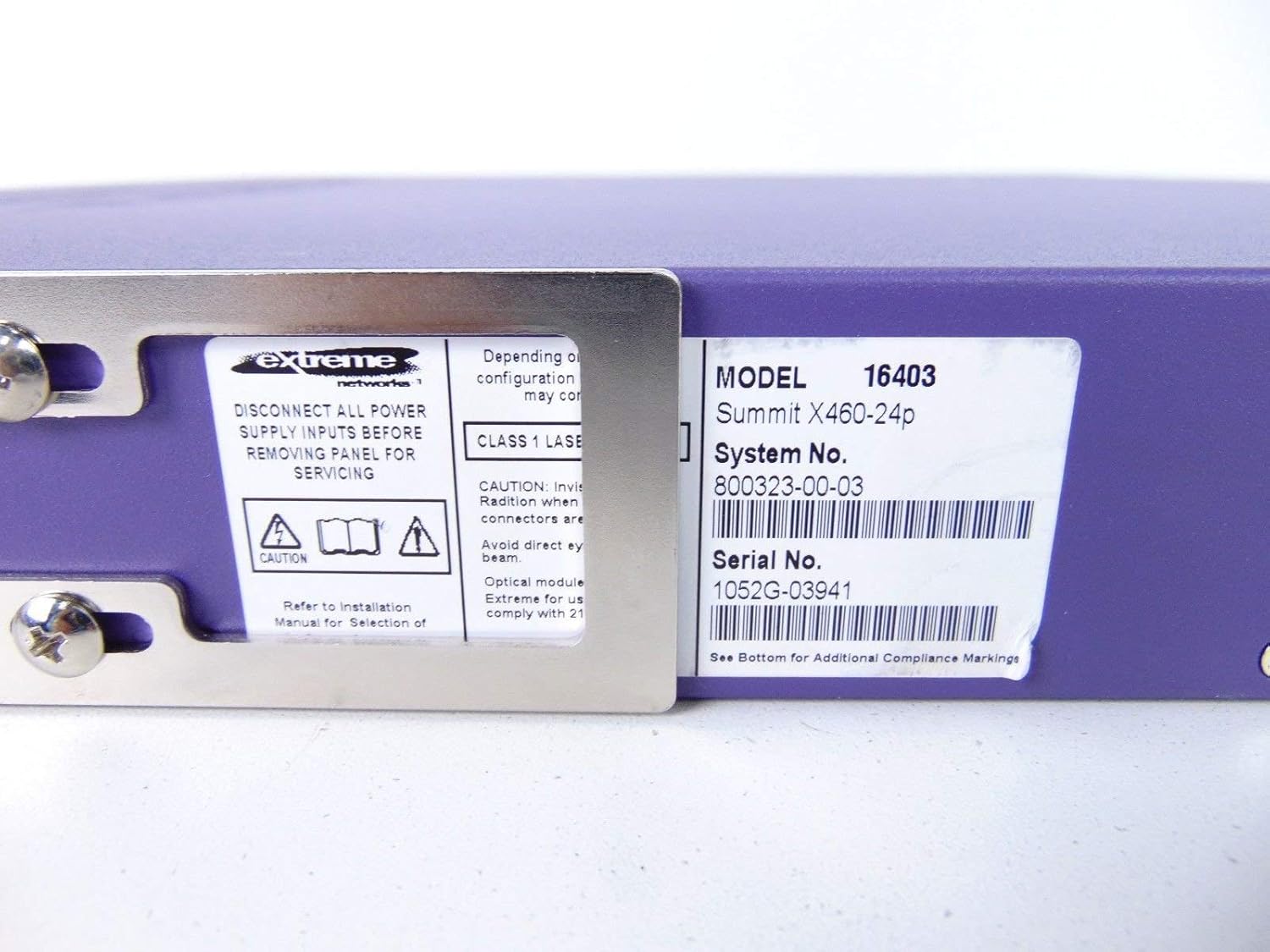
This label provides critical identification information for the switch, including Model: 16403, Summit X460-24p, System No.: 800323-00-03, and Serial No.: 1052G-03941.
Ngwa nhọrọ

This image shows the label for an optional Extreme Networks Summit 750W PoE AC Power Supply Unit (PSU), Model 10931, System No. 800382-00-03, Serial No. 1053A-41986.

This image displays the label for an optional Extreme Networks SummitStack Module, Model 16419, System No. 800384-00-01, Serial No. 1122G-02565.
Melite
Ntuziaka nwụnye
Ihe ntinye
The Summit X460-24p is designed for standard 19-inch rack mounting. Use the provided rack-mounting kit to secure the switch in a server rack. Ensure adequate ventilation around the unit.
Ijikọ Ike
Connect the power cord to the AC power inlet on the rear of the switch and then to a grounded electrical outlet. The switch will power on automatically.
Ijikọ eriri netwọkụ
- Connect Ethernet cables from your network devices to the 24 10/100/1000Base-T PoE ports on the front panel.
- For uplink or fiber connections, use the SFP or shared Gigabit SFP ports.
- For stacking, connect SummitStack ports on multiple switches using appropriate stacking cables.
Initial Configuration Access
Access the switch's management interface via a console cable connected to the console port, or through a web browser if the switch has a default IP address configured. Refer to the Extreme Networks documentation for detailed initial setup procedures.
Ntuziaka ọrụ
Isi ọrụ
Gbanyụọ/ Gbanyụọ
The switch powers on automatically when connected to a power source. To power off, disconnect the power cord. For proper shutdown, it is recommended to use the software-based shutdown command if available.
Ihe ngosi LED
Observe the LED indicators on the front panel for status information regarding power, system health, port activity, and PoE status. Consult the full product documentation for a detailed explanation of each LED's behavior.
Njikwa Njikwa
Enwere ike ijikwa mgba ọkụ ahụ site na Interface Command Line (CLI) nke a na-enweta site na ọdụ ụgbọ mmiri ma ọ bụ Telnet/SSH, ma ọ bụ site na web-based graphical user interface (GUI).
Nlekọta
Nlekọta na nlekọta
Nhicha
Keep the switch clean and free of dust. Use a soft, dry cloth for external cleaning. Do not use liquid or aerosol cleaners.
Firmware mmelite
Periodically check the Extreme Networks support website for firmware updates to ensure optimal performance and security. Follow the provided instructions for firmware upgrade procedures.
Modul na-eweta Fan na ike
The switch may feature hot-swappable fan and power supply modules. Refer to the Extreme Networks documentation for instructions on replacement if necessary.
Nchọpụta nsogbu
Okwu ndị nkịtị
Enweghị ike
- Ensure the power cord is securely connected to both the switch and the power outlet.
- Nyochaa na ntinye ọkụ na-arụ ọrụ.
Port Link Down
- Lelee njikọ eriri Ethernet na nsọtụ abụọ ahụ.
- Nyochaa na agbanyere ngwaọrụ ejikọrọ ma na-arụ ọrụ nke ọma.
- Check the port status via the management interface.
Okwu Njikọta netwọkụ
- Verify IP configuration and network settings.
- Check for conflicting IP addresses.
- Consult network diagnostics tools.
Nkọwapụta
Nkọwa nka nka
| Njirimara | Nkọwa |
|---|---|
| Nlereanya | Summit X460-24p (Part Number: 16403) |
| ọdụ ụgbọ mmiri | 24 x 10/100/1000Base-T PoE+ ports, 4 x shared Gigabit SFP, 4 x SFP |
| oyi akwa | Ngbanwe ejirila oyi akwa 3 |
| Ụdị | Netwọk dị oke egwu |
| Ụdị interface | PoE, SFP |
| Nọmba Sistemu | 800323-00-03 |
| Nọmba usoro n'usoro | 1052G-03941 |
| UPC | 683332278646 |
Akwụkwọ ikike na nkwado
Ozi akwụkwọ ikike
This product typically comes with a 90-day limited warranty. For specific warranty terms and conditions, please refer to the official Extreme Networks warranty statement or contact your vendor.
Nkwado ndị teknuzu
For technical assistance, visit the official Extreme Networks support website or contact their customer service. Have your product model and serial number ready when seeking support.