
1. Okwu mmalite
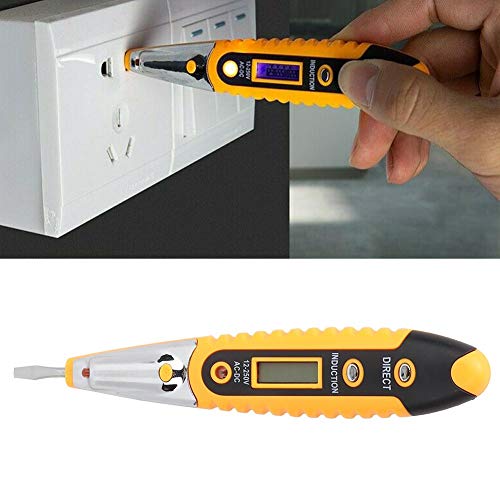
The Walfront VD700 Digital Test Pencil is a versatile tool designed for detecting AC and DC current within a range of 12-250V. It is also capable of identifying zero lines, phase lines, and breakpoints in AC circuits, as well as testing non-live conductors and continuity. Constructed from chrome vanadium alloy steel and ABS insulating plastic, this test pencil offers high hardness, wear resistance, and durability. Its insulated, ergonomic handle ensures comfortable and safe operation.
2. Ozi nchekwa
WARNING: Always prioritize safety when working with electrical systems. Failure to follow these instructions may result in electric shock, injury, or death.
- Oke Voltage: Atụla nha AC voltage karịrị 250V.
- Ihe mkpuchi: The tool features an insulated handle for safety. Ensure your hands are dry and you are not standing in water when using the device.
- Ọnọdụ anụ ahụ: Do not use the device if the screen is not lit, if there is visible damage, or if the tip is not intact.
- DC Voltage: Onye nyocha agaghị achọpụta voltage ọ bụrụ na voltagọ bụ DC.
- Shielded Wires: Onye nyocha agaghị achọpụta voltage if the wire is shielded.
- Nda ala: Onye nyocha agaghị achọpụta voltage if the operator is not grounded or is otherwise isolated from the ground.
- Conduit/Insulation: Onye nyocha ahụ nwere ike ọ gaghị achọpụta voltage if the wire is partially buried, in a grounded metal conduit, too far from the voltage source, or if the insulation is too thick or incompatible.
- Known Live Circuit: Always test on a known live circuit before use to ensure the tester is functioning correctly.
3. Ngwaahịa gafereview


Akụkụ ndị bụ isi:
- Ihe: Chrome vanadium alloy steel and ABS insulating plastic for high hardness and durability.
- Voltage Oke: Detects 12-250V AC and DC current.
- Ọrụ: Simple detection of zero line, phase line, and breakpoints in AC current. Also tests non-live conductors and continuity.
- Nhazi Ergonomic: Soft, insulated handle for comfortable and safe use.
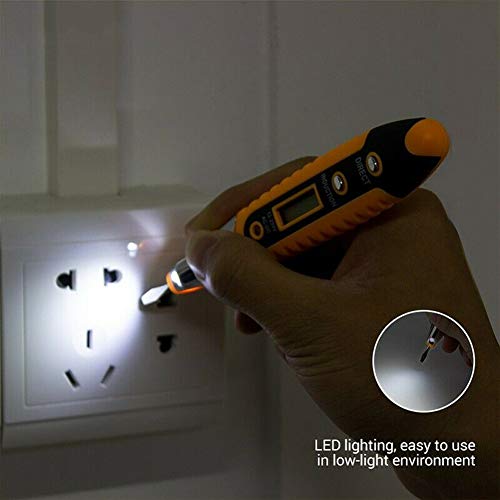
- Ọkụ ọkụ LED: Integrated LED for improved visibility in low-light environments.
4. Nhazi
Nwụnye batrị:
The Walfront VD700 Test Pencil requires 3 AG10 (1.5V) batteries (not included). Follow these steps to install them:
- Unscrew the cap at the top of the test pencil to reveal the battery compartment.
- Insert three AG10 batteries, ensuring correct polarity (+/-).
- Securely screw the cap back onto the test pencil.

5. Ntuziaka ọrụ
Voltage Detection (12-250V AC/DC):
- Ensure the test pencil is powered on and functioning correctly.
- Gently touch the tip of the test pencil to the conductor or surface you wish to test.
- The digital display will indicate the detected voltage.
Zero Line, Phase Line, and Breakpoint Detection (AC Current):
- Press the "inductive break point test" button on the test pencil.
- When the charged symbol appears on the display, the line being tested is the phase line.
- To detect a breakpoint in a live circuit, move the test pen along the wire. The point where the charged symbol disappears indicates the breakpoint.
Iji ọkụ LED:
The integrated LED light can be activated to illuminate dark work areas, enhancing visibility during testing.
6. Nlekọta
- Nhicha: Wipe the test pencil with a dry, clean cloth. Do not use abrasive cleaners or solvents.
- Nchekwa: Chekwaa ngwaọrụ ahụ n'ebe dị jụụ, kpọrọ nkụ na-adịghị na ìhè anyanwụ kpọmkwem na oke okpomọkụ.
- Ngbanwe batrị: Replace batteries when the display becomes dim or the device fails to power on. Ensure correct battery type and polarity.
7. Nchọpụta nsogbu
- Ngwaọrụ anaghị agba ọkụ: Lelee nrụnye batrị ma hụ na batrị anaghị agwụcha. Dochie ma ọ dị mkpa.
- Enweghị Voltage Nchọpụta:
- Ensure the circuit being tested is within the 12-250V AC/DC range.
- Verify the wire is not shielded or in a grounded metal conduit.
- Confirm the test pencil is in close proximity to the voltage isi iyi.
- Check if the insulation of the wire is too thick for non-contact detection.
- Test the device on a known live circuit to confirm functionality.
- Ọgụgụ na-ezighi ezi: Ensure proper contact with the conductor and that environmental factors (e.g., strong electromagnetic fields) are not interfering.
8. Nkọwapụta
| Njirimara | Nkọwa |
|---|---|
| Ụdị | Walfront |
| Nlereanya | NKP |
| Ihe onwunwe | Chrome vanadium alloy steel and ABS insulating plastic |
| Voltage Oke nchọpụta | 12-250V AC and DC |
| Ụdị batrị | 3 x AG10 (1.5V) (not included) |
| Akụkụ ngwaahịa | 25 x 7 x 2 cm |
| Ibu Ibu | 0.02 kilogram |
| Agba | Odo |
| Ụdị | Digital, Ergonomic |
9. Akwụkwọ ikike na nkwado
For warranty information or technical support, please refer to the product packaging or contact Walfront customer service directly. Keep your purchase receipt for any warranty claims.