
1. Ngwaahịa gafereview
The HW HAOWORKS S278 is a versatile 15W portable voice amplifier designed to enhance vocal projection for various applications such as teaching, tour guiding, fitness instruction, and public speaking. It features multiple connectivity options including Bluetooth, AUX, TF card, and USB, along with FM radio and recording capabilities. Its lightweight and compact design ensures ease of portability and use.

Image: The HW HAOWORKS S278 Portable Voice Amplifier, a compact black device with a speaker grille and control panel, shown with its wired headset microphone.
2. Nhazi
Ihe ngwugwu 2.1
Mgbe ị wepụsịrị igbe, chọpụta na akụrụngwa niile dị:
- 1 x Amponye na-ekwu okwu
- 1 x Wired Headset Microphone
- 1 x Adjustable Belt
- 1 x AUX USB
- 1 x eriri USB
- 1 x Akwụkwọ ntuziaka onye ọrụ

Foto: nkọwa zuru ezu view of the HW HAOWORKS S278 voice amplifier and its accessories, including the headset microphone, USB cable, AUX cable, adjustable belt, and user manual, with labels pointing to various ports and controls on the ampna -emegharị ihe.
2.2 Ịchaji Ampna -emegharị ihe
Before initial use, fully charge the voice amplifier. The device typically takes 3-5 hours to achieve a full charge, providing up to 12 hours of continuous operation.
- Jikọọ eriri USB enyere na ọdụ ụgbọ mmiri dị na ya ampna -emegharị ihe.
- Plug the other end of the USB cable into a compatible USB power source (e.g., computer USB port, wall adapter).
- The charging indicator on the display will show charging status.

Image: An illustration highlighting the long battery life of the HW HAOWORKS S278 voice amplifier, showing a 2500 mAh battery, 3-5 hours charging time, and 10-12 hours working time, with people practicing yoga in the background.
2.3 Connecting the Wired Headset Microphone
Olu amplifier comes with a high-performance wired headset microphone for clear voice input.
- Locate the 3.5mm Mic-in jack on the ampna -emegharị ihe.
- Insert the 3.5mm plug of the headset microphone firmly into the Mic-in jack.
- Adjust the headset for a comfortable fit, ensuring the microphone is positioned 2-3 cm from your mouth for optimal sound capture. The headset features a 270-degree rotatable fulcrum for easy adjustment.

Image: A close-up of the wired headset microphone, detailing its highly sensitive recording mic, non-slip surface, 270-degree rotatable fulcrum, and double-shielded wire cable. Insets show how to wear the headset and position the microphone.
3. Ntuziaka ọrụ
3.1 Gbanyụọ/ Gbanyụọ na njikwa olu
To power on the device, slide the ON/OFF switch located on the top of the amplifier. The digital display screen will illuminate. The same switch also functions as the volume control; slide it to increase or decrease the ampọkwa ọkwa.

Image: The HW HAOWORKS S278 voice amplifier shown in a classroom setting with children, highlighting its easy volume control switch and durable, wear-resistant design.
3.2 Nhọrọ ọnọdụ
Nke amplifier supports various modes for different functionalities. Press the 'M' (Mode) button on the control panel to cycle through the available modes:
- Ọnọdụ Bluetooth: Allows wireless connection to your smartphone or other Bluetooth-enabled devices for audio streaming. The display will show "BLUE" when in Bluetooth mode.
- Ụdị redio FM: Enables listening to FM radio stations. To change stations, hold down the arrow buttons.
- Ntinye AUX: Connect external audio devices via the 3.5mm AUX cable.
- TF Card Playing: Insert a TF (Micro SD) card to play audio files ozugbo.
- USB Flash Drive na-egwu: Insert a USB flash drive to play audio files ozugbo.

Image: A visual representation of the HW HAOWORKS S278's multifunctional design, illustrating its capabilities as a Bluetooth speaker, AUX input, TF card player, U disk (USB) player, FM radio, and one-key voice recorder.
3.3 Olu Ampntughari
Nke S278 amplifier provides clear and loud voice projection, suitable for rooms of 25 to 60 people or outdoor spaces for 25 to 65 people, covering up to 10,000 square feet. This helps protect your vocal cords by reducing the need to yell.
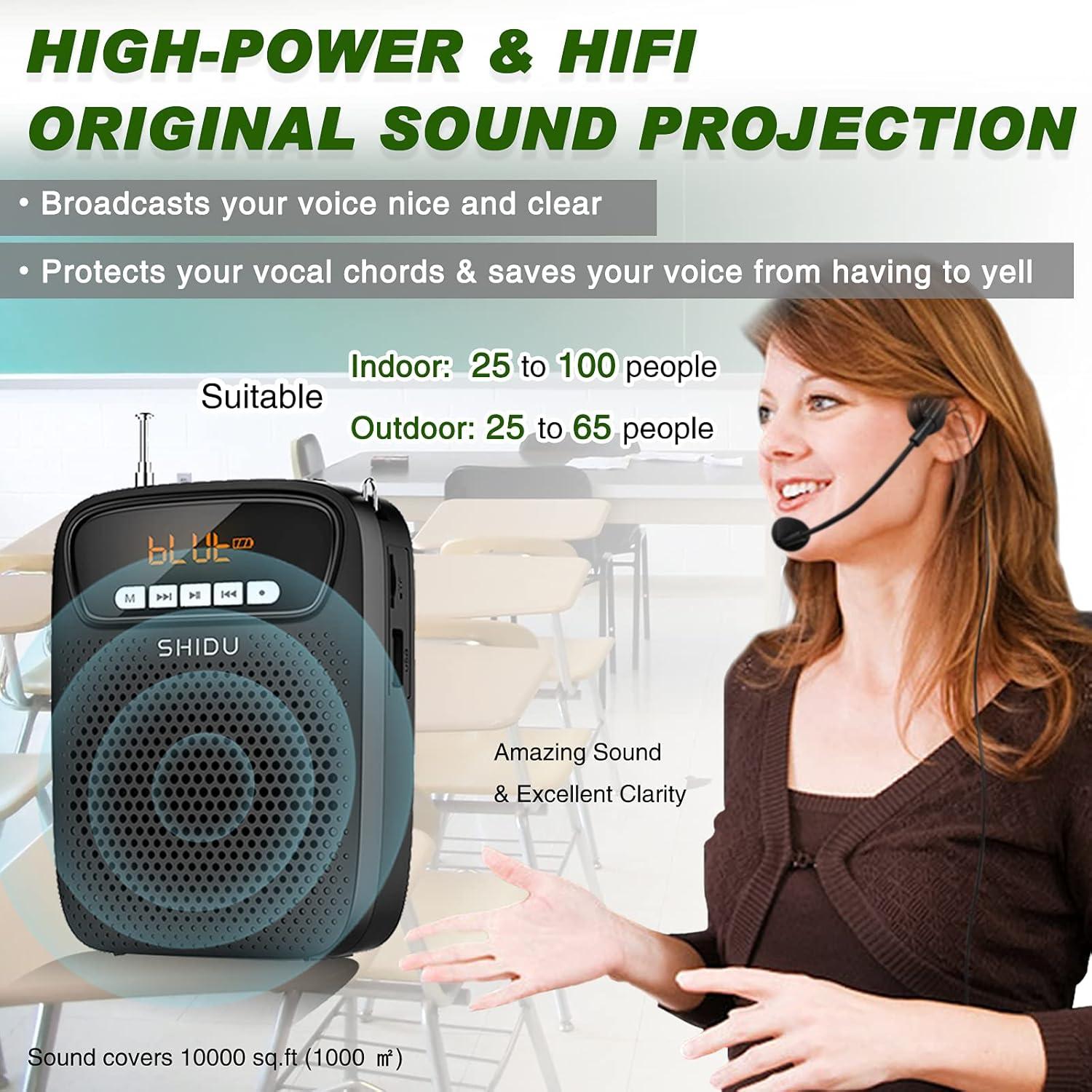
Image: A graphic illustrating the high-power and Hi-Fi sound projection of the HW HAOWORKS S278 voice amplifier, indicating its suitability for indoor (25-100 people) and outdoor (25-65 people) use, covering 10,000 sq ft, with a clear sound projection.
3.4 Ọrụ ndekọ
Nke amplifier supports one-key recording. To use this feature, ensure a TF/SD card is inserted into the designated slot and the wired microphone is connected. Press the 'Record' button to begin recording. Recorded audio can be played back through the ampna -emegharị ihe.
3.5 Yiri Ampna -emegharị ihe
The S278 is designed for portability. It can be easily worn using the included adjustable belt, either around your waist or hung around your neck, allowing for hands-free operation while moving.

Image: Three individuals demonstrating different ways to wear the lightweight and small HW HAOWORKS S278 voice amplifier: around the waist, over the shoulder, and clipped to clothing, emphasizing its portability.
4. Nlekọta
To ensure the longevity and optimal performance of your voice amplifier, soro ntuziaka mmezi ndị a:
- Nhicha: Jiri akwa dị nro ma kpọọ nkụ hichaa mpụta amplifier. Avoid using harsh chemicals or abrasive materials that could damage the surface.
- Nchekwa: Chekwaa amplifier in a cool, dry place away from direct sunlight and extreme temperatures. When not in use for extended periods, ensure it is fully charged before storage.
- Nlekọta batrị: Do not expose the battery to high temperatures or attempt to disassemble it. Charge the device regularly, even if not in frequent use, to maintain battery health.
5. Nchọpụta nsogbu
If you encounter issues with your voice amplifier, rụtụ aka na nsogbu na azịza ndị a na-ahụkarị:
- Enweghị ụda/olu dị ala:
- Gbaa mbọ hụ na amplifier is powered on and fully charged.
- Check the volume level and increase it as needed.
- Verify that the headset microphone is securely plugged into the Mic-in jack.
- Howling/Feedback:
- Position the headset microphone and the speaker a sufficient distance from each other.
- Ensure the microphone is not directly facing the speaker.
- Reduce the volume setting if it is too high.
- Adjust the microphone's position relative to your mouth (ideally 2-3 cm away).
- Okwu njikọ Bluetooth:
- Gbaa mbọ hụ na amplifier is in Bluetooth mode.
- Check that Bluetooth is enabled on your external device.
- Bugharịa ya amplifier closer to your device to ensure it is within range.
- Nsogbu ndekọ:
- Confirm that a TF/SD card is properly inserted.
- Ensure the wired microphone is connected.
- Check for sufficient storage space on the TF/SD card.
For persistent issues not covered here, please consult the original user manual provided with your product or contact HW HAOWORKS customer support.
6. Nkọwapụta
| Nkọwapụta | Uru |
|---|---|
| Ụdị | HỤ HAOWORKS |
| Nọmba nlereanya | S278 |
| Isi Iyi Ike | Akwanyere batrị |
| Mpụta Wattage | 15 Watt |
| Ụdị batrị | 1 batrị lithium polymer (gụnyere) |
| Oge Nchaji | 3-5 Awa |
| Oge ọrụ | Ruo awa 12 |
| Ntinye ọdịyo | Wired Headset Microphone |
| Teknụzụ Njikọta | AUX, Bluetooth, USB |
| Ihe onwunwe | Acrylonitrile Butadiene Styrene (ABS) |
| Ibu Ibu | 7 ounce (0.44 pound) |
| Agba | Nwa |
| Onye nrụpụta | SHIDU |
| UPC | 723888000435 |
7. Akwụkwọ ikike na nkwado
For warranty information and customer support, please refer to the documentation included with your purchase or visit the official HW HAOWORKS website. Typically, warranty details and contact information for support are provided by the manufacturer.