
Okwu mmalite
This manual provides essential instructions for the setup, operation, and maintenance of your Easytry123 replacement remote control. This remote is designed to function with various ONKYO AV A/V Receiver models, including RC-745M, TX-NR1007, TX-NR807, RC-717M, RC-738M, TX-SR607, TX-SR607S, RC-742M, and TX-SR707.
Ihe ndetu dị mkpa: As a replacement unit, this remote control may not support all advanced functions or features present on your original ONKYO remote. Its primary purpose is to provide core control over your AV receiver. Please ensure your receiver model is listed above for compatibility.
Melite
1. Ntinye batrị
Njikwa remote ahụ chọrọ batrị AAA abụọ (anaghị etinye ya). Soro usoro ndị a iji wụnye ha:
- Chọta mkpuchi mkpuchi batrị n'azụ nke njikwa anya.
- Pịa ala na taabụ ahụ wee mịda mkpuchi ahụ ala iji mepee ngalaba ahụ.
- Insert two AAA batteries, ensuring the positive (+) and negative (-) terminals align correctly with the markings inside the compartment. Incorrect insertion can prevent the remote from functioning.
- Weghachite mkpuchi nke batrị batrị n'ime ebe ruo mgbe ọ pịrị na nchekwa.
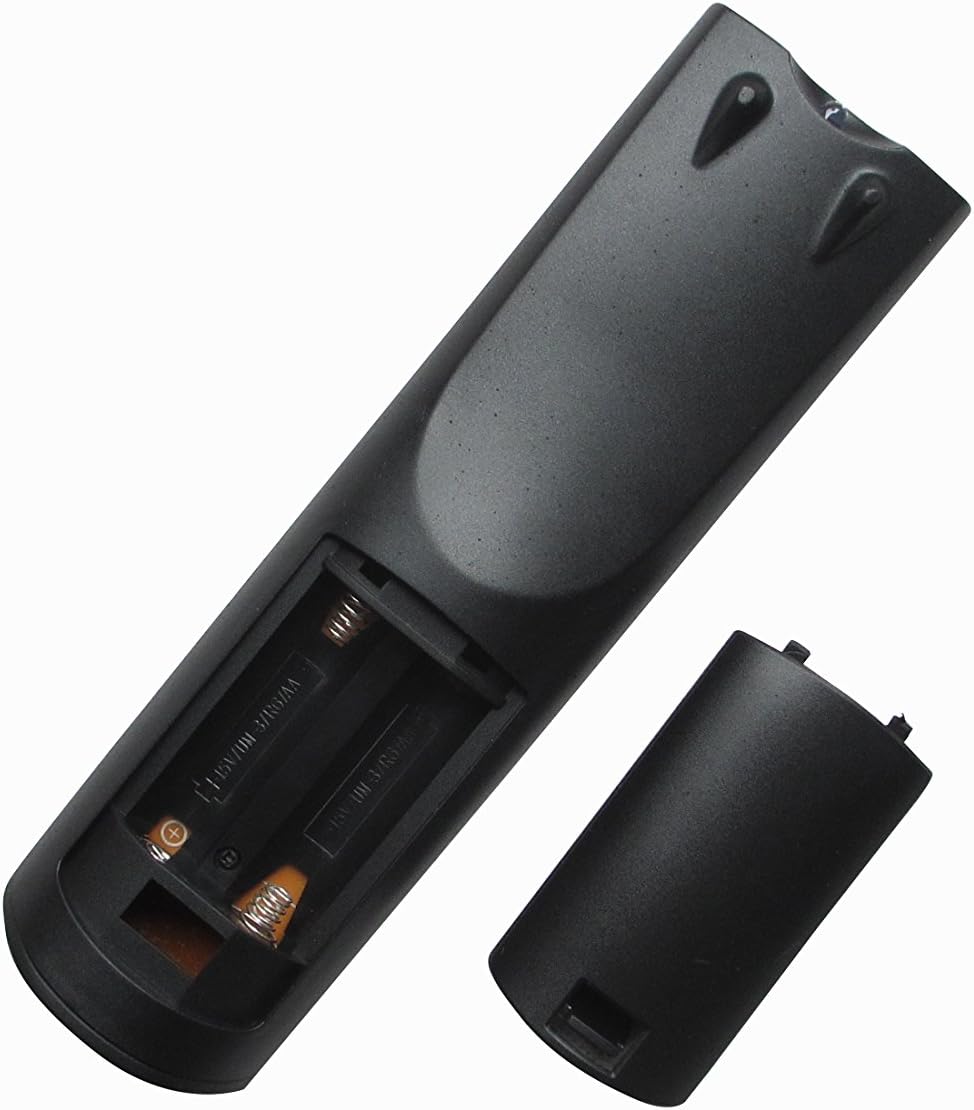
Foto 1: N'azụ view of the remote control with the battery compartment open, ready for battery insertion. Note the spring contacts for the negative terminals and raised contacts for the positive terminals.

Foto nke 2: Ọzọ view of the remote's battery compartment, illustrating the correct orientation for AAA battery placement.
2. Ojiji mbụ
This replacement remote control is pre-programmed for the listed ONKYO AV A/V Receiver models. No additional programming or pairing steps are typically required. Once batteries are installed, the remote should be ready for immediate use with your compatible receiver.
Point the remote control directly at your ONKYO AV A/V Receiver and press the desired function button.
Ntuziaka ọrụ
The Easytry123 replacement remote control provides intuitive access to the primary functions of your ONKYO AV A/V Receiver. While the exact button layout may vary slightly from your original remote, the core functions are generally mapped to standard remote control buttons.
- Gbanyụọ/ Gbanyụọ: Jiri ihe IKE button to turn your receiver on or off.
- Njikwa olu: Adjust the audio level using the Olu + na Mpịakọta - bọtịnụ.
- Nhọrọ ntinye: Cycle through available audio/video inputs (e.g., HDMI 1, DVD, CD) using the Ntinye or dedicated input selection buttons.
- Mechie: Temporarily silence the audio output with the MUTU bọtịnụ.
- Ntugharị: Jiri bọtịnụ akụ ntụziaka na Banye or OK button for menu navigation on your receiver's display.
For specific advanced functions or detailed operation of your ONKYO receiver's features, please refer to your receiver's original instruction manual.
Nlekọta
Na-ehicha Remote
Iji nọgide na-enwe ọdịdị na ọrụ nke njikwa remote:
- Jiri akwa dị nro hichaa elu ya.
- Maka unyi isi ike, obere dampen the cloth with water or a mild, non-abrasive cleaner. Do not use harsh chemicals or solvents.
- Avoid getting moisture into the battery compartment or any openings.
Ngbanwe batrị
Replace the batteries when the remote's response becomes sluggish or it stops functioning. Always replace both batteries at the same time with new AAA batteries. Do not mix old and new batteries, or different types of batteries.
Nchekwa
Ọ bụrụ na ejirighị njikwa remote ahụ ruo ogologo oge, wepụ batrị ndị ahụ iji gbochie ntapu na mmebi nke remote ahụ.
Nchọpụta nsogbu
Ọ bụrụ na ị hụ nsogbu na njikwa remote gị, biko lee azịza ndị a:
- Remote anaghị aza:
- Lelee ma etinyere batrị ndị ahụ nke ọma site na iji polarity ziri ezi (+/-).
- Dochie batrị ahụ na batrị AAA ọhụrụ.
- Ensure there are no obstructions between the remote control and the ONKYO receiver's infrared sensor.
- Make sure you are within the effective range of the receiver and pointing the remote directly at it.
- Some functions do not work:
- As a replacement remote, it may not support all functions of your original ONKYO remote. Focus on core functions like power, volume, and input selection.
- Verify that your ONKYO receiver model is listed as compatible in the introduction section.
- Consult your ONKYO receiver's original manual for specific function details.
- Remote na-arụ ọrụ mgbe ụfọdụ:
- Nke a na-egosipụtakarị ike batrị dị ala. Dochie batrị.
- Ensure a clear line of sight to the receiver.
If problems persist after trying these steps, please contact the seller for further assistance.
Nkọwapụta
| Nọmba nlereanya: | RM-736M |
| Akara: | Easytry123 |
| Ngwa dakọtara: | ONKYO AV A/V Receivers (Models: RC-745M, TX-NR1007, TX-NR807, RC-717M, RC-738M, TX-SR607, TX-SR607S, RC-742M, TX-SR707) |
| Teknụzụ Njikọta: | Infrared (IR) |
| Njirimara Pụrụ Iche: | Ergonomic imewe |
| Ọnụọgụ ngwaọrụ akwadoro kacha: | 1 |
| Isi mmalite ike: | Batrị 2 x AAA (anaghị etinye ya) |
Akwụkwọ ikike na nkwado
Specific warranty information for this replacement remote control is typically provided by the seller at the time of purchase. Please refer to your purchase documentation or contact the seller directly for details regarding warranty coverage and support.
For technical assistance or inquiries not covered in this manual, please reach out to the Easytry123 customer support or the retailer from whom you purchased the product.