
1. Okwu mmalite na gafereview
Thank you for choosing the Lorex Analog 4K Weatherproof Indoor/Outdoor HD Wired Add-On Security Camera. This manual provides essential information for the proper installation, operation, and maintenance of your new security camera. This camera is designed as an add-on unit and requires a compatible Lorex recorder (DVR/NVR) for full functionality.
This camera features 4K resolution for superior image clarity, robust weatherproof construction for reliable indoor and outdoor use, and advanced deterrence features such as motion-activated lights and remote-triggered sirens. Its long-range night vision ensures comprehensive surveillance even in low-light conditions.
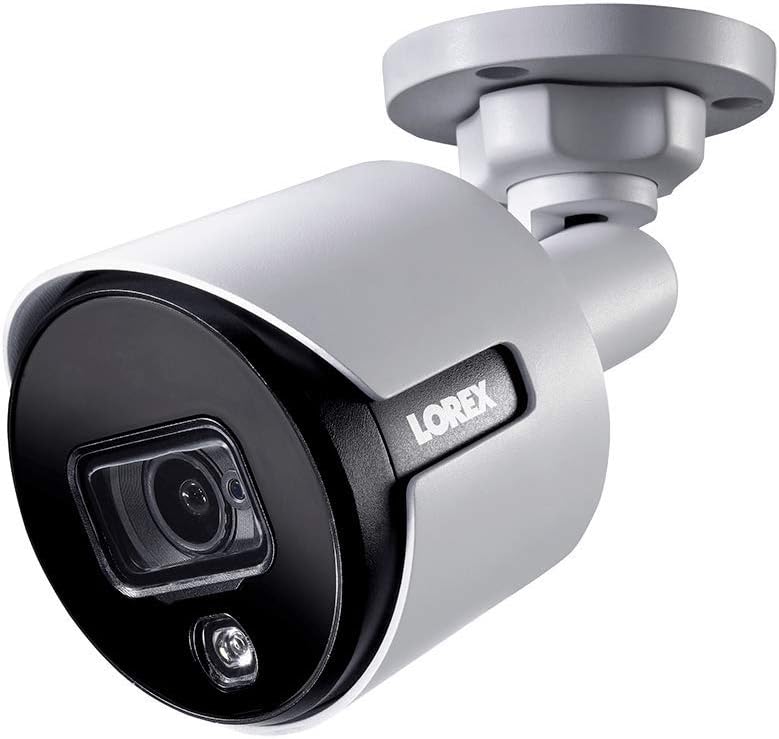
Figure 1.1: Front angle view of the Lorex 4K Weatherproof Security Camera. This image shows the camera's bullet form factor, lens, and integrated light.
2. Ihe ngwugwu
The Lorex Analog 4K Weatherproof Indoor/Outdoor HD Wired Add-On Security Camera package includes:
- 1 x Lorex Analog 4K Weatherproof Indoor/Outdoor HD Wired Add-On Security Camera (Model: LBV8543XW)
- Ngwa mgbakwasa (skru na plọg mgbidi)
- Allen Key (for adjustment)
Note: This is an add-on camera. Video cables, power adapters, and a compatible Lorex recorder are sold separately and are required for operation.
3. Atụmatụ igodo
- 4K Ultra HD mkpebi: Provides exceptional detail and clarity with an 8MP effective still resolution.
- Ihu igwe anaghị egbochi ya (IP67): Durable metal housing ensures reliable performance in various weather conditions, suitable for both indoor and outdoor installation.
- Long Range Night Vision: See clearly up to 150 feet (45m) in ambient night conditions and up to 98 feet (30m) in total darkness. Features Color Night Vision for enhanced detail in low light.
- Motion-Activated Warning Light: Integrated LED light can be triggered by motion to deter intruders.
- Remote-Triggered Siren: Activate a loud siren directly from your Lorex recorder or connected app to scare away unwanted visitors.
- Wired Connectivity (BNC): Ensures a stable and secure connection to your Lorex DVR/NVR system.
- Okpomọkụ arụ ọrụ sara mbara: Functions reliably in temperatures up to 60 degrees Celsius.
4. Ntọala na nwụnye
Before installation, ensure you have a compatible Lorex recorder (DVR/NVR) and necessary video/power cables.
4.1 Ịhọrọ ebe
Select a location that provides the desired viewing angle and is within reach of your Lorex recorder and a power source. Consider areas prone to intrusion, such as entry points or vulnerable perimeters. The camera is suitable for ceiling mount and wall mount applications.

Foto 4.1: Akụkụ view of the Lorex 4K Weatherproof Security Camera, showing its adjustable mounting base.
4.2 na -arịgo igwefoto
- Mark Drill oghere: Use the mounting template (if provided) or the camera base to mark the positions for drilling.
- Oghere egwu egwu: Drill pilot holes for the mounting screws. If mounting on drywall or masonry, insert the provided wall plugs.
- Igwefoto echedoro: Align the camera base with the drilled holes and secure it using the provided screws.
- Gbanwee akụkụ: Loosen the adjustment screws on the camera body using the Allen key to position the camera for the optimal viewMee ka skru ndị ahụ sie ike ozugbo edoziri ha.
4.3 Ijikọ igwefoto
- Jikọọ eriri vidiyo: Connect one end of the BNC video cable (not included) to the camera's BNC port and the other end to an available video input channel on your Lorex recorder.
- Njikọ Ike: Connect the camera's power input to a compatible power adapter (not included). Ensure the power adapter is connected to a power outlet.
- Power On Recorder: Ensure your Lorex recorder is powered on and properly configured.
5. Ntuziaka ọrụ
Once the camera is physically installed and connected to your Lorex recorder, you can begin operation.
5.1 Viewna-eri nri Live
Access your Lorex recorder's interface (via monitor, Lorex Home app, or client software) to view the live video feed from the camera. Ensure the correct channel is selected.

Ọgụgụ 5.1: nso nso view of the Lorex 4K Weatherproof Security Camera's lens and integrated light.
5.2 Motion Detection and Smart Deterrence
Your Lorex recorder manages motion detection settings. Refer to your recorder's manual for detailed instructions on configuring motion zones and sensitivity.
- Motion-Activated Light: The camera's integrated light can be set to activate automatically upon motion detection. This setting is typically configured within your Lorex recorder's deterrence or alarm settings.
- Remote-Triggered Siren: You can manually activate the camera's siren through your Lorex recorder's interface or the Lorex Home app. This feature is useful for immediate deterrence.

Figure 5.2: The Lorex 4K Weatherproof Security Camera mounted on a brick wall at night, demonstrating its motion-activated light feature.
5.3 Ọhụụ abalị
The camera automatically switches to night vision mode in low-light conditions. The infrared (IR) LEDs provide illumination for clear black and white video. Color Night Vision (CNV) may be available if there is sufficient ambient light, providing full-color video in low-light scenarios.
6. Nlekọta
Regular maintenance ensures optimal performance and longevity of your security camera.
- Nhicha: Jiri nro dị nro na-ehicha oghere igwefoto na ụlọ kwa oge, damp cloth. Avoid abrasive cleaners or solvents that could damage the finish or lens.
- Lelee njikọ: Ensure all cable connections (BNC and power) are secure and free from corrosion, especially for outdoor installations.
- Mmelite femụwe: Regularly check the Lorex website or your recorder's settings for available firmware updates for your camera and recorder to ensure the latest features and security enhancements.
- Ọnọdụ gburugburu: While weatherproof, extreme conditions outside the specified operating temperature range (up to 60°C) may affect performance.
7. Nchọpụta nsogbu
If you encounter issues with your Lorex camera, refer to the following common troubleshooting steps:
| Nsogbu | Ihe nwere ike ime | Ngwọta |
|---|---|---|
| No video feed from camera | Njikọ eriri adịghị atọ ụtọ Enweghị ike na igwefoto Incorrect channel selected on recorder | Check BNC and power connections. Ensure power adapter is working and connected. Verify the correct input channel on your Lorex recorder. |
| Poor image quality / blurry video | oghere ruru unyi Improper focus (if adjustable) Cable interference/damage | Jiri akwa dị nro hichaa oghere igwefoto. Ensure the camera is properly focused (if applicable). Check video cable for damage or interference. Use high-quality cables. |
| Ọhụụ abalị anaghị arụ ọrụ | IR LEDs obstructed Ike ezughi oke Ntọala igwefoto | Ensure nothing is blocking the IR LEDs. Verify stable power supply. Check night vision settings on your Lorex recorder. |
| Motion detection not triggering | Incorrect motion zone setup Mmetụta dị oke ala Ihe mgbochi n'ime view | Review and adjust motion detection zones on your recorder. Increase motion sensitivity. Clear any obstructions from the camera's field of view. |
For more advanced troubleshooting, consult your Lorex recorder's user manual or visit the Lorex support websaịtị.
8. Nkọwapụta
| Njirimara | Nkọwapụta |
|---|---|
| Nọmba nlereanya | LBV8543XW |
| Mkpebi ịse vidiyo | 4K (8MP Effective Still Resolution) |
| Teknụzụ Njikọta | BNC (Wired) |
| Ojiji ime ime/n'èzí | Ime ụlọ, n'èzí |
| Ogo nchekwa mba ụwa | IP67 (ihe mkpuchi ihu igwe) |
| Oke ọhụụ abalị | Ụkwụ 150 (45m) |
| Atụmatụ pụrụ iche | Motion Sensor, Night Vision, Motion Activated Lights, Remote-Triggered Siren |
| Ụdị Ihe | Mgbo |
| Ihe onwunwe | Ọla |
| Operating Temperature (Upper) | 60 Ogo Celsius |
| Akụkụ ngwaahịa (L x W x H) | 16 x 6 x 6 sentimita asatọ |
| Ibu Ibu | 0.01 ounces |
| UPC | 695529017136 |
| Usoro njikwa | App, Remote (via compatible Lorex recorder) |
9. Akwụkwọ ikike na nkwado
Lorex products are designed for reliability and performance. For information regarding your product's warranty, please refer to the warranty policy available on the official Lorex website or the documentation included with your Lorex recorder.
For technical support, product registration, or to download the latest software and firmware updates, please visit the official Lorex support page or the Lorex Store:
- Lorex Store: Visit the Lorex Store on Amazon
- Ntuziaka onye ọrụ (PDF): A comprehensive user guide in PDF format is also available for download: Budata ntuziaka onye ọrụ
When contacting support, please have your product model number (LBV8543XW) and serial number ready.