
Okwu mmalite
This manual provides instructions for the VINABTY MKJ36998126 Replacement Remote Control. This remote is designed as a direct replacement for various LG TV models, including the 32LV2400, 42LV4400, 47LV4400, and 55LV4400 series. It is pre-programmed and requires no additional setup beyond battery installation.
The remote control offers a comfortable, ergonomic design and provides full functionality for your compatible LG television, allowing you to control power, volume, channels, input, and other essential TV functions.
Melite
1. Ntinye batrị
The VINABTY MKJ36998126 remote control requires two (2) AAA batteries (not included) for operation. Follow these steps to install the batteries:
- Chọta ebe batrị dị n'azụ nke njikwa anya.
- Pịa aka na latch ahụ wee mịda mkpuchi batrị ahụ ala iji mepee ya.
- Fanye batrị AAA abụọ, na-ahụ na njedebe dị mma (+) na nke na-adịghị mma (-) dabara nke ọma na akara ndị dị n'ime ụlọ ahụ.
- Weghachite mkpuchi batrị n'ime ebe ruo mgbe ọ pịrị na nchekwa.
Mara: Always replace both batteries at the same time with new ones. Do not mix old and new batteries, or different types of batteries.
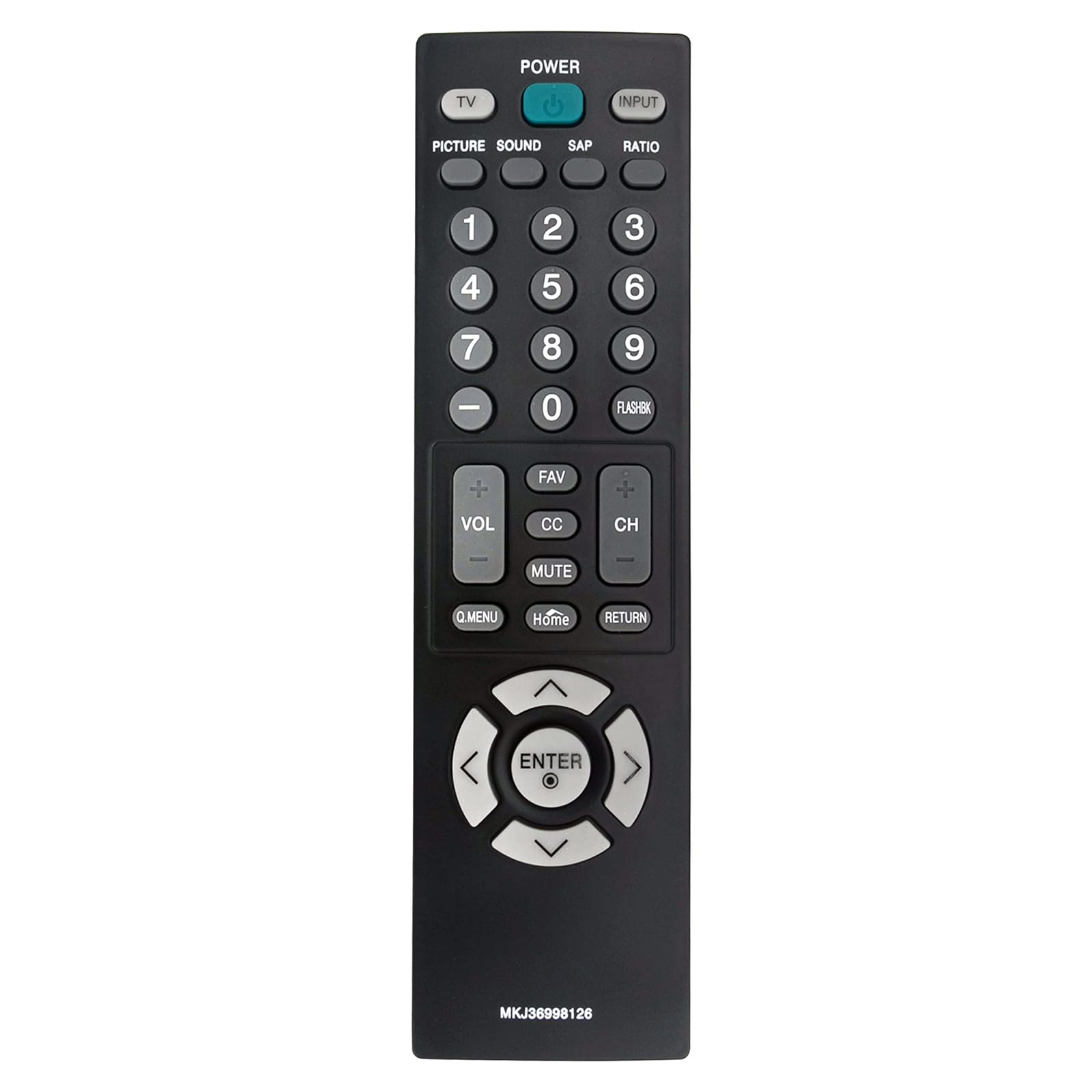
Foto: N'ihu view of the VINJABTY MKJ36998126 remote control, showing the button layout. The battery compartment is on the reverse side.
2. Ojiji mbụ
This remote control is pre-programmed for compatible LG TV models. Once batteries are installed, it is ready for immediate use. No additional programming or pairing is required.
Ntuziaka ọrụ
The VINABTY MKJ36998126 remote control provides intuitive access to your LG TV's functions. Below is a general overview of the main buttons and their functions:

Foto: A zuru ezu n'ihu view of the VINABTY MKJ36998126 remote control, highlighting the various buttons and their labels for easy identification.
- IKE: Gbanyụọ ma ọ bụ gbanyụọ TV.
- TV: Switches to TV mode.
- Ntinye: Selects the input source (HDMI, AV, Component, etc.).
- Foto: Na-agbanwe ntọala foto.
- Ụda: Adjusts sound settings.
- SAP: Selects Secondary Audio Program (if available).
- RATIO: Changes the screen aspect ratio.
- Igodo ọnụọgụ (0-9): Directly selects channels or enters numerical values.
- FLASHBK: Na-echeta ihe gara aga viewọwa ed.
- VOL (+/-): Na-abawanye ma ọ bụ na-ebelata olu.
- CH (+/-): Na-agbanwe ọwa elu ma ọ bụ ala.
- Ajụjụ: Nweta ọwa ọkacha mmasị.
- CC: Toggles Closed Captions on or off.
- IHE: Mebie ma ọ bụ mebie ụda TV.
- Q.MENU: Accesses the Quick Menu for common settings.
- Ụlọ: Ọ na-alaghachi na ihuenyo mbụ nke TV ma ọ bụ menu isi.
- Nlaghachi: Na-alaghachi na ihuenyo gara aga ma ọ bụ menu.
- Navigation Pad (Up, Down, Left, Right, ENTER): Na-agagharị na menu ma na-akwado nhọrọ.

Image: The VINABTY MKJ36998126 remote control shown next to a compatible LG television, illustrating its intended use.
Nlekọta
Ngbanwe batrị
When the remote control's performance degrades or it stops responding, it is likely time to replace the batteries. Follow the battery installation steps outlined in the 'Setup' section.
Nhicha
Iji hichaa njikwa dịpụrụ adịpụ, jiri akwa dị nro ma kpọọ nkụ. Maka unyi isi ike, ntakịrị dampJiri mmiri ma ọ bụ ihe nhicha dị nro, nke na-anaghị afụ ụfụ kpuchie ákwà ahụ. Ejila kemịkalụ siri ike ma ọ bụ mikpuo remote ahụ n'ime mmiri.
Nchekwa
Store the remote control in a dry place, away from direct sunlight and extreme temperatures. If the remote will not be used for an extended period, it is recommended to remove the batteries to prevent leakage.
Nchọpụta nsogbu
- Remote anaghị aza:
- Ensure batteries are correctly installed with the correct polarity.
- Jiri batrị AAA ọhụrụ dochie batrị ochie.
- Lelee ma ọ bụrụ na ihe mgbochi ọ bụla dị n'etiti njikwa remote na sensọ infrared nke TV.
- Ensure you are within the maximum operating range (approximately 33 feet) and pointing the remote directly at the TV.
- Bọtịnụ ndị akọwapụtara anaghị arụ ọrụ:
- Clean the remote control, especially around the affected buttons, to remove any debris that might be causing sticking.
- If cleaning does not resolve the issue, the button may be worn or damaged.
- TV not listed as compatible:
- This remote is specifically designed for the listed LG TV models. If your TV model is not listed, full compatibility cannot be guaranteed.
Nkọwapụta
| Njirimara | Nkọwa |
|---|---|
| Ụdị | VINABTY |
| Aha Nlereanya | MKJ36998126 |
| Ngwa dakọtara | LG Television (32LV2400, 42LV4400, 47LV4400, 55LV4400 series) |
| Teknụzụ Njikọta | Infrared |
| Ọnụọgụ batrị achọrọ | 2 |
| Ụdị batrị | AAA (Alkaline recommended) |
| Oke kacha | 33 ụkwụ |
| Ọnụọgụ bọtịnụ | 30 |
| Akụkụ ihe (L x W x H) | 5"L x 1.9"W x 0.5"H |
| Njirimara Pụrụ Iche | Ergonomic |

Image: The VINABTY MKJ36998126 remote control with its length (7.28 inches) and width (1.97 inches) clearly marked.
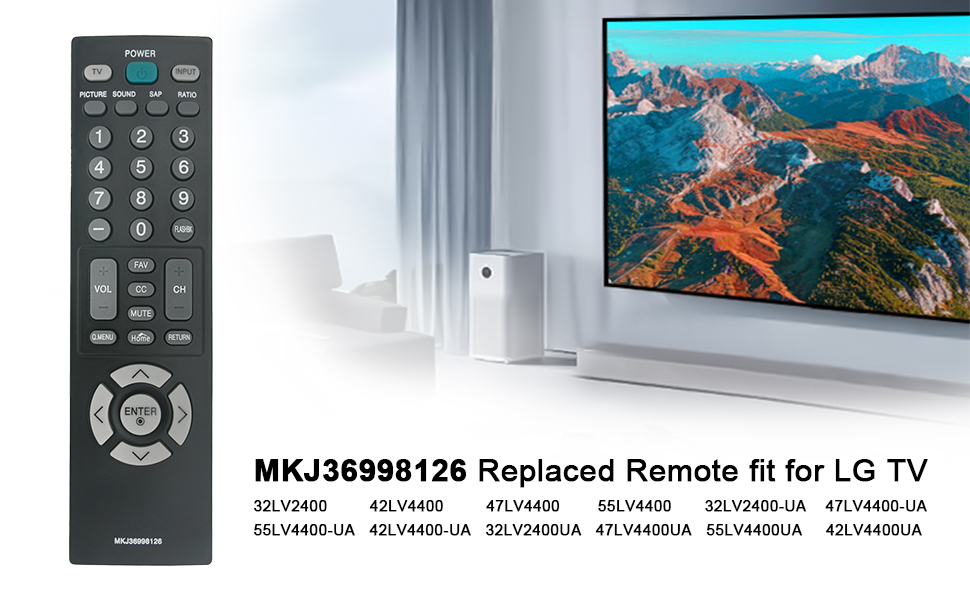
Image: The VINABTY MKJ36998126 remote control displayed alongside a list of compatible LG TV models, including 32LV2400, 42LV4400, 47LV4400, and 55LV4400 series.
Ozi akwụkwọ ikike
Specific warranty details for the VINABTY MKJ36998126 remote control may vary. Please refer to the retailer's return policy or contact the manufacturer directly for comprehensive warranty information.
Nkwado
For further assistance, troubleshooting, or inquiries regarding your VINABTY MKJ36998126 remote control, please contact your point of purchase or the product manufacturer. Ensure you have your product model number (MKJ36998126) available when seeking support.