
1. Okwu mmalite
Thank you for choosing the Dacom Athlete G05 Bluetooth Headset. This manual provides comprehensive instructions to help you set up, operate, and maintain your new wireless headphones. Please read this manual carefully before use to ensure optimal performance and longevity of your device.
2. Ihe ngwugwu
Nyochaa na etinyere ihe niile edepụtara n'okpuru na ngwugwu gị:
- 1 x Dacom Athlete G05 Bluetooth Headset
- 1 x eriri USB
- Akwụkwọ ntuziaka onye ọrụ 1 x (akwụkwọ a)
3. Ngwaahịa gafereview
The Dacom Athlete G05 is a wireless stereo earphone designed for sports and running, featuring a comfortable in-ear design with ear hooks for secure fit. It connects via Bluetooth V4.1.
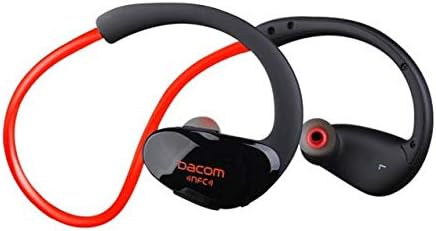
Foto 3.1: N'ihu view of the Dacom Athlete G05 Bluetooth Headset, showing the earbud and ear hook design.
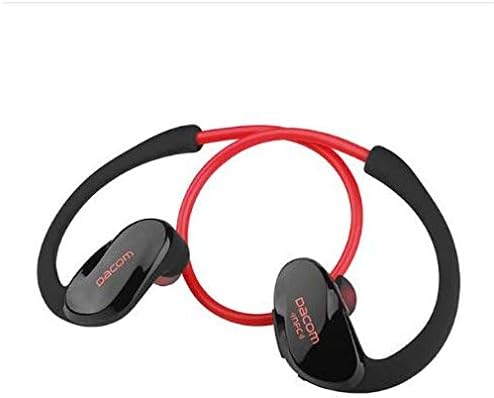
Foto 3.2: N'azụ view of the Dacom Athlete G05 Bluetooth Headset, illustrating the connecting cable between the two earbuds.
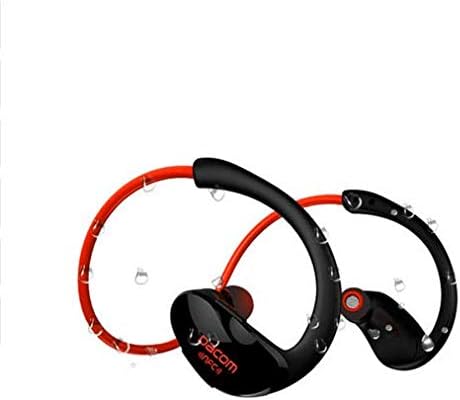
Foto 3.3: Dacom Athlete G05 Bluetooth Headset demonstrating water resistance, suitable for sports activities.
4. Nhazi
4.1 Ịchaji ekweisi
Before first use, fully charge your Dacom Athlete G05 headset. A full charge typically takes approximately 1.5 to 2 hours.
- Jikọọ eriri USB na-ebunye na ọdụ ụgbọ mmiri dị na isi okwu.
- Connect the other end of the USB cable to a power adapter (DC5V 150mAh output recommended) or a computer's USB port.
- The battery indicator light will illuminate during charging and change color or turn off once fully charged.
A fully charged headset provides approximately 8 hours of talk time or music playback, and up to 180 hours of standby time.
4.2 Njikọ Bluetooth
To connect your headset to a Bluetooth-enabled device (e.g., smartphone, tablet):
- Ensure the headset is fully charged and turned off.
- Press and hold the multi-function button on the headset until the Bluetooth indicator light flashes red and blue alternately, indicating it is in pairing mode.
- Na ngwaọrụ gị, gbanye Bluetooth ma chọọ ngwaọrụ dịnụ.
- Select "Dacom Athlete G05" (or similar name) from the list of found devices.
- Ọ bụrụ na ịchọrọ paswọọdụ, tinye "0000" (efu anọ).
- Once paired, the Bluetooth indicator light will flash blue slowly or turn solid blue, and you will hear a confirmation tone.
The headset supports Bluetooth V4.1 and profiles such as Headset, Handsfree, A2DP, AVRC, and APT-X.
5. Ntuziaka ọrụ
5.1 Gbanyụọ ma ọ bụ gbanyụọ
- Ike Na: Press and hold the multi-function button for approximately 3 seconds until the indicator light flashes blue and you hear a power-on tone.
- Gbanyụọ: Press and hold the multi-function button for approximately 5 seconds until the indicator light flashes red and you hear a power-off tone.
5.2 Njikwa oku
- Oku azaa: Short press the multi-function button when a call comes in.
- Oku ngwụcha: Short press the multi-function button during a call.
- Jụ oku: Press and hold the multi-function button for 2 seconds when a call comes in.
- Nọmba Ikpeazụ emegharịgharịrị: Pịa bọtịnụ ọtụtụ ọrụ ugboro abụọ mgbe ọ na-anọghị na oku.
5.3 Nghaghachi egwu
- Gwuo/kwụsịtụ: Mkpirisi pịa bọtịnụ ọtụtụ ọrụ.
- Track na-esote: Pịa bọtịnụ Olu + ogologo oge.
- Gara aga Track: Pịa bọtịnụ olu ogologo.
- Olu elu: Obere pịa bọtịnụ olu +.
- Olu ala: Obere pịa bọtịnụ olu - bọtịnụ.
Note: The headset features touch control for various functions.
6. Nlekọta na nlekọta
- Keep the headset dry. Do not expose it to extreme temperatures or humidity.
- Clean the earbuds and charging contacts regularly with a soft, dry cloth.
- Zere idobe ma ọ bụ idobe ekweisi na mmetụta siri ike.
- Chekwaa ekweisi n'ebe dị jụụ, kpọrọ nkụ mgbe ọ naghị eji ya.
- Do not attempt to disassemble or modify the headset, as this will void the warranty.
7. Nchọpụta nsogbu
| Nsogbu | Ngwọta enwere ike |
|---|---|
| Igweisi anaghị agba ọkụ. | Ensure the headset is fully charged. Connect to a power source and try again. |
| Enweghị ike ijikọ na ngwaọrụ. |
|
| Enweghị ụda ma ọ bụ obere olu. |
|
| Njikọ na-adịte aka. |
|
8. Nkọwapụta
| Njirimara | Nkọwa |
|---|---|
| Aha ngwaahịa | Athlete sports Bluetooth headset |
| Nọmba nlereanya | G05 |
| Ụdị Bluetooth | V4.1 |
| Klas Bluetooth | Klas 2 |
| Akwadoro Profiles | Headset, Handsfree, A2DP, AVRC, APT-X |
| Nchaji ntinye | DC5V 150mAh (Power adapter output) |
| Ụdị batrị | High-performance lithium polymer battery |
| Oge Okwu | Ihe dị ka awa 8 |
| Oge egwu | Ihe dị ka awa 8 |
| Oge Njikere | Ihe dị ka awa 180 |
| Oke ugboro ọdịyo | 20Hz-20kHz |
| BT Radio Frequency | 2.400-2.481GHz |
| Mmepụta Mmebi | 16Ω 3mW |
| Mmetụta | 100-105dB |
| Ụdị ekweisi | Na Ntị |
| Teknụzụ Njikọta | Ikuku |
| Usoro njikwa | Metụ aka |
| Ihe onwunwe | Plastic |
| Agba | Uhie |
9. Akwụkwọ ikike na nkwado
Dacom products are manufactured to the highest quality standards. For warranty information or technical support, please refer to the warranty card included with your purchase or visit the official Dacom websaịtị. Biko dowe ihe akaebe nke ịzụrụ ihe maka akwụkwọ ikike.