
1. Okwu mmalite
This manual provides comprehensive instructions for the setup, operation, maintenance, and troubleshooting of your Canyon CNS-SW71SS Smartwatch. Please read this manual carefully before using your device to ensure proper function and longevity.
The Canyon CNS-SW71SS Smartwatch is designed to help you monitor your fitness activities and stay connected. It features a 1.22-inch color screen, multi-sport modes, heart rate monitoring, sleep tracking, and notification alerts. Its IP68 water resistance makes it suitable for various environments.
2. Ngwaahịa gafereview
2.1 Atụmatụ
- 1.22-inch color touch screen display.
- Multi-sport mode for tracking various activities.
- Daily activity monitoring: calories, steps, heart rate, and sleep.
- Notifications for incoming calls, SMS, emails, calendar events, and social media.
- Music control and remote camera function.
- Smart alarm and weather data display.
- Ruo ụbọchị 7 nke ndụ batrị.
- IP68 water resistance (submersible up to 1 meter for 30 minutes).
- Njikọ Bluetooth 4.0.
- Compatible with iOS and Android operating systems.
- Comes with two interchangeable wristbands: metal and TPU.
2.2 Akụkụ
The Canyon CNS-SW71SS Smartwatch consists of the main watch unit, interchangeable wristbands, and a charging cable.

Foto 1: N'ihu view of the Canyon CNS-SW71SS Smartwatch, showing the display with steps, distance, calories, and heart rate data.

Ọgụgụ 2: N'akuku view of the Canyon CNS-SW71SS Smartwatch, featuring a silver metal mesh strap and a round display.
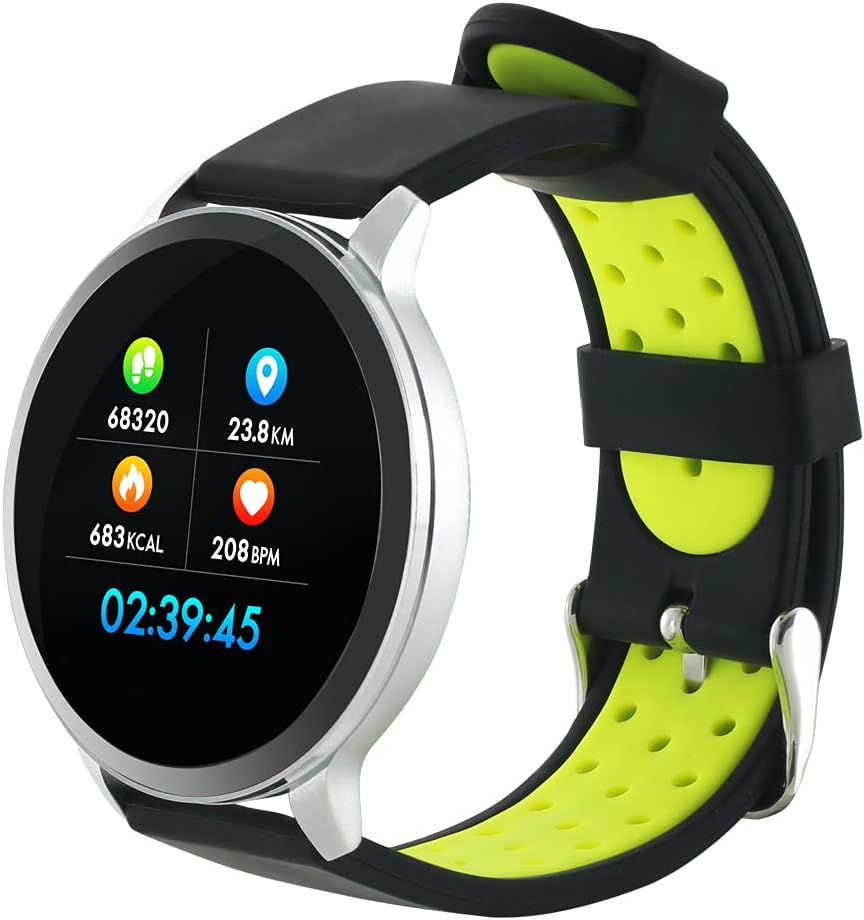
Figure 3: The Canyon CNS-SW71SS Smartwatch shown with an alternative black and lime green TPU strap, highlighting its interchangeable design.

Ọgụgụ 4: N'azụ view of the Canyon CNS-SW71SS Smartwatch, displaying the optical heart rate sensor and magnetic charging contacts.

Figure 5: The retail packaging for the Canyon CNS-SW71SS Smartwatch, illustrating key features and the included two straps.
3. Nhazi
3.1 Ịchaji elekere smart
- Connect the charging cable to a USB power adapter (not included) or a computer's USB port.
- Align the magnetic charging pins of the cable with the charging contacts on the back of the smartwatch. The watch will vibrate and display a charging icon.
- Allow approximately 2-3 hours for a full charge. A full charge provides up to 7 days of usage.
3.2 Installing the Canyon Fit Application
- Scan the QR code provided in the packaging or search for "Canyon Fit" in your smartphone's app store (Google Play Store for Android, Apple App Store for iOS).
- Budata ma wụnye ngwa ahụ.
- Open the Canyon Fit app and follow the on-screen instructions to create an account and set up your profile.
3.3 Ijikọ na ama gị
- Hụ na elekere smart gị na-achaji ma na-agba ọkụ.
- Kwado Bluetooth na ekwentị gị.
- Open the Canyon Fit application.
- Navigate to the device pairing section within the app (usually found under 'Device' or 'Profile').
- Select your smartwatch (e.g., "CNS-SW71SS") from the list of available devices.
- Confirm the pairing request on both your smartphone and smartwatch if prompted.
3.4 Attaching/Changing Wristbands
The smartwatch comes with two wristbands (metal and TPU) that can be interchanged. To attach or change a wristband, locate the quick-release pins on the underside of the strap. Slide the pin to detach the current strap and then align and slide the pin of the new strap into the corresponding holes on the watch body until it clicks into place.
4. Ntuziaka ọrụ
4.1 Nsoro ụzọ
- Ihuenyo mmetụ aka: Swipe left/right to navigate through different functions and menus. Swipe up/down to view notifications or quick settings.
- Bọtịnụ akụkụ: Press the side button to return to the main watch face or to wake up the screen. A long press may access power options or specific features depending on the context.
4.2 Nlekota Ahụike
- Ụdị egwuregwu ọtụtụ: Access the 'Workout' or 'Sport' menu on your watch. Select your desired activity (e.g., running, cycling, walking) to start tracking. The watch will record duration, distance, calories burned, and heart rate.
- Omume kwa ụbọchị: The watch automatically tracks your steps, distance, and calories burned throughout the day. View these statistics on the watch face or in the Canyon Fit app.
- Nlekota obi obi: The watch continuously monitors your heart rate. You can also manually initiate a heart rate measurement from the heart rate interface.
- Nchicha ụra: Wear the smartwatch to bed, and it will automatically track your sleep patterns, including deep sleep, light sleep, and wake times. View detailed sleep analysis in the Canyon Fit app.
4.3 Amamọkwa
Once paired with your smartphone and with notification permissions granted in the Canyon Fit app, your smartwatch will display alerts for:
- Oku na-abata
- Ozi SMS
- Ozi ịntanetị
- Ihe omume kalenda
- Social Media Apps (e.g., WhatsApp, Facebook, Instagebule)
Sụgharịa na ihu nche gaa view recent notifications. You can dismiss notifications from the watch.
4.4 Ọrụ ndị ọzọ
- Njikwa egwu: While music is playing on your phone, you can use the watch to play/pause, skip tracks, and adjust volume.
- Igwefoto dị anya: Open the camera function in the Canyon Fit app. Use your smartwatch as a remote shutter button to take photos on your phone.
- Smart Oti mkpu: Set alarms through the Canyon Fit app. The watch will vibrate to wake you up gently.
- Data ihu igwe: Once connected to your phone, the watch will display current weather conditions and forecasts for your location.
5. Nlekọta
5.1 Nhicha
- Wipe the watch screen and body with a soft, damp akwa .
- For the metal strap, use a soft brush to gently clean any debris. For the TPU strap, wash with mild soap and water.
- Gbaa mbọ hụ na kọntaktsị chajị dị ọcha na akpọnwụwo tupu chajịa.
- Zere iji kemịkalụ siri ike ma ọ bụ ihe na-ekpo ọkụ maka ihicha.
5.2 Mmiri Na-eguzogide Mmiri (IP68)
The Canyon CNS-SW71SS Smartwatch is IP68 rated, meaning it is resistant to dust and can be immersed in water up to 1 meter deep for a maximum of 30 minutes. While it can withstand splashes, rain, and brief immersion, it is not recommended for hot showers, saunas, or diving, as steam and high water pressure can compromise the seals.
- Do not press any buttons while the watch is submerged.
- Kpoo elekere ahụ nke ọma mgbe mmiri batara ya.
5.3 Nlekọta batrị
- Zere ịchaji batrị ugboro ugboro.
- Chaji ngwaọrụ ahụ mgbe niile, ọbụlagodi na ọ naghị eji ya, iji hụ na batrị dị mma.
- Debe elekere ahụ n'ebe dị jụụ ma kpọọ nkụ mgbe a naghị eji ya ruo ogologo oge.
6. Nchọpụta nsogbu
- Lelee anaghị agbanye: Gbaa mbọ hụ na chajịrị elekere ahụ nke ọma. Jikọọ ya na chaja opekata mpe nkeji iri atọ.
- Enweghị ike ijikọ na smartphone:
- Gbaa mbọ hụ na agbanyere Bluetooth na ekwentị gị.
- Ensure the Canyon Fit app has necessary permissions.
- Malitegharịa ekwentị gị na smartwatch.
- Gbalịa iwepụ ma jikọta ngwaọrụ ahụ ọzọ site na ngwa ahụ.
- Amamọkwa anaghị apụta:
- Check notification settings in the Canyon Fit app and your phone's system settings.
- Gbaa mbọ hụ na ejikọrọ elekere site na Bluetooth.
- Inaccurate heart rate/activity data:
- Gbaa mbọ hụ na etinyere elekere nke ọma na nkwojiaka gị, ọ bụghị nke siri ike ma ọ bụ nke tọgbọrọ chakoo.
- Hichaa ihe mmetụta dị n'azụ elekere.
- Environmental factors or certain movements can affect accuracy.
- Ihuenyo anaghị anabata: Try restarting the smartwatch by holding down the side button. If unresponsive, allow the battery to fully drain and then recharge.
7. Nkọwapụta
| Aha Nlereanya | CNS-SW71SS |
| Ụdị | CANYON |
| Ngosipụta nha | 1.22 sentimita asatọ |
| Ndakọrịta sistemụ arụmọrụ | Android, iOS |
| Teknụzụ Njikọta | Bluetooth 4.0 |
| Ogo Nguzogide Mmiri | IP68 |
| Atụmatụ pụrụ iche | Wireless Charging (implied by product data), Multi-Sport Mode, Heart Rate Monitor, Sleep Tracker, Notifications |
| Ngwa dakọtara | Ekwentị mkpanaaka |
| Batrị | Rechargeable (1 included) |
| Nhọrọ agba | Black, Lime Green, Silver |
8. Akwụkwọ ikike na nkwado
For warranty information and technical support, please refer to the documentation included with your purchase or visit the official Canyon website. You can also contact Canyon customer service for assistance with product issues or inquiries.
Nkwado n'ịntanetị: https://canyon.eu/support/ (Ọpụample link, please verify official support page)