
1. Okwu mmalite
The Zealot S11 is a portable, wireless Bluetooth speaker designed for versatile use, including outdoor activities. It features IP67 waterproofing, a multi-mode flashlight, a power bank function, and supports various audio input methods. This manual provides detailed instructions for its setup, operation, and maintenance.

Image 1: Zealot S11 Waterproof Bluetooth Speaker
2. Ihe ngwugwu
Before use, please verify that all items are present in the package:
- Zealot S11 Bluetooth Speaker
- Bike/Cycle Mount
- 3.5mm Audio USB
- Igwe nchaji USB
- Akwụkwọ ntuziaka onye ọrụ
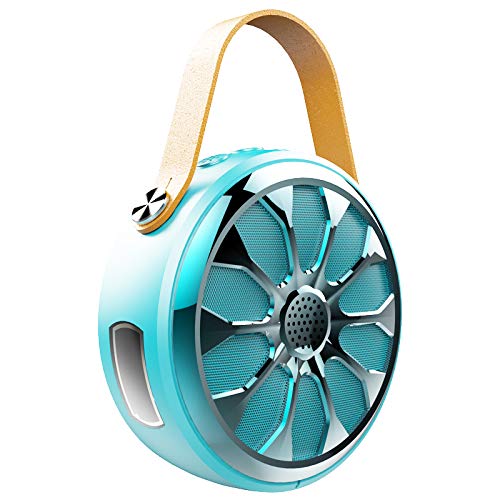
Image 2: Zealot S11 Speaker with included accessories
3. Nhazi ngwaahịa
3.1 ọdụ ụgbọ mmiri na njikọ

Foto 3: Akụkụ view of the Zealot S11 showing the AUX-in port, USB-out port (for power bank), USB-in port (for charging), Power ON/OFF switch, and TF card slot.
- IN (USB-in): Ọdụ USB micro maka ịchaji ọkà okwu.
- Gbanyụọ/gbanwuo: Power switch to turn the speaker on or off.
- TF: Slot for a TF (MicroSD) card for local music playback.
- OUT (USB-out): Standard USB port for using the speaker as a power bank.
- AUX: 3.5mm audio input jack for wired connection.
3.2 bọtịnụ njikwa

Foto 4: Elu view of the Zealot S11 showing the control buttons for Flashlight, Mode Switch, Volume Down/Previous Track, and Volume Up/Next Track.
- Bọtịnụ ọkụ ọkụ: Activates and cycles through flashlight modes.
- M (Mode Switch): Switches between Bluetooth, TF card, and AUX modes.
- Vol-/Pre Track: Pịa obere oge maka mbelata olu, pịa ogologo oge maka egwu gara aga.
- Vol+/ Track na-esote: Pịa mkpirisi maka ibuli olu, ogologo pịa maka egwu ọzọ.
4. Nhazi
4.1 Ịchaji ọkà okwu
- Jikọọ eriri chaja USB enyere na ya na IN ọdụ ụgbọ mmiri na ọkà okwu.
- Connect the other end of the USB cable to a 5V/1A USB power adapter (not included) or a computer's USB port.
- The charging indicator light will illuminate. Once fully charged, the light will change or turn off (refer to specific LED behavior in the quick start guide if available).
- A full charge provides approximately 20 hours of music playback.
4.2 Mounting on a Bike/Cycle
The Zealot S11 includes a mount for attachment to a bike or cycle handlebar.
- Locate the screw hole on the bottom of the speaker.
- Attach the provided bike mount to the speaker using the screw.
- Securely fasten the mount to your bike's handlebar. Ensure the speaker is stable before riding.
5. Ntuziaka ọrụ
5.1 Gbanyụọ ma ọ bụ gbanyụọ
- Iji gbanye, mịpụ ya Gbanyụọ/gbanwuo gbanwee gaa na ọnọdụ 'ON'.
- Iji gbanyụọ ọkụ, mịpụ ya Gbanyụọ/gbanwuo switch to the 'OFF' position.
5.2 Njikọ Bluetooth
- Ensure the speaker is powered on and in Bluetooth mode (indicated by a flashing LED, if applicable). If not, press the M bọtịnụ ka ịgbanwee gaa na ọnọdụ Bluetooth.
- Na ama ma ọ bụ mbadamba gị, gbanye Bluetooth wee chọọ ngwaọrụ dịnụ.
- Select "Zealot S11" from the list of devices.
- Ozugbo ejikọtara ya, ọkà okwu ahụ ga-ewepụta nkwenye olu, ihe ngosi LED ga-akwụsịkwa ịgbawa.
5.3 Nghaghachi egwu

Image 5: The Zealot S11 supports three major player modes: Bluetooth, TF card, and AUX input.
- Bluetooth Play: Mgbe ijikọchara nke ọma, kpọọ egwu sitere na ngwaọrụ ejikọrọ gị.
- Egwuregwu TF kaadị: Insert a TF (MicroSD) card with music files n'ime TF slot. The speaker will automatically switch to TF card mode or you can press the M bọtịnụ ka ịhọrọ ya.
- AUX Play: Connect an audio device using the 3.5mm audio cable to the AUX port. Press the M bọtịnụ ka ịgbanwee gaa na ọnọdụ AUX.
5.4 Oku na-enweghị aka

Image 6: The Zealot S11 allows for hands-free phone calls when connected via Bluetooth.
When connected via Bluetooth to your smartphone, the speaker can be used for hands-free calls.
- Oku azaa: Pịa M pịa otu ugboro iji zaa oku mbata.
- Oku ngwụcha: Pịa M bọtịnụ otu ugboro n'oge oku iji kwụsị ya.
- Jụ oku: Pịa ma jide M bọtịnụ ịjụ oku mbata.
5.5 Ọrụ Ọkụ Mkpọchi
The speaker features a 3-mode flashlight.
- Pịa Bọtịnụ ọkụ ọkụ once to turn on the flashlight.
- Press again to cycle through the different modes (e.g., high, low, SOS).
- Press a third time to turn off the flashlight.
5.6 Ike Bank arụ ọrụ
The Zealot S11 can act as a power bank to charge other devices.
- Connect your mobile phone or other USB-powered device to the Mpụ (USB-out) port on the speaker using a compatible USB cable.
- The speaker will begin providing 5V/1A current to charge your device.
6. Nlekọta
- Ọnụọgụ enweghị mmiri: The Zealot S11 is IP67 waterproof and dustproof. This means it can withstand immersion in water up to 1 meter for 30 minutes and is protected against dust ingress. Ensure all port covers are securely closed before exposure to water or dust.
- Nhicha: Jiri nwayọ hichaa ọkà okwu, damp akwa . Ejila kemịkalụ siri ike ma ọ bụ ihe mkpocha abrasive.
- Nchekwa: Chekwaa ọkà okwu n'ebe dị jụụ, kpọrọ nkụ na-adịghị na ìhè anyanwụ kpọmkwem na oke okpomọkụ.
- Nlekọta batrị: To prolong battery life, fully charge the speaker before first use and at least once every three months if not used regularly. Avoid completely draining the battery frequently.
7. Nchọpụta nsogbu
- Speaker not turning on: Ensure the battery is charged. Connect the speaker to a power source using the USB charging cable.
- Enweghị ike ijikọ site na Bluetooth:
- Hụ na ọkà okwu ahụ nọ n'ọnọdụ njikọta Bluetooth (LED na-enwu enwu).
- Make sure your device's Bluetooth is enabled and within range (typically 10 meters).
- Forget "Zealot S11" from your device's Bluetooth list and try pairing again.
- Malitegharịa ekwentị ma ọkà okwu na ngwaọrụ Bluetooth gị.
- Enweghị ụda:
- Lelee ọkwa olu na ma ọkà okwu na ngwaọrụ gị ejikọrọ.
- Ensure the correct playback mode (Bluetooth, TF, AUX) is selected.
- Ọ bụrụ na ị na-eji AUX, hụ na e tinyere eriri ahụ nke ọma ma rụọ ọrụ nke ọma.
- Igwe ọkụ anaghị arụ ọrụ: Ensure the speaker is powered on and press the flashlight button.
- Power bank not charging device: Ensure the speaker has sufficient charge. Verify the USB cable and the connected device are functional.
8. Nkọwapụta
| Njirimara | Nkọwapụta |
|---|---|
| Nlereanya | S11 |
| Ụdị | Onye na-anụ ọkụ n'obi |
| Teknụzụ Njikọta | Bluetooth, Auxiliary, Wireless |
| Ọkwa Nguzogide mmiri | Ihe mgbochi mmiri IP67 |
| Isi Iyi Ike | Akwanyere batrị |
| Ike batrị | 4000mAh batrị lithium |
| Nkezi Ndụ batrị | 20 Hours (Music Time) |
| Usoro njikwa | Metụ (bọtịnụ) |
| Atụmatụ pụrụ iche | Bluetooth, Portable, Wireless, Flashlight (3 Modes), Power Bank, TF Card Support, Hands-Free Calling |
| Ngwa dakọtara | Smartphone, Mbadamba ụrọ |
| Ọnọdụ mmepụta ọdịyo | Stereo |
| Ibu Ibu | 360 grams |
| Akụkụ ngwaahịa (LxWxH) | 11.5 x 11.5 x 4.5 cm |
9. Product Video Overview
Vidiyo a na-enye nkọwa zuru okeview of the Zealot S11 speaker's features, including its flashlight, design, and various playback options. Please note that the video source URL is a placeholder as a direct m3u8 link was not provided in the product data.
10. Akwụkwọ ikike na nkwado
For warranty information and customer support, please refer to the documentation included with your purchase or visit the official Zealot websaịtị. Debe ihe akaebe nke ịzụrụ ihe maka akwụkwọ ikike ọ bụla.