
Okwu mmalite
This manual provides essential information for the proper use and care of your GRADO RS2x Reference Series Open-Back Headphones. The RS2x headphones are designed for high-fidelity audio reproduction, featuring a blend of maple and hemp wood chambers and custom 44mm X Drivers. Each pair is hand-assembled to deliver a detailed and warm sound signature.
Please read these instructions thoroughly before using your headphones to ensure optimal performance and longevity.
Ngwaahịa gafereview
The GRADO RS2x headphones are engineered for an immersive listening experience, combining traditional craftsmanship with advanced audio technology.
- Reference-Grade Audio Performance: Equipped with 44mm X Series drivers for balanced, transparent sound.
- Natural Maple & Hemp Wood Design: Hand-matched wood housing enhances warmth, clarity, and resonance.
- Hand-Assembled in Brooklyn, NY: Each pair is meticulously built, continuing a legacy of handcrafted audio gear.
- Nhazi Emepere Emepe: Provides a wide, three-dimensional soundstage, ideal for home listening.
- Dị mma ma dị fechaa: Features plush cushions, a braided cable, and a durable frame for extended listening.

Foto 1: N'ihu view of the GRADO RS2x Reference Series Open-Back Headphones, showcasing the maple and hemp wood earcups, black foam cushions, and leather headband.
Ihe ngwugwu
Chọpụta na ihe niile dị na ngwugwu:
- GRADO RS2x Reference Series Open-Back Headphones
- Attached Audio Cable (8-conductor braided)
- Adjustable Leather Headband
Melite
Jikọọ na isi iyi ọdịyo
- Locate the 3.5mm audio jack on your audio source (e.g., cellphone, laptop, desktop computer, ampna -eme mkpọtụ).
- Insert the 3.5mm plug of the headphone cable firmly into the audio jack of your device.
- Hụ na njikọ ahụ dị nchebe iji gbochie nkwụsị ọdịyo.
Identifying Left and Right Channels
The headphones are marked for proper channel orientation:
- The left earcup is marked with an 'L'.
- The right earcup is marked with an 'R'.
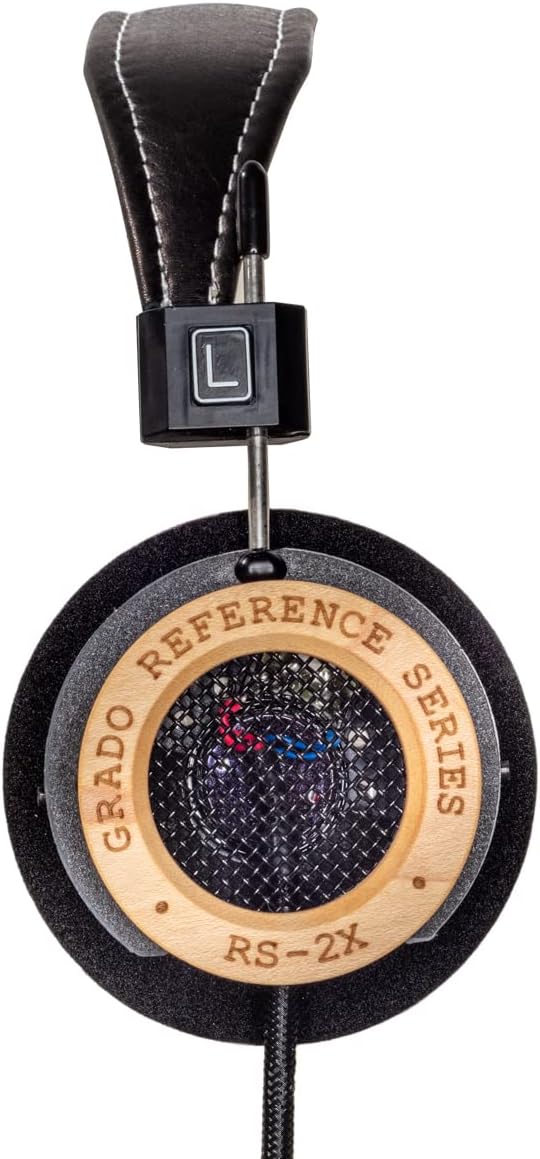
Figure 2: Close-up of the left earcup, showing the 'L' indicator on the headband adjustment.
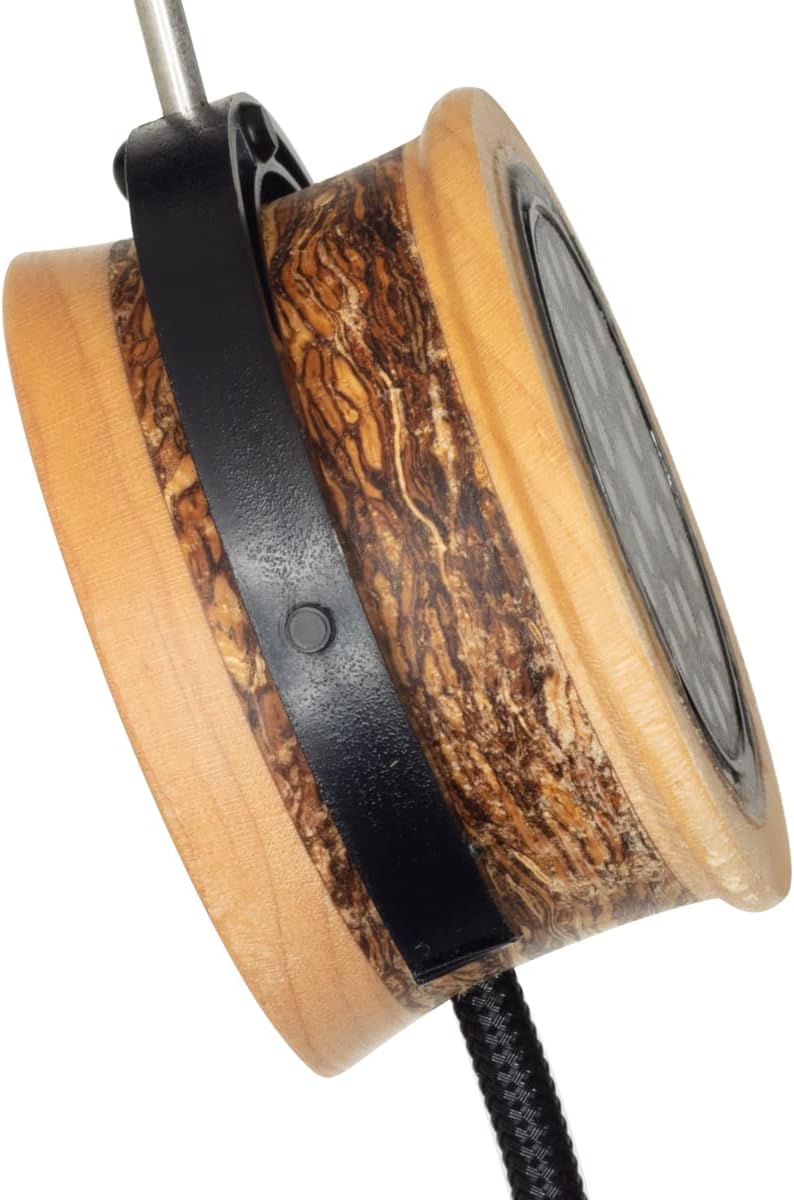
Figure 3: Close-up of the right earcup, showing the 'R' indicator on the headband adjustment.
Yi ekweisi
- Hazie eriri isi: Gently slide the earcups up or down along the metal rods until the headband rests comfortably on the top of your head and the ear cushions sit evenly over your ears.
- Position the Earcups: Ensure the foam cushions fully cover your ears for optimal sound and comfort. The open-back design means some sound will naturally leak out, and external sounds may be audible.

Foto 4: Akụkụ view of an earcup, illustrating the maple and hemp wood construction and the headband adjustment mechanism.
Ntuziaka ọrụ
Ngwugharị ọdịyo
- Connect the headphones to your audio source as described in the Setup section.
- Malite ịkpọghachi ọdịyo na ngwaọrụ ejikọtara gị.
- Adjust the volume using the controls on your audio source. Begin with a low volume and gradually increase it to a comfortable listening level.
The GRADO RS2x headphones do not feature integrated media controls or a remote on the cable. All playback and volume adjustments are managed directly from your connected audio device.
Nlekọta na nlekọta
Proper care will help maintain the performance and appearance of your headphones.
- Nhicha: Use a soft, dry cloth to wipe the wood and leather surfaces. For the foam ear cushions, gently pat them with a slightly damp cloth if necessary, and allow them to air dry completely. Avoid using harsh chemicals or abrasive materials.
- Nlekọta USB: Avoid sharp bends or excessive pulling on the cable. Store the cable neatly when not in use.
- Nchekwa: Store your headphones in a clean, dry place away from direct sunlight and extreme temperatures.
- Nguzogide mmiri: Igwe ekweisi ndị a bụ ọ bụghị mmiri na-eguzogide. Avoid exposure to moisture, rain, or liquids.
Nchọpụta nsogbu
If you encounter issues with your GRADO RS2x headphones, refer to the following common solutions:
- Enweghị ụda:
- Ensure the 3.5mm audio plug is fully inserted into the audio source.
- Lelee ọkwa olu dị na isi iyi ọdịyo gị ma hụ na ọ naghị agbachi nkịtị.
- Nwalee ekweisi ahụ site na iji isi iyi ọdịyo dị iche iji wepụ nsogbu ngwaọrụ.
- Ụda agbagọ ma ọ bụ adịghị mma:
- Verify the audio cable connection is secure.
- Ensure the audio source's volume is not set too high, causing clipping or distortion.
- Lelee ma ọ bụrụ ọdịyo file or streaming quality is sufficient.
- Ahụ erughị ala n'oge eji:
- Adjust the headband and earcup position to find a comfortable fit.
- Take breaks during long listening sessions.
If problems persist, contact GRADO customer support for further assistance.
Nkọwa nka nka
| Njirimara | Nkọwapụta |
|---|---|
| Aha Nlereanya | RS2x |
| Teknụzụ Njikọta | Ekwenyere |
| Jack ekweisi | 3.5mm ọkpụrụkpụ |
| Ntinye ntị | N'elu Ntị |
| Ụdị Ihe | N'elu Ntị |
| Ụdị ọkwọ ụgbọ ala ọdịyo | Ọkwọ ụgbọala dị ike |
| Nha ọkwọ ụgbọ ala ọdịyo | 44 millimeters |
| Oke ugboro ugboro | 14-28,000 Hz |
| Mgbochi | 38 Ohm |
| Ihe onwunwe | Wood (Maple & Hemp) |
| Ibu Ibu | 14.4 ounces |
| Ọkwa Nguzogide mmiri | Ọ bụghị mmiri na-eguzogide |
Akwụkwọ ikike na nkwado
GRADO products are known for their quality and craftsmanship. For specific warranty details, please refer to the documentation included with your purchase or visit the official GRADO websaịtị.
If you require technical support, service, or have questions regarding your GRADO RS2x headphones, please contact GRADO customer service directly. Contact information can typically be found on the manufacturer's websaịtị ma ọ bụ na nkwakọ ngwaahịa gị.