
1. Okwu mmalite
This manual provides essential instructions for the installation, operation, and maintenance of your FSP iFP600 Uninterruptible Power Supply (UPS). Please read this manual thoroughly before installing or operating the unit to ensure proper function and safety. The FSP iFP600 is designed to provide reliable power backup and surge protection for your electronic devices.

Foto 1.1: N'ihu view of the FSP iFP600 UPS, showcasing its compact design and integrated LCD display.
2. Ntuziaka nchekwa
Please adhere to these important safety guidelines during installation, operation, and maintenance of the UPS:
- Emeghela UPS casing. Enweghị akụkụ ọrụ ọ bụla dị n'ime ya. Nye ndị ọrụ ruru eru ọrụ niile.
- Do not connect appliances that could overload the UPS, such as laser printers, vacuum cleaners, or heaters.
- Hụ na ejikọtara UPS na ebe ọkụ eletrik AC dị n'ala.
- Avoid placing the UPS in direct sunlight, near heat sources, or in environments with excessive dust, humidity, or corrosive substances.
- Position the UPS in a well-ventilated area to prevent overheating.
- In case of fire, use a dry chemical extinguisher. Water can be hazardous.
- The battery inside the UPS is not user-replaceable. Battery replacement should only be performed by qualified personnel.
3. Ngwaahịa gafereview
The FSP iFP600 UPS provides reliable power protection for your critical electronics. It features a compact design and an intuitive LCD display for monitoring status.
Ihe ngwugwu 3.1
Mgbe imepechara ngwugwu ahụ, biko chọpụta na akụrụngwa niile dị na enweghị mmebi:
- FSP iFP600 UPS Unit
- Akwụkwọ ntuziaka (akwụkwọ a)
- Ụdọ ọkụ
- USB nkwurịta okwu
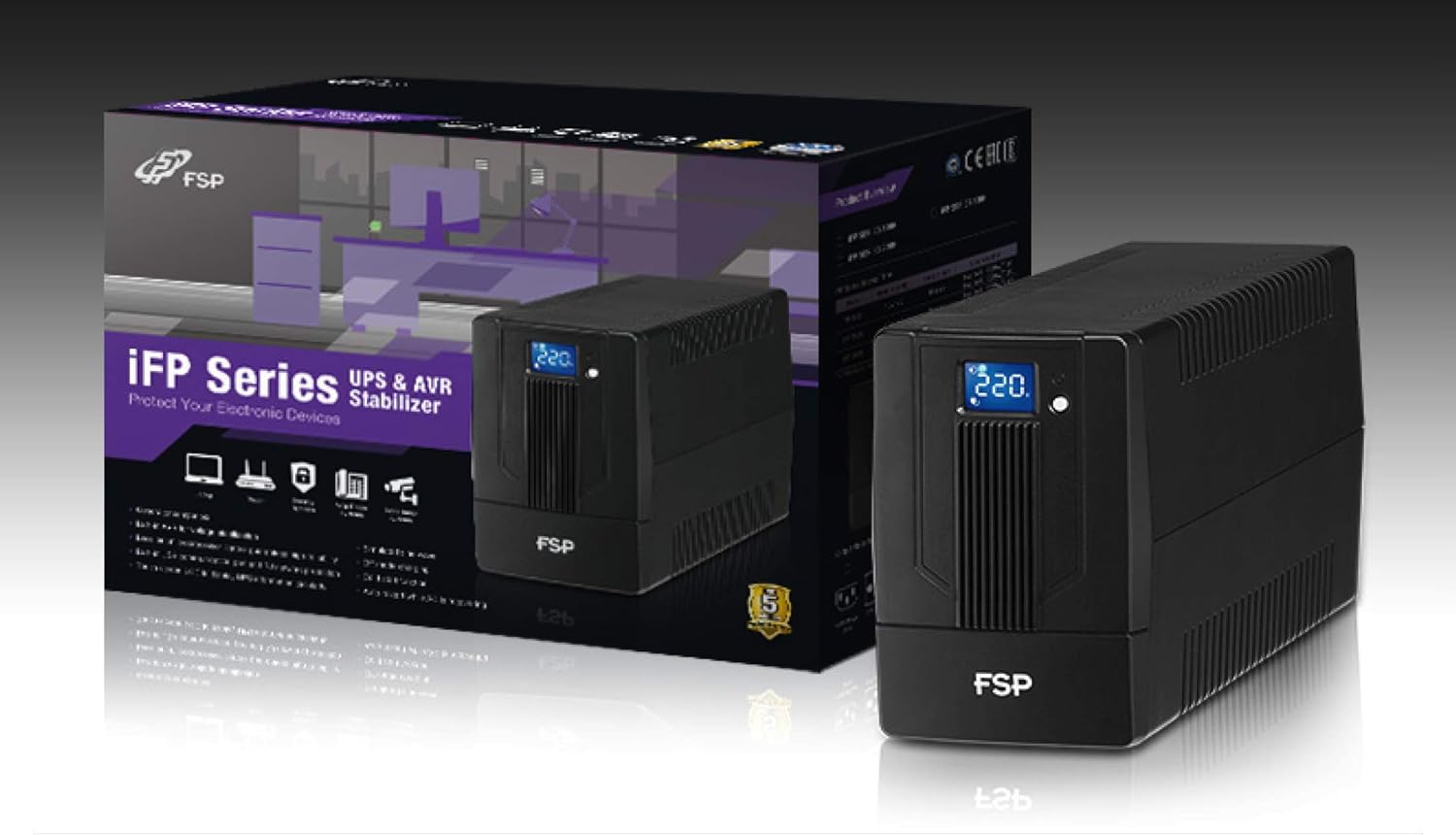
Image 3.1: The FSP iFP600 UPS shown alongside its retail packaging, illustrating the product's presentation.
3.2 Akụkụ azụ azụ
Familiarize yourself with the connections on the rear panel of the UPS:

Foto 3.2: Zuru ezu view of the FSP iFP600 UPS rear panel, highlighting connection points.
- Ụlọ ahịa: Two SCHUKO type outlets for connecting protected equipment.
- Ntinye AC: Connects the UPS to the main utility power.
- Fuse/Breaker: Overcurrent protection for the UPS.
- Nkwukọrịta USB: Port for connecting to a computer for monitoring and management.
- Combo RJ11/RJ45 Surge Protection: Provides surge protection for telephone/network lines.
4. Ntọala na nwụnye
Follow these steps to set up your FSP iFP600 UPS:
- Iwepu: Jiri nlezianya wepụ UPS ahụ na ngwugwu ya. Lelee ma ọ bụrụ na e mebisịrị ihe ọ bụla e ji ebuga ya.
- Nkwanye: Place the UPS on a flat, stable surface in a clean, cool, and well-ventilated area. Ensure adequate clearance around the unit for airflow.
- Nchaji mbụ: Connect the UPS to a standard grounded AC outlet using the provided power cord. Allow the unit to charge for at least 4-6 hours before initial use to ensure optimal battery performance. The UPS will charge whether it is turned on or off.
- Ngwa njikọ: Plug your computer, monitor, and other critical electronic devices into the UPS outlets (A). Do not connect surge suppressors or power strips to the UPS outlets.
- USB Communication (Optional): Connect the USB cable from the UPS USB port (D) to your computer's USB port to enable power management software features (software not included, typically downloaded from manufacturer's websaịtị).
- RJ11/RJ45 Protection (Optional): For surge protection of your telephone or network line, connect the incoming line to the 'IN' port of the Combo RJ11/RJ45 (E) and connect the 'OUT' port to your device.
5. Ntuziaka ọrụ
5.1 Gbanyụọ/ gbanyụọ
- Iji gbanye: Press and hold the power button on the front panel for approximately 2 seconds until you hear a beep and the LCD display illuminates.
- Iji gbanyụọ: Press and hold the power button for approximately 2 seconds until you hear a beep and the LCD display turns off.
Ozi Ngosipụta LCD 5.2
The FSP iFP600 features an LCD display that provides real-time status information. The display is touch-sensitive for navigating information.

Image 5.1: The LCD display of the FSP iFP600 UPS, indicating voltage output and its touch-screen functionality.
The LCD display typically shows:
- Ntinye Voltage
- Mmepụta Voltage
- Ọkwa chaja batrị
- Ọkwa ibu
- Operating Mode (e.g., AC mode, Battery mode)
- Warning/Fault Indicators
5.3 Battery Mode Operation
When the utility power fails or fluctuates outside acceptable limits, the UPS will automatically switch to battery mode. During battery mode, the UPS will provide power to connected equipment from its internal battery. An audible alarm will sound to indicate battery operation.
6. Nlekọta
Proper maintenance ensures the longevity and reliability of your UPS.
- Nhicha: Use a soft, dry cloth to clean the exterior of the UPS. Do not use liquid or aerosol cleaners.
- Nlekọta batrị: To maximize battery life, ensure the UPS is connected to AC power and fully charged. If the UPS is stored for an extended period, recharge it every three months to prevent battery degradation.
- Ngbanwe batrị: The internal battery (12V / 7Ah x1) is not user-serviceable. Battery replacement should only be performed by FSP-certified service personnel or a qualified technician. Incorrect battery replacement can pose a risk of explosion or injury.
- Nchekwa: Store the UPS in a cool, dry place with adequate ventilation. Ensure the battery is fully charged before storage.
7. Nchọpụta nsogbu
Refer to the following table for common issues and their solutions. If the problem persists, contact FSP support.
| Mgbaàmà | Oti mkpu | Ihe nwere ike ime | Ngwọta |
|---|---|---|---|
| UPS operating on battery power | Na-ada ụda ọ bụla 10 sekọnd | Utility power failure or fluctuation | Save work and shut down equipment if power outage is prolonged. UPS will return to AC mode when power is restored. |
| Ịdọ aka ná ntị batrị dị ala | Beeps kwa sekọnd ọ bụla | Ịcha batrị dị ala nke ukwuu | Immediately save work and shut down connected equipment. |
| Ọnọdụ ibufe oke | Na-eti mkpu kwa nkeji 0.5 ọ bụla | Ngwa ejikọrọ karịrị ikike UPS | Disconnect non-essential equipment until the alarm stops. Ensure total load is within UPS capacity. |
| UPS kpatara | Na-aga n'ihu na-akụ ụda | Mmejọ nke ime ma ọ bụ adịghị arụ ọrụ | Turn off the UPS and disconnect it from the AC outlet. Contact FSP technical support. |
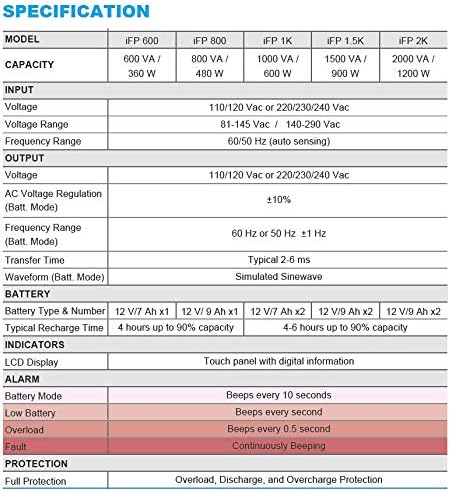
Image 7.1: Excerpt from the FSP iFP series specification table, detailing alarm indicators and their meanings.
8. Nkọwapụta
Detailed technical specifications for the FSP iFP600 UPS:
| Njirimara | Nkọwapụta |
|---|---|
| Nlereanya | iFP 600 |
| Ike | 600 VA / 360 W |
| Ntinye Voltage | 110/120 Vac or 220/230/240 Vac |
| Ntinye Voltage Oke | 81-145 Vac / 140-290 Vac |
| Ntinye ugboro ugboro | 60/50 Hz (nhụta akpaaka) |
| Mmepụta Voltage | 110/120 Vac or 220/230/240 Vac |
| AC Voltage Iwu (Batt. Ọnọdụ) | ±10% |
| Output Frequency Range (Batt. Mode) | 60 Hz or 50 Hz ±1 Hz |
| Oge mbufe | 2-6 ms |
| Ụdị Waveform (Batt. Ụdị) | Sinewave emepụtara |
| Ụdị batrị & Nọmba | 12V / 7Ah x1 |
| Oge nchaji a na-ahụkarị | 4 awa ruo 90% ikike |
| Ihe ngosi | LCD Display (Touch panel with digital information) |
| Nchedo | Overload, Discharge, and Overcharge Protection |
| Ibu Ibu | 9.24 pound (4.2 n'arọ) |
| Akụkụ ngwaahịa (LxWxH) | 11.81 x 3.98 x 5.59 sentimita asatọ |
| Agba | Nwa |
| Ihe onwunwe | Ọla |
9. Akwụkwọ ikike na nkwado
FSP products are designed for reliability and performance. For warranty information, please refer to the warranty card included with your product or visit the official FSP website. For technical support, troubleshooting assistance, or service inquiries, please contact FSP customer service through their official channels.
Ị nwere ike ịchọta ozi ndị ọzọ na akụrụngwa nkwado na FSP Store on Amazon.