
Okwu mmalite
This manual provides instructions for the safe and efficient operation of your RIDGID R84086B 18-Volt Cordless Mini Bluetooth Radio. This compact and versatile device offers portable audio entertainment and device charging, featuring AM/FM radio, Bluetooth connectivity, and an auxiliary input. It is powered by RIDGID 18-Volt batteries and can also function as a power bank for charging other devices.
Ozi nchekwa
Always read and understand all safety warnings and instructions before operating this product. Failure to follow these instructions may result in electric shock, fire, and/or serious injury.
- Do not expose the radio to rain or wet conditions. Water entering the radio will increase the risk of electric shock.
- Use only with specified battery packs. Using any other battery packs may create a risk of injury and fire.
- Do not operate the radio in explosive atmospheres, such as in the presence of flammable liquids, gases, or dust.
- Keep the radio away from heat sources, direct sunlight, and extreme temperatures.
- Always ensure the battery is properly seated before use.
Ngwaahịa gafereview
Familiarize yourself with the components of your RIDGID R84086B radio.
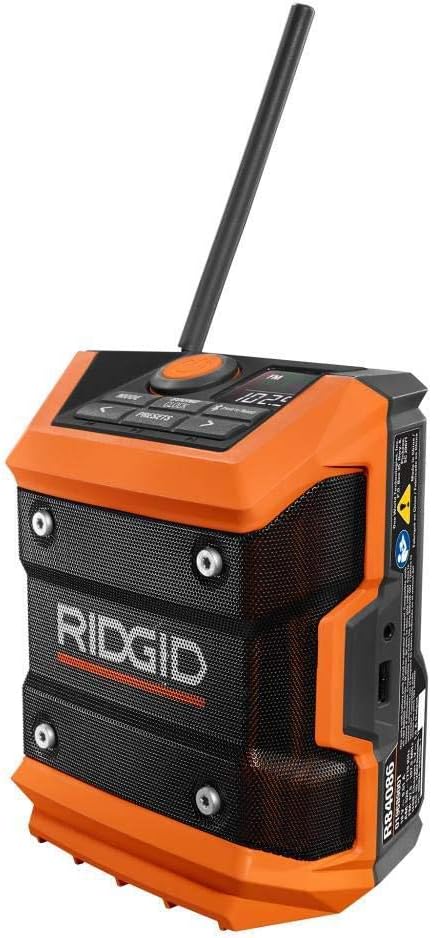
Foto 1: N'ihu view of the RIDGID R84086B radio, showing the control panel, speaker, and extended antenna.

Figure 2: The RIDGID R84086B radio in a workshop setting, demonstrating its portability and use with a smartphone.
Melite
Ntinye batrị
- Gbaa mbọ hụ na agbanyụrụ redio.
- Align a charged RIDGID 18-Volt battery pack with the battery port on the radio.
- Malite ngwungwu batrị n'ọdụ ụgbọ mmiri ruo mgbe ọ pịrị na ebe nchekwa.
Ndozi antenna
For optimal radio reception, extend and adjust the antenna as needed. The antenna can be rotated and tilted to improve signal strength.
Ntuziaka ọrụ
Gbanyụọ/ Gbanyụọ
Press the orange power button located on the control panel to turn the radio on or off.
Nhọrọ ọnọdụ
Pịa MODE button to cycle through available audio sources: FM Radio, AM Radio, Bluetooth, and Auxiliary (AUX) input.
Radio Tuning (AM/FM)
- Select FM or AM mode using the MODE bọtịnụ.
- Use the left (<) na nri (>) arrow buttons to manually tune to a desired frequency.
- Iji chekwaa ọdụ dị ka ihe edobere, pịa ma jide AKWỤKWỌ button, then use the arrow buttons to select a preset number and press AKWỤKWỌ ọzọ iji gosi.
Njikọ Bluetooth
- Họrọ ọnọdụ Bluetooth site na iji MODE button. The Bluetooth icon on the display will flash, indicating it is in pairing mode.
- Na ekwentị mkpanaaka gị, gbanye Bluetooth wee chọọ ngwaọrụ dị.
- Select "RIDGID Radio" from the list of devices to pair. Once paired, the Bluetooth icon will stop flashing and remain solid.
Ntinye inyeaka
To use the auxiliary input, connect an audio device (e.g., smartphone, MP3 player) to the 3.5mm AUX port on the side of the radio using a standard audio cable. Select AUX mode using the MODE bọtịnụ.
Ndozi ụda
Pịa SOUND/CLOCK button to access sound settings. Use the arrow buttons to adjust bass and treble levels for your preferred audio experience.
Ọrụ Bank Power
The radio features a USB port that allows you to charge compatible devices. Connect your device to the USB port using an appropriate charging cable. The radio's battery will provide power to charge your device.
Video: Demonstration of the RIDGID R84086B radio's features, including battery installation, mode selection, radio tuning, auxiliary input, and power bank functionality.
Nlekọta
Nhicha
Regularly clean the radio with a soft, damp cloth. Do not use harsh chemicals or abrasive cleaners. Ensure all ports are free of dust and debris.
Nlekọta batrị
Store battery packs in a cool, dry place away from direct sunlight. Do not store battery packs in a discharged condition. Always charge batteries fully before extended storage.
Nchọpụta nsogbu
Enweghị ike
- Ensure the battery pack is fully charged and properly inserted.
- Check for any obstructions in the battery port.
Ogbenye Redio nnabata
- Extend and adjust the antenna for better signal.
- Move the radio to a different location to avoid interference.
Okwu Njikọta Bluetooth
- Ensure the radio is in Bluetooth pairing mode.
- Gbaa mbọ hụ na agbanyere ngwaọrụ mkpanaka gị Bluetooth yana n'ime oke.
- Gbalịa iwepụ ma megharịa ngwaọrụ ahụ ọzọ.
Nkọwapụta
| Ụdị | RIDGID |
| Nọmba nlereanya | R84086B |
| Teknụzụ Njikọta | Bluetooth |
| Isi Iyi Ike | Battery Powered (RIDGID 18-Volt) |
| Ibu Ibu | 1.75 pound |
| Ngwa dakọtara | Ekwentị mkpanaaka |
| Ngwaọrụ Akụrụngwa | USB |
| UPC | 723548648427 |
Akwụkwọ ikike na nkwado
Ozi akwụkwọ ikike
This product comes with a 90-day limited warranty. Please refer to the warranty card included with your purchase for full terms and conditions.
Nkwado ndị ahịa
For technical assistance, troubleshooting, or warranty claims, please contact RIDGID customer support. Contact information can typically be found on the official RIDGID websaịtị ma ọ bụ na nkwakọ ngwaahịa gị.