
1. Okwu mmalite
Thank you for choosing the HOTT CD511 Portable CD Player. This manual provides detailed instructions for the proper setup, operation, and maintenance of your device. Please read this manual thoroughly before use to ensure optimal performance and longevity of your CD player.
2. Ngwaahịa gafereview
2.1 Atụmatụ
- CD/MP3 Compatibility: Supports CD, CD-R, CD-RW, and MP3 discs.
- Electronic Anti-Skip/Anti-Shock Protection (ESP/ASP): Ensures smooth playback even during movement.
- Nhọrọ ikenye: Can be powered by batteries or via USB charging.
- Ọrụ Mkpọchi bọtịnụ: Prevents accidental button presses during use.
- Mmetụta ụda ọtụtụ: Includes BBS, Classic, Jazz, Pop, and Rock EQ modes.
- Various Play Modes: Offers play in order, repeat a track, repeat all, intro (first 10 seconds), and shuffle.
- Resume Function: Remembers the last played position even after power off.
2.2 Ngwa na njikwa
Familiarize yourself with the various parts and controls of your HOTT CD511 CD player.
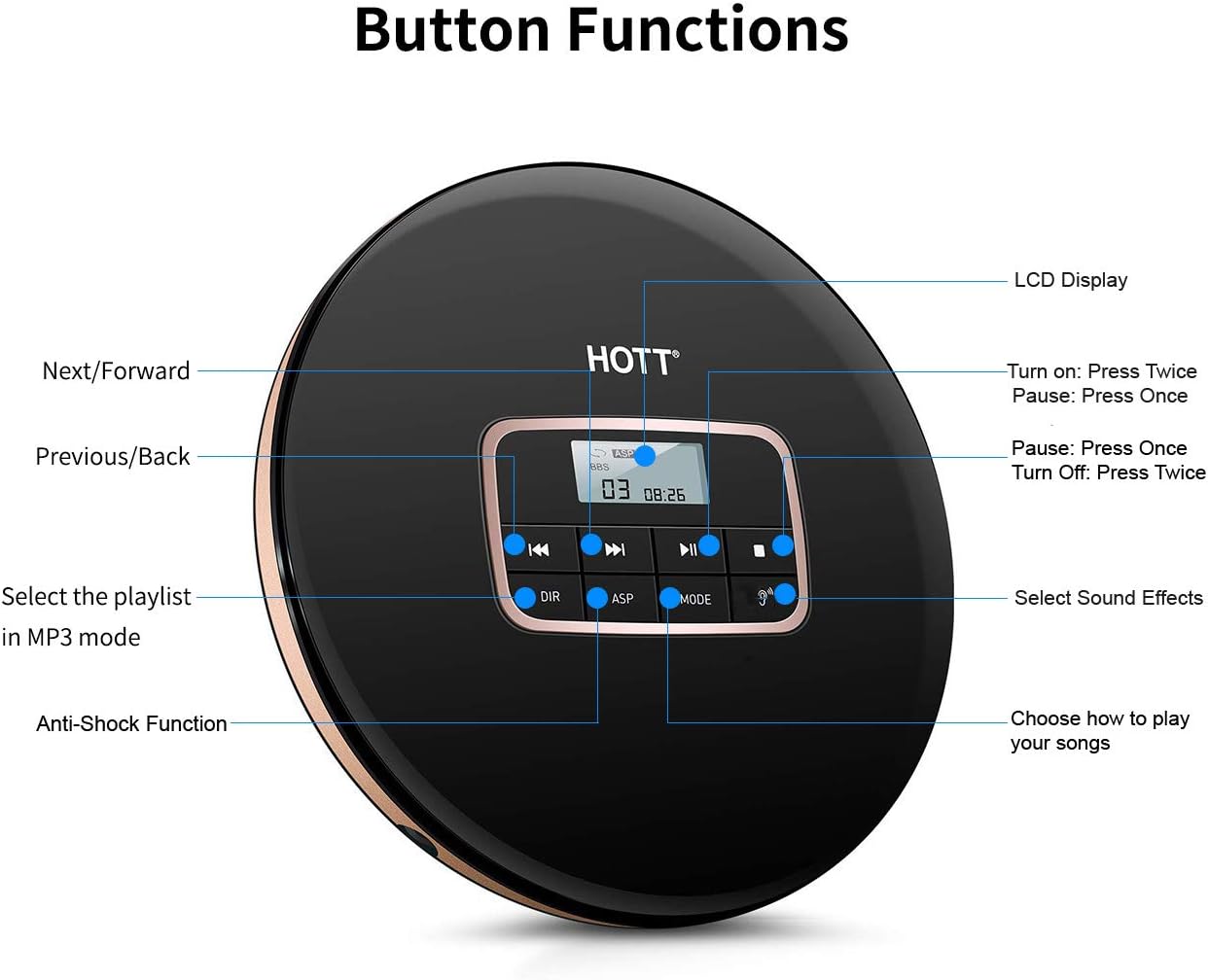
Foto nke 1: N'elu view of the HOTT CD511 Portable CD Player, highlighting the LCD display and various control buttons for navigation, sound effects, and play modes.
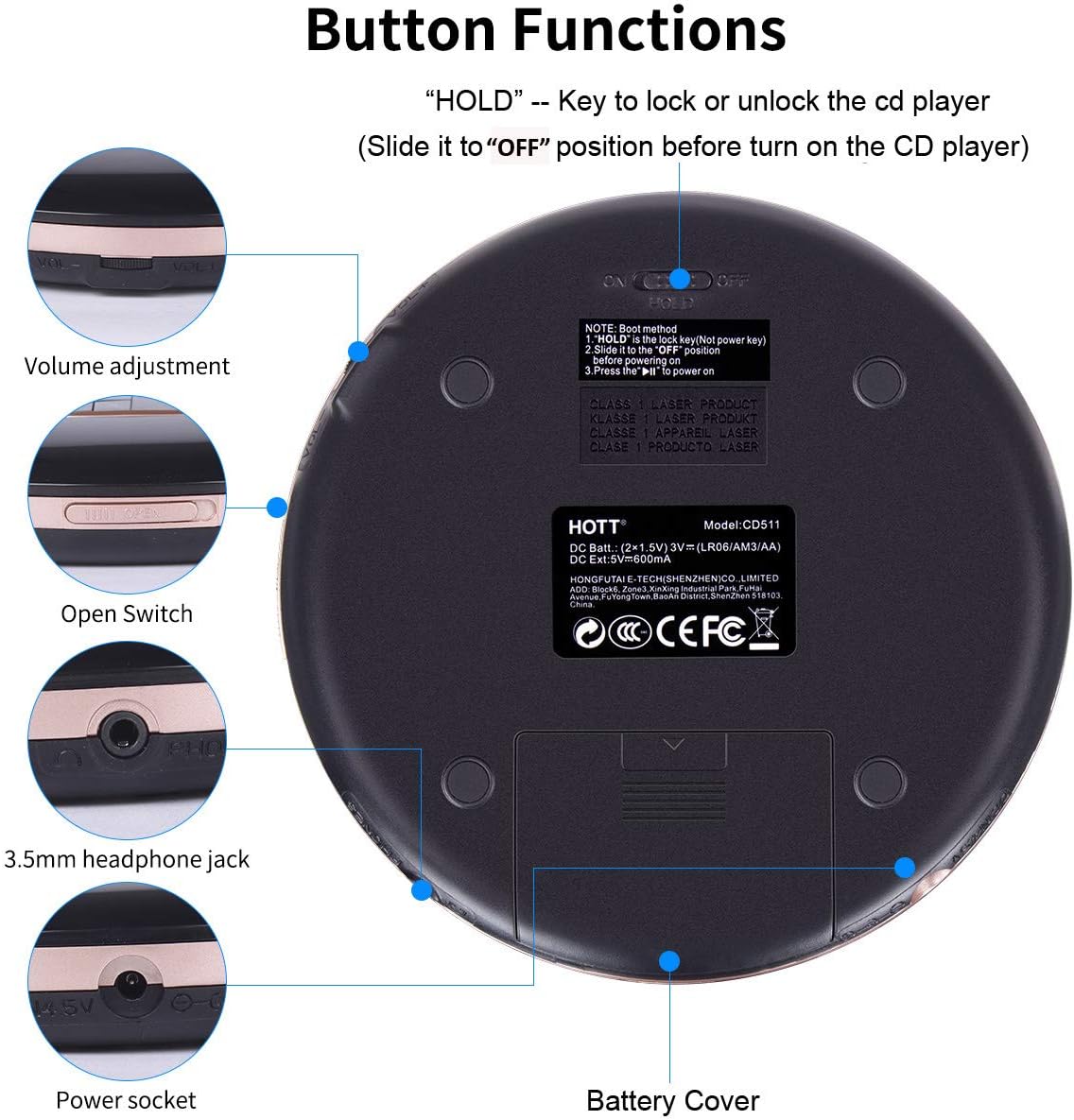
Foto nke 2: Bottom and side view of the HOTT CD511 Portable CD Player, showing the HOLD switch, volume control, disc compartment open switch, headphone jack, power socket, and battery cover.
2.3 ndakọrịta

Foto nke 3: The HOTT CD511 CD player supports various disc formats including standard CD, CD-R, CD-RW, and MP3 discs.
3. Nhazi
3.1 Ịkwanye ngwaọrụ
The HOTT CD511 can be powered in two ways:
- Batrị: Open the battery cover on the bottom of the player. Insert two (2) 1.5V AA batteries, ensuring correct polarity. Close the battery cover securely.
- Ike USB: Connect the provided USB cable to the power socket on the side of the player and to a USB power adapter (not included) or a computer's USB port.
Note: Ensure the "HOLD" switch is in the "OFF" position before turning on the CD player.
3.2 Inserting a CD
- Slide the "OPEN" switch to open the disc compartment lid.
- Carefully place the CD onto the center spindle with the label side facing up.
- Pịa CD ahụ nwayọ ruo mgbe ọ pịara ebe ọ nọ.
- Close the disc compartment lid firmly until it latches.
3.3 Ejikọ ekweisi
Insert your 3.5mm headphones into the headphone jack located on the side of the player.
4. Ntuziaka ọrụ
4.1 Nkpọghachi azụ
- Ike Na: Pịa KWURU/Kwụsịa bọtịnụ ugboro abụọ.
- Gwuo/kwụsịtụ: Pịa KWURU/Kwụsịa button once to play or pause.
- Kwụsị: Pịa KWỤSỊ bọtịnụ.
- Gbanyụọ: Pịa KWỤSỊ bọtịnụ ugboro abụọ.
4.2 Nsoro ụzọ
- Track na-esote: Pịa Osote/Gaa n'ihu bọtịnụ.
- Gara aga Track: Pịa PREVIOUS/BACK bọtịnụ.
- Ọsọ n'iru/Nweghachi: Pịa ma jide Osote/Gaa n'ihu or PREVIOUS/BACK bọtịnụ n'oge playback.
4.3 Njikwa olu
Gbanwee olu site na iji Olu +/- buttons located on the side of the player.
4.4 Play Modes and Sound Effects

Foto nke 4: The HOTT CD511 offers various play modes and sound effects for a customized listening experience.
- Bọtịnụ MODE: Press to cycle through play modes: Single Repeat, All Repeat, Intro, Shuffle.
- EQ bọtịnụ: Press to cycle through sound effects: BBS, Pop, Jazz, Rock, Classic.
- DIR Button (MP3 mode only): Selects the playlist or folder when playing MP3 discs.
4.5 Jide ọrụ
Malite Jide switch on the side of the player to the "ON" position to lock all buttons. This prevents accidental operation during transport. Slide it to "OFF" to unlock the buttons.
4.6 Anti-Skip/Anti-Shock Protection (ASP)
The ASP feature is automatically activated to prevent interruptions during playback caused by minor shocks or vibrations. The duration of anti-shock protection varies depending on the disc type (e.g., CD: 40 seconds, MP3 CD: 120 seconds).
4.7 Car Connectivity

Foto nke 5: The HOTT CD511 can be connected to a car's auxiliary input using a 3.5mm audio cable for playback through the car's sound system.
The CD player supports connection to car audio systems via a 3.5mm auxiliary cable. Connect one end of the cable to the player's headphone jack and the other end to your car's AUX input. This feature is compatible with most car models including Toyota, Honda, and Hyundai.
4.8 Ihe ngosi ojiji

Foto nke 6: The HOTT CD511 is suitable for various activities such as relaxation, learning, prenatal education, and travel.
5. Nlekọta
- Nhicha: Use a soft, dry cloth to clean the exterior of the player. For the lens, use a specialized CD lens cleaning kit. Do not use abrasive cleaners or solvents.
- Nlekọta diski: Jide CD n'akụkụ ha. Debe ha ọcha ma ghara inwe ọkọ. Debe diski n'ime akpa ha mgbe a naghị eji ha.
- Ngbanwe batrị: Replace batteries when the low battery indicator appears on the LCD screen or when playback becomes inconsistent. Remove batteries if the player will not be used for an extended period.
- Nchekwa: Store the player in a cool, dry place away from direct sunlight, high temperatures, and humidity.
6. Nchọpụta nsogbu
| Nsogbu | Ihe nwere ike ime | Ngwọta |
|---|---|---|
| Onye ọkpụkpọ anaghị agba ọkụ. | Batteries are dead or incorrectly inserted. USB cable is not connected or faulty. HOLD switch is ON. | Replace batteries, check polarity. Ensure USB cable is securely connected. Turn HOLD switch OFF. |
| Disc anaghị egwu. | Disc is dirty, scratched, or inserted incorrectly. Disc format is not supported. | Clean the disc, check for damage. Reinsert the disc correctly. Ensure disc is CD, CD-R, CD-RW, or MP3. |
| Sound skipping or interruption. | Disc is dirty or scratched. Player is subjected to excessive shock. | Clean the disc. Avoid strong vibrations. ASP function is active but has limits. |
| Enweghị ụda sitere na ekweisi. | Headphones not connected properly. Volume is too low. Headphones are faulty. | Hụ na ekweisi ndị ahụ dị na ekwentị mkpanaaka. Mee ka olu ha dịkwuo elu. Jiri ekweisi dị iche iche nwaa ya. |
7. Nkọwapụta
- Ụdị: CD511
- Akụkụ ngwaahịa: 5.6 x 5.6 x 0.6 sentimita asatọ
- Ibu ihe: 15.5 ounces
- Akara: NA-ekpo ọkụ
- Agba: Nwa
- Teknụzụ Njikọta: Enyemaka, USB
- Njirimara Pụrụ Iche: Enwere ike ibugharị
- Ọnụọgụ diski: 1
- Onye nrụpụta: NA-ekpo ọkụ
- Nke mbụ dị: Maachị 10, 2019
8. Official Product Video
Vidio 1: An official product video demonstrating the features and usage of the HOTT CD Player.
9. Akwụkwọ ikike na nkwado
For warranty information or technical support, please refer to the contact details provided with your product packaging or visit the official HOTT websaịtị. Debe nnata nzụta gị dị ka ihe akaebe nke ịzụrụ maka nkwupụta ikike.