
1. Okwu mmalite
This manual provides instructions for the Zerone Universal Remote Control, designed as a replacement for various Haier TV models. It is compatible with Haier HTR-A18M, 55D3550, 40D3500M, and 48D3500 series televisions. This remote control offers direct access to digital TV functions without complex programming.

Image 1.1: The Zerone Universal Remote Control in use, demonstrating its compatibility with Haier HTR-A18M, 55D3550, 40D3500M, and 48D3500 TV models.
2. Nhazi
2.1 Ntinye batrị
The remote control requires two (2) AAA batteries (not included) for operation. Follow these steps to install the batteries:
- Chọta ebe batrị dị n'azụ nke njikwa anya.
- Pịa ala na latch ma gbanyụọ mkpuchi batrị.
- Fanye batrị AAA abụọ, na-ahụ na njedebe dị mma (+) na nke na-adịghị mma (-) dabara nke ọma na akara ndị dị n'ime ụlọ ahụ.
- Weghachite mkpuchi batrị n'ime ebe ruo mgbe ọ pịrị na nchekwa.
The remote is ready for use immediately after battery installation; no additional programming is required for compatible Haier TV models.

Foto 2.1: Zuru ezu view of the remote control, highlighting the battery compartment for AAA battery installation.
3. Ntuziaka ọrụ
3.1 Ọrụ ndị bụ isi
This remote control provides standard functions for your Haier TV. Point the remote directly at your television's infrared receiver for optimal performance.
- bọtịnụ ike (U): Na-agbanyụ ma ọ bụ gbanyụọ TV.
- Ntinye: Selects video input sources (HDMI, AV, etc.).
- Bọtịnụ ọnụọgụ (0-9): Nhọrọ ọwa kpọmkwem.
- Vol +/-: Na-agbanwe olu elu ma ọ bụ ala.
- AK +/-: Na-agbanwe ọwa elu ma ọ bụ ala.
- MUTU: Mebie ma ọ bụ mebie ụda olu TV.
- MENU: Na-abanye na menu isi nke TV.
- Bọtịnụ Nsoroụzọ (Elu, Ala, Aka ekpe, Aka nri, Ọ dị mma): Na-agagharị na menu ma na-akwado nhọrọ.
- AKWỤKWỌ / Ọpụpụ: Returns to the previous screen or exits the current menu.
- Ngosipụta: Shows current channel information.
- SAP / AUDIO: Selects audio language or mode.
- Ụra: Sets the sleep timer.
- PICTURE / WIDE: Adjusts picture mode or aspect ratio.
- CH.LIST / FAVORITE: Accesses channel list or favorite channels.
- Media Control Buttons (Play, Pause, Fast Forward, Rewind): Na-achịkwa egwu egwuregwu mgbasa ozi.
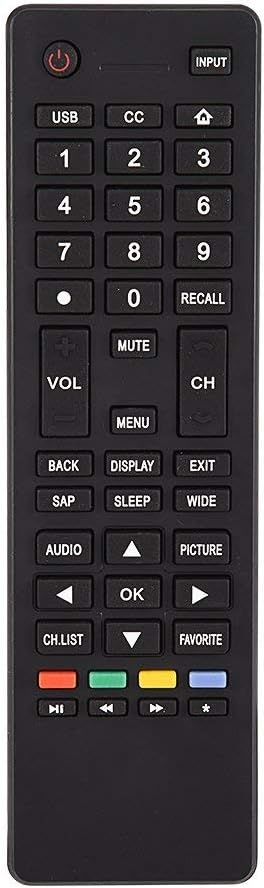
Foto 3.1: Ofeview of the remote control's button layout for easy identification of functions.
3.2 Oke arụ ọrụ
The remote control has a stable signal transmission distance of up to 10 meters (33 feet). Actual remote distance may vary depending on environmental factors and the specific model of your TV.
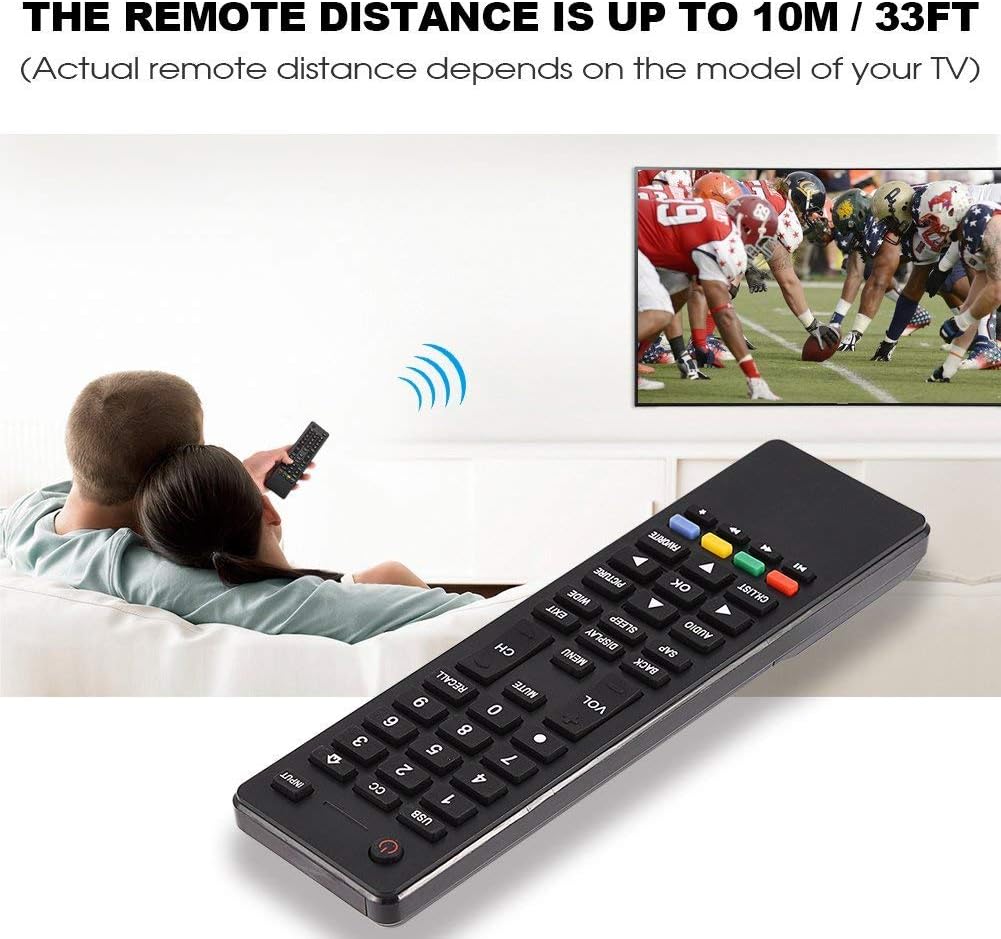
Image 3.2: Visual representation of the remote control's effective operating distance to the television.
4. Nlekọta
4.1 Nhicha
Iji hichaa ihe njikwa remote, jiri ákwà dị nro ma kpọọ nkụ. Maka unyi siri ike, jiri obere d hichaa ya.ampen the cloth with water or a mild cleaning solution. Avoid using harsh chemicals or abrasive cleaners, as these can damage the remote's surface or internal components.
4.2 Nlekọta batrị
- Dochie batrị mgbe nzaghachi nke remote ahụ gwụchara ma ọ bụ kwụsị ịrụ ọrụ.
- Ejikọtala batrị ochie na nke ọhụrụ, ma ọ bụ ụdị batrị dị iche iche.
- Wepu batrị ma ọ bụrụ na agaghị eji njikwa ime ihe ruo ogologo oge iji gbochie ntapu.
- Tụfuo batrị eji arụ ọrụ dịka iwu obodo siri dị.
5. Nchọpụta nsogbu
5.1 Remote anaghị aza
- Lelee batrị: Ensure batteries are inserted correctly with the correct polarity (+/-) and are not depleted. Replace with fresh AAA batteries if necessary.
- Ahịrị Anya: Make sure there are no obstructions between the remote control and the TV's infrared sensor.
- Anya: Confirm you are within the effective operating range (up to 10 meters / 33 feet).
- Ndakọrịta TV: Verify that your TV model is listed as compatible (Haier HTR-A18M, 55D3550, 40D3500M, 48D3500).
5.2 Buttons Not Working Correctly
- Ime dị ọcha: Dust or debris under buttons can cause malfunction. Refer to the Maintenance section for cleaning instructions.
- Lelee batrị: Weak batteries can lead to inconsistent button responses. Replace batteries.
6. Nkọwapụta
| Njirimara | Nkọwa |
|---|---|
| Ụdị | Zerone |
| Ngwa dakọtara | Haier HTR-A18M, 55D3550, 40D3500M, 48D3500 TVs |
| Teknụzụ Njikọta | Infrared |
| Oke kacha | 10 mita (33 ụkwụ) |
| Ụdị batrị | 2 x AAA (anaghị etinye ya) |
| Ụdị njikwa | Njikwa bọtịnụ |
| Ihe onwunwe | ABS |
| Nọmba nlereanya | Zerone9rnag3b5y4-cr |
| UPC | 647213811490 |

Image 6.1: Physical dimensions of the Zerone Universal Remote Control.
7. Akwụkwọ ikike Ozi
This product is offered as an Amazon Renewed item. Amazon Renewed products are professionally inspected and tested to work and look like new. If you are not satisfied with your purchase, renewed products are eligible for replacement or refund under the Amazon Renewed Guarantee.
Additionally, the manufacturer provides a Akwụkwọ ikike nwere oke ụbọchị 90. For specific details regarding the terms and conditions of this warranty, please refer to the documentation provided at the time of purchase or contact customer support.
8. Nkwado ndị ahịa
If you encounter any issues or have questions regarding your Zerone Universal Remote Control that are not addressed in this manual, please contact the seller or Amazon Renewed customer service for assistance.
For Amazon Renewed Guarantee claims, please visit the Amazon Renewed program page or contact Amazon customer support directly.