
1. Okwu mmalite
This manual provides instructions for the Macally BTDYNAMOUSE Wireless Bluetooth Mouse. This device is designed for comfortable and quiet operation across various platforms.
The Macally BTDYNAMOUSE is a slim, ambidextrous Bluetooth mouse featuring silent click buttons and adjustable DPI settings. It connects wirelessly to compatible devices, offering a clutter-free workspace.
2. Kedu ihe dị na Igbe ahụ
- Macally BTDYNAMOUSE Wireless Bluetooth Mouse
- 2 x AAA batrị
3. Akụrụngwa Ngwaahịa
- DPI nwere ike imeghari: Switch between 800, 1200, and 1600 DPI for precise cursor control.
- Pịa bọtịnụ jụụ: Designed for quiet operation, reducing click noise by 90% compared to traditional mice.
- Slim and Ambidextrous Design: Comfortable for both left and right-handed users, with a low-profile ụdị ihe.
- Njikọ ikuku Bluetooth: Connects wirelessly up to 10 meters (30 feet).
- Ogologo ndụ batrị: Two AAA batteries provide up to 3 months of use (based on 8 hours daily use). Battery life may vary.
- ndakọrịta: Works with Windows and macOS operating systems.
4. Nhazi ntuziaka
4.1. Wụnye batrị
1. Locate the battery compartment on the underside of the mouse.
2. Mepee mkpuchi mkpuchi batrị.
3. Insert two AAA batteries, ensuring correct polarity (+/-).
4. Mechie mkpuchi oghere batrị.

Ọgụgụ 1: Ntinye batrị
4.2. Njikọ Bluetooth
1. Turn on the mouse using the ON/OFF switch located on the underside.
2. Press and hold the Bluetooth pairing button (usually a small button near the ON/OFF switch or sensor) for 2-3 seconds until the LED indicator starts blinking, indicating it's in pairing mode.
3. On your computer or device (Mac, Windows, iPad, Tablet):
- Gaa na ntọala Bluetooth.
- Chọọ maka ngwaọrụ ọhụrụ.
- Select "Macally BTDYNAMOUSE" from the list of available devices.
- Soro mkpali na ihuenyo ọ bụla iji mezue usoro njikọta.
Once successfully paired, the LED indicator on the mouse will stop blinking and remain solid or turn off, depending on the mouse model.

Figure 2: Mouse with Laptop, indicating multi-device compatibility
5. Ntuziaka ọrụ
The Macally BTDYNAMOUSE features a standard 3-button layout with a scroll wheel for intuitive navigation.
- Pịa aka ekpe: Primary action, typically used for selecting items or opening links.
- Pịa aka nri: Secondary action, typically used to open context menus.
- Mpempe akwụkwọ mpịakọta: Ejiri ya maka mpịakọta kwụ ọtọ site na akwụkwọ na web pages. The scroll wheel can also be pressed for a middle-click action, depending on software configuration.

Figure 3: Ergonomic Design for Comfortable Use

Figure 4: Quiet Click Buttons in Action
6. DPI mmezi
The mouse features a DPI switch button to adjust cursor sensitivity. This allows you to fine-tune the mouse's responsiveness to your preference.
To change the DPI setting, press the small button located behind the scroll wheel. Each press cycles through the available DPI levels: 800, 1200, and 1600.
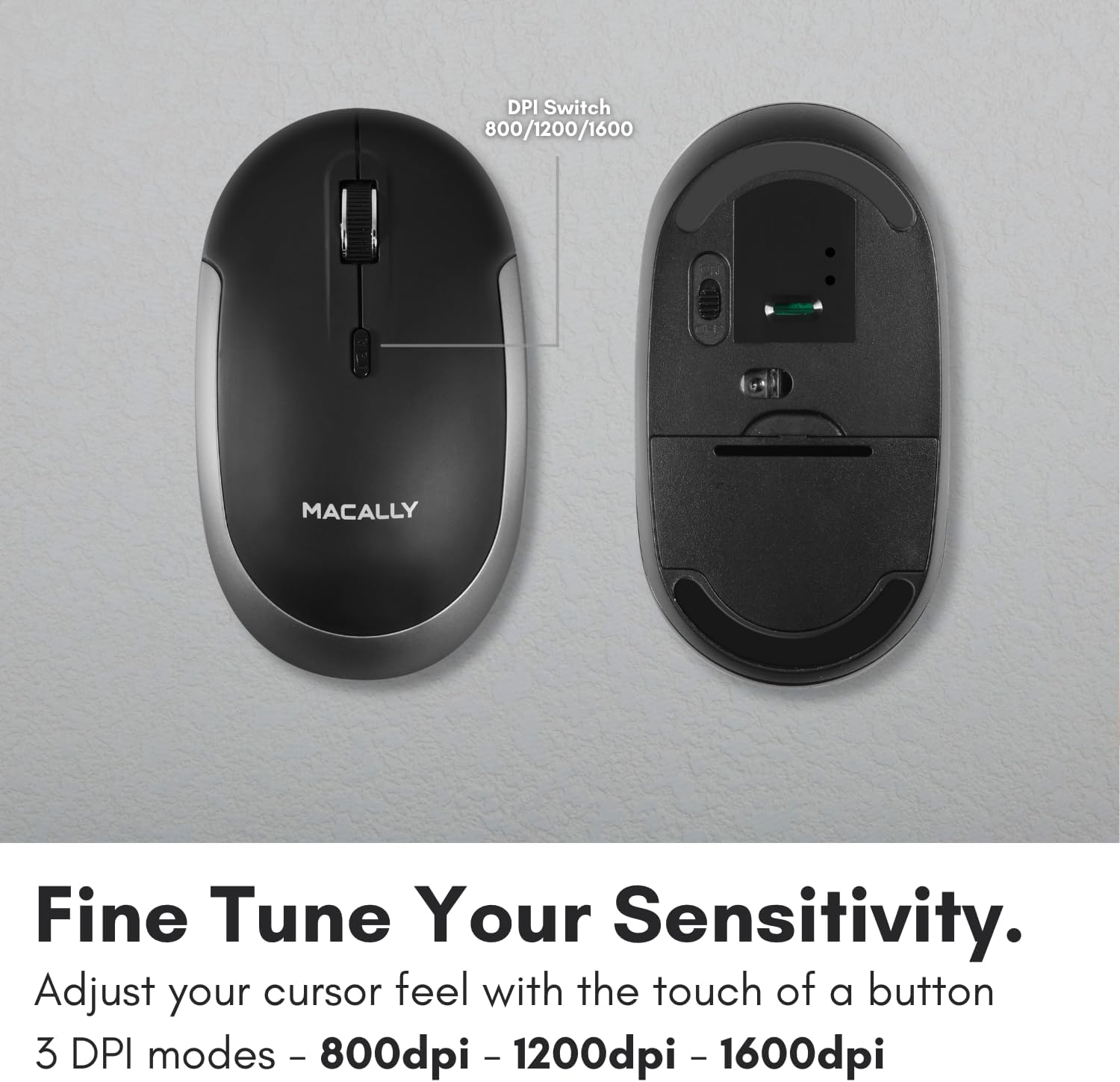
Figure 5: DPI Switch Location
7. Ozi batrị
The Macally BTDYNAMOUSE uses two AAA batteries. For optimal performance and battery life, it is recommended to use high-quality alkaline batteries.
- Ụdị batrị: 2 x AAA
- Ndụ batrị echere: Up to 3 months (based on 8 hours of daily use). Actual battery life may vary based on usage patterns and computing conditions.
When the battery level is low, the mouse's LED indicator may flash or change color to alert you. Replace batteries promptly to ensure uninterrupted use.
8. Nlekọta
To ensure the longevity and optimal performance of your Macally BTDYNAMOUSE, follow these maintenance guidelines:
- Nhicha: Jiri akwa dị nro dị nro hichaa òké. Maka unyi isi ike, ntakịrị damp enwere ike iji akwa mee ihe, mana hụ na mmiri adịghị abanye na ngwaọrụ ahụ.
- Zere Mmiri mmiri: Ekwela ka òké ahụ banye n'ime mmiri ma ọ bụ oke mmiri.
- Nchekwa: Debe òké ahụ n'ebe dị jụụ ma kpọọ nkụ mgbe a naghị eji ya ruo ogologo oge.
- Ngbanwe batrị: Replace batteries as needed. Dispose of old batteries according to local regulations.
9. Nchọpụta nsogbu
| Nsogbu | Ihe nwere ike ime | Ngwọta |
|---|---|---|
| Òké anaghị ejikọ site na Bluetooth | Mouse is off or batteries are low. Not in pairing mode. Device's Bluetooth is off. | Ensure mouse is on and batteries are fresh. Put mouse in pairing mode. Check device's Bluetooth settings. Try re-pairing. |
| Cursor is erratic or unresponsive | Dirty optical sensor. Mouse used on unsuitable surface. Low battery. | Clean the optical sensor. Use a mouse pad or a smooth, non-reflective surface. Replace batteries. |
| Mouse clicks are not silent | This mouse is designed for 90% noise reduction, not complete silence. | The mouse provides a significantly quieter click than standard mice, but a faint sound may still be audible. |
| Ndụ batrị dị mkpụmkpụ | Frequent usage. Low-quality batteries. | Jiri batrị alkaline dị elu. Gbanyụọ òké mgbe ejighị ya ogologo oge. |
10. Nkọwapụta
| Njirimara | Nkọwa |
|---|---|
| Ụdị | Macally |
| Aha Nlereanya | BTDYNAMOUSE |
| Teknụzụ Njikọta | Bluetooth, Ikuku |
| Teknụzụ nchọpụta ngagharị | Ngwa anya |
| Ntọala DPI | 800 / 1200 / 1600 |
| Bọtịnụ | 4 (Left, Right, Scroll Click, DPI Switch) |
| Ntuzi aka | Ambidextrous |
| Ngwa dakọtara | Laptop, Personal Computer (Windows, macOS) |
| Ikuku iche | Ruo 10m (30 ft) |
| Ụdị batrị | 2 x AAA (gụnyere) |
| Ndụ batrị | Ruo ọnwa iri abụọ na anọ (eme atụmatụ) |
| Ibu Ibu | 73 grams |
| Ihe onwunwe | Silicone (Enclosure) |
| Agba | Nwa |
11. Official Product Videos
11.1. Bluetooth Optical Silent Click Mouse - White
Vidiyo a na-enye nkọwa zuru ezuview of the Macally BTDYNAMOUSE, highlighting its slim design, ambidextrous body, simple 3-button layout, 90% noise reduction, and easy DPI adjustability (800/1200/1600).
11.2. Macally Wireless Bluetooth Mouse for Windows PC and Mac
This video demonstrates the Macally BTDYNAMOUSE's features, including its Bluetooth wireless technology, comfortable ambidextrous design, simple 3-button/scroll wheel layout, silent click buttons, and easy DPI adjustability.
12. Akwụkwọ ikike na nkwado
For warranty information and technical support, please refer to the official Macally websaịtị ma ọ bụ kpọtụrụ ndị ahịa ha ọrụ. Debe akwụkwọ nnata ịzụrụ maka akwụkwọ ikike.