REMAX RB-M26 Multifunction Bluetooth Speaker with FM Radio and Alarm Clock
Akwụkwọ ntuziaka onye ọrụ
Okwu mmalite
Daalụ maka ịzụrụasing the REMAX RB-M26 Multifunction Bluetooth Speaker. This device combines a portable Bluetooth speaker, FM radio, and a dual alarm clock, with additional support for TF card and USB audio playback. This manual provides detailed instructions to help you set up and operate your speaker effectively.
Ihe ngwugwu
REMAX RB-M26 Bluetooth Speaker
Igwe nchaji USB
Eriri ọdịyo (AUX)
Akwụkwọ ntuziaka onye ọrụ
Ngwaahịa gafereview
Mara onwe gị na akụkụ na njikwa ọkà okwu.
Figure 1: REMAX RB-M26 Clock Speaker retail packaging, showing the product and key features.
The speaker features a large LED display for time and mode information, along with intuitive buttons and a rotary knob for control. The top panel typically includes buttons for power, mode selection, play/pause, volume, and alarm settings. The rear or side panel houses ports for USB, TF card, AUX input, and charging.
Melite
1. gingchaji Okwu Okwu
Jikọọ obere nsọtụ nke eriri chaja USB na ọdụ chaja dị na ọkà okwu.
Connect the large end of the USB cable to a USB power adapter (not included) or a computer's USB port.
The charging indicator will illuminate. It will turn off or change color once fully charged.
2. Ịgbanye / gbanyụọ
To power on, press and hold the Power button until the display lights up.
To power off, press and hold the Power button again until the display turns off.
3. Isetịpụ Oge
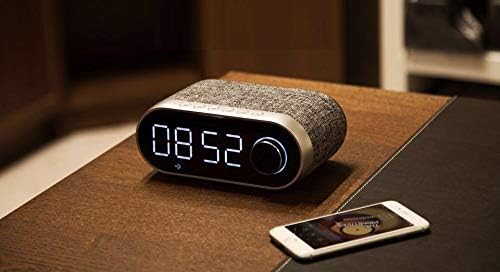
Figure 2: The REMAX RB-M26 speaker on a bedside table, showing the digital clock display.
In clock mode, press and hold the 'Time Set' button (or a similar button, refer to your specific unit's markings).
The hour digits will start flashing. Use the '+' and '-' buttons or the rotary knob to adjust the hour.
Press the 'Time Set' button again to move to minute adjustment. Adjust minutes similarly.
Press 'Time Set' once more to confirm and exit.
Ntuziaka ọrụ
1. Njikọ Bluetooth
Figure 3: The REMAX RB-M26 speaker connected via Bluetooth to a smartphone.
Power on the speaker. It will automatically enter Bluetooth pairing mode, indicated by a flashing Bluetooth icon on the display.
On your smartphone, tablet, or laptop, enable Bluetooth and search for available devices.
Select "REMAX RB-M26" from the list of devices.
Once paired, the Bluetooth icon will stop flashing and remain solid, and you will hear a confirmation tone.
2. Ọrụ redio FM
Press the 'Mode' button to switch to FM Radio mode.
Pịa ma jide bọtịnụ 'Play/Pause' iji nyochaa ma chekwaa ọdụ FM dị na akpaghị aka.
Use the 'Next/Previous' buttons to navigate between saved stations.
For manual tuning, short press the 'Next/Previous' buttons.
3. TF Card / USB Audio Playback
Insert a TF card (MicroSD) or a USB flash drive with MP3 audio files n'ime oghere dị iche iche.
The speaker will automatically switch to TF card or USB mode and begin playback. If not, press the 'Mode' button to select the correct source.
Use the 'Play/Pause' button to control playback.
Use the 'Next/Previous' buttons to skip tracks.
4. ntinye AUX
Connect one end of the 3.5mm audio cable to the AUX port on the speaker.
Connect the other end to the audio output of your external device (e.g., MP3 player, computer).
Press the 'Mode' button to switch to AUX mode.
Audio playback will be controlled from your external device.
5. Alarm Clock Functions
Ịtọ ntọala 1/2: In clock mode, short press the 'Alarm Set' button (or similar). The alarm time will flash. Use the '+' and '-' buttons or rotary knob to set the hour and minutes. Press 'Alarm Set' again to confirm. Repeat for a second alarm if desired.
Mkpu na-eme ka ọ rụọ ọrụ/gbanyụọ ya: After setting, press the 'Alarm Set' button to toggle the alarm on/off. An alarm icon will appear/disappear on the display.
Ọrụ Sooze: When the alarm sounds, press any button (except power off) to activate snooze. The alarm will sound again after a few minutes.
Mkpu Nkwụsị: To stop the alarm completely, press and hold the 'Alarm Set' button when it is sounding.
Nlekọta
Jiri akwa dị nro hichaa ọkà okwu. Ejila ihe nchacha abrasive ma ọ bụ ihe mgbaze.
Zere ikpughe onye na-ekwu okwu n'ebe okpomọkụ dị oke elu, anwụ kpọmkwem, ma ọ bụ oke iru mmiri dị elu.
Eminyela ọkà okwu n'ime mmiri.
Chekwaa ọkà okwu n'ebe dị jụụ ma kpọọ nkụ mgbe ọ naghị eji ya ogologo oge.
Nchọpụta nsogbu
Nsogbu
Ngwọta
Ọkà okwu anaghị agba ọkụ.
Ensure the speaker is charged. Connect it to a power source using the USB cable.
Enweghị ụda sitere na ọkà okwu.
Check the volume level on both the speaker and the connected device. Ensure the correct mode (Bluetooth, FM, TF, USB, AUX) is selected.
Njikọ Bluetooth ada ada.
Ensure the speaker is in Bluetooth pairing mode. Turn off and on Bluetooth on your device. Move the device closer to the speaker.
Nnabata redio FM adịghị mma.
Adjust the speaker's position. Extend any built-in antenna if available. Try scanning for stations again.
TF card/USB not playing.
Ensure the TF card/USB is inserted correctly and contains compatible audio files (e.g., MP3). Check if the speaker is in the correct mode.
Nkọwapụta
Akara: REMAX
Ụdị: RB-M26
Teknụzụ Njikọta: Bluetooth
Ụdị nkwụnye: N'elu tebụl
Ụdị ọkà okwu: Gburugburu ụda
Atụmatụ pụrụ iche: FM Radio, Alarm Clock
Ngwa dakọtara: Tablet, Laptop, Smartphone
Ụdị njikwa: Integrated Buttons/Knob (Note: Some models may include a remote control, please check your package contents.)
Nkpọghachi ọdịyo: Supports TF Card, USB Audio
Akwụkwọ ikike na nkwado
The REMAX RB-M26 speaker comes with a standard manufacturer's warranty. Please refer to the warranty card included in your package for specific terms and conditions. For technical support or service inquiries, please contact your local REMAX distributor or the retailer where you purchased the product.
Ask a question about this manual
Ask about setup, troubleshooting, compatibility, parts, safety, or missing instructions. Manuals+ will review the question and use this page’s manual context to help answer it.