
Okwu mmalite
This manual provides essential information for the proper use and maintenance of your Easytry123 replacement infrared remote control. This remote is designed to be compatible with specific Philips LED HDTV TV models, including 49PUS6501/12, 49PUS6551/12, 49PUS6561/12, 49PUS7101/12, 49PUS7181/12, 49PUT6801/98, and 55PUS6501/12. Please verify your TV model number to ensure compatibility.
Important Note: This is a replacement remote control and may not support all functions of your original TV remote. It is not a universal remote control.
Ngwaahịa gafereview

Foto nke 1: N'ihu view of the Easytry123 replacement remote control, showing the power button, navigation pad, channel/volume controls, and numeric keypad.
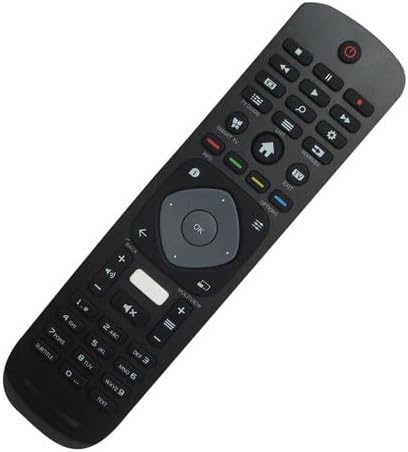
Foto nke 2: Ihu ihu view of the remote control, highlighting its ergonomic design and button layout.

Foto nke 3: Azu view nke njikwa dịpụrụ adịpụ, na-egosi mkpuchi nke ebe batrị ahụ.
The Easytry123 replacement remote control features a standard button layout for TV operation, including power, channel, volume, navigation, and numeric input. It is designed for comfortable handling and intuitive use.
Melite
1. Ntinye batrị
- Chọta ebe batrị dị n'azụ nke njikwa anya.
- Mikpuo mkpuchi nke batrị ahụ n'ala ma ọ bụ n'èzí iji mepee ya.
- Tinye batrị AAA abụọ (2), hụ na njedebe ndị dị mma (+) na nke na-adịghị mma (-) kwekọrọ na eserese dị n'ime ngalaba ahụ.
- Mechie mkpuchi nke batrị batrị nke ọma.
No setup or coding is required for this remote control. Once batteries are installed, it is ready for use with compatible Philips TV models.
Ntuziaka ọrụ
This remote control operates using infrared (IR) technology. Ensure there is a clear line of sight between the remote control and the IR receiver on your television for optimal performance.
- Bọtịnụ ike: Pịa ka ịgbanwuo ma ọ bụ gbanyụọ TV.
- Ahụigodo ọnụọgụ (0-9): Use to directly enter channel numbers.
- Ọwa elu/ala: Press to change channels sequentially.
- Elu elu/ala: Press to adjust the sound volume.
- Oghere bọtịnụ: Press to mute or unmute the TV sound.
- Ntugharị igodo (bọtịnụ akụ & OK): Use to navigate menus and confirm selections.
- Bọtịnụ Azụ/Ọpụpụ: Used to return to the previous screen or exit menus.
- Bọtịnụ TV/Ụlọ Smart: Na-enweta atụmatụ smart nke TV ma ọ bụ ihuenyo ụlọ.
Functionality may vary depending on your specific TV model. Some advanced features or specific buttons present on your original remote may not be replicated on this replacement unit.
Nlekọta
Ngbanwe batrị
Dochie batrị mgbe nzaghachi njikwa remote gwụchara ma ọ bụ kwụsị ịrụ ọrụ. Jiri batrị AAA ọhụrụ dochie batrị abụọ ahụ n'otu oge. Ejikọtala batrị ochie na nke ọhụrụ, ma ọ bụ ụdị batrị dị iche iche.
Nhicha
Iji hichaa njikwa dịpụrụ adịpụ, jiri akwa dị nro ma kpọọ nkụ. Maka unyi isi ike, ntakịrị dampen akwa na mmiri. Zere iji kemịkalụ siri ike, ihe na-ehicha ihe, ma ọ bụ oke mmiri, n'ihi na ndị a nwere ike imebi ebe dịpụrụ adịpụ.
Nchọpụta nsogbu
- Remote anaghị aza:
- Lelee ma etinyere batrị ndị ahụ nke ọma site na polarity ziri ezi.
- Jiri batrị AAA ọhụrụ dochie batrị ochie.
- Hụ na enweghị ihe mgbochi ọ bụla n'etiti remote na ihe nnata IR nke TV.
- Confirm that the remote is pointed directly at the TV.
- Some functions do not work:
- As a replacement remote, it may not support all functions of the original TV remote. This is normal for some replacement units.
- Verify that your TV model is listed as compatible.
- Ogologo ọrụ dị mkpirikpi:
- Dochie batrị.
- Ensure no strong light sources (like direct sunlight) are interfering with the IR signal.
Nkọwapụta
| Ụdị | Easytry123 |
| Nọmba nlereanya | Easytry5633 |
| Ngwa dakọtara | Television (Specific Philips LED HDTV models) |
| Teknụzụ Njikọta | Infrared (IR) |
| Ụdị njikwa | Njikwa bọtịnụ |
| Oke kacha | Mita 10 (ihe dị ka 33 ụkwụ) |
| Batrị achọrọ | Batrị 2 x AAA (anaghị etinye ya) |
| Njirimara Pụrụ Iche | Replacement item; may not work with all original functions. Not a universal remote. |
Akwụkwọ ikike na nkwado
Ozi akwụkwọ ikike
This Easytry123 remote control comes with a 90-day warranty from the date of purchase. This warranty covers manufacturing defects under normal use. It does not cover damage caused by misuse, accidents, unauthorized modifications, or battery leakage.
Nkwado ndị ahịa
For any questions, issues, or warranty claims regarding your Easytry123 remote control, please contact the seller or manufacturer directly through your purchase platform. Provide your order number and a detailed description of the issue for prompt assistance.