
1. Ngwaahịa gafereview
The Sato One-Touch Timer TM-22 is a versatile digital timer designed for various timing needs, from kitchen use to laboratory applications. It combines ease of use with practical features to enhance your daily tasks.
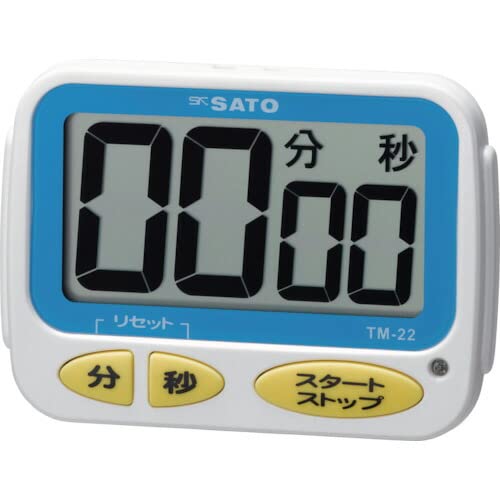
Foto 1: N'ihu view of the Sato One-Touch Timer TM-22. The timer features a clear digital display and control buttons.
Akụkụ ndị bụ isi:
- Automatic Reset Alarm: The alarm sounds for 5 seconds at the set time and automatically resets to the initial set time.
- Ọrụ dị mfe: The primary key is for starting; no complex operations are required to stop the timer's alarm cycle.
- Dual Notification: Alerts users with both sound (70dB) and light.
- Drip-Proof Construction: Designed to resist splashes, making it suitable for kitchen environments.
- Ọtụtụ Nhọrọ Nkwanye: Equipped with a magnet on the back for attachment to metal surfaces and a strap for hanging.
- Ọrụ Ngụkọ na Ngụkọta: Supports both decreasing and increasing time measurements.
2. Nhazi
Nwụnye batrị:
The TM-22 timer requires one AAA battery for operation. A battery is included with the unit.
- Locate the battery compartment cover on the back of the timer.
- Dụgharịa ma ọ bụ kpọchie mkpuchi ka imepe oghere ahụ.
- Insert one AAA battery, ensuring the positive (+) and negative (-) terminals align correctly with the markings inside the compartment.
- Dochie mkpuchi nke batrị batrị nke ọma.
The timer should power on, and the display will show '00:00' or the last set time.
3. Ntuziaka ọrụ
The TM-22 timer features both countdown and count-up functionalities.
3.1. Ngụkọta oge
This function allows you to set a specific duration, and the timer will count down to zero.
- Tọọ oge: Use the 'M' (Minute) button and 'S' (Second) button to adjust the desired countdown duration. The timer can be set from 1 second up to 99 minutes and 59 seconds.
- Start Countdown: Press the 'START' button to begin the countdown.
- Ịma Ọkwa: When the time reaches zero, an alarm will sound for 5 seconds, accompanied by a flashing light.
- Ntọgharị akpaaka: After the 5-second alarm, the timer automatically resets to the initial set time, ready for the next countdown without manual intervention.
- Kwụsị/ Kwụsị: To pause the countdown, press the 'START' button again. To resume, press 'START' once more. To clear the set time, press the 'RESET' button (if available) or hold the 'START' button for a few seconds.
3.2. Count-up Timer
This function measures elapsed time from zero.
- Start Count-up: Ensure the timer display shows '00:00'. If not, press the 'RESET' button to clear any previous settings. Press the 'START' button to begin counting upwards from zero.
- Kwụsị/ maliteghachi: To pause the count-up, press the 'START' button. To resume, press 'START' again.
- Tọgharia: To reset the count-up timer to '00:00', press the 'RESET' button (if available) or hold the 'START' button for a few seconds while paused.
4. Nlekọta
Nhicha:
To maintain the timer's appearance and functionality:
- Wipe the exterior of the timer with a soft, dry cloth.
- Do not use abrasive cleaners, solvents, or chemical agents, as these may damage the casing ma ọ bụ ngosipụta.
- The timer is drip-proof, but do not immerse it in water or expose it to heavy splashing.
Ngbanwe batrị:
Replace the battery when the display becomes dim or the timer's functions become erratic.
- Follow the battery installation steps outlined in the "2. Setup" section.
- Always use a fresh AAA battery.
- Tụfuo batrị eji eme ihe dịka iwu mpaghara siri dị.
5. Nchọpụta nsogbu
If you encounter issues with your TM-22 timer, refer to the following common problems and solutions:
| Nsogbu | Ihe nwere ike ime | Ngwọta |
|---|---|---|
| Timer does not turn on. | Batrị anwụọla ma ọ bụ etinyere ya na ezighi ezi. | Lelee polarity nke batrị. Jiri batrị AAA ọhụrụ dochie ya. |
| Display is faint or flickering. | Ike batrị dị ala. | Dochie batrị AAA. |
| Mkpu anaghị ada ụda. | Volume obstruction or internal issue. | Ensure the speaker is not covered. Check battery level. If problem persists, contact support. |
| Timer does not reset automatically after alarm. | This feature is specific to the countdown function. | Ensure you are using the countdown function. For count-up, manual reset is required. |
6. Nkọwapụta
| Njirimara | Nkọwa |
|---|---|
| Nọmba nlereanya | TM-22 |
| Oge kacha elu | 99 nkeji 59 sekọnd |
| Minimum Timing | 1 sekọnd |
| Akụkụ (H x W x D) | 67 mm x 93 mm x 20 mm |
| Ibu | 96 g |
| Isi Iyi Ike | Batrị AAA x 1 (gụnyere) |
| Olu mkpu | 70 dB |
| Ọrụ | Countdown, Count-up |
| Atụmatụ pụrụ iche | Drip-proof construction, Magnet on back, Hanging strap, Sound and light notification |
7. Akwụkwọ ikike na nkwado
For warranty information, technical assistance, or customer support regarding your Sato One-Touch Timer TM-22, please contact your authorized retailer or the manufacturer, Sato Corporation. Keep your purchase receipt as proof of purchase.
Please visit the official Sato websaịtị maka ozi nkwado kachasị ọhụrụ na nkọwa kọntaktị.