
Okwu mmalite
Thank you for choosing the SIMOLIO Kids Wireless Headphones Model JH-711. This manual provides essential information for the proper setup, operation, and maintenance of your headphones. Please read it carefully to ensure safe and optimal use.
Njirimara ngwaahịa
- 3-Level Volume Limiting: Protects children's hearing with switchable volume limits (75dB for toddlers, 85dB for kids, 94dB for adults). This feature is active in both wired and wireless modes.
- Mwepu mkpọtụ: Over-ear design provides passive noise reduction, helping to block external sounds for improved listening focus.
- Wireless & Wired Modes: Offers Bluetooth connectivity for wireless use and includes a 3.5mm audio cable for wired connection when the battery is depleted or for non-Bluetooth devices.
- Igwe okwu arụnyere n'ime ya: Enables hands-free calling and voice chat.
- Audio Sharing Port: Allows another headphone to connect and share audio from the same device.
- Durable & Flexible Design: Constructed with memory stainless steel strips in the headband for impressive durability and flexibility, designed to withstand active use. Earmuffs feature an anti-shedding design.
- Mpịakọta & Kọmpat: Easy to fold and store in the included EVA carrying case, ideal for travel and school.
- Ogologo ndụ batrị: Ruo awa iri na abụọ nke oge egwuregwu n'otu ụgwọ.

The headphones feature a 3-level volume limiter to protect hearing, adjustable for toddlers, kids, and adults.
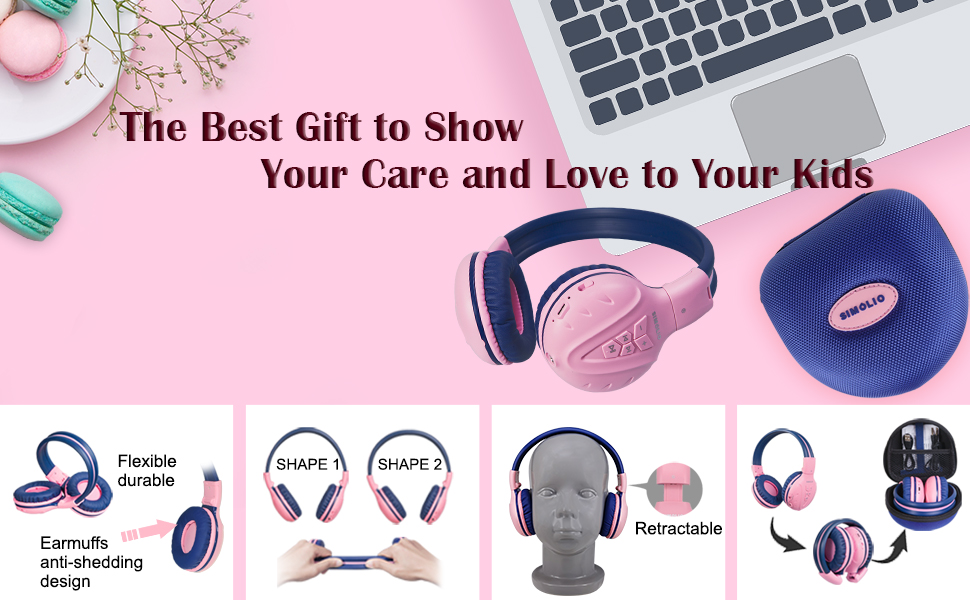
The flexible and durable design allows the headphones to withstand bending and twisting.
Kedu ihe dị na Igbe ahụ
Ngwungwu ahụ gụnyere ihe ndị a:
- SIMOLIO Kids Wireless Headphones JH-711
- Eriri Nchaji (USB)
- Eriri AUX (eriri ọdịyo 3.5mm)
- Akwụkwọ ntuziaka onye ọrụ
- Carrying EVA Case
Melite
1. Ịchaji ekweisi
Before first use, fully charge the headphones. Connect the provided USB charging cable to the charging port on the headphones and to a USB power source (e.g., computer, wall adapter). The LED indicator will show charging status and turn off when fully charged.
2. Njikọ Bluetooth
- Gbaa mbọ hụ na agbanyụrụ ekweisi.
- Press and hold the Multi-Function Button (MFB) until the LED indicator flashes blue and red alternately, indicating pairing mode.
- Na ngwaọrụ gị (smartphone, tabletị, wdg), gbanye Bluetooth wee chọọ ngwaọrụ dịnụ.
- Select "SIMOLIO JH-711" from the list of devices.
- Ozugbo ejikọrọ, ihe ngosi LED ga -eji nwayọ na -acha anụnụ anụnụ.
3. Wired Mode Connection
To use the headphones in wired mode, connect one end of the 3.5mm AUX cable to the audio jack on the headphones and the other end to the audio output of your device. The headphones will automatically switch to wired mode, even if the battery is dead.

The headphones support both wireless Bluetooth mode and wired mode via the included AUX cable.
4. Volume Limiter Adjustment
Locate the 3-level volume limiter switch on the headphones. Adjust the switch to the desired maximum volume level:
- 75dB (S): Recommended for toddlers or very quiet environments.
- 85dB (M): Recommended for children in general listening environments.
- 94dB (L): Recommended for adults or noisy environments.

Adjust the physical switch to select the appropriate volume limit.
5. Using the Sharing Port
The headphones feature an additional sharing jack on the right side. To share audio, plug another headphone into this port. This allows two users to listen to the same audio source simultaneously.

Connect another headphone to the sharing port to share audio with a friend.
Ntuziaka ọrụ
1. Gbanyụọ / gbanyụọ
- Ike Na: Press and hold the MFB for approximately 3 seconds until the LED indicator lights up.
- Gbanyụọ: Pịa ma jide MFB ihe dịka sekọnd 3 ruo mgbe ihe ngosi LED gbanyụrụ.
2. Nghaghachi egwu
- Gwuo/kwụsịtụ: Obere pịa MFB.
- Track na-esote: Pịa bọtịnụ "+" nkenke.
- Gara aga Track: Pịa bọtịnụ "-".
- Olu elu: Long press the "+" button.
- Olu ala: Long press the "-" button.
3. Njikwa oku
When connected via Bluetooth:
- Azịza/Kwụsị Oku: Obere pịa MFB.
- Jụ oku: Pịa MFB ogologo oge.

Igwe okwu arụnyere n'ime ya na-enye ohere maka oku na-enweghị aka.
Nlekọta
- Jiri ákwà dị nro ma kpọọ nkụ hichaa ekweisi gị. Ejila ihe nhicha ma ọ bụ ihe mgbaze.
- Zere ikpughe ekweisi na oke okpomọkụ, iru mmiri, ma ọ bụ ìhè anyanwụ kpọmkwem.
- Store the headphones in the provided EVA carrying case when not in use to protect them from dust and damage.
- Anwala ịkwasa ma ọ bụ gbanwee ekweisi, n'ihi na nke a ga-emebi akwụkwọ ikike ma nwee ike imebi.

The headphones fold compactly and fit into the included EVA case for easy storage and transport.
Nchọpụta nsogbu
| Nsogbu | Ihe nwere ike ime | Ngwọta |
|---|---|---|
| Igwe ekweisi anaghị agba ọkụ. | Batrị dị ala. | Chajie ekweisi nke ọma. |
| Enweghị ike ijikọ site na Bluetooth. | Igwe ekweisi adịghị na ọnọdụ njikọta; gbanyụọ ngwaọrụ Bluetooth; tere aka site na ngwaọrụ. | Gbaa mbọ hụ na ekweisi nọ na ọnọdụ njikọta (na-acha uhie uhie/acha anụnụ anụnụ). Gbanwuo ngwaọrụ Bluetooth. Bugharịa ekweisi nso na ngwaọrụ (n'ime mita iri). |
| Enweghị ụda n'ụdị ikuku. | Olu dị oke ala; ejikọghị ya; ahọrọghị mmepụta ọdịyo na-ezighi ezi na ngwaọrụ ahụ. | Increase headphone and device volume. Re-pair headphones. Check device audio settings. |
| No sound in wired mode. | AUX cable not fully inserted; cable damaged; device volume too low. | Ensure AUX cable is securely connected at both ends. Try a different AUX cable. Increase device volume. |
Nkọwapụta
| Njirimara | Nkọwa |
|---|---|
| Aha Nlereanya | Kids Bluetooth Headphones JH-711 |
| Teknụzụ Njikọta | Wireless (Bluetooth), Wired (3.5 mm Jack) |
| Ụdị Bluetooth | 4.0 |
| Oke Bluetooth | 9 mita |
| Njikwa mkpọtụ | Mwepu ụda |
| Mmetụta | 94dB (Max) |
| Ndụ batrị | Awa 15 |
| Oge Nchaji | Awa 3 |
| Ibu Ibu | 187 grams (6.6 ounces) |
| Akụkụ ngwaahịa | 5.51 x 3.15 x 5.31 sentimita asatọ |
| Ihe onwunwe | Nylon, Stainless Steel (headband) |
| Ihe eji ebu akpa | EVA |
| Atụmatụ pụrụ iche | 3 Adjustable Volume Limited, Microphone, Durable, Flexible, Foldable, Wired & Wireless, Share Port, EVA Case |
Vidiyo ngwaahịa ngwaahịa
Vidiyo a na-enye nkọwa zuru okeview of the SIMOLIO Bluetooth Headphones for Kids with Case JH-711, demonstrating its features and functionality.
Akwụkwọ ikike na nkwado
SIMOLIO products are designed for quality and reliability. For specific warranty information, please refer to the warranty card included with your product or visit the official SIMOLIO website. If you encounter any issues or require technical assistance, please contact SIMOLIO customer support through their official channels.