
Alpha EK 60
Akwụkwọ ntuziaka maka onye ji ahụigodo Piano eletrọniki nke Alpha EK-60 61
Portable Digital Keyboard with Audio Input, Microphone Input, Headphone Output, 255 Tones, Rhythms, LED Display
1. Okwu mmalite
Daalụ maka ịzụrụasing the Alpha EK-60 61-Key Electronic Piano Keyboard. This manual provides detailed instructions for the proper setup, operation, and maintenance of your new instrument. The EK-60 is designed to offer a rich musical experience with its versatile features, including a wide range of tones and rhythms, intelligent teaching functions, and various connectivity options. Please read this manual thoroughly before using the product to ensure optimal performance and longevity.
2. Ozi nchekwa
Iji gbochie ujo eletriki, ọkụ, ma ọ bụ mmebi na unit ahụ, biko lelee ihe ndị a:
- Do not expose the keyboard to rain or moisture.
- Do not place objects filled with liquids, such as vases, on the keyboard.
- Akwụsịla oghere ikuku ikuku ọ bụla.
- Jiri naanị ihe nkwụnye ike akọwapụtara.
- Ewepụla ma ọ bụ gbanwee unit ahụ. Kpọtụrụ ndị ọrụ ruru eru ọrụ niile.
- Debe ebe ụmụntakịrị na-apụghị iru.
3. Ihe ngwugwu
Biko lelee na etinyere ihe niile ndị a na ngwugwu gị:
- 1 x Alpha 61-Key Standard Keyboard EK-60
- 1 x Adjustable Stand
- 1 x Mpempe akwụkwọ egwu
- 1 x nkwụnye ọkụ
- Akwụkwọ ntuziaka onye ọrụ 1 x (akwụkwọ a)
4. Ngwaahịa gafereview
Familiarize yourself with the components of your Alpha EK-60 keyboard.
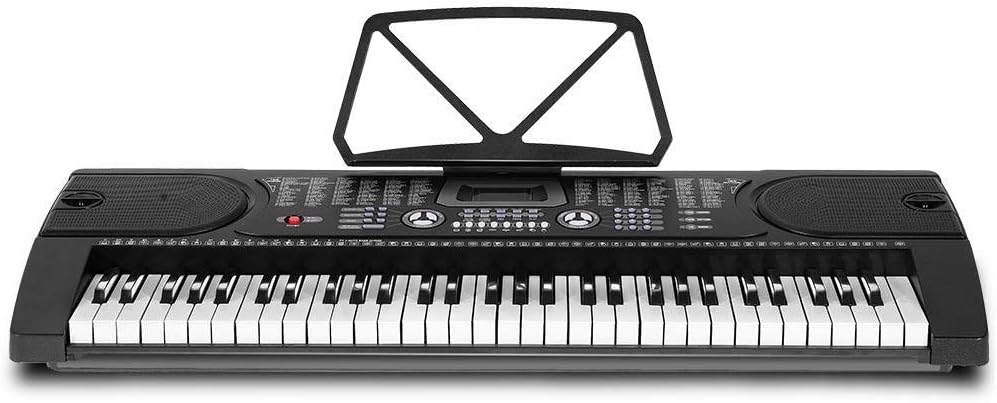
Ọgụgụ 4.1: N'elu-ala view of the Alpha EK-60 keyboard, highlighting the control panel, integrated speakers, and the 61 standard piano keys.

Figure 4.2: Detail of the LED display for convenient settings adjustment and the battery compartment for portable use.

Foto 4.3: View of the multiple jacks including Audio Input, Microphone Input, and Headphone Output for versatile connectivity.
Akụkụ ndị bụ isi:
- 61-Key Standard Piano Keyboard
- LED display for easy navigation
- 24 ngosi egwu
- 255 timbres (instrument sounds)
- 255 rhythms (accompaniment styles)
- 61 kinds of keyboard percussions
- 8 Panel Percussions
- Master volume, accompaniment volume, and tempo control
- Intelligent teaching function: one-key, follow and ensemble function
- Ọrụ mmemme Rhythm
- Auto chord and chord timbre option
- Ọrụ ndekọ na ịkpọghachi
- Sustain and vibrato effects
- Microphone input and speaker output
- Headphone jack for silent practice
- Battery powered option (6 x AA-size batteries, not included)
5. Nhazi
5.1 Ịchịkọta Stand
- Unpack all components of the adjustable stand.
- Connect the horizontal support bars to the vertical legs, ensuring they are securely fastened.
- Adjust the height of the stand to your preferred playing position using the adjustment knobs. The stand is adjustable from 59cm to 79cm in height.
- Place the keyboard securely on top of the assembled stand.
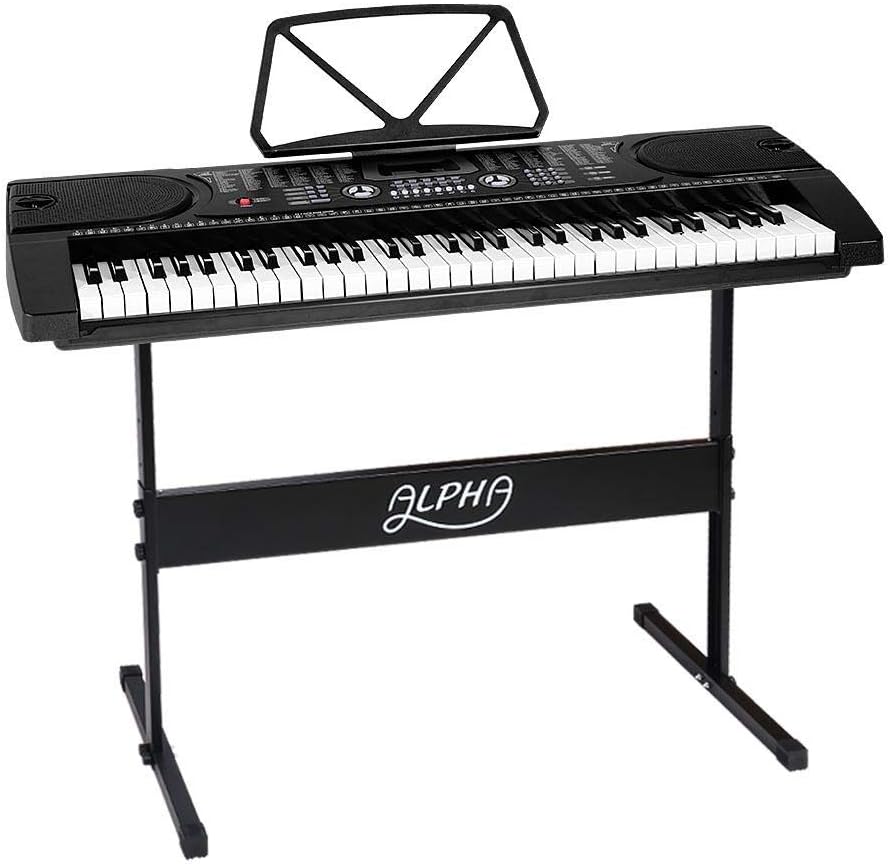
Figure 5.1: The Alpha EK-60 keyboard fully assembled on its adjustable stand, ready for use.
5.2 Ịkwado ahụigodo ahụ
The Alpha EK-60 can be powered by the included AC adaptor or by batteries.
Iji AC Adaptor:
- Connect the DC plug of the power adaptor to the DC 9V input jack on the rear of the keyboard.
- Plug the AC adaptor into a standard wall outlet.
Iji batrị:
- Chọta ebe batrị dị n'okpuru ala ahụigodo.
- Mepee mkpuchi nke batrị batrị.
- Insert 6 x AA-size batteries (not included), ensuring correct polarity (+/-).
- Mechie mkpuchi nke batrị batrị nke ọma.
Note: When using batteries, disconnect the AC adaptor. The keyboard will automatically switch to battery power if the adaptor is removed.
6. Ntuziaka ọrụ
6.1 Basic Arụmọrụ
- Gbanyụọ/ Gbanyụọ: Pịa IKE button to turn the keyboard on or off.
- Njikwa olu: Jiri ihe UMUAKA VOLUME bọtịnụ iji gbanwee ọkwa ụda zuru oke.
- Njikwa Tempo: Jiri ihe TEMPO buttons to adjust the speed of rhythms and demo songs.
6.2 Ịhọrọ ụda na uda
- Tones (Timbre): Pịa TIMBRE button, then use the number pad or +/- buttons to select from 255 different instrument sounds. The selected timbre number will appear on the LED display.
- N'afọ iri na ụma: Pịa RHYTHM button, then use the number pad or +/- buttons to select from 255 accompaniment rhythms. Press Malite/Kwụsị ịmalite ma ọ bụ kwụsị ụda ahụ.
6.3 Intelligent Teaching Function
The EK-60 features a 3-step intelligent teaching system to help you learn to play.
- Otu igodo: Plays the melody of a demo song by pressing any key.
- Soro: Waits for you to play the correct note before proceeding with the melody.
- Ọnụ: Plays the accompaniment while you play the melody.
To use, select a demo song, then press the desired teaching mode button (OTU-IKWU, Soro, ma ọ bụ NSEMBLE).
6.4 Ndekọ na ịkpọghachi
The keyboard allows you to record your performances.
- Pịa REC button to start recording. The LED display will indicate recording mode.
- Kpọọ egwu ị chọrọ.
- Pịa KWURU button to stop recording and play back your recorded performance.
6.5 Njikọta
- Jack ekweisi: Jikọọ ekweisi na Igwe ekwe ntị jack for silent practice.
- Ntinye igweokwu: Jikọọ igwe okwu na Ntinye MIC jack to sing along while playing.
- Ntinye/mpụta ọdịyo: Jiri ihe Ntinye ederede AUDIO to connect external audio devices (e.g., MP3 player) and the Mepụta AUDIO to connect to external speakers or an ampna -emegharị ihe.
7. Nlekọta
Proper care will ensure the longevity of your Alpha EK-60 keyboard.
- Nhicha: Wipe the keyboard with a soft, dry cloth. For stubborn dirt, use a slightly damp cloth and then wipe dry immediately. Do not use abrasive cleaners, waxes, or solvents.
- Nchekwa: When not in use for extended periods, store the keyboard in a cool, dry place away from direct sunlight and extreme temperatures. If using batteries, remove them before long-term storage to prevent leakage.
- Ijikwa: Zere idobe ahụigodo ma ọ bụ idobe ya na mmetụta siri ike.
8. Nchọpụta nsogbu
If you encounter any issues with your keyboard, refer to the following table for common problems and solutions.
| Nsogbu | Ihe nwere ike ime | Ngwọta |
|---|---|---|
| Enweghị ụda | Volume is too low; Power is off; Headphones connected; Faulty power connection. | Increase master volume; Turn on power; Disconnect headphones; Check power adaptor or replace batteries. |
| Igodo anaghị aza | Keyboard is in a teaching mode; Internal malfunction. | Exit teaching mode; Power cycle the keyboard. If issue persists, contact support. |
| Rhythm/Demo song not playing | Rhythm/Demo song not selected; START/STOP button not pressed. | Select a rhythm/demo song; Press START/STOP. |
| Ụda agbagọ | Volume too high; External device connected incorrectly. | Reduce volume; Check connections of external devices. |
Ọ bụrụ na nsogbu ahụ dịgidere mgbe ịnwale azịza ndị a, biko kpọtụrụ nkwado ndị ahịa.
9. Nkọwapụta
| Njirimara | Nkọwa |
|---|---|
| Nlereanya | EK-60 |
| Igodo | 61 Standard Piano Keys |
| Key Width | 1.9 cm |
| Tones (Timbres) | 255 |
| Rhythm | 255 |
| Egwu ngosi | 24 |
| Polyphony kachasị elu | 8 |
| Njikọta | Audio Input, Audio Output, Headphone Jack (3.5mm), Microphone Input (3.5mm) |
| Ịnye ọkụ | AC Adaptor (DC 9V) or 6 x AA-size batteries (not included) |
| Akụkụ (ahụigodo) | 86cm (L) x 32.5cm (W) |
| Dimensions (Overall with Stand) | 86cm (L) x 32.5cm (W) x 59-79cm (H) |
| Ibu | 6.2 kilogram |
| Agba | Nwa |

Figure 9.1: Detailed dimensions of the Alpha EK-60 keyboard and its adjustable stand.
10. Akwụkwọ ikike na nkwado
10.1 Ozi akwụkwọ ikike
The Alpha EK-60 keyboard comes with a 1-afọ akwụkwọ ikike from the date of purchase. This warranty covers manufacturing defects and ensures the product is free from defects in material and workmanship under normal use. It does not cover damage caused by misuse, accident, unauthorized modification, or normal wear and tear.
10.2 Nkwado ndị ahịa
For any queries, technical assistance, or warranty claims, please contact the seller or manufacturer directly. Please have your purchase receipt and product model number (EK-60) ready when contacting support.
Ask a question about this manual
Ask about setup, troubleshooting, compatibility, parts, safety, or missing instructions. Manuals+ will review the question and use this page’s manual context to help answer it.