
1. Okwu mmalite
The Zerone Sport Action DV Camera is a compact and portable device designed for capturing high-definition video during various outdoor activities. Featuring 1080P and 720P recording options, a 120-degree wide-angle lens, and an IPX-4 waterproof aluminum alloy shell, this camera is built for durability and ease of use. It includes a built-in microphone for audio recording and provides vibration feedback for operational status.
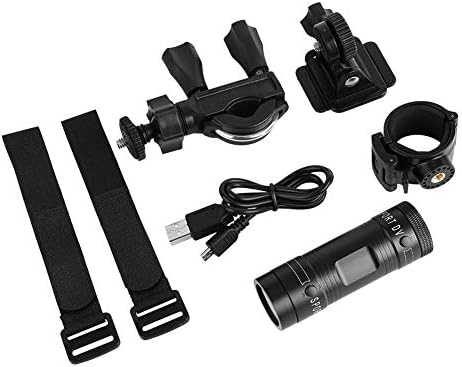
Image 1.1: The Zerone Sport Action DV Camera unit.
2. Ozi nchekwa
- Do not expose the camera to extreme temperatures or direct sunlight for extended periods.
- While the camera features an IPX-4 waterproof rating, it is designed to withstand splashes and light rain. Do not submerge or soak the camera in water.
- Debe ngwaọrụ ahụ pụọ na oghere magnetik siri ike.
- Use only the specified charging cable and power adapter to prevent damage.
- Do not attempt to disassemble or modify the camera, as this will void the warranty and may cause damage.
- Debe igwefoto ahụ n'ebe kpọrọ nkụ ma dị jụụ mgbe a naghị eji ya.
3. Ihe ngwugwu
Biko lelee ngwungwu ka ị hụ na ihe niile dị:
- Zerone Sport Action DV Camera Unit
- Igwe nchaji USB
- Mounting Accessories (e.g., bike mount, helmet mount, strap mounts)
- Rechargeable Battery (may be pre-installed)
- Akwụkwọ ntuziaka (akwụkwọ a)
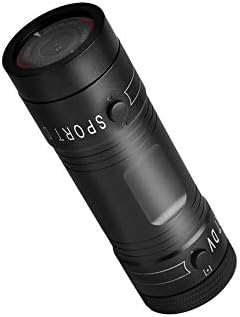
Image 3.1: Contents of the Zerone Sport Action DV Camera package, showing the camera, USB cable, and various mounting options.
4. Igwefoto gafereview
Familiarize yourself with the camera's components and controls.
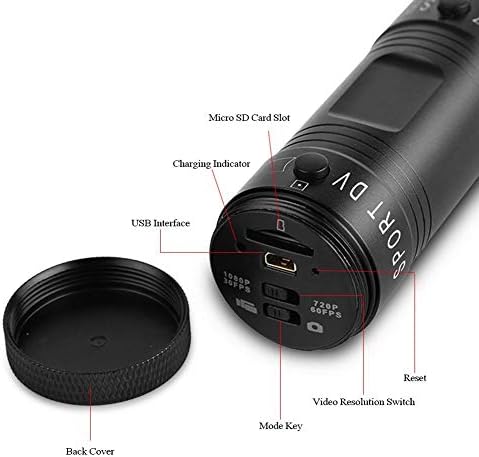
Foto 4.1: Zuru ezu view of the camera's rear end, highlighting the Micro SD card slot, USB interface, charging indicator, mode key, video resolution switch (1080P 30fps / 720P 60fps), and reset button.
- Oghere kaadị Micro SD: Insert your Micro SD card here. A card is required for operation.
- Ngosipụta chaja: Displays charging status. A red light indicates charging; it turns off when fully charged.
- Njikọ USB: For charging and connecting to a computer.
- Igodo ọnọdụ: Used to switch between recording modes (e.g., video, photo).
- Mgbanwe Mkpebi Vidiyo: Selects between 1080P 30fps and 720P 60fps recording resolutions.
- Tọgharịa bọtịnụ: Used to reset the device if it becomes unresponsive.
- Power Button (Front): Located on the front side of the camera.
- Record/Stop Button (Back): Located on the back side of the camera.
5. Nhazi
5.1 Ịchaji batrị
- Connect the camera to a USB power source (e.g., computer, wall adapter) using the provided USB cable.
- Nke ìhè uhie on the back of the camera will illuminate, indicating that it is charging.
- Ozugbo chajịchara zuru oke, ọkụ na-acha uhie uhie ga-agbanyụ.
- Note: If the camera blinks red and blue when plugged in, it indicates that an SD card is not inserted. This is not a charging indicator.
5.2 Ịtinye kaadị Micro SD
A Micro SD card (not included) is required for recording video and photos. The camera supports Micro SD cards up to a certain capacity (check product packaging for maximum supported size, typically 32GB or 64GB for similar devices).
- Mepee mkpuchi azụ nke igwefoto.
- Locate the Micro SD card slot (refer to Image 4.1).
- Gently insert the Micro SD card into the slot until it clicks into place. Ensure the card is oriented correctly.
- Replace the back cover, ensuring it is securely tightened to maintain water resistance.
5.3 na -arịgo igwefoto
The camera comes with various mounting accessories for different applications.
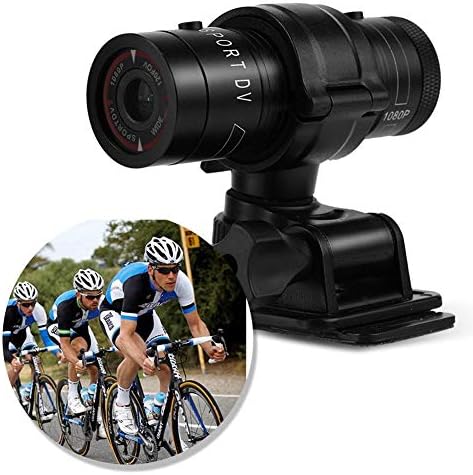
Image 5.1: The camera attached to a bicycle handlebar, demonstrating one of its mounting options.
- Nkwanye Igwe Ọgba: Jiri clamp mount to attach the camera securely to bicycle handlebars or other tubular structures.
- Helmet Mount: Utilize the adhesive or strap mounts to fix the camera to a helmet.
- Strap Mounts: For attaching to various gear or body parts.
Ensure all mounts are securely fastened before engaging in activities to prevent the camera from falling.
6. Na-arụ ọrụ igwefoto
6.1 Gbanyụọ ma ọ bụ gbanyụọ
- Iji gbanye, pịa ma jide bọtịnụ ike (front switch) until the camera vibrates.
- Iji gbanyụọ, pịa ma jide bọtịnụ ike again until the camera vibrates once.
6.2 Selecting Video Resolution
Before recording, select your desired video resolution using the switch on the back of the camera (refer to Image 4.1).
- Malite ngbanwe ahụ gaa na "1080P 30fps" for Full HD video at 30 frames per second.
- Malite ngbanwe ahụ gaa na "720P 60fps" for HD video at 60 frames per second.
6.3 Vidiyo ndekọ
- Gbaa mbọ hụ na agbanyere igwefoto.
- Pịa Bọtịnụ ndekọ/Kwụsị (back switch) to start recording. The camera will vibrate three times to indicate recording has started.
- Ka ịkwụsị ndekọ, pịa Bọtịnụ ndekọ/Kwụsị again. The camera will vibrate once to indicate recording has stopped.
6.4 Ijikọ na Kọmputa
Ka ịnyefe files or access recorded content:
- Gbaa mbọ hụ na agbanyụrụ igwefoto.
- Jikọọ igwefoto na kọmputa gị site na iji eriri USB enyere.
- The camera will be recognized as a removable storage device.
- You can then access and transfer your video files.
7. Nlekọta
- Nhicha: Jiri ákwà dị nro ma kpọọ nkụ hichaa ahụ igwefoto ahụ. Maka lensi ahụ, jiri ákwà nhicha lensi pụrụ iche na ihe ngwọta. Zere ihe ndị na-emebi ihe.
- Nchekwa: When not in use for extended periods, store the camera in a cool, dry place. Ensure the battery is partially charged (around 50%) to prolong its lifespan.
- Nguzogide mmiri: Regularly check that the back cover is securely tightened to maintain the IPX-4 water resistance. Avoid exposing the USB port or SD card slot to moisture when the cover is open.
- Nlekọta batrị: Avoid fully discharging the battery frequently. Recharge it when the low battery indicator appears.
8. Nchọpụta nsogbu
| Nsogbu | Ihe nwere ike ime | Ngwọta |
|---|---|---|
| Igwefoto anaghị agba ọkụ. | Batrị agwụla. | Chajie igwefoto ahụ nke ọma. |
| Camera blinks red and blue, then turns off. | No Micro SD card inserted or card is faulty. | Insert a functional Micro SD card. Ensure it is properly seated. |
| Enweghị ike ịdekọ vidiyo. | No Micro SD card, card full, or card error. | Insert a Micro SD card, delete old files, ma ọ bụ hazie kaadị ahụ (nke a ga-ehichapụ data niile). |
| Ogo vidiyo na-adịghị mma. | Lens is dirty; low light conditions; incorrect resolution setting. | Clean the lens. Ensure adequate lighting. Select 1080P resolution for higher detail. |
| Igwefoto anaghị anabata ya. | Nsogbu ngwanrọ. | Use a thin object (like a paperclip) to press the Tọgharịa bọtịnụ (refer to Image 4.1). |
9. Nkọwapụta
| Njirimara | Nkọwa |
|---|---|
| Ụdị | Zerone |
| Nọmba nlereanya | Zeronefg3h149y2s |
| Mkpebi ịse vidiyo | 1080p (30fps), 720p (60fps) |
| Igwe oghere | 120-degree A+ grade wide-angle |
| Ngosi nke enweghị mmiri | IPX-4 (splash-proof) |
| Ihe onwunwe Shell | Aluminom Alloy |
| Teknụzụ ihe mmetụta foto | CMOS |
| Oghere kacha | 1.8 millimeters |
| Ụdị ebe nchekwa Flash | Micro SD (card not included) |
| Usoro Nseta vidiyo | AVI |
| Ụdị ọdịyo akwadoro | AAC, MP3, PCM, FLAC, or Dolby Digital/AC-3 |
| Teknụzụ Njikọta | USB |
| Ibu Ibu | 10.8 ounces (ihe dị ka gram 306) |
| Akụkụ ngwaahịa | 11.81 x 6.3 x 5.91 sentimita (ihe dịka 30 x 16 x 15 cm) |
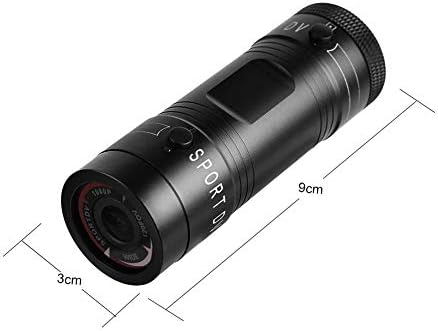
Image 9.1: Physical dimensions of the camera, showing a length of 9cm and a diameter of 3cm.
10. Akwụkwọ ikike na nkwado
For warranty information and technical support, please refer to the documentation provided with your purchase or contact the retailer/manufacturer directly. Keep your proof of purchase for warranty claims.
Manufacturer: Zerone
For further assistance, you may visit the Zerone Store on Amazon: Zerone Store