
Okwu mmalite
This manual provides instructions for the Insignia NS-PNKNUM19 Wired Numeric Keypad. This device is designed to enhance data entry for accounting functions and spreadsheet applications on both Mac and PC computers. It features a standard numeral arrangement and responsive keys for efficient operation.
Ozi nchekwa
Please read these safety instructions carefully before using your new numeric keypad to prevent damage to the device or injury to yourself.
- Do not expose the keypad to water or excessive moisture.
- Zere oke okpomọkụ.
- Do not attempt to disassemble or repair the keypad yourself. Refer all servicing to qualified personnel.
- Keep the keypad away from strong magnetic fields.
- Jiri naanị ngwaọrụ ndị dakọtara dịka akọwara n'akwụkwọ ntuziaka a.
Ihe ngwugwu
- Insignia NS-PNKNUM19 Wired Numeric Keypad
- Ntuziaka Ntọlite Ngwa Ngwa (anaghị etinye ya na akwụkwọ ntuziaka dijitalụ a)

Image: The Insignia NS-PNKNUM19 Wired Numeric Keypad shown in its retail packaging, highlighting the product and its simple design.
Atụmatụ
- 19 igodo: Offers a comfortable and complete numeric typing experience.
- Njikọ USB: Enables a simple wired connection to your computer.
- PC and Mac Compatible: Designed for use with both Windows and macOS operating systems.
- Nkwụnye na-egwu: Enweghị nrụnye ọkwọ ụgbọala achọrọ maka ọtụtụ sistemụ arụmọrụ.
- Ihe ngosi LED: An LED light indicates when the keypad is connected and active.
Melite
Setting up your Insignia NS-PNKNUM19 Wired Numeric Keypad is a straightforward process.
- Jikọọ igodo ahụ: Locate an available USB port on your computer (PC or Mac). Plug the USB connector of the numeric keypad into the USB port.
- Nkwekọrịta sistemụ: Your computer should automatically detect and install the necessary drivers. This is a plug-and-play device, so no manual driver installation is typically required.
- Nyochaa njikọ: An LED indicator on the keypad will illuminate, confirming that the device is connected and ready for use.
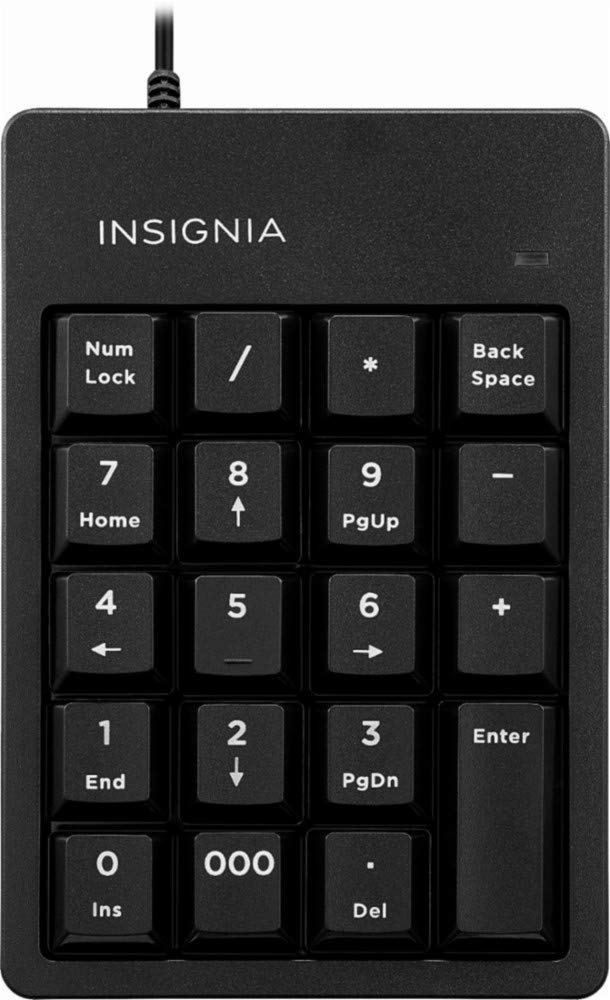
Image: The Insignia NS-PNKNUM19 Wired Numeric Keypad, showing its 19 keys and the attached USB cable ready for connection.
Ntuziaka ọrụ
Once connected, the numeric keypad functions similarly to the numeric section of a full-sized keyboard.
- Ntinye ọnụọgụgụ: Press the number keys (0-9) to input numerical data.
- Arithmetic Operators: Use the +, -, *, and / keys for basic arithmetic operations.
- Ọnụ ọgụgụ The '.' key allows for decimal input.
- Tinye igodo: Functions as a standard Enter key.
- Mkpọchi ọnụọgụ: The "Num Lock" key toggles the numeric function of the keys. When Num Lock is active (indicated by the LED), the keys function as numbers. When Num Lock is off, some keys may perform alternative functions like Home, End, PgUp, PgDn, or arrow navigation, depending on the application.
- Oghere azụ: Deletes the character to the left of the cursor.
- Del (Delete): Deletes the character to the right of the cursor or selected text.
- 000 igodo: Provides quick input for three zeros.
Nlekọta
To ensure the longevity and optimal performance of your numeric keypad, follow these simple maintenance guidelines:
- Nhicha: Use a soft, dry, lint-free cloth to clean the surface of the keypad. For stubborn dirt, slightly dampen the cloth with water or a mild, non-abrasive cleaner. Avoid spraying liquids directly onto the keypad.
- Nchekwa: When not in use, store the keypad in a clean, dry environment away from direct sunlight and extreme temperatures.
- Ijikwa: Avoid dropping the keypad or subjecting it to strong impacts, which can damage internal components.
Nchọpụta nsogbu
If you encounter issues with your Insignia NS-PNKNUM19 Wired Numeric Keypad, refer to the following common solutions:
| Nsogbu | Ngwọta |
|---|---|
| Keypad is not recognized by the computer. |
|
| Keys are not responding or typing incorrect characters. |
|
| Agbanyụrụ ihe ngosi LED. |
|
Nkọwapụta
| Nọmba nlereanya: | NS-PNKNUM19 |
| Akara: | Insignia |
| Njikọta: | Wired USB (standard USB-A connector) |
| Ọnụọgụ nke igodo: | 19 |
| ndakọrịta: | PC, Mac |
| Agba: | Nwa |
| Nkọwa ahụigodo: | Ergonomic |
| Akụkụ (ihe dị ka): | 25.9 x 14.9 x 3.9 cm (Nha nke ngwugwu) |
| Ibu (ihe dị ka): | 156 g |
Akwụkwọ ikike na nkwado
Insignia products are manufactured to high quality standards. For specific warranty information, please refer to the warranty card included with your purchase or visit the official Insignia website. For technical support or customer service, please contact Insignia customer support through their official channels.
Manufacturer Contact Information: Peachtree City, GA 30269, US