
1. Okwu mmalite
The FeinTech VAX00102 is an advanced HDMI 2.0 audio extractor designed to separate audio from an HDMI signal and route it to an AV receiver, soundbar, or active speakers. It supports resolutions up to Ultra-HD / 4K HDR (up to 18 Gbps data rate) with lossless HDMI signal transmission. This device is backward compatible with all lower resolutions and includes features to enhance compatibility with older HDMI 1.3/1.4 devices.
The VAX00102 also supports Audio Return Channel (ARC), allowing audio from your TV to be output through the extractor's digital outputs. An audio mode switch provides control over the audio format output by the HDMI source, ensuring optimal sound delivery even when connected to stereo TVs.
2. Ozi nchekwa
- Gbaa mbọ hụ na etinyere ngwaọrụ ahụ n'elu ala kwụsiri ike, dịkwa larịị.
- Do not expose the device to moisture, rain, or extreme temperatures.
- Jiri naanị ihe nkwụnye ọkụ enyere.
- Zere igbochi oghere ikuku iji gbochie ikpo oke ọkụ.
- Anwala imeghe ma ọ bụ rụkwaa ngwaọrụ n'onwe gị. Kpọtụrụ ndị ọrụ ruru eru ọrụ niile.
3. Ihe ngwugwu
Biko lelee ngwungwu maka ihe ndị a:
- FeinTech VAX00102 HDMI 2.0 Audio Extractor
- Ihe nkwụnye ọkụ
- Akwụkwọ ntuziaka onye ọrụ
4. Ngwaahịa gafereview
The FeinTech VAX00102 features a compact design with clearly labeled ports and controls for easy integration into your home theater system.
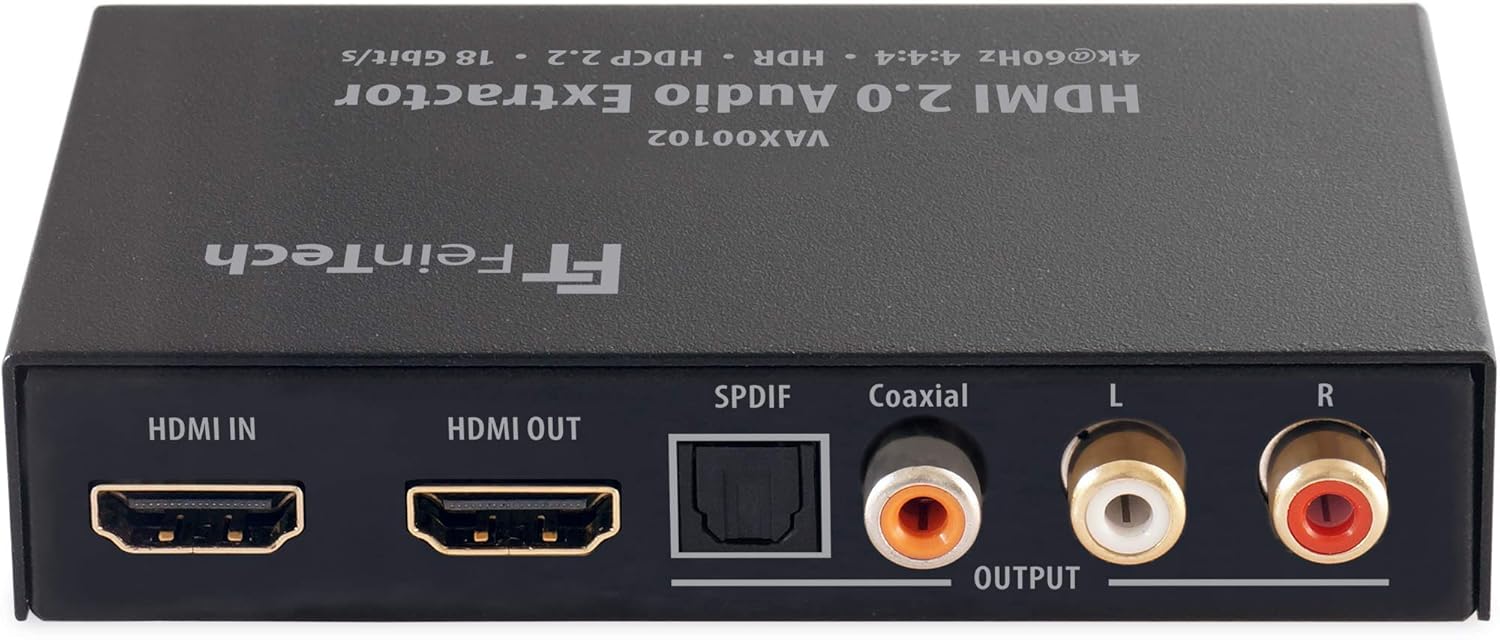
Foto nke 4.1: Ihu na azụ view of the FeinTech VAX00102 HDMI Audio Extractor, showing HDMI In, HDMI Out, SPDIF (Toslink), Coaxial, and Analog L/R RCA audio output ports.
Njikwa na njikọ:
- Ntinye ike: Connection for the included power supply.
- Ihe ngosi LED: Lights up when functions are active.
- Audio EDID Switch: Selects audio format (Auto/Bypass, 2.0, 5.1).
- HDMI 1.3/1.4 Downgrade Switch: Improves compatibility with older HDMI devices.
- Video Stop Switch: Disables video output, allowing only audio output.
- ARC (Audio Return Channel) Switch: Enables TV audio output via SPDIF and Coaxial (not analog).
- Mgbanwu ma ọ bụ gbanyụọ: Njikwa ike maka ngwaọrụ.
- Ntinye HDMI: Connects to your media player or source device.
- Ihe mmepụta HDMI: Connects to your TV, monitor, or projector.
- SPDIF Digital Audio Output (Toslink): Optical digital audio output.
- Mmepụta ọdịyo dijitalụ Coaxial: Mmepụta ọdịyo dijitalụ Coaxial.
- Analog Stereo L+R Audio Output (RCA): Mwepụta ọdịyo stereo analog.
5. Nhazi
5.1 Njikọ njikọ
- Connect your HDMI source (e.g., Blu-ray player, streaming device) to the HDMI n'ime port on the VAX00102.
- Connect your display (TV, monitor, projector) to the HDMI pụọ port on the VAX00102.
- Connect your audio receiver, soundbar, or active speakers to the desired audio output port on the VAX00102 (SPDIF, Coaxial, or Analog RCA).
- Connect the included power adapter to the VAX00102 and then to a power outlet.
- Gbanwuo ngwaọrụ niile ejikọrọ.
5.2 Connecting to a 5.1 Sound System
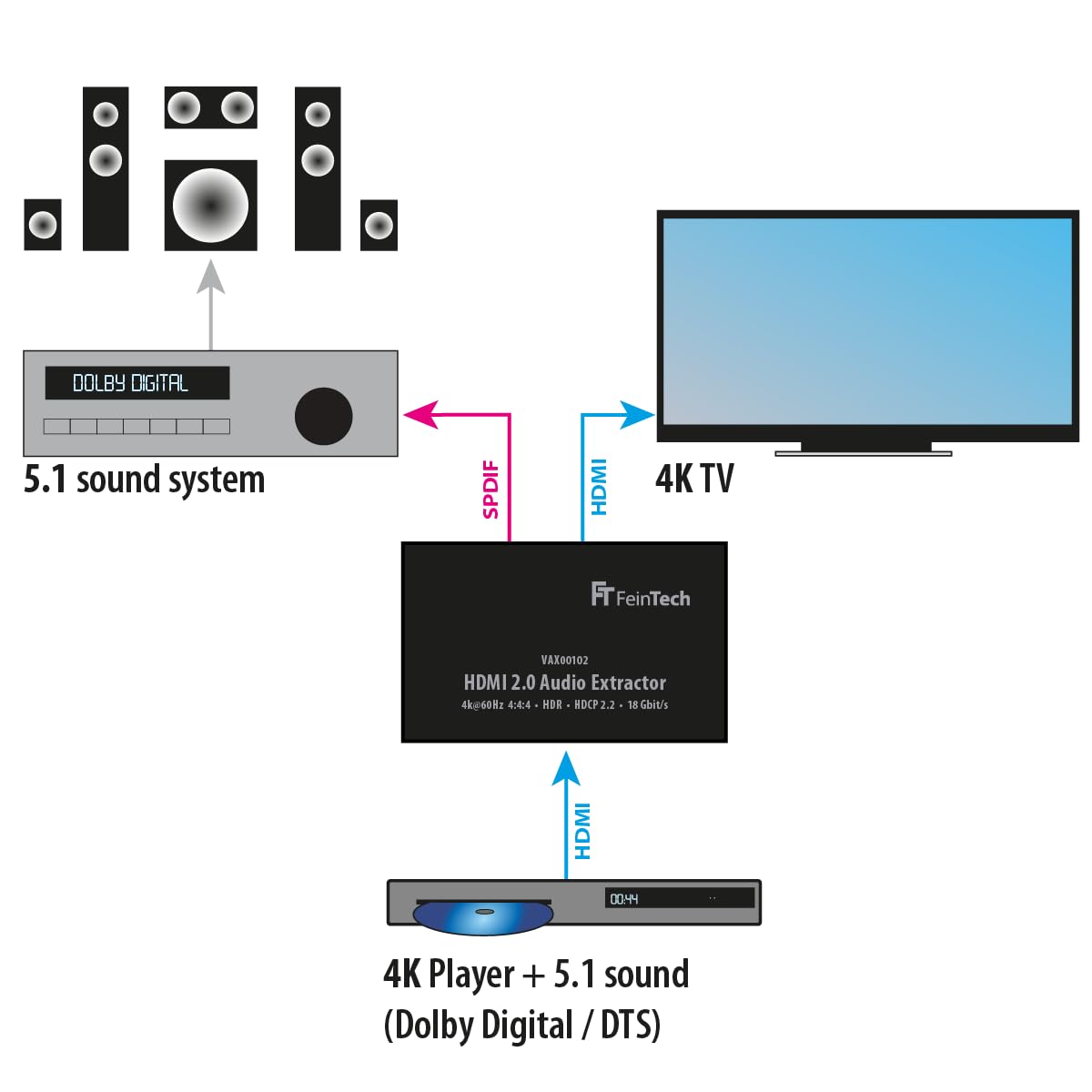
Foto nke 5.1: Connection diagram for a 4K player with 5.1 sound (Dolby Digital / DTS) to a 5.1 sound system and 4K TV via the VAX00102.
For 5.1 channel audio, connect your 4K player to the HDMI IN of the VAX00102. Connect the HDMI OUT to your 4K TV. Use the SPDIF or Coaxial output from the VAX00102 to connect to your 5.1 sound system. Ensure your HDMI source is configured to output Bitstream (Dolby Digital or DTS) instead of PCM for 5.1 audio via SPDIF/Coaxial.
5.3 Using Audio Return Channel (ARC)

Foto nke 5.2: Connection diagram for ARC functionality, where TV audio is sent back to the VAX00102 and then to a 5.1 sound system via SPDIF. Note that analog RCA outputs do not support ARC audio.
To use ARC, connect the HDMI OUT port of the VAX00102 to the ARC-enabled HDMI input on your TV. Connect the SPDIF or Coaxial output of the VAX00102 to your audio system. Ensure ARC is enabled on both your TV and the VAX00102. Note that ARC audio is only available via the digital SPDIF and Coaxial outputs, not the analog RCA outputs.
6. Ntuziaka ọrụ
6.1 Audio Mode Switch (EDID)
The audio mode switch allows you to manually control the audio format output by the HDMI source. This is useful when your audio system has specific format requirements or when you want to ensure a particular audio output.
- Auto / Bypass: The output audio format is determined by the best format supported by the connected HDMI display device.
- 2.0 (Stereo): The output is stereo (LPCM 2.0) on all audio outputs.
- 5.1: The output is in 5.1 audio format (Dolby Digital / AC-3 or DTS), provided the 5.1 soundtrack is available from the source.
Important Note on 5.1 Audio via SPDIF/Coaxial: For 5.1 audio transmission via SPDIF or Coaxial, set your HDMI source to output Bitstream (e.g., Dolby Digital or DTS) instead of PCM. Ensure you select Dolby Digital, not Dolby Digital Plus, if applicable.
6.2 HDMI 1.3/1.4 Compatibility Switch
If you are connecting an older HDMI 1.3 or 1.4 source device to a newer HDMI 2.0 TV, you may encounter compatibility issues. Use this switch to downgrade the HDMI signal to 1.3/1.4, which can improve compatibility.
6.3 Video Stop Switch
This switch allows you to disable the video output, making the TV screen go black. This feature is useful if you only require audio output from the HDMI source and want to conserve power or avoid display issues.
6.4 Njikwa olu
Volume control should be managed at the source device (e.g., media player) or your audio system (AV receiver, soundbar), not on the TV, to ensure proper audio levels.
6.5 Supported Audio Formats
- Digital Outputs (SPDIF, Coaxial): AC3 / Dolby Digital 2.0 and 5.1, DTS 5.1, Stereo PCM.
- Mmepụta RCA Analog: Stereo PCM only.
- Ihe mmepụta HDMI: All formats, including Dolby Atmos, Dolby TrueHD, DTS-HD, and multi-channel PCM. Note that Dolby Atmos can ONLY be transmitted via HDMI, not via other audio outputs.
7. Nlekọta
To ensure the longevity and optimal performance of your FeinTech VAX00102, follow these simple maintenance guidelines:
- Debe ngwaọrụ ahụ ọcha site na iji akwa dị nro na-ehichapụ ya.
- Do not use liquid cleaners or aerosol sprays.
- Gbaa mbọ hụ na ikuku ikuku dị na gburugburu ngwaọrụ iji gbochie ikpo oke ọkụ.
- Disconnect the power adapter if the device will not be used for an extended period.
8. Nchọpụta nsogbu
If you encounter issues with your VAX00102, please refer to the following common troubleshooting steps:
- Enweghị mmepụta ọdịyo:
- Lelee njikọ niile nke eriri iji hụ na echekwara ha.
- Verify the audio mode switch (EDID) setting. Try "Auto/Bypass" first.
- Ensure your audio source is outputting a compatible audio format for your connected audio system.
- If using SPDIF/Coaxial for 5.1 audio, confirm the source is set to Bitstream (Dolby Digital/DTS), not PCM.
- Check the volume levels on your source device and audio system.
- Enweghị mmepụta vidiyo:
- Ensure the HDMI cables are connected correctly and are not damaged.
- Check if the "Video Stop" switch is accidentally activated.
- Try connecting the HDMI source directly to the TV to rule out source or TV issues.
- ARC Not Working:
- Confirm that your TV's HDMI port supports ARC and that ARC is enabled in your TV's settings.
- Ensure the HDMI cable is connected to the ARC-enabled HDMI port on your TV.
- Remember that ARC audio is only available via SPDIF and Coaxial outputs, not analog RCA.
- Compatibility Issues with Older Devices:
- Utilize the HDMI 1.3/1.4 compatibility switch to improve connection stability with older source devices.
9. Nkọwapụta
| Nọmba nlereanya | VAX00102 |
| Akụkụ ngwaahịa (L x W x H) | 10.5 x 6.2 x 2.2 cm |
| Ibu Ibu | 160 grams |
| Ụdị interface | Coaxial, HDMI |
| Ọnụọgụ nke ọwa | 2 (Stereo) |
| Ngwa dakọtara | TV, AV Receivers, Soundbars, Active Speakers |
| Ụdị nkwụnye | Wall Mount (if applicable, based on product design) |
| Mba onye si | China |
| Ụdị HDMI | HDMI 2.0 |
| Mkpebi Max | 4K 60Hz HDR |
| Ọnụego data | Ruo 18 Gbps |
| Nkwado ARC | Yes (SPDIF, Coaxial) |
Cable Length Recommendation: With standard 24AWG HDMI cables, maximum range for 1080p is 10m input + 8m output. For 4K, maximum range is 5m input + 5m output.
10. Akwụkwọ ikike Ozi
FeinTech products are designed for reliability and performance. This product comes with a standard manufacturer's warranty. Please refer to the warranty card included in your package or visit the official FeinTech websaịtị maka nkọwa na usoro akwụkwọ ikike.
11. Nkwado ndị ahịa
For any questions, technical assistance, or support regarding your FeinTech VAX00102, please contact FeinTech customer service. Contact details can typically be found on the official FeinTech websaịtị ma ọ bụ na nkwakọ ngwaahịa.