
Okwu mmalite
Thank you for choosing the MIFA A3 Soundbox Bluetooth Portable Speaker. This manual provides essential information for the safe and efficient use of your device. Please read it thoroughly before operating the speaker and retain it for future reference.
Ozi nchekwa
- Ewepụla ọkà okwu na oke okpomọkụ, ìhè anyanwụ kpọmkwem, ma ọ bụ oke iru mmiri.
- Zere idobe ma ọ bụ idobe ọkà okwu na mmetụta siri ike.
- Do not disassemble or attempt to repair the speaker yourself. Contact qualified service personnel.
- Keep the speaker away from water and liquids, despite its waterproof rating, to prevent damage to charging ports or internal components.
- Jiri naanị eriri chaja na ihe nkwụnye ọkụ akọwapụtara.
Ihe ngwugwu
Biko lelee ngwungwu maka ihe ndị a:
- MIFA A3 Bluetooth Portable Speaker
- Igwe nchaji USB
- AUX Audio USB
- Akwụkwọ ntuziaka (akwụkwọ a)
Ngwaahịa gafereview
The MIFA A3 speaker features intuitive touch controls and multiple connectivity options. Familiarize yourself with the speaker's layout:
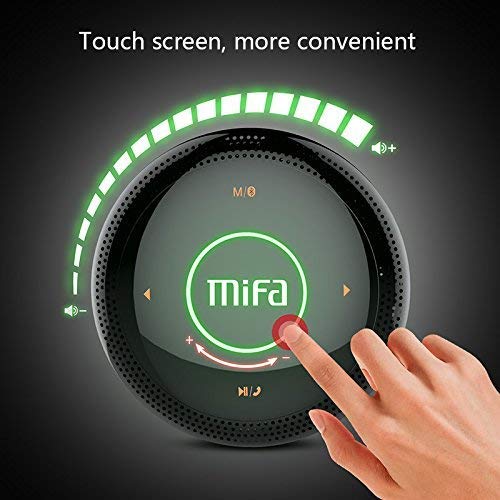
Foto 1: N'elu view of the MIFA A3 speaker, highlighting the touch-sensitive control panel. The panel displays volume indicators, play/pause, and track navigation buttons. A central 'Mifa' logo is also visible.
- Ogwe njikwa aka: Located on the top surface for volume adjustment, playback control, and mode selection.
- Igwe okwu: Maka oku na-enweghị aka.
- Nchaji ọdụ ụgbọ mmiri: Micro USB ọdụ ụgbọ mmiri maka ịchaji.
- Ntinye AUX: 3.5mm audio jack for wired connection.
- Oghere kaadị Micro SD: Maka ịkpọ egwu ozugbo site na kaadị ebe nchekwa.
Melite
1. gingchaji Okwu Okwu
Before first use, fully charge the speaker. Connect the provided USB charging cable to the speaker's charging port and the other end to a USB power adapter (not included) or a computer's USB port.
- Ọkụ na-egosi nchaji ga-enwu n'oge ịchaji.
- The indicator will turn off or change color once fully charged.
- A full charge provides approximately 8 hours of continuous playtime.
2. Gbanyụọ / gbanyụọ
- Iji gbanye: Press and hold the Power button (usually integrated into the touch panel or a dedicated button) for 2-3 seconds until you hear an audible prompt or see an indicator light.
- Iji gbanyụọ: Press and hold the Power button again for 2-3 seconds.
Ntuziaka ọrụ
1. Njikọ Bluetooth
- Ensure the speaker is powered on and in Bluetooth pairing mode (indicated by a flashing blue light or audible prompt).
- Na ngwaọrụ gị (smartphone, tabletị, PC), gbanye Bluetooth wee chọọ ngwaọrụ dị.
- Select "MIFA A3" from the list of devices.
- Once paired, the speaker will provide an audible confirmation, and the indicator light will become solid blue.
- The speaker will automatically connect to the last-paired device when powered on, if that device's Bluetooth is active and within range.
2. Njikọ AUX
For devices without Bluetooth, use the provided 3.5mm AUX audio cable:
- Connect one end of the AUX cable to the speaker's AUX input port.
- Jikọọ nsọtụ nke ọzọ na igwe ekweisi nke ngwaọrụ ọdịyo gị.
- Ọkà okwu ga-agbanwe ozugbo gaa na ọnọdụ AUX.
3. Mkpọghachi Kaadị Micro SD
Insert a Micro SD card (up to 32GB, FAT32 format) with music files into the designated slot. The speaker will automatically detect the card and begin playback.
4. Touch Control Operations
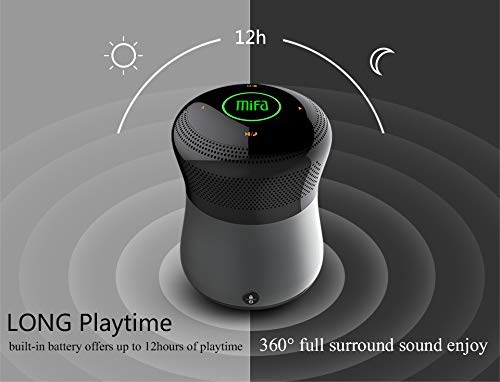
Foto 2: The MIFA A3 speaker shown with an overlay indicating "LONG Playtime" (up to 12 hours) and "360° full surround sound enjoy." This image emphasizes the speaker's battery life and audio dispersion.
- Njikwa olu: Slide your finger clockwise on the touch panel to increase volume, counter-clockwise to decrease.
- Gwuo/kwụsịtụ: Tap the central Play/Pause icon.
- Track na-esote: Tap the "Next" arrow icon.
- Gara aga Track: Tap the "Previous" arrow icon.
- Ụdị mgbanwe: Tap the "M/O" icon to cycle between Bluetooth, AUX, and Micro SD card modes.
- Bọtịnụ mkpọchi: Press the lock icon to prevent accidental touch inputs.
5. Call Handling (Bluetooth Mode)
- Oku azaa: Tap the Play/Pause icon when a call comes in.
- Oku ngwụcha: Tap the Play/Pause icon again.
- Jụ oku: Press and hold the Play/Pause icon for 2 seconds.
Nlekọta
- Jiri akwa dị nro hichaa ọkà okwu. Ejila ihe nchacha abrasive ma ọ bụ ihe mgbaze.
- Chekwaa ọkà okwu n'ebe dị jụụ ma kpọọ nkụ mgbe ọ naghị eji ya ogologo oge.
- Charge the battery at least once every three months to maintain battery health.
Nchọpụta nsogbu
| Nsogbu | Ngwọta enwere ike |
|---|---|
| Ọkà okwu anaghị agba ọkụ. | Gbaa mbọ hụ na agbagoro batrị. Jikọọ na isi iyi ike wee nwaa ọzọ. |
| Enweghị ike ijikọ site na Bluetooth. |
|
| Enweghị ụda. |
|
| Ogo ụda adịghị mma. |
|
Nkọwapụta
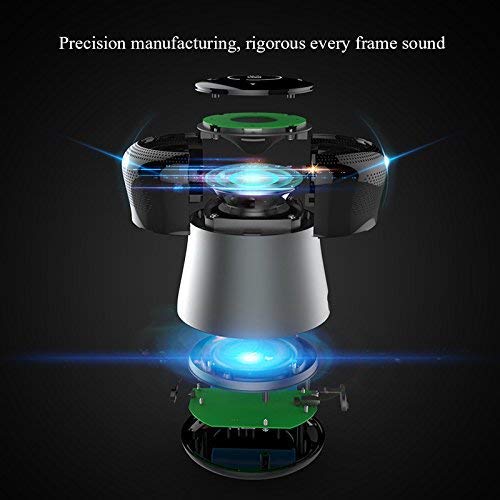
Foto 3: An exploded diagram of the MIFA A3 speaker, illustrating its internal components and structural design, emphasizing precision manufacturing.
| Nlereanya | MIFA A3 |
| Ike mmepụta | 10W |
| Njikọta | Bluetooth 4.2, AUX, Micro SD Card |
| Batrị | 1800 mAh Li-ion |
| Oge egwuregwu | Ruo awa 8 (na olu 60%) |
| Oge Nchaji | Ihe dị ka awa 3-4 |
| Igwe okwu | Ewuru maka oku na-enweghị aka |
| Waterproof | Yes (as per product specifications, but general caution advised for ports) |
| Usoro njikwa | Metụ aka |
| Ngwa dakọtara | Laptọọpụ, PC, Ama ekwentị, Mbadamba |
Akwụkwọ ikike na nkwado
MIFA products are designed to provide reliable performance. For warranty information or technical support, please refer to the warranty card included with your purchase or visit the official MIFA websaịtị. Debe ihe akaebe nke ịzụrụ maka akwụkwọ ikike.
For further assistance, you may contact MIFA customer support through their official channels.