
Okwu mmalite
Thank you for choosing the Riwbox CT-7S Kids Wireless Headphones. These headphones are designed with children in mind, featuring a fun cat-ear design with LED lights, 85dB volume limiting for hearing protection, and versatile wired/wireless connectivity. This manual provides detailed instructions to help you get the most out of your new headphones.
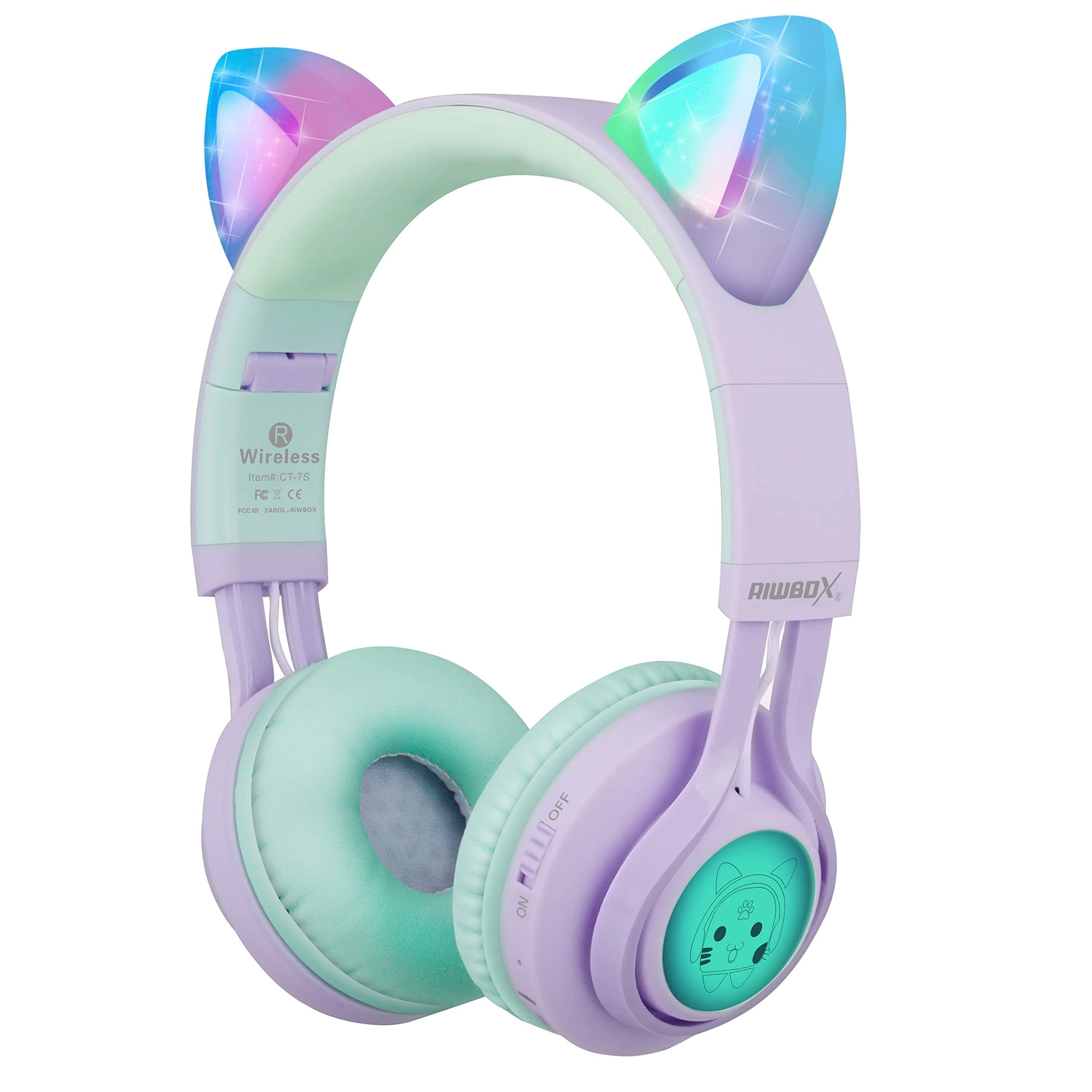
Image: Riwbox CT-7S Kids Wireless Headphones in purple and green, showcasing the cat-ear design and soft earcups.
Kedu ihe dị na Igbe ahụ
- Volume limiting cat ear headphones (Wireless)
- 3.5mm Anti-Tangle Audio Cable with Mic
- USB-C eriri USB
- Akwụkwọ ntuziaka onye ọrụ

Image: The included 3.5mm audio cable and USB-C charging cable.
Melite
1. Ịchaji ekweisi
Before first use, fully charge the headphones. Connect the provided USB-C charging cable to the charging port on the headphone and the other end to a USB power source (e.g., computer, wall adapter). The LED indicator will show charging status. A full charge takes approximately 2 hours and provides up to 40 hours of playback.
2. Ịgbanye / gbanyụọ
Locate the ON/OFF switch on the side of the headphone. Slide the switch to the "ON" position to power on. Slide to "OFF" to power off.
3. Njikọ Bluetooth
- Gbaa mbọ hụ na agbanyụrụ ekweisi.
- Slide the ON/OFF switch to the "ON" position. The headphones will automatically enter pairing mode, and the LED indicator will flash.
- Na ngwaọrụ gị (smartphone, tabletị, laptọọpụ), gbanye Bluetooth wee chọọ ngwaọrụ dị.
- Select "CT-7S" from the list of devices.
- Once paired, the LED indicator will stop flashing and remain solid, and a voice reminder will confirm the connection.
- The connection status and battery level will be shown on your smartphone screen.

Image: Detailed diagram showing the location of the ON/OFF switch, microphone, LED indicator, USB charge port, and 3.5mm audio AUX port on the headphones.
Ntuziaka ọrụ
1. Wired Mode (Optional)
If the headphone battery runs out, or if you prefer a wired connection, you can use the provided 3.5mm anti-tangle audio cable. Simply plug one end into the headphone's AUX port and the other end into your device's 3.5mm audio jack. The cable includes a built-in microphone for phone calls.
2. Njikwa olu
In Bluetooth mode, use the volume control buttons on the headphone to adjust the sound level. The 85dB volume limiting feature ensures safe listening levels for children.
3. Music Playback & Call Management
- Gwuo/kwụsịtụ: Obere pịa bọtịnụ Play/kwụsịtụ.
- Abụ na-esote: Pịa bọtịnụ olu elu (+) ogologo.
- Abụ gara aga: Ogologo oge pịa bọtịnụ ụda ala (-).
- Azịza/Kwụsị Oku: Obere pịa bọtịnụ Play/kwụsịtụ.
4. Njikwa ọkụ ọkụ LED
The cat ears and side panels feature colorful LED lights that can blink and change color with the rhythm of the music. To turn the LED lights ON or OFF, press and hold the 'M' button for 3 seconds. Turning off the LED lights can help conserve battery for longer music playback.

Image: Illustration showing the LED lights on the cat ears and side panels of the headphones.
Nlekọta
- Debe ekweisi ahụ ọcha site na iji akwa dị nro na nke kpọrọ nkụ hichapụ ya.
- Zere ikpughe ekweisi na oke okpomọkụ ma ọ bụ ìhè anyanwụ kpọmkwem.
- Debe ekweisi n'ebe dị jụụ ma kpọọ nkụ mgbe a naghị eji ya. Nhazi a na-apịachi apịachi na-enye ohere maka obere ebe nchekwa.
- Agbalịla ịkwatu ma ọ bụ rụzie ekweisi n'onwe gị, n'ihi na nke a nwere ike imebi akwụkwọ ikike ahụ.
- Keep away from water. While the product description mentions "Waterproof" in one specification, it's generally safer to avoid direct water exposure for electronic devices.

Image: Riwbox CT-7S headphones shown in their folded position, highlighting portability.
Nchọpụta nsogbu
| Nsogbu | Ngwọta |
|---|---|
| Ekweisi agaghị agbanwu. | Ensure the headphones are charged. Connect the USB-C charging cable and try again. |
| Enweghị ike ijikọ site na Bluetooth. |
|
| Enweghị ụda n'ụdị ikuku. |
|
| No sound in wired mode. |
|
| Ọkụ LED anaghị arụ ọrụ. | Press and hold the 'M' button for 3 seconds to toggle the LED lights on/off. Ensure headphones are charged. |
Nkọwapụta
| Njirimara | Nkọwa |
|---|---|
| Nọmba nlereanya | CT-7S |
| Ụdị | Riwbox |
| Teknụzụ Njikọta | Bluetooth, Wired, Wireless |
| Ụdị Bluetooth | 5.3 |
| Oke Bluetooth | 50 ụkwụ |
| Nha ọkwọ ụgbọ ala ọdịyo | 40 millimeters |
| Mmetụta | 85 dB (Volume Limiting) |
| Nzaghachi ugboro ugboro | 2 kHz |
| Oge nchaji batrị | Awa 2 |
| Nkezi Ndụ batrị | Awa 40 |
| Ụdị njikwa | Volume Control, Touch, Button |
| Ntinye ntị | Na Ntị |
| Ụdị Ihe | Over Ear, Foldable |
| Ihe onwunwe | Plastic |
| Ibu Ibu | 0.35 pound |
Akwụkwọ ikike & Nkwado
Riwbox offers a 1-afọ akwụkwọ ikike for products purchased from Amazon. To register for warranty service, please email support@riwbox.com within one week of purchase. Don't forget to offer your order number for verification.
For further assistance or inquiries, please visit the official Riwbox websaịtị ma ọ bụ kpọtụrụ nkwado ndị ahịa ha.