
1. Okwu mmalite
This manual provides essential information for the safe and efficient operation of your Zerone 10.8V-12V Lithium Battery Charger. This charger is designed for use with 10.8V to 12V Lithium-Ion batteries, offering quick and reliable charging. Please read this manual thoroughly before first use and retain it for future reference.

Image 1: The Zerone 10.8V-12V Lithium Battery Charger, showing its compact design and universal compatibility label.
2. Ntuziaka nchekwa
Always observe the following safety precautions to reduce the risk of electric shock, fire, or serious injury:
- Gụọ ntuziaka niile: Tupu iji chaja, gụọ ntuziaka niile na akara ịdọ aka ná ntị na chaja, batrị na ngwaahịa site na iji batrị.
- Ime ụlọ jiri naanị: Ekpughela chaja ka ọ bụrụ mmiri ozuzo ma ọ bụ ọnọdụ mmiri mmiri.
- Kwesịrị ekwesị voltage: Gbaa mbọ hụ na ọkọnọ ọkụ voltage dabara na voltage akọwapụtara na efere ọkwa chaja.
- Zere mmebi: Do not operate the charger if it has received a sharp blow, been dropped, or otherwise damaged. Take it to a qualified service person.
- Igwe ikuku: Do not block any ventilation openings. Ensure adequate airflow around the charger during operation.
- Kpupu mgbe ejighị ya: Always unplug the charger from the power outlet before attempting any maintenance or cleaning, and when not in use.
- Use specified batteries: Only charge batteries specifically designed for this charger. Charging other battery types may cause them to burst, leading to personal injury and damage.
- Do not short-circuit: Adịla mkpirisi okirikiri ọdụ batrị.
- Debe ụmụaka: Ezubere ngwa a maka iji ndị mmadụ (gụnyere ụmụaka) nwere ike anụ ahụ, mmetụta uche ma ọ bụ nke uche, ma ọ bụ enweghị ahụmịhe na ihe ọmụma, ma ọ bụrụ na enyereghị ha nlekọta ma ọ bụ ntụziaka gbasara iji ngwa ahụ site n'aka onye na-ahụ maka nchekwa ha.
3. Ihe ngwugwu
Chọpụta na ihe niile dị na ọ dị mma:
- 1 x Zerone 10.8V-12V Lithium Battery Charger
- 1 x Akwụkwọ ntuziaka onye ọrụ
4. Akụrụngwa Ngwaahịa
The Zerone 10.8V-12V Lithium Battery Charger offers the following key features:
- Ndakọrịta Universal: Specifically designed for 10.8V to 12V Lithium-Ion batteries.
- Ihe ngosi LED: Built-in LED display provides intuitive monitoring of battery status.
- Njikwa Nchaji Smart: Utilizes a 'first in, first charged' system and protects against overload.
- Nchaji ngwa ngwa: Capable of charging a 12V Lithium-Ion 1.5Ah battery in approximately 50 minutes.
- Wide Model Compatibility: Compatible with models such as DC10WD, DC10SB, DC10WC, BL1015, BL1016, BL1021B, and BL1041B.

Image 2: The charger displaying its compatibility with various battery models, including DC10WD, DC10SB, DC10WC, BL1015, BL1016, BL1021B, and BL1041B.
5. Nhazi
Soro usoro ndị a ka ịtọlite chaja batrị gị:
- Mepee chaja: Carefully remove the charger and all components from the packaging.
- Jikọọ na Ike: Plug the charger's power cord into a standard 100V-260V AC electrical outlet. The charger's LED indicator will flash green once to confirm power connection.
- Kwadebe Batrị: Ensure the battery to be charged is clean and free from debris.
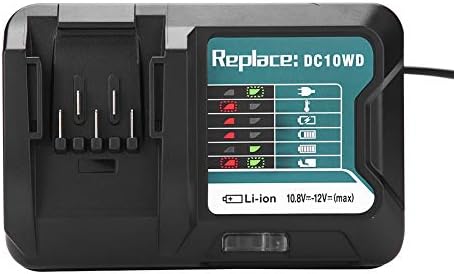
Image 3: The Zerone charger with its integrated power cord, ready for connection to an electrical outlet.
6. Ntuziaka ọrụ
Ịchaji batrị:
- Fanye batrị: Align the battery with the charger's slot and slide it in until it clicks securely into place.
- Nleba anya: The LED indicator will show the charging status. Refer to the "LED Indicator Guide" section for detailed explanations of the light patterns.
- Nchaji zuru ezu: Once the battery is fully charged, the LED indicator will show a solid green light.
- Wepu batrị: Press the release button on the battery (if applicable) and slide it out of the charger.
- Kpupu chaja: Kwupu chaja na oghere ọkụ mgbe anaghị eji ya.

Image 4: The Zerone charger with a compatible lithium-ion battery inserted, ready for charging.
7. Ntuziaka ihe ngosi LED
The charger features an LED display to communicate the battery's status:
| Ìhè ihe ngosi | Ọnọdụ |
|---|---|
| Nchapu ọkụ | Charger is plugged in and ready. |
| Ịcha uhie uhie | Battery is in cooling mode. Charging will begin once the battery temperature is within the optimal range. |
| Red Sustained Light | Battery is currently charging (0-100%). |
| Green Sustained Light | Charging is completed. The battery is fully charged. |
| Red and Green Flashing | Indicates a defective battery pack or charger. |

Foto 5: nso nso view of the charger's LED indicator panel, detailing the meaning of each light pattern for battery status.
8. Nlekọta
Proper maintenance ensures the longevity and performance of your charger:
- Nhicha: Disconnect the charger from the power supply before cleaning. Use a dry, soft cloth to wipe the exterior of the charger. Do not use water or chemical cleaners.
- Nchekwa: Store the charger in a dry, cool place, away from direct sunlight and moisture.
- Na-enyocha mgbe niile: Periodically inspect the charger and its cord for any signs of damage. If damage is found, discontinue use and seek professional repair.
9. Nchọpụta nsogbu
Ọ bụrụ na ị hụ nsogbu na chaja gị, lee nsogbu na ngwọta ndị a na-ahụkarị:
- Chaja anaghị arụ ọrụ:
- Ensure the power cord is securely plugged into both the charger and a working electrical outlet.
- Lelee ebe ọkụ eletrik ahụ site na iji ngwaọrụ ọzọ iji gosi na ọ na-arụ ọrụ.
- Battery not charging (Red Flashing LED):
- The battery may be too hot or too cold. Allow the battery to reach room temperature before attempting to charge again. Charging will automatically resume once the temperature is optimal.
- Battery not charging (Red and Green Flashing LED):
- This indicates a defective battery or charger. Try charging a different, known-good battery. If the issue persists, the charger may be faulty. If only the original battery causes this, the battery is likely defective.
- Nchaji nwayọ:
- Ensure the battery is fully seated in the charger.
- Verify that the battery is compatible with this charger.
Ọ bụrụ na usoro ndị a akwụsịghị nsogbu a, biko kpọtụrụ nkwado ndị ahịa.
10. Nkọwapụta
| Nkọwapụta | Nkọwa |
|---|---|
| Nọmba nlereanya | Zeronegfvetp6dn8-01 |
| Ntinye Voltage | 100V-260V AC, 50-60Hz |
| Mmepụta Voltage | 10.8V-12V (DC) |
| Akụkụ ngwaahịa | 4.72 x 1.97 x 5.91 sentimita asatọ |
| Ibu Ibu | 11.6 ounces (0.33 Kilogram) |
| Onye nrụpụta | Zerone |
| Ụdị batrị dakọtara | 10.8V-12V Lithium-Ion (e.g., BL1015, BL1016, BL1021B, BL1041B) |
| Compatible Charger Models | DC10WD, DC10SB, DC10WC |

Image 6: The bottom view of the Zerone charger, showing its input/output specifications and model number.
11. Akwụkwọ ikike na nkwado
For warranty information or technical support, please refer to the documentation provided with your purchase or contact Zerone customer service through the retailer where the product was purchased. Keep your purchase receipt as proof of purchase.