
Okwu mmalite
Daalụ maka ịzụrụasing the CAMRY CR 1153 Digital Radio. This manual provides important information regarding the safe operation, setup, and maintenance of your device. Please read these instructions thoroughly before use and retain them for future reference.
The CAMRY CR 1153 is a modern digital radio featuring a classic design with a wooden finish. It includes an alarm clock, thermometer, and calendar functions, making it a versatile addition to any room. It can be powered by mains electricity or batteries for portable use.
Ntuziaka nchekwa dị mkpa
- Gụọ ntuziaka niile tupu ị rụọ ọrụ ngwaọrụ.
- Debe ngwaọrụ ahụ pụọ na mmiri na mmiri.
- Do not expose to direct sunlight, heat sources, or extreme temperatures.
- Gbaa mbọ hụ na ikuku ikuku kwesịrị ekwesị; egbochila oghere ikuku.
- Use only the specified power adapter or batteries.
- Anwala ịkwasa ma ọ bụ rụkwaa ngwaọrụ n'onwe gị. Kpọtụrụ ndị ọrụ ruru eru ọrụ niile.
- Clean the device with a soft, dry cloth. Avoid abrasive cleaners.
- Tụfuo batrị n'ụzọ ziri ezi dịka iwu obodo siri dị.
Ngwaahịa gafereview
Familiarize yourself with the components of your CAMRY CR 1153 Digital Radio.
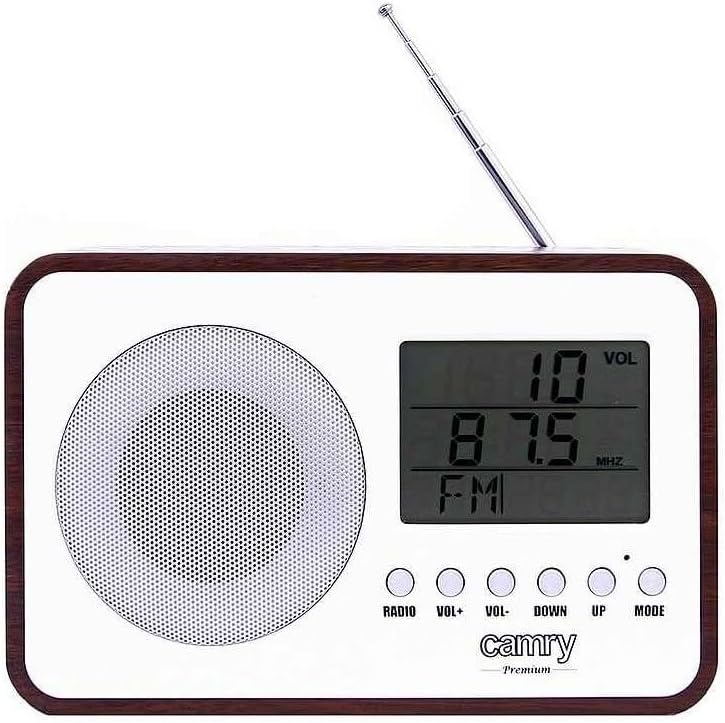
Foto 1: N'ihu View. This image shows the front of the CAMRY CR 1153 Digital Radio, featuring a large LCD display, a circular speaker grille on the left, and five control buttons below the display. The buttons are labeled RADIO, VOL+, VOL-, DOWN, UP, and MODE. A telescopic antenna is visible at the top right.

Figure 2: Display Close-up. A zuru ezu view of the radio's LCD screen, showing "VOL" at the top right, "89.8 MHz" as the current frequency, and "FM" indicating the band. The control buttons are partially visible below the screen.

Ọgụgụ 3: N'azụ View. This image displays the back of the radio, including the telescopic antenna on the left, a ventilation grille, and an open battery compartment designed for two AA (LR06) batteries. A label with model information (CR 1153, Input: DC 3V, 1A, Battery: 2x AA (LR06), Power: 0.4W) is also visible.

Foto nke 4: Nha. The radio is shown with its approximate measurements: 19 cm in width, 11 cm in height, and 7 cm in depth. The telescopic antenna is extended.
bọtịnụ njikwa:
- RADIO: Toggles between radio mode and other functions (e.g., clock/alarm).
- VOL+/VOL-: Na-edozi ọkwa olu.
- DOWN / UP: Used for tuning radio frequencies, setting time, or navigating menu options.
- Edị: Selects different operating modes or confirms settings.
Melite
Ịkwanye ngwaọrụ:
The CAMRY CR 1153 can be powered by either mains electricity or batteries.
- Ike isi: Connect the provided power adapter to the DC 3V input port on the back of the radio and then plug it into a standard wall outlet.
- Ike batrị:
- Open the battery compartment cover on the back of the radio (refer to Figure 3).
- Insert two AA (LR06) batteries, ensuring correct polarity (+/-).
- Mechie mkpuchi nke batrị batrị nke ọma.
Note: Batteries are not included. Remove batteries if the device will not be used for an extended period.
Initial Setup (Time and Date):
Upon first power-on or after battery replacement, you may need to set the time and date.
- Pịa MODE button repeatedly until the time setting appears on the display.
- Jiri ihe UP na N'ala Pịa bọtịnụ iji hazie awa ahụ. MODE iji gosi.
- Jiri ihe UP na N'ala Pịa bọtịnụ iji hazie nkeji ahụ. MODE iji gosi.
- Follow similar steps to set the year, month, and day.
Ntuziaka ọrụ
Radio Operation (FM):
- Gbasaa antenna telescopic ahụ maka nnabata kacha mma.
- Pịa RADIO button to switch to FM radio mode. The display will show the frequency.
- Jiri ihe UP na N'ala buttons to manually tune to your desired FM frequency.
- To automatically scan for stations, press and hold the UP or N'ala button for a few seconds. The radio will stop at the next strong signal.
- Gbanwee olu site na iji VOL+ na Vol- bọtịnụ.
Ọrụ elekere mkpu:
The radio features an alarm that can wake you with a standard alarm tone or your preferred radio station.
- Pịa MODE button repeatedly until the alarm setting appears (e.g., "ALARM SET").
- Jiri UP na N'ala iji tọọ oge mkpu ahụ, wee pịa MODE.
- Jiri UP na N'ala to set the alarm minute, then press MODE.
- Select the alarm source (Buzzer or FM Radio) using UP/N'ala, wee pịa MODE. If FM Radio is selected, ensure a station is tuned.
- To activate/deactivate the alarm, navigate to the alarm display and use the UP/N'ala button to toggle it On/Off. An alarm icon will appear on the display when active.
Thermometer and Calendar:
The radio automatically displays the current temperature and date. These functions are typically visible in the default clock display mode or can be cycled through using the MODE bọtịnụ.
Ọrụ Mmechi Akpaka:
The radio includes an automatic shut-off timer. By default, it is set to 10 minutes. This can be adjusted up to 1.5 hours (90 minutes).
- Mgbe redio na-akpọ, pịa MODE button until the "SLEEP" or "AUTO OFF" setting appears.
- Jiri ihe UP na N'ala buttons to adjust the desired shut-off time (e.g., 10, 20, 30, 60, 90 minutes, or OFF).
- The radio will automatically turn off after the selected duration.
Nlekọta
- Nhicha: Wipe the radio's surface with a soft, slightly damp cloth. The special protective coating helps resist grease and water splashes, making it easy to clean. Do not use harsh chemicals or abrasive materials.
- Ngbanwe batrị: Replace batteries when the display dims or the radio's performance degrades. Always replace both batteries simultaneously with new ones of the same type (AA LR06).
- Nchekwa: Ọ bụrụ na ị na-echekwa redio ahụ ruo ogologo oge, wepụ batrị ndị ahụ ka ọ ghara ịgbapụta. Debe ya n'ebe dị jụụ ma kpọọ nkụ.
Nchọpụta nsogbu
| Nsogbu | Ihe nwere ike ime | Ngwọta |
|---|---|---|
| Redio anaghị agba. | No power supply; batteries depleted or incorrectly inserted; power adapter not connected. | Check power adapter connection. Replace batteries or ensure correct polarity. |
| Nnabata redio adịghị mma. | Antenna not extended; weak signal area; interference from other electronics. | Fully extend the telescopic antenna. Reposition the radio. Move away from other electronic devices. |
| Oti mkpu anaghị ada ụda. | Alarm not activated; volume too low; incorrect alarm time set. | Ensure alarm is set to ON. Increase volume. Verify alarm time. |
| Ngosipụta adịchaghị ma ọ bụ oghere. | Ike batrị dị ala. | Replace batteries or connect to mains power. |
Nkọwapụta
- Ụdị: CR 1153
- Akara: CAMRY
- Ịnye ọkụ: DC 3V, 1A (Mains adapter) or 2 x AA (LR06) batteries
- Oriri ike: 0.4W
- Otu egwu redio: FM
- Atụmatụ pụrụ iche: Digital FM Radio, Alarm Clock, Thermometer, Calendar, Automatic Shut-off, Portable
- Njikọta: Auxiliary (for compatible devices like headphones, MP3 players)
- Akụkụ (ihe dị ka): 19 cm (obosara) x 11 cm (Elu) x 7 cm (Omimi)
- Onye nrụpụta: Adler Itd
- Mba onye si: France
Akwụkwọ ikike na nkwado
For warranty information and technical support, please refer to the warranty card included with your product or contact your local CAMRY distributor. Keep your proof of purchase for any warranty claims.