
UMLIFE W3001
UMLIFE XH-W3001 Digital LED Temperature Controller Module User Manual
Model: XH-W3001
Brand: UMLIFE
Ngwaahịa gafereview
The UMLIFE XH-W3001 Digital LED Temperature Controller Module is a versatile thermostat switch designed for precise temperature control in various applications. It features a clear digital display and a waterproof NTC10K probe, making it suitable for both heating and cooling modes. Its robust ABS flame retardant housing ensures safety and durability.

Figure 1: UMLIFE XH-W3001 Digital LED Temperature Controller Module with probe and wiring.
Atụmatụ igodo
- Ìhè ihe ngosi LED: Displays the current output status for easy monitoring.
- Digital Display Tube: Shows measuring temperature with high accuracy.
- Ụdị ọrụ abụọ: Supports both heating (start temperature < stop temperature) and cooling (start temperature > stop temperature) operations.
- Oke okpomoku sara mbara: Operates from -50℃ to 110℃ with a control precision of 0.1℃.
- Ụlọ na-adịgide adịgide: Constructed with ABS flame retardant material for high safety, aging resistance, and durability.
- Nyocha mmiri anaghị egbochi mmiri: Equipped with a 1-meter NTC10K stainless steel probe that is waterproof and rust-resistant.
Ntọala na Waya
Proper wiring is crucial for the safe and correct operation of the XH-W3001 module. Ensure all connections are secure before applying power.

Figure 2: Wiring diagram for the 12V XH-W3001 model. Connect the 12V input (red/black wires) to your power source. The output (yellow/black wires) connects to your load (e.g., a light bulb or fan). The sensor probe connects to the designated port.
Ntuziaka waya:
- Ntinye ike: Connect the red wire to the positive (+) terminal of your 12V DC power supply and the black wire to the negative (-) terminal.
- Mbupu Ibu: Connect the yellow wire to the positive (+) terminal of your heating or cooling device (load) and the black wire to the negative (-) terminal of the load. Ensure the load's voltage matches the controller's input voltagE (12V).
- Nyocha okpomọkụ: Insert the NTC10K waterproof probe into the designated two-pin connector on the module.
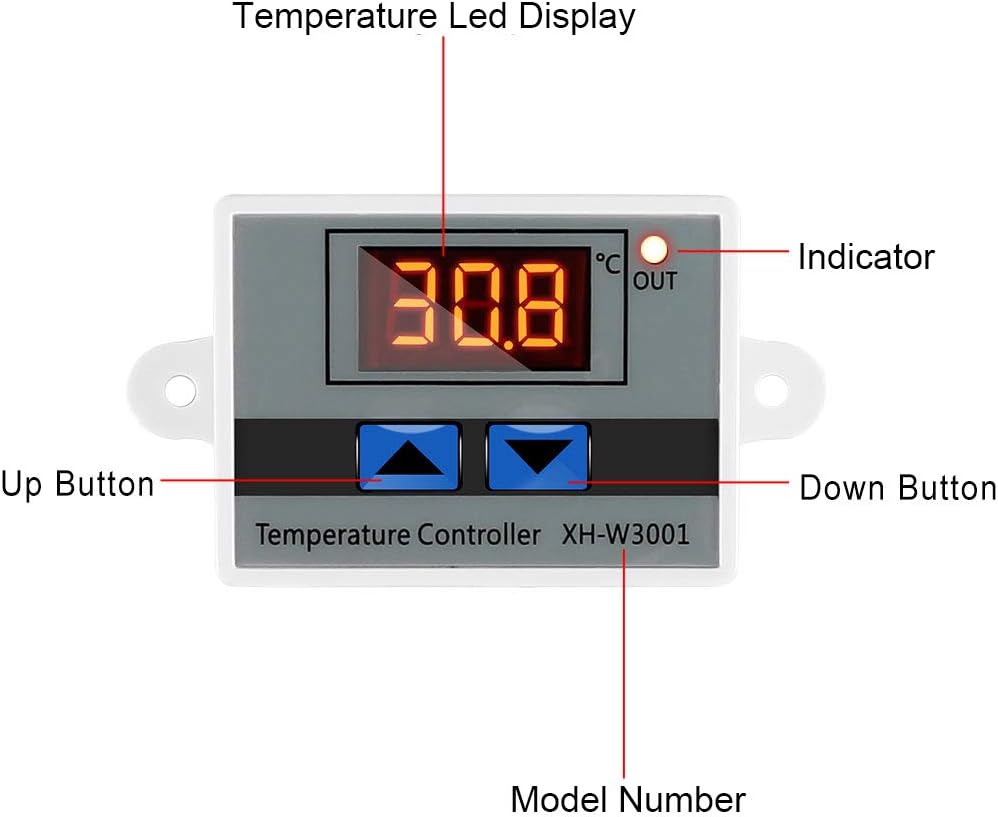
Figure 3: Labeled components of the XH-W3001 module, showing the temperature LED display, indicator light, up button, down button, and model number.
Ntuziaka ọrụ
The XH-W3001 has two main parameters to set: the start temperature and the stop temperature.
Setting Start Temperature:
- Pịa ma jide Bọtịnụ dị elu (left button) for approximately 3 seconds. The display will start flashing, indicating it's in setting mode.
- Jiri ihe Up na bọtịnụ ala to adjust the desired start temperature.
- Pịa Bọtịnụ dị elu again or wait for 3 seconds for the setting to be saved automatically.
Setting Stop Temperature:
- Pịa ma jide bọtịnụ ala (right button) for approximately 3 seconds. The display will start flashing.
- Jiri ihe Up na bọtịnụ ala to adjust the desired stop temperature.
- Pịa bọtịnụ ala again or wait for 3 seconds for the setting to be saved automatically.
Ụdị arụ ọrụ:
- Ụdị ikpo oku: If the Start Temperature is set ala than the Stop Temperature, the module will operate in heating mode. The output will turn ON when the temperature drops below the Start Temperature and turn OFF when it reaches the Stop Temperature.
- Ụdị oyi: If the Start Temperature is set elu than the Stop Temperature, the module will operate in cooling mode. The output will turn ON when the temperature rises above the Start Temperature and turn OFF when it drops to the Stop Temperature.
Note: The display shows temperature in Celsius only. There is no option to change to Fahrenheit.
Nlekọta
The XH-W3001 module is designed for low maintenance. Regular checks can ensure its longevity and accurate performance.
- Nhicha: Keep the module and probe clean. Use a soft, dry cloth to wipe the display and housing. For the probe, ensure it is free from debris that might affect temperature readings.
- Njikọ: Na-elele njikọ waya niile mgbe niile iji hụ na ha dị nchebe ma ghara imebi emebi. Njikọ ndị na-adịghị mma nwere ike ibute ọrụ ma ọ bụ mmebi mgbe ụfọdụ.
- Probe Condition: Inspect the temperature probe for any signs of damage to the cable or the sensor tip. Replace if damaged to maintain accuracy.
- gburugburu: Ensure the module is installed in an environment within its specified operating temperature and humidity ranges to prevent premature failure.
Nchọpụta nsogbu
If you encounter issues with your XH-W3001 module, refer to the following common problems and solutions:
| Nsogbu | Ihe nwere ike ime | Ngwọta |
|---|---|---|
| Display not lighting up. | No power, incorrect wiring, or faulty unit. | Check power supply connections. Ensure correct polarity. Verify power source is active. |
| Temperature reading is inaccurate. | Damaged probe, probe not properly connected, or environmental interference. | Ensure probe is securely connected. Inspect probe for physical damage. Test with another known accurate thermometer if possible. |
| Output not switching ON/OFF as expected. | Incorrect start/stop temperature settings, load not connected, or faulty relay. | Review and re-set start/stop temperatures. Verify load connections. Ensure the load's power requirements are within the module's specifications (10A 120W for 12V model). |
| Ngosipụta na-egosi "LLL" ma ọ bụ "HHH". | "LLL" indicates open circuit or probe not connected. "HHH" indicates short circuit or temperature exceeding range. | Check probe connection. Replace probe if damaged. Ensure temperature is within -50℃ to 110℃ range. |
Nkọwapụta
| Njirimara | Nkọwapụta |
|---|---|
| Nọmba nlereanya | XH-W3001 |
| Voltage | 12 Volts (for this specific model) |
| Mmepụta ugbu a | Oke 10A |
| Ike mmepụta | Max 120W (for 12V model) |
| Oke njikwa okpomọkụ | -50 ℃ ruo 110 ℃ |
| Izizi nha okpomọkụ | ±0.2℃ |
| Izizi njikwa okpomọkụ | ±0.1℃ |
| Typedị nyocha | NTC10K (Waterproof) |
| Ụdị ngosi | Ngosipụta dijitalụ LED |
| Ihe eji eme ụlọ | ABS ire ere |
| Akụkụ ngwaahịa | 3.3 x 1.8 x 1.1 sentimita asatọ |
| Ibu Ibu | 1.76 ounce (gram 50) |
Akwụkwọ ikike na nkwado
For warranty information or technical support regarding your UMLIFE XH-W3001 Digital LED Temperature Controller Module, please refer to the product packaging or contact UMLIFE customer service directly. Contact details are typically provided with your purchase or can be found on the manufacturer's official websaịtị.
Ask a question about this manual
Ask about setup, troubleshooting, compatibility, parts, safety, or missing instructions. Manuals+ will review the question and use this page’s manual context to help answer it.