
Easytry123 Easytry2094
Easytry123 Replacement Remote Control User Manual
For Samsung HW-J450/ZA, PS-WJ651, PS-WJ470/ZA, HW-J6502, HW-J650 Audio Soundbar Systems
1. Okwu mmalite
This manual provides instructions for the Easytry123 replacement remote control, designed for use with various Samsung audio soundbar systems. This remote control offers basic functionality for compatible models. Please note that as a replacement unit, it may not support all advanced functions of the original remote control.
Ụdị dakọtara:
- Samsung HW-J450/ZA
- Samsung PS-WJ651
- Samsung PS-WJ651/ZA
- Samsung PS-WJ470/ZA
- Samsung HW-J6502
- Samsung HW-J650
2. Nhazi
2.1 Ntinye batrị
The remote control requires batteries for operation. Batteries are not included with the remote control and must be purchased separately. This remote typically uses standard Lithium batteries.
- Chọta ebe batrị dị n'azụ nke njikwa anya.
- Remove the battery compartment cover by sliding or gently prying it open.
- Insert the new batteries, ensuring the correct polarity (+ and -) as indicated inside the compartment.
- Dochie mkpuchi nke batrị batrị ruo mgbe ọ pịrị na ebe nchekwa.

Figure 1: Remote control with battery compartment open.
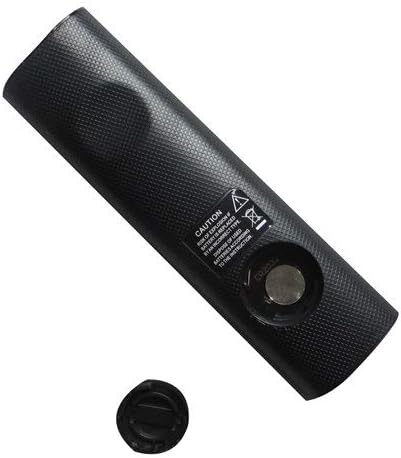
Figure 2: Remote control showing the battery cap detached.
2.2 Ojiji mbụ
This remote control utilizes infrared (IR) technology. No complex pairing or programming is typically required. Once batteries are installed, point the remote directly at your Samsung soundbar system and begin operation.
3. Ntuziaka ọrụ
The remote control features 15 buttons for various functions. While specific button labels may vary, common functions include:
- Ike: Turns the soundbar system on or off.
- Elu elu/ala: Na-emezi ọkwa mmepụta ọdịyo.
- Mechie: Na-eme ka ihe na-esi na ọdịyo apụta ghara ịdị jụụ.
- Ntinye/Isi mmalite: Cycles through available audio input sources (e.g., HDMI, Optical, Bluetooth).
- Bọtịnụ igodo nsoroụzọ: Used for menu navigation (if supported by the soundbar and remote).
- Njikwa ọkpụkpọ: Play, Pause, Skip (if controlling a connected media device).
For optimal performance, ensure a clear line of sight between the remote control and the soundbar's IR receiver. The maximum effective range is approximately 10 meters (33 feet).
4. Nlekọta
4.1 nnọchi batrị
Replace batteries when the remote control's response becomes inconsistent or stops working. Always replace all batteries at the same time with new ones of the same type. Do not mix old and new batteries, or different types of batteries.
4.2 Nhicha
Iji hichaa njikwa remote, jiri ákwà dị nro ma kpọọ nkụ hichaa ya. Ejila ihe nhicha mmiri, ihe nhicha abrasive, ma ọ bụ ihe mgbaze kemịkalụ, n'ihi na ihe ndị a nwere ike imebi elu remote ma ọ bụ ihe dị n'ime ya.
4.3 Nchekwa
Debe ihe njikwa remote n'ebe dị jụụ ma kpọọ nkụ, ebe anwụ na-anaghị apụta kpọmkwem, ebe okpomọkụ dị oke elu. Ọ bụrụ na a gaghị eji remote ahụ ruo ogologo oge, a na-atụ aro ka ị wepụ batrị ndị ahụ iji gbochie mmiri ịpụpụta.
5. Nchọpụta nsogbu
- Remote anaghị aza:
- Lelee ma etinyere batrị ndị ahụ nke ọma site na polarity kwesịrị ekwesị.
- Dochie batrị ndị dị ọhụrụ.
- Ensure there is a clear line of sight between the remote and the soundbar's IR receiver. Remove any obstructions.
- Make sure you are within the effective operating range (approximately 10 meters).
- Some functions do not work:
- As a replacement remote, it may not support all advanced or specific functions of the original equipment. This is normal for universal or replacement remotes.
- Verify that your soundbar model is listed as compatible in the Introduction section.
6. Nkọwapụta
| Njirimara | Nkọwapụta |
|---|---|
| Ụdị | Easytry123 |
| Aha Nlereanya | Easytry2094 |
| Teknụzụ Njikọta | Infrared (IR) |
| Ọnụọgụ bọtịnụ | 15 |
| Ụdị njikwa | Njikwa bọtịnụ |
| Oke kacha | 10 mita |
| Ụdị batrị | Lithium (not included) |
| Agba | Nwa |
| Ngwa dakọtara | Samsung Audio Soundbar Systems (specific models listed) |
7. Akwụkwọ ikike na nkwado
For warranty information and customer support, please refer to the seller or retailer from whom you purchased this product. Specific warranty terms and support channels are typically provided at the point of sale.
Ask a question about this manual
Ask about setup, troubleshooting, compatibility, parts, safety, or missing instructions. Manuals+ will review the question and use this page’s manual context to help answer it.