
1. Okwu mmalite
This manual provides instructions for the proper setup, operation, and maintenance of your Acer B247Y 23.8-inch LED LCD Monitor. Please read this manual thoroughly before using your monitor to ensure optimal performance and to prevent damage.
The Acer B247Y is a 23.8-inch Full HD (1920 x 1080) monitor featuring an IPS panel for wide viewing angles, an anti-glare display, and a frameless design on three sides. It includes multiple connectivity options and an ergonomic stand for comfortable viewing.
2. Ihe ngwugwu
Verify that all items are present in your package. If any items are missing or damaged, contact your retailer.
- Acer B247Y 23.8-inch LED LCD Monitor
- Nyochaa Stand (Base and Olu)
- Power Adapter (Internal) and Power Cable
- USB VGA
- Ihe ngosi DisplayPort 1.2
- HDMI USB
- Audio-in Cable (if included)
- Audio-out Cable (if included)
- Akwụkwọ ntuziaka (akwụkwọ a)
3. Nhazi
3.1 Ịchịkọta Monitor Stand
The monitor comes with a detachable foot stand. Follow these steps to assemble:
- Jiri nlezianya wepụ ihe nleba anya ma guzobe ihe ndị dị na nkwakọ ngwaahịa ahụ.
- Tinye olu kwụ ọtọ na panel nlekota. Gbaa mbọ hụ na ọ pịrị na ebe nchekwa.
- Attach the stand base to the stand neck. Tighten any screws if provided, usually located on the underside of the base.
- Debe ihe nleba anya gbakọtara n'elu kwụsiri ike ma dịkwa larịị.
Mara: The monitor also supports VESA mount (100 x 100 mm) for wall or arm mounting. Refer to your VESA mount kit instructions for installation.
3.2 Ijikọ Monitor
Jikọọ ihe nleba anya na kọmputa gị ma ọ bụ ngwaọrụ ndị ọzọ site na iji eriri kwesịrị ekwesị.
- Njikọ vidiyo:
- Connect one end of the DisplayPort cable to the DisplayPort output on your computer and the other end to the DisplayPort input on the monitor.
- Alternatively, connect an HDMI cable from your computer's HDMI output to the monitor's HDMI input.
- For older systems, connect a VGA cable from your computer's VGA output to the monitor's VGA input.
- Njikọ Audio:
- If using VGA or DisplayPort without audio, connect an audio cable from your computer's audio output to the monitor's audio-in port for integrated speakers.
- To connect external speakers or headphones, use the monitor's audio-out port.
- Njikọ ike:
- Jikọọ eriri ọkụ na ntinye ike nke onye nleba anya, wee gbanye nsọtụ nke ọzọ n'ime oghere eletrik gbadoro ụkwụ.

Figure 3.2.1: Acer B247Y Monitor with Stand. This image illustrates the overall appearance of the monitor when fully assembled on its stand.
4. Ntuziaka ọrụ
4.1 Gbanyụọ/ gbanyụọ
Press the power button, usually located on the bottom right or rear of the monitor, to turn the monitor on or off. The power indicator light will illuminate when the monitor is on.
4.2 Adjusting Monitor Settings (OSD)
The monitor features an On-Screen Display (OSD) menu for adjusting various settings. Use the control buttons (typically located near the power button) to navigate and select options within the OSD menu.
Ntọala OSD nkịtị gụnyere:
- Foto: Brightness, Contrast, Color Temperature, Gamma, Acer eColor Management modes (e.g., Dark Room, Eco).
- Audio: Volume control for integrated speakers or audio-out.
- Ntinye: Select the active video input source (VGA, DisplayPort, HDMI).
- OSD: OSD timeout, language.
- Njikwa: Tọgharia ka nrụpụta ụlọ ọrụ.
4.3 Mgbanwe Ergonomic
The Acer B247Y monitor stand offers several ergonomic adjustments to optimize your viewahụmahụ nke:
- Gbaa: Adjust the screen angle from -5 degrees to 25 degrees (forward/backward).
- Swivel: Rotate the monitor horizontally up to +/- 45 degrees.
- Ndozi elu: Adjust the screen height by up to 120mm.
- Pivot: Rotate the screen 90 degrees for portrait viewing.
5. Nlekọta
Ndozi nke ọma na-eme ka ogologo ndụ na arụmọrụ kacha mma nke nyocha gị.
- Na-ehicha ihuenyo: Jiri nwayọ hichaa ihuenyo ahụ site na iji akwa dị nro na-enweghị lint. Maka akara isi ike, dampen the cloth with a small amount of water or a non-abrasive screen cleaner. Do not spray liquid directly onto the screen.
- Na-ehicha Casing: Jiri akwa dị nro dị nro hichaa ihe nleba anya casing. Zere iji ihe nhicha siri ike ma ọ bụ ihe nhicha na-eme ka ihe dị nro.
- Igwe ikuku: Gbaa mbọ hụ na egbochighị oghere ikuku na ihe nleba anya ka ọ ghara ikpo oke ọkụ.
- Gbanyụọ: Always turn off the monitor and unplug it from the power outlet before cleaning or when not in use for extended periods.
6. Nchọpụta nsogbu
Ọ bụrụ na ị hụ nsogbu na ihe nlele gị, gaa na usoro ndị a na-emekarị maka nchọpụta nsogbu:
- No Power / Monitor Does Not Turn On:
- Hụ na eriri ọkụ eletrik ahụ jikọtara nke ọma na ihe nlele ahụ na oghere ọkụ eletrik na-arụ ọrụ.
- Nyochaa na ntinye ọkụ na-arụ ọrụ site na nkwụnye na ngwaọrụ ọzọ.
- Pịa bọtịnụ ike ike.
- No Image / "No Signal" Message:
- Check that the video cable (DisplayPort, HDMI, or VGA) is securely connected to both the monitor and your computer.
- Hụ na kọmputa gị na-agba ọkụ, ọ bụghị n'ọnọdụ ụra.
- Use the OSD menu to manually select the correct input source.
- Nwaa eriri vidiyo ma ọ bụ ọdụ ụgbọ mmiri dị iche ma ọ bụrụ na ọ dị.
- Image is Distorted or Unclear:
- Ensure the display resolution on your computer is set to the monitor's native resolution (1920 x 1080).
- Adjust brightness, contrast, and other picture settings via the OSD menu.
- Check for any physical damage to the screen or cables.
- Enweghị ụda sitere na ndị na-ekwu okwu:
- Increase the volume using the OSD menu or your computer's sound settings.
- Ensure the audio cable (if used) is properly connected.
- Hụ na ahọpụtara ngwaọrụ mmepụta ọdịyo ziri ezi na ntọala ụda kọmputa gị.
7. Nkọwapụta
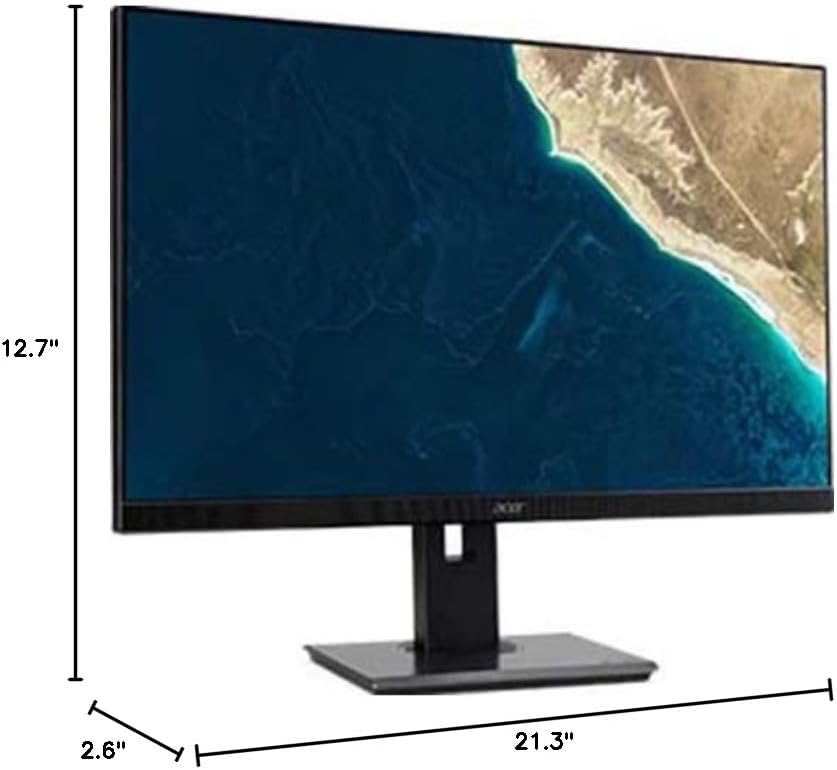
Figure 7.1.1: Acer B247Y Monitor Dimensions. This image shows the approximate height (12.7"), width (21.3"), and depth (2.6") of the monitor without the stand.
| Njirimara | Nkọwapụta |
|---|---|
| Nọmba nlereanya | B247Y |
| Nha ihuenyo | 23.8 sentimita (60.5 cm) |
| Ụdị ngosi | LED LCD, IPS Panel, Anti-glare (AG) |
| Mkpebi kachasị | 1920 x 1080 (HD zuru ezu) |
| Akụkụ akụkụ | 16:9 |
| Ọnụego ume ọhụrụ | 75 Hz |
| Oge nzaghachi | 4ms (gray-to-gray) |
| Icha ọkụ (nke a na-ahụkarị) | 250 cd/m² |
| Ọnụọgụ Ntugharị ala ala | 1,000:1 |
| Ratio dị iche iche na-agbanwe agbanwe | 100,000,000:1 |
| ViewAngle (H/V) | 178° / 178° |
| Njikọta | VGA, DisplayPort 1.2, HDMI, Audio-in, Audio-out |
| Ndị na-ekwu okwu ọnụ | 2 x 2.0W |
| Ndozi ergonomic | Tilt (-5° to 25°), Swivel (+/- 45°), Height Adjustment (120mm), Pivot (90°) |
| VESA Mount Support | 100 x 100 mm |
| Akụkụ ya na Nkwụrụ (W x H x D) | 21.3" x 14.9"~19.6" x 7.6" (54.0cm x 37.9cm~49.9cm x 19.3cm) |
| Arọ na Stand | 12.3 lb. (5.6 n'arọ) |
| Ihe nkwụnye ọkụ | Ime |
| Agba | Nwa |
8. Akwụkwọ ikike na nkwado
Your Acer B247Y monitor comes with a Limited Three-Year Warranty. Please retain your proof of purchase for warranty claims.
For technical support, service, or warranty inquiries, please refer to the official Acer support website or contact their customer service department. Contact information can typically be found on the Acer websaịtị ma ọ bụ na kaadị akwụkwọ ikike nke dị na ngwaahịa gị.
Mkpọchi Kensington: The monitor supports a Kensington lock for security. Attach a compatible Kensington lock (sold separately) to the security slot on the monitor to deter theft.