
1. Okwu mmalite
The DROK LD25 USB Load Tester is an intelligent temperature-controlled electronic load module designed for testing USB and Type-C power sources and cables. It features high power, high current, and high voltage capabilities, along with intelligent control for precise measurements. This device is ideal for verifying charger output capacity, testing cable quality, and performing bulk aging tests.
It provides a constant current discharge task up to 4A, 25V, and 25W, offering a user-friendly interface and robust performance for diverse testing requirements.
2. Ozi nchekwa dị mkpa
Ịdọ aka ná ntị: This product does not have reverse connection protection. The input polarity cannot be reversed. Reversing the input polarity will cause permanent damage to the product and it cannot be repaired. Always ensure correct polarity before connecting the device.
Gbaa mbọ hụ na vol na -arụ ọrụtage, current, and power do not exceed the rated maximums to prevent damage to the device or the power source being tested.
3. Njirimara ngwaahịa na akụrụngwa
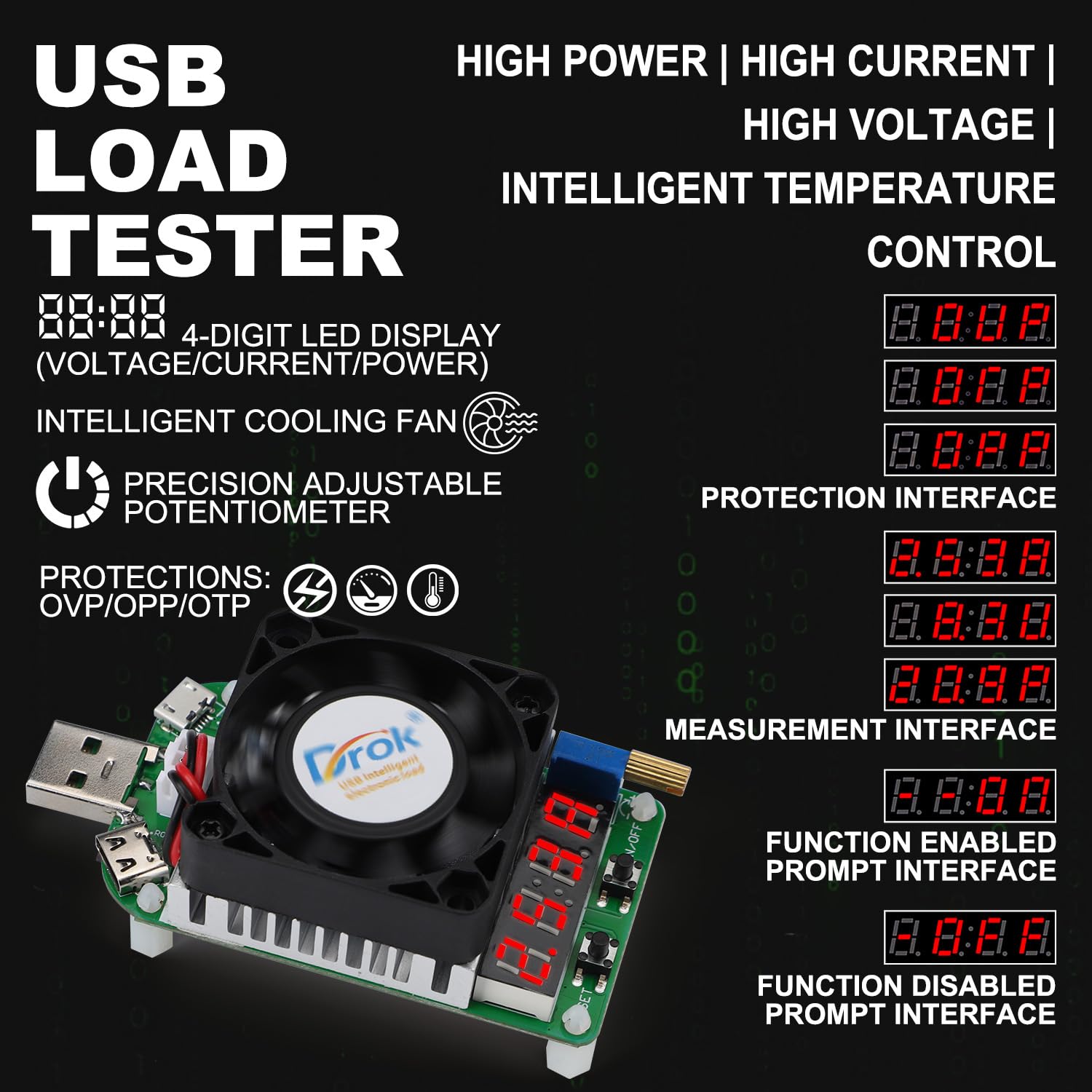

- 4-Digit LED Digital Display: Ihe ngosi voltage, current, and power values.
- Fan oyi nwere ọgụgụ isi: Oil bearing fan with intelligent temperature control, speed up to 5800±10% RPM. Activates automatically when current exceeds 2A or temperature exceeds 40°C.
- Precision Adjustable Potentiometer: Allows fine-tuning of the output current.
- USB Male Port: For connecting to USB power sources.
- Micro USB Port (Max. Current: 2A): For testing Micro USB cables and devices.
- Type-C Port (Max. Current: 4A): For testing Type-C cables and devices.
- Igodo ngbanwu/ Gbanyụọ: Short press to toggle the load output on or off. Long press to set the default boot state (output on or off) for future use.
- SET igodo: Short press to cycle through the display modes: Voltage (V), Current (A), and Power (W). Long press to enter the protection setting menu.
- Full Aluminum Heat Sink: Efficient heat dissipation for stable operation.
- Njirimara nchedo: N'elu voltage protection (OVP), Over-power protection (OPP), Over-temperature protection (OTP).
4. Nkọwapụta

| Oke | Uru |
|---|---|
| Ọnụ na-arụ ọrụ Voltage | DC 4-25.0V |
| Ike ịchaji kacha | 25W |
| Enyere aha na-arụ ọrụ ugbu a | 0.25-4.00A (Min. 0.05A when fan is off) |
| Ọsọ fan | Oil bearing intelligent temperature control fan, 5800±10% RPM |
| Constant Current Resolution | ± (1%+3 mkpụrụọnụọgụgụ) |
| Usoro ikposa ọkụ | Intelligent temperature control fan + Aluminum heat sink |
| Okpomọkụ na-arụ ọrụ | -10 ℃ ~ + 40 ℃ |
| Potentiometer na-agbanwe agbanwe | Precision multiloop adjustable potentiometer |
| Ụdị ngosi | 4-bit LED tube |
| Ebe Mgbasa | Micro USB port, Type-C port |
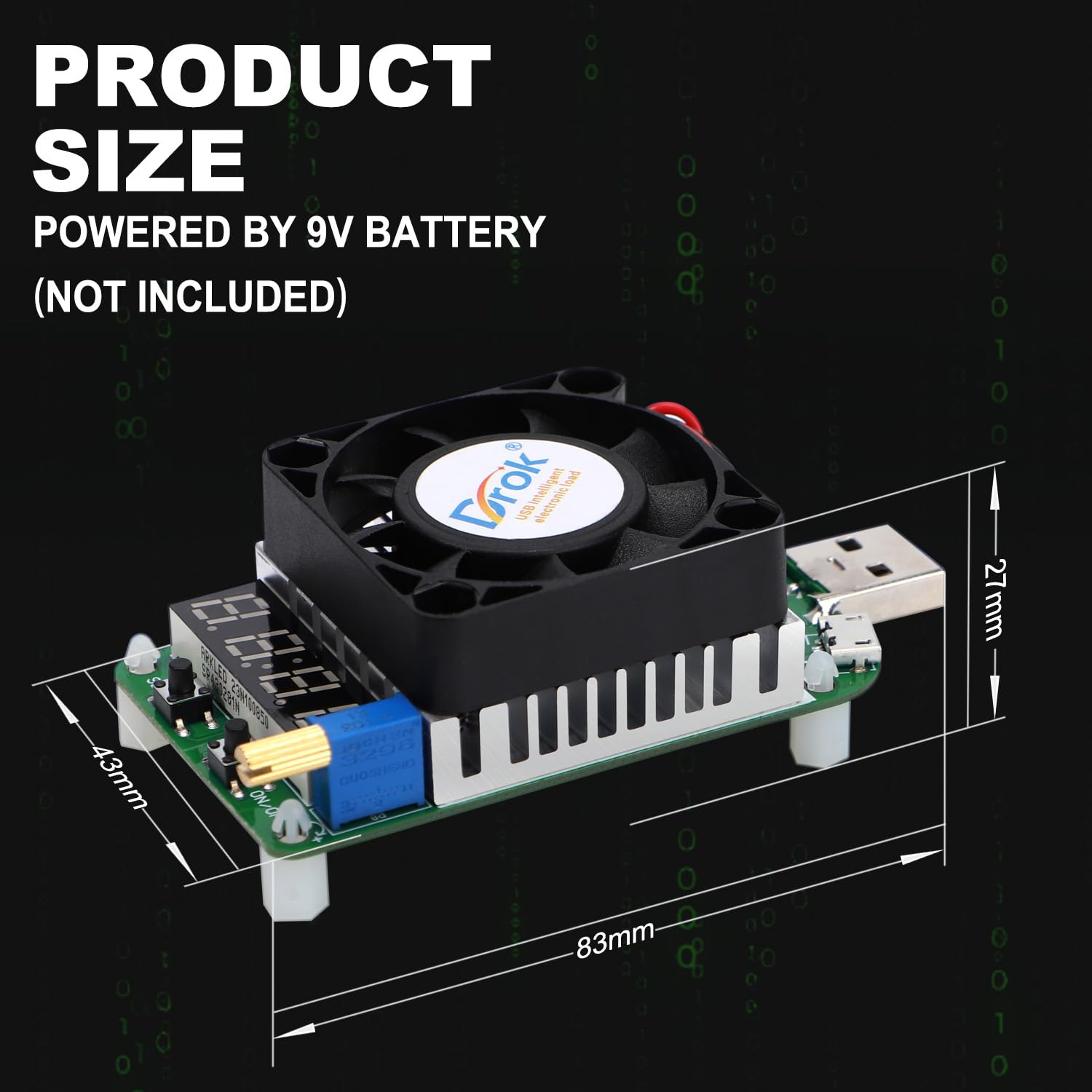
| Akụkụ ngwaahịa | 84 x 41 x 28mm |
| Ibu ngwaahịa | 57g |
5. Nhazi
- Prepare Power Source: Ensure the power source (e.g., USB charger, power bank) you intend to test is within the operating voltage nso nke DC 4-25.0V.
- Connect the Load Tester:
- For standard USB power sources: Plug the USB male port of the LD25 directly into the USB output port of your charger or power bank.
- For Micro USB or Type-C cables/devices: Connect the Micro USB or Type-C port of the LD25 to the respective cable or device.
- Nyochaa njikọ: Once connected, the 4-digit LED display should illuminate, indicating the device is powered on. If it does not power on, check the connection and ensure the power source is active.
- Initial Current Setting: Before applying a load, ensure the adjustable potentiometer is set to a low current or off position to avoid sudden high current draw.
6. Ntuziaka ọrụ
6.1 Basic Arụmọrụ
- Gbanyụọ/ Gbanyụọ:
- Mkpirisi pịa Igodo ngbanwu/ Gbanyụọ to toggle the load output on or off.
- Pịa ogologo Igodo ngbanwu/ Gbanyụọ to set the default boot state (output on or off) for future use.
- Na-emezi ugbu a: Tugharia ihe Potentiometer na-agbanwe agbanwe to increase or decrease the discharge current. The current value will be displayed on the LED screen. Adjust gradually to the desired load.
- Ụdị ngosi: Mkpirisi pịa SET igodo to cycle through the display modes: Voltage (V), Current (A), and Power (W).
- Setting Protection Modes: Pịa ogologo SET igodo to enter the protection setting menu. Refer to Section 7 for details on protection functions.
6.2 Intelligent Cooling Fan Operation
The intelligent cooling fan will automatically activate under the following conditions to maintain optimal operating temperature:
- When the discharge current exceeds 2A.
- When the internal temperature of the device exceeds 40°C.
The fan supports continuous 25W discharge and ensures uninterrupted operation by efficiently dissipating heat.

7. Protection Functions and Troubleshooting
The LD25 USB Load Tester incorporates several protection mechanisms to ensure safe operation and prevent damage to the device and connected equipment.
- OVP (Ofefe-Voltage Nchedo):
- Activates if the input voltage exceeds 25V (up to 30V).
- The digital display will show "OVP".
- Ịkpachara anya: Voltages exceeding 30V can cause permanent damage.
- OTP (Over-Temperature Protection):
- Activates if the load temperature exceeds 80°C.
- The device will stop working, and the digital display will show "OTP".
- OPP (Over-Power Protection):
- Activates if the discharge power exceeds 25W.
- The device will stop working, and the digital display will show "OPP".
When a protection condition is met, the device will halt operation. To resume, address the underlying issue (e.g., reduce voltage, allow cooling, reduce power draw) and then manually or automatically reset the load as configured.
8. Ngwa
The DROK LD25 USB Load Tester is a versatile tool for various testing scenarios:
- Charger Testing: Measure the actual output current capacity of USB chargers and power banks.
- Cable Quality Testing: Evaluate the quality and performance of Micro USB and Type-C charging cables by observing voltage drop under load.
- Bulk Aging Tests: Suitable for factory quality control and aging tests of chargers and power supplies.
- Power Delivery Verification: Confirm stable power output from various USB power sources.

9. Nlekọta
To ensure the longevity and accurate performance of your DROK LD25 USB Load Tester:
- Nhicha: Jiri ákwà dị nro ma kpọọ nkụ hichaa ngwaọrụ ahụ. Ejila ihe nhicha mmiri ma ọ bụ ihe mgbaze.
- Nchekwa: Chekwaa ngwaọrụ ahụ n'ebe dị jụụ, kpọrọ nkụ na-adịghị na ìhè anyanwụ kpọmkwem na oke okpomọkụ.
- Ijikwa: Zere idobe ma ọ bụ idobe ngwaọrụ ahụ na mmetụta siri ike.
- Igwe ikuku: Ensure the cooling fan and heat sink are free from dust and obstructions to maintain efficient heat dissipation.