
Okwu mmalite
This manual provides detailed instructions for the setup, operation, and maintenance of your Zerone BN59-01179A Replacement Remote Control. Please read this manual carefully before using the product to ensure proper functionality and longevity.
Ngwaahịa gafereview
The Zerone BN59-01179A is a universal replacement remote control designed for compatible Smart TVs. It offers a compact design and a comprehensive set of buttons for various functions.
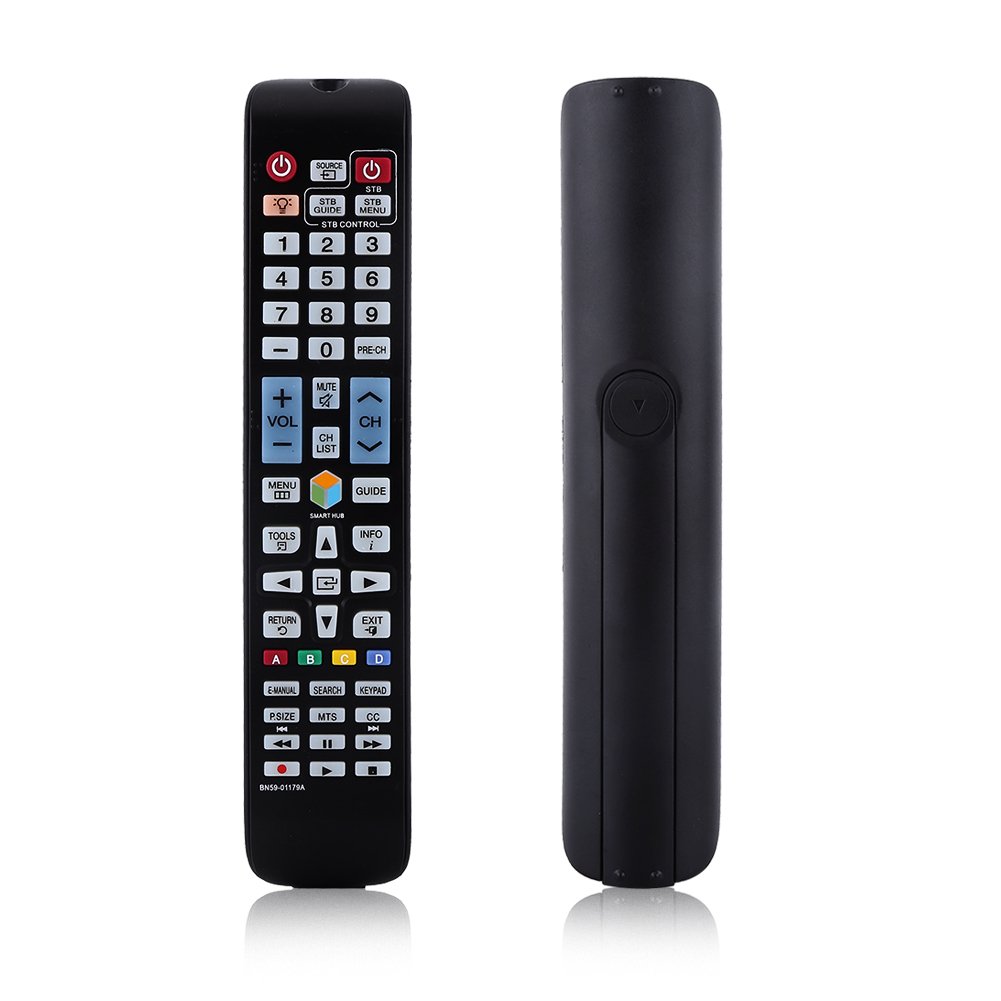
Foto: N'ihu view of the Zerone BN59-01179A remote control, showing its full layout and approximate dimensions (23cm length, 4.7cm width, 2cm thickness).
Melite
Ntinye batrị
- Chọta ebe batrị dị n'azụ nke njikwa anya.
- Mia mkpuchi batrị ala ma ọ bụ pịa eriri ma welie ya ka imepee.
- Fanye batrị abụọ (2) AAA, na-ahụ na njedebe dị mma (+) na nke na-adịghị mma (-) dabara nke ọma na akara ndị dị n'ime ụlọ ahụ.
- Dochie mkpuchi batrị ahụ site n'ịdọghachi ya n'ọnọdụ ya ruo mgbe ọ pịrị aka nke ọma.
Mara: Batteries are not included with the remote control. Please use new AAA batteries for optimal performance.

Image: The back of the remote control with the battery cover removed, showing the empty battery compartment ready for two AAA batteries.
Ntuziaka ọrụ
This remote control is designed for immediate use with compatible TVs without requiring programming. Simply insert batteries and point the remote towards your television.
Ọrụ igodo

Image: A hand holding the Zerone remote control, with inset close-ups highlighting the power/source buttons and the navigation/Smart Hub buttons.
- Ike (Bọtịnụ Uhie): Gbanyụọ ma ọ bụ gbanyụọ TV.
- Isi mmalite: Na-ahọrọ isi mmalite ntinye (HDMI, AV, wdg).
- STB/DTV: Switches between Set-Top Box and Digital TV modes.
- Igodo ọnụọgụ (0-9): Nhọrọ ọwa ozugbo.
- PRE-CH: Laghachi na ọwa gara aga.
- Olu (+/-): Na-edozi ọkwa olu.
- Mechie: Mebie ma ọ bụ mebie ụda TV.
- Channel (CH Up/Down): Na-agbanwe ọwa TV n'usoro.
- Ndepụta CH: Na-egosiputa ndepụta ọwa.
- NchNhr: Na-abanye na menu isi nke TV.
- Smart Hub: Opens the Smart Hub interface for apps and streaming services.
- NDỤMỌDỤ: Na-egosi ntuziaka mmemme eletrọniki.
- Ozi: Shows information about the current program.
- Ngwa: Accesses quick settings or contextual options.
- Navigation Buttons (Up/Down/Left/Right/Enter): Navigates through menus and selects options.
- Nlaghachi: Na-alaghachi na ihuenyo gara aga ma ọ bụ menu.
- ỤZỌ ỌPỤPỤ: Na-apụ na menu ma ọ bụ ngwa dị ugbu a.
- Color Buttons (A, B, C, D): Ọrụ dị iche iche dabere na ụdị TV na ngwa.
- E-MANUAL: Accesses the TV's electronic manual.
- Chọọ: Opens the search function.
- KEYPAD: Displays an on-screen keypad.
- P.SIZE: Adjusts picture size/aspect ratio.
- MTS: Multi-channel Television Sound (SAP).
- CC: Closed Captioning.
- Bọtịnụ Njikwa Mgbasa Ozi (Kpọọ, Kwụsị, Kwụsị, Laghachi azụ, Gaa n'ihu ngwa ngwa): Na -ejikwa ọkpụkpọ mgbasa ozi.
Nlekọta
- Nhicha: Jiri akwa dị nro dị nro hichaa njikwa ime ihe. Ejila ihe na-ehicha mmiri mmiri ma ọ bụ ihe abrasive.
- Ngbanwe batrị: Replace batteries when the remote's response becomes sluggish or stops working. Always replace both batteries at the same time with new ones.
- Nchekwa: Ọ bụrụ na agaghị eji ebe nchekwa ahụ ruo ogologo oge, wepụ batrị ndị ahụ ka ọ ghara ịpụpụ na mmebi.
- Zere mkpughepu: Keep the remote away from direct sunlight, heat sources, and moisture.
Nchọpụta nsogbu
- Remote anaghị aza:
- Hụ na etinyere batrị nke ọma na polarity ziri ezi.
- Jiri batrị AAA ọhụrụ dochie batrị ochie.
- Lelee ma ọ bụrụ na ihe mgbochi ọ bụla dị n'etiti ihe ntanetị na ihe mmetụta infrared nke TV.
- Hụ na e tinyere ihe njikwa anya kpọmkwem na TV.
- Oke oke:
- Dochie batrị.
- Ensure there are no strong light sources or electronic devices interfering with the signal.
- Bọtịnụ ndị akọwapụtara anaghị arụ ọrụ:
- Hichaa ihe njikwa remote, ọkachasị gburugburu bọtịnụ ndị na-anaghị anabata ozi, iji wepụ unyi ma ọ bụ ihe mkpofu ọ bụla.
- If the issue persists after battery replacement and cleaning, the remote may be faulty.
Nkọwapụta
| Njirimara | Nkọwa |
|---|---|
| Ụdị | Zerone |
| Aha Nlereanya | Zerone32687x9gqs (BN59-01179A compatible) |
| Teknụzụ Njikọta | Infrared |
| Ngwa dakọtara | Television (specifically for Samsung BN59-01179A compatible models) |
| Ọnụọgụ ngwaọrụ akwadoro kacha | 8 (Universal functionality) |
| Ọnụọgụ bọtịnụ | 12 (referring to main function groups, actual count is higher) |
| Ụdị njikwa | Njikwa bọtịnụ |
| Oke kacha | 8 mita |
| Ụdị batrị | AAA |
| Ọnụọgụ nke batrị | A chọrọ batrị 2 AAA (anaghị etinye ya) |
| Njirimara Pụrụ Iche | Universal replacement, no programming required |
Akwụkwọ ikike na nkwado
Zerone provides a service guarantee for this product. If you encounter any questions or issues regarding your remote control, please contact the seller or manufacturer for assistance. They will provide follow-up services to address your concerns.
For specific warranty details and support contact information, please refer to your purchase documentation or the retailer's websaịtị.