
Okwu mmalite
This manual provides detailed instructions for the setup, operation, and maintenance of your TOZO T8 True Wireless Earbuds. Please read this manual thoroughly before using the product to ensure proper function and longevity.
Kedu ihe dị na Igbe ahụ
Mgbe ebupuchara, biko hụ na ihe niile edepụtara n'okpuru nọ:
- Egbe ntị TOZO T8 True Wireless (aka ekpe na aka nri)
- Nchaji case
- Igwe nchaji USB
- Akwụkwọ ntuziaka onye ọrụ
- Ear Cushions (3 sets: Small, Medium, Large)

Image: Contents of the TOZO T8 package, including earbuds, charging case, and accessories.
Melite
1. Nchaji mbụ
Before first use, fully charge the earbuds and the charging case. Connect the provided USB cable to the charging port on the case and a power source. The indicator light on the case will show charging status.

Image: The TOZO T8 charging case with earbuds, illustrating the charging process.
2. Ijikọ na ngwaọrụ gị
- Remove both earbuds from the charging case. They will automatically power on and connect to each other. You will hear an audio cue "Connected", followed by "Left Channel" and "Right Channel".
- Enable Bluetooth on your mobile phone or other device.
- Chọọ maka available Bluetooth devices and select "TOZO-T8-R". Do not select "TOZO-T8-L".
- Once connected, you will hear "Second Device Connected", and you can begin playing audio.

Image: Visual guide demonstrating the steps to pair TOZO T8 earbuds with a mobile device.
3. Yiri ekwe ntị
Select the ear tip size that provides the best fit and seal for optimal sound quality and comfort. Gently insert the earbud into your ear canal and slightly rotate it to ensure a secure and comfortable fit.
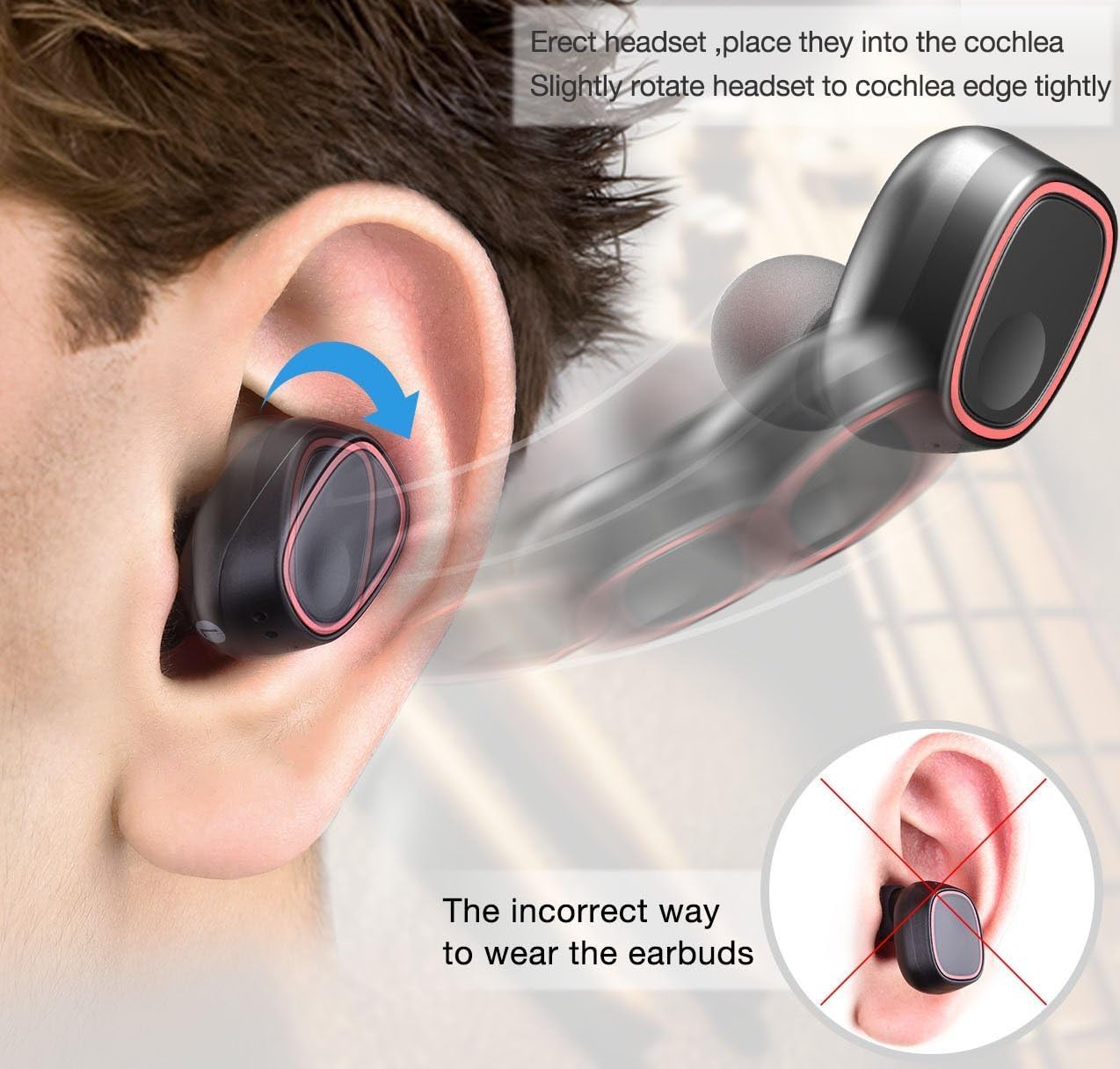
Image: Illustration detailing the proper method for wearing the earbuds and an example of an incorrect fit.
Ntuziaka ọrụ
The TOZO T8 earbuds feature touch controls for various functions:
- Gwuo/kwụsịtụ: Tap the button on either earbud once.
- Azịza/Kwụsị Oku: Tap the button on either earbud once.
- Jụ oku: Press and hold the button on either earbud for 2 seconds.
- Track na-esote: Double-tap the button on the right earbud.
- Gara aga Track: Double-tap the button on the left earbud.
- Enyemaka Olu: Triple-tap the button on either earbud.
The earbuds can be used individually. To use a single earbud, simply remove one from the charging case. It will automatically enter single-earbud mode. To switch back to stereo, remove the other earbud from the case.
Nlekọta
- Keep the earbuds and charging case clean and dry. Use a soft, dry cloth to wipe them.
- Avoid exposing the product to extreme temperatures, humidity, or corrosive substances.
- Chekwaa ntị ntị n'akpa chaja ha mgbe anaghị eji ya iji chebe ha ma debe ya ebubo.
- Na-ehicha kọntaktị chaja dị na ntị na ihe mkpuchi ahụ mgbe niile iji hụ na chaja ya kwesịrị ekwesị.
Nchọpụta nsogbu
| Nsogbu | Ngwọta |
|---|---|
| Earbuds not pairing with each other. | Place both earbuds back into the charging case, then remove them again. Ensure they are fully charged. |
| Earbuds not connecting to device. | Ensure Bluetooth is enabled on your device. Forget "TOZO-T8-R" from your device's Bluetooth list and re-pair following the setup instructions. |
| Naanị otu earbud na-arụ ọrụ. | Place both earbuds back into the charging case. Ensure both are charging. Remove them simultaneously to re-establish stereo connection. |
| Ogo ụda adịghị mma ma ọ bụ obere olu. | Ensure earbuds are properly seated in your ears and try different sized ear tips for a better seal. Clean any debris from the earbud grilles. |
| Nchaji anaghị akwụ ụgwọ. | Check the USB cable and power adapter. Ensure the cable is securely connected to both the case and the power source. |
Nkọwapụta
| Njirimara | Nkọwa |
|---|---|
| Ụdị | TOZO |
| Nọmba nlereanya | T8 |
| Teknụzụ Njikọta | Ikuku (Bluetooth) |
| Ụdị Bluetooth | 4.1 |
| Oke Bluetooth | 10 mita |
| Ntinye ntị | Na Ntị |
| Njikwa mkpọtụ | Mwepu ụda |
| Battery Average Life (Earbuds) | Awa 2.5 |
| Battery Charge Time (Earbuds) | Oge elekere 1 |
| Na-ebu Case Nkezi Ndụ | 6 Hours (provides 2-3 full charges for earbuds) |
| Ọkwa Nguzogide mmiri | Waterproof |
| Ibu Ibu | 0.1 kilogram |
| Ihe onwunwe | Silicone (Ear tips) |
Akwụkwọ ikike na nkwado
For warranty information or technical support, please refer to the official TOZO website or contact their customer service directly. Details can typically be found on the product packaging or the TOZO official support page.