
UIOTEC SRD-05VDC-SL-C
UIOTEC SRD-05VDC-SL-C 8-Way 5V Relay Module User Manual
Model: SRD-05VDC-SL-C
Brand: UIOTEC
1. Okwu mmalite
The UIOTEC SRD-05VDC-SL-C is an 8-channel USB controlled relay module designed for ON/OFF switching of electrical devices. It is suitable for various applications including home automation, robotics, and PC intelligent control systems. This module utilizes HID technology, eliminating the need for specific drivers, offering plug-and-play functionality with Windows XP, 7, and 8 (32-bit and 64-bit) systems.
2. Ngwaahịa gafereview
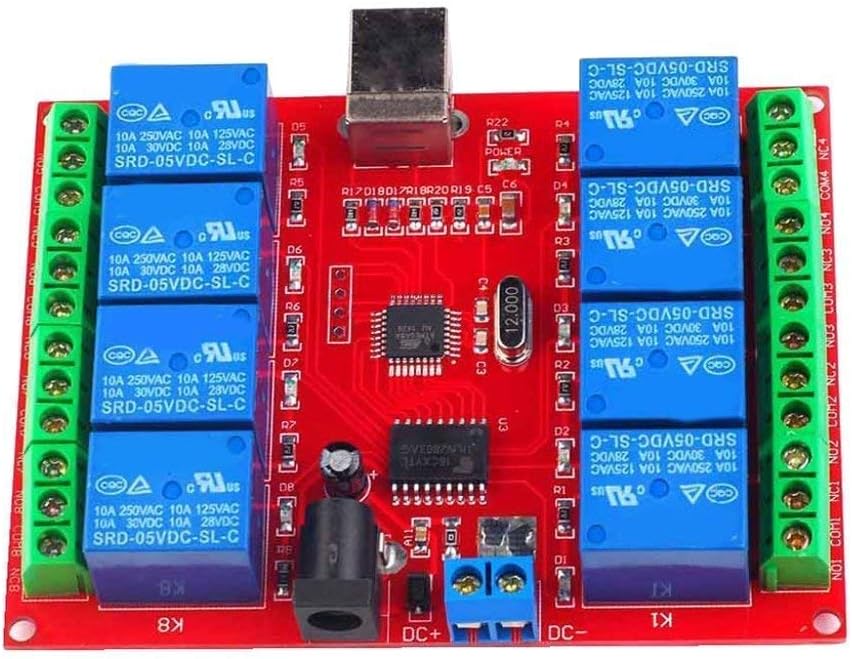
Figure 1: UIOTEC SRD-05VDC-SL-C 8-Way 5V Relay Module. This image shows the red PCB board with eight blue relays, green screw terminals on both sides, a USB Type-B port, and a DC power jack.
2.1 Atụmatụ
- HID technology for driver-free, plug-and-play operation.
- Compatibility with Windows XP/7/8 (32-bit and 64-bit systems).
- High-performance USB controller chip and military-grade PCB production.
- Eight 5V relays, capable of controlling loads up to 250V 10A AC or 30V 10A DC.
- Reserved 4-way and 8-way power interfaces for maintaining relay state even when USB is disconnected or PC is off. (Note: 1-way and 2-way versions do not have this power connector).
- LED indicators for power and each relay output.
3. Nkọwapụta
| Oke | Uru |
|---|---|
| Nkọwapụta agbagharị agbagharị | 10A 250VAC / 10A 125VAC / 10A 30VDC / 10A 28VDC |
| Ịnye ọkụ | 5V DC |
| Ụdị ịgbagharị | Mgbasa ozi 5V |
| Ụdị kọntaktị | NC / COM / NO (Normally Closed / Common / Normally Open) |
| Ntinye ugbu a | ≤300mA |
| Ibu Ibu | AC250V/10A or DC30V/10A |
| OS akwadoro | Win XP/Win7/Win8 32-bit/64-bit systems |
| Oriri ugbu a | 300 mA |
| Akụkụ (L x W x H) | 93mm x 70mm x 16mm |
| PCB Parameters | FR4 / 1.5mm / two layers / metalized holes / HAL / white stamp / solder nkpuchi |
4. Ntọala na nwụnye
- Njikọ ike: Connect a 5V DC power supply to the module's DC power jack or the DC+ / DC- screw terminals. Ensure the power supply can provide at least 300mA. For 4-way and 8-way modules, this external power supply allows the relay state to be maintained even if the USB connection is lost.
- Njikọ USB: Connect the module to your computer's USB port using a standard USB cable. The module will be recognized automatically as a HID device, requiring no additional driver installation.
- Njikọ Ibu Ibu: Identify the Normally Open (NO), Normally Closed (NC), and Common (COM) terminals for each relay.
- Na-emepe emepe (MKWU): Sekit a na-emepe (anaghị ejikọ) mgbe relay ahụ kwụsịrị ike ma mechie (na-ejikọ) mgbe relay ahụ na-enye ike.
- Emechikarị (NC): A na-emechi sekit ahụ (ejikọtara) mgbe relay ahụ kwụsịrị ike ma mepee (kwụsị) mgbe relay ahụ na-enye ike.
- A na-ahụkarị (COM): Ọdụ nkịtị maka mgba ọkụ relay.
5. Ntuziaka ọrụ
The UIOTEC SRD-05VDC-SL-C module is controlled via software running on your PC. UIOTEC provides universal software compatible with their relay boards, along with example code for various programming environments.
5.1 Software Control
- Budata ngwanrọ: Obtain the latest control software and example code from the UIOTEC official website or the provided resources.
- Ngwa Mmalite: Run the provided software application on your Windows PC.
- Njikwa nnyefe: The software interface will typically allow you to individually control each of the 8 relays (e.g., turn ON/OFF). Observe the LED indicators on the module, which will illuminate when a corresponding relay is energized.
5.2 Programming Examples
UIOTEC provides software examples for various programming languages, facilitating custom application development:
- VB6
- BCB6
- Java (NetBeans)
- VB.NET 2010 Express
- C++.NET 2010 Express
Rụtụ aka na ex nyereample code and documentation for integrating the relay module into your own projects.
6. Nlekọta
- Nhicha: Keep the module clean and free from dust. Use a soft, dry cloth for cleaning. Do not use liquid cleaners or solvents.
- gburugburu: Operate the module in a dry environment, away from moisture, extreme temperatures, and corrosive substances.
- Njikọ: Na-enyocha njikọ eletriki niile mgbe niile iji hụ na ha dị nchebe ma ghara imebi emebi.
- Nchekwa: When not in use for extended periods, store the module in an anti-static bag in a cool, dry place.
7. Nchọpụta nsogbu
| Nsogbu | Ihe nwere ike ime | Ngwọta |
|---|---|---|
| Module not recognized by PC. | USB cable faulty; USB port faulty; Module not powered correctly. | Try a different USB cable and/or USB port. Ensure 5V DC power is supplied to the module. Check device manager for HID device recognition. |
| Relays not switching. | Incorrect software command; Insufficient power supply; Overload on relay. | Verify software commands are correct. Ensure stable 5V DC power. Check if the connected load exceeds relay specifications. |
| LED indicators not working. | No power to module; Faulty LED. | Check power supply connection. If power LED is off, troubleshoot power. If individual relay LEDs are off, check software commands. |
| Ọrụ na-adịte aka. | Unstable power supply; Loose connections; Electromagnetic interference. | Use a stable 5V DC power supply. Secure all connections. Keep module away from strong electromagnetic fields. |
8. Ngwa
The UIOTEC SRD-05VDC-SL-C 8-Way 5V Relay Module is versatile and can be used in various projects, including:
- Robotics control
- Sistemụ akpaaka ụlọ
- Controlling doors and windows via a Windows system
- General controller power supply applications
9. Ihe ngwugwu
Upon opening the package, you should find the following item:
- 1 x UIOTEC SRD-05VDC-SL-C 8-Channel USB Relay Module
10. Akwụkwọ ikike na nkwado
For warranty information, technical support, or further inquiries, please refer to the official UIOTEC webma ọ bụ kpọtụrụ ndị ọrụ ahịa ha ozugbo. Debe risit ịzụrụ ihe gị maka akwụkwọ ikike ọ bụla.
Ask a question about this manual
Ask about setup, troubleshooting, compatibility, parts, safety, or missing instructions. Manuals+ will review the question and use this page’s manual context to help answer it.