
Ntuziaka nchekwa dị mkpa
Please read these instructions carefully before operating the unit. Keep this manual for future reference.
- Akwụsịla oghere ikuku ikuku ọ bụla.
- Awụnyela n'akụkụ ebe okpomọkụ ọ bụla.
- Chebe eriri ọkụ ka ị ghara ịgagharị ma ọ bụ tuo ya.
- Jiri naanị mgbakwunye / ngwa ndị nrụpụta akọwapụtara.
- Kwupu ngwa a n'oge oke mmiri ozuzo ma ọ bụ mgbe ejighi ya ogologo oge.
- Tụtụ aka n'aka ndị ọrụ ruru eru.
- Ịdọ aka ná ntị: Iji belata ihe egwu nke ọkụ ma ọ bụ ujo eletrik, ekpuchila ngwa a na mmiri ozuzo ma ọ bụ mmiri.
Ngwaahịa gafereview
The Victrola VS-120 is a versatile microsystem offering multiple audio playback options. It includes Bluetooth connectivity, a CD player, USB playback, an Aux-in port, and an FM radio.
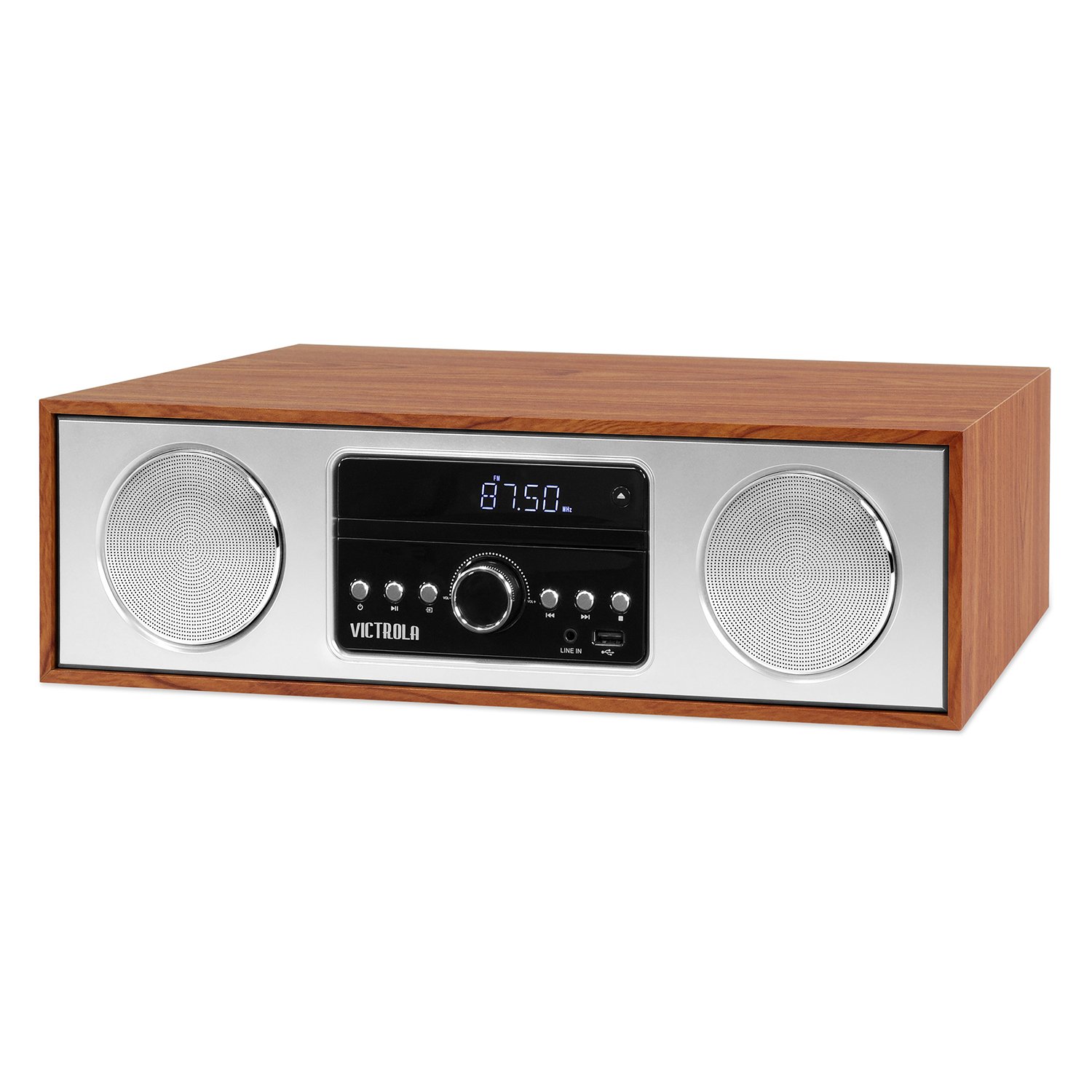
N'ihu view of the Victrola VS-120 Bluetooth Microsystem, showing the speaker, display, and control panel.

The Victrola VS-120 microsystem with its CD tray open, revealing a disc, and the included remote control positioned in the foreground.
Ntuziaka nhazi
Iwepu ngwongwo
Carefully remove the unit from its packaging. Ensure all accessories are present:
- Victrola VS-120 Microsystem
- Njikwa anya
- Ihe nkwụnye ọkụ
- Akwụkwọ ntuziaka (akwụkwọ a)
Njikọ Ike
- Insert the small end of the power adapter into the DC IN jack on the rear of the unit.
- Tinye nsọtụ nke ọzọ nke nkwụnye ọkụ n'ime oghere ọkọlọtọ ọkọlọtọ (AC 100-240V, 50/60Hz).
- The unit will enter standby mode, and the LED clock display will illuminate.
Antenna Connection (FM Radio)
For optimal FM radio reception, extend the FM wire antenna fully. Adjust its position for the best signal.
Ntuziaka ọrụ
Gbanyụọ/ Gbanyụọ
Pịa IKE button on the unit or remote control to turn the system on or off (standby mode).
Nhọrọ ọnọdụ
Pịa MODE button on the unit or remote control repeatedly to cycle through available functions: Bluetooth, CD, USB, AUX, na Redio FM.
Ọrụ Bluetooth
- Họrọ Bluetooth mode. The display will show "BT" and flash, indicating pairing mode.
- On your Bluetooth-enabled device (smartphone, tablet, etc.), enable Bluetooth and search for "Victrola VS-120".
- Select "Victrola VS-120" to pair. Once connected, the "BT" indicator will stop flashing and a confirmation tone will sound.
- You can now stream audio from your device to the microsystem.
- Use your device or the microsystem's controls (PLAY/PAUSE, NEXT, PREVIOUS) to manage playback.
Ịkpọghachi CD
- Họrọ CD ọnọdụ.
- Pịa Mepee/mechie bọtịnụ imepe tray CD.
- Place a CD (audio CD or MP3 CD) with the label side facing up into the tray.
- Pịa Mepee/mechie again to close the tray. The unit will read the disc and begin playback automatically.
- Jiri KWURU/Kwụsịa, OSOTE, na Gburugburu bọtịnụ iji jikwaa ịkpọghachi.
USB playback
- Insert a USB flash drive (FAT32 format, containing MP3 files) n'ime ọdụ ụgbọ USB.
- Họrọ USB mode. The unit will automatically detect and begin playing MP3 files site na mbanye.
- Jiri KWURU/Kwụsịa, OSOTE, na Gburugburu bọtịnụ iji jikwaa ịkpọghachi.
FM Radio arụ ọrụ
- Họrọ Redio FM ọnọdụ.
- Pịa ma jide TUNE +/- bọtịnụ iji nyochaa akpaghị aka maka ọdụ ọzọ dị.
- Pịa TUNE +/- buttons briefly to manually adjust the frequency in small increments.
- To save a station as a preset, press the MEM bọtịnụ, wee jiri PRESET +/- iji họrọ nọmba edobere, wee pịa MEM ọzọ iji gosi.
- Iji cheta ebe a na-edebe ihe ochie, jiri ya PRESET +/- bọtịnụ.
Njikọ Aux-in
- Jikọọ ngwaọrụ ọdịyo mpụga (dịka ọmụmaatụ, ọkpụkpọ MP3, ama) na ỌXụ IN jack na-eji eriri ọdịyo 3.5mm (anaghị etinye ya).
- Họrọ AUX ọnọdụ.
- Jikwaa ọkpụkpọ egwu na olu site na ngwaọrụ mpụga gị.
Ọrụ njikwa anya
The included remote control provides full functionality. Ensure batteries are correctly inserted. Key functions include:
- IKE: Turn unit on/off.
- Edị: Họrọ isi iyi.
- Vol +/-: Gbanwee olu.
- PLAY/PAUSE, NEXT, PREVIOUS: Control playback for CD, USB, and Bluetooth.
- TUNE +/-: Tune FM radio stations.
- MEM: Store FM presets.
- NTỤZI AKA +/-: Select FM presets.
- EQ: Cycle through equalizer settings (Flat, Rock, Pop, Jazz, Classic).
- Elekere: Tọọ elekere.
- DIMMER: Gbanwee nchapụta ngosi.
Na-edozi Ntọala EQ
Pịa EQ button on the remote control to cycle through preset equalizer modes: Flat, Rock, Pop, Jazz, and Classic. Select the mode that best suits your audio preference.
Ịtọ ntọala elekere
Ka ịtọọ elekere, pịa EGE button on the remote control. Use the TUNE +/- buttons to adjust the hour and minute, and press EGE again to confirm each setting.
Nlekọta
Na-ehicha Ngalaba
To clean the exterior of the unit, use a soft, dry cloth. Do not use abrasive cleaners, waxes, or solvents as these may damage the surface. Ensure the unit is unplugged before cleaning.
Nlekọta Ndị Na-egwu CD
Handle CDs by their edges. Keep them clean and free of scratches. If a CD is dirty, wipe it gently with a soft, lint-free cloth from the center outwards. Do not use solvents or abrasive cleaners on CDs.
Nchọpụta nsogbu
| Nsogbu | Ihe nwere ike ime | Ngwọta |
|---|---|---|
| Enweghị ike | Ejikọghị eriri ọkụ; Ọkụ ọkụ anaghị arụ ọrụ. | Hụ na e tinyere eriri ọkụ eletrik n'ime ya nke ọma; Nwaa oghere ọzọ. |
| Enweghị ụda | Volume too low; Incorrect mode selected; External device not playing. | Increase volume; Select correct mode (BT, CD, USB, AUX, FM); Ensure external device is playing and its volume is up. |
| CD anaghị egwu | E tinyere CD na-ezighi ezi; CD ruru unyi ma ọ bụ kpụchaa; anaghị akwado usoro diski. | Insert CD with label side up; Clean or replace CD; Ensure it's an audio CD or MP3 CD. |
| Njikọ Bluetooth ada ada | Unit not in pairing mode; Device too far; Device already paired to another unit. | Ensure unit is in BT mode and "BT" is flashing; Move device closer; Disconnect from other devices. |
| Nnabata FM adịghị mma | A naghị agbatị ma ọ bụ tinye eriri ahụ n'ọnọdụ kwesịrị ekwesị. | Gbatịa ma gbanwee eriri waya FM ahụ nke ọma. |
| Njikwa anya anaghị arụ ọrụ | Batteries dead or inserted incorrectly; Obstruction between remote and unit. | Replace batteries; Ensure correct polarity; Remove obstructions; Point remote directly at the unit's sensor. |
Nkọwapụta
- Akara: Victrola
- Ụdị: VS-120
- Njikọta: Bluetooth, USB, Enyemaka (3.5mm)
- Isi mmalite ọdịyo: CD Player, USB Player, FM Radio, Bluetooth, Aux-in
- Ike mmepụta: 30 Watt
- Ụdị ọdịyo akwadoro: CD, MP3
- Akụkụ (L x W x H): 15.97 x 4.69 x 10.83 sentimita (40.56 x 11.91 x 27.51 cm)
- Arọ: Pound 10.76 (4.88 n'arọ)
- Ntinye ike: AC 100-240V, 50/60Hz
- Agba: Maple
Akwụkwọ ikike na nkwado
Victrola products are designed with quality and performance in mind. For detailed warranty information, please refer to the warranty card included with your product or visit the official Victrola website. For technical support or customer service inquiries, please contact Victrola customer support through their official channels.
Websaịtị: www.victrola.com