
1. Okwu mmalite
This manual provides instructions for the setup, operation, and maintenance of the Avaya 1616 IP Telephone (Model 700450190). The Avaya 1616 is designed for users who require a robust and feature-rich communication device, supporting 16 line appearances and a high-quality speakerphone. This guide will help you maximize the functionality of your IP telephone.
2. Nhazi
Follow these steps to properly set up your Avaya 1616 IP Telephone.
2.1 Mwepu na njirimara akụrụngwa
Carefully remove all components from the packaging. Ensure all parts are present before proceeding with the setup.
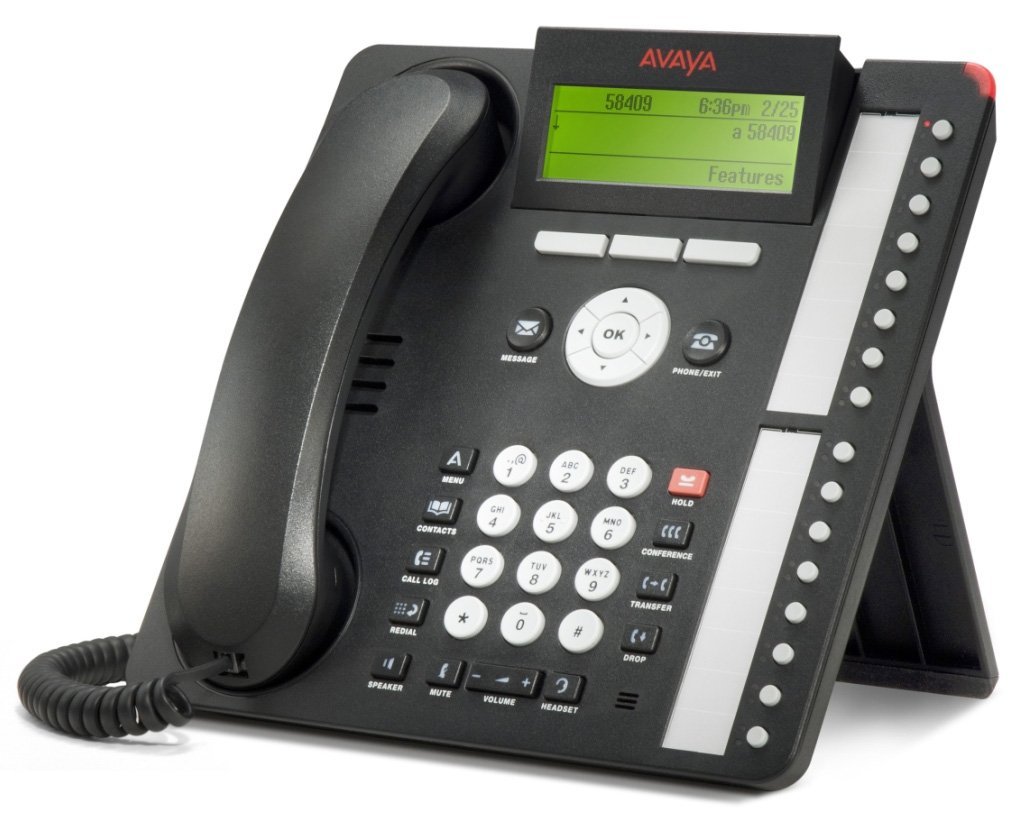
Foto 1: Avaya 1616 IP Telephone components. This image displays the main telephone unit, the handset, the coiled handset cord, an Ethernet cable, and the desk stand. The main unit features a display screen, a numeric keypad, and various function buttons. The desk stand is designed to elevate the phone for easier viewing na arụ ọrụ.
- Telephone Base Unit: The main body of the phone with keypad, display, and function buttons.
- Ihe Aka: The receiver for voice communication.
- Handset Cord: Coiled cord connecting the handset to the base unit.
- Ethernet USB: Maka njikọ netwọkụ.
- Ogwe oche: For positioning the phone on a desk.
- Power Adapter (Sold Separately): A 5V local power supply may be required if Power over Ethernet (PoE) is not available.
2.2 Njikọ anụ ahụ
- Tinye Desk Stand: Securely attach the desk stand to the bottom of the telephone base unit.
- Jikọọ ekwentị: Plug one end of the coiled handset cord into the handset and the other end into the designated handset port on the side or back of the telephone base unit.
- Jikọọ na netwọk: Insert one end of the Ethernet cable into the "LAN" port on the back of the telephone and the other end into a network switch or router. The phone supports dual Ethernet ports for connection of the phone and a collocated PC with VLAN separation.
- Njikọ Ike:
- Ike n'elu Ethernet (PoE): If your network switch supports 802.3af PoE, the phone will receive power through the Ethernet cable. No separate power adapter is needed.
- Local Power Supply: If PoE is not available, connect a 5V local power supply (sold separately) to the power port on the back of the telephone and then to an electrical outlet.
Once connected, the phone will power on and begin its boot sequence. This may take a few moments.
3. Ntuziaka ọrụ
This section covers the basic operation of your Avaya 1616 IP Telephone.
3.1 Atụmatụ
- 16 Line Appearances/Feature Keys: Programmable buttons with dual LEDs for line status and feature access.
- High-Quality 2-Way Speakerphone: Maka nkwukọrịta na-enweghị aka.
- NJ onye ọkpụkpọ: Na-egosi ozi onye na-akpọ oku na-abata.
- Ọrụ multiline: Supports multiple active lines.
- Ikike oku ọgbakọ: Basic conferencing features.
3.2 Ọrụ oku bụ isi
- Ịkpọ oku:
- Welie ekwentị ma ọ bụ pịa bọtịnụ Ọkà Okwu.
- Jiri ahụ igodo pịa nọmba achọrọ.
- Press the "Call" or "Dial" softkey, or wait for automatic dialing.
- Na-aza oku:
- Lift the handset, or press the Speaker button, or press the flashing line appearance button.
- Ịkwụsị oku:
- Replace the handset, or press the Speaker button again if using speakerphone, or press the "End Call" softkey.
- Placing a Call on Hold:
- During an active call, press the "Hold" button. The line appearance LED will flash.
- To retrieve the call, press the flashing line appearance button.
- Ịnyefe oku:
- During an active call, press the "Transfer" button. The current call is put on hold.
- Dial the number of the party to whom you wish to transfer the call.
- Wait for the party to answer (consulted transfer) or press "Transfer" again to complete the transfer (blind transfer).
- Ịmalite oku ọgbakọ:
- During an active call, press the "Conference" button. The current call is put on hold.
- Kpọọ nọmba nke ndị ọzọ.
- Once the third party answers, press the "Conference" button again to join all parties.
4. Nlekọta
Proper maintenance ensures the longevity and optimal performance of your Avaya 1616 IP Telephone.
4.1 Nhicha
- Jiri nro dị nro damp cloth to clean the exterior surfaces of the phone.
- Avoid using abrasive cleaners, solvents, or strong chemicals, as these can damage the finish and electronic components.
- Do not spray cleaning liquids directly onto the phone. Apply to the cloth first.
- Ensure the phone is disconnected from power before cleaning.
4.2 Nlekọta n'ozuzu
- Keep the phone away from excessive heat, direct sunlight, and moisture.
- Zere idobe ekwentị ma ọ bụ tinye ya na mmetụta siri ike.
- Ensure cables are not pinched or strained.
5. Nchọpụta nsogbu
This section provides solutions to common issues you might encounter with your Avaya 1616 IP Telephone.
| Nsogbu | Ihe nwere ike ime | Ngwọta |
|---|---|---|
| Ekwentị anaghị agbanye. | Enweghị ike ọkọnọ ma ọ bụ njikọ adịghị mma. |
|
| Enweghị ụda ọkpụkpọ. | Network connectivity issue or service problem. |
|
| Enweghị ike ịkpọ ma ọ bụ nata oku. | Network configuration, service issue, or phone registration problem. |
|
| Ogo ọdịyo adịghị mma. | Network congestion, faulty cable, or handset issue. |
|
If the problem persists after attempting these solutions, please contact your IT department or Avaya support for further assistance.
6. Nkọwapụta
Key technical specifications for the Avaya 1616 IP Telephone (700450190).
| Njirimara | Nkọwa |
|---|---|
| Nọmba nlereanya | 700450190 |
| Line Appearances | 16 with dual LEDs |
| Igwe okwu | High-quality 2-way |
| Nhọrọ nkwụnye | Desk or wall mountable (with optional adapter) |
| ọdụ ụgbọ mmiri Ethernet | Dual (for phone and collocated PC w/VLAN separation) |
| Isi Iyi Ike | 802.3af Power over Ethernet (PoE) or optional 5V local power supply |
| Ụdị ọkpụkpọ | Otu ahụ igodo |
| Ụdị Sistemu na-aza | Dijitalụ |
| Ngwa dakọtara | Computers, Telephone Networks, VoIP Services |
| Ike oku ogbako | Isi |
| Multiline arụ ọrụ | Ọrụ Multi-Line |
| NJ onye ọkpụkpọ | Ee |
| Agba | Nwa |
| Akụkụ ngwaahịa | 9.8 x 7.9 x 2.8 sentimita (ihe dị ka) |
| Akụkụ ngwugwu | 16.8 x 10 x 3.3 sentimita asatọ |
| Ibu | 2.9 Pounds (Package Weight) |
7. Akwụkwọ ikike Ozi
This Avaya 1616 IP Telephone (700450190) is typically offered with a Akwụkwọ ikike nwere oke ụbọchị 90. This warranty covers defects in materials and workmanship under normal use. For specific terms and conditions, please refer to the warranty documentation provided at the time of purchase or contact your vendor.
Note: As a renewed product, warranty terms may vary from new products. Always confirm warranty details with your supplier.
8. Nkwado
For technical assistance, further troubleshooting, or inquiries regarding your Avaya 1616 IP Telephone, please contact your system administrator or the vendor from whom you purchased the device. Avaya's official support channels can also provide resources and documentation for their products.
For general information about Avaya products, you may visit the official Avaya websaịtị.