
1. Okwu mmalite
This manual provides instructions for the Easytry123 replacement infrared remote control, model Easytry0400. This remote is designed to function as a direct replacement for the original remote controls of Dynex DX-LCD37-09-02 and DX-LCD37-09-2 LCD LED HDTV television models. Please ensure your television model is listed for proper compatibility. This remote operates using infrared technology and requires 2 AAA batteries (not included).
2. Ntọlite: Ntinye batrị
To begin using your Easytry123 replacement remote control, you must first install the batteries.
- Chọta ebe batrị dị n'azụ nke njikwa anya.
- Mikpuo mkpuchi nke batrị ahụ n'ala ma ọ bụ n'èzí iji mepee ya.
- Insert two (2) AAA batteries, ensuring the positive (+) and negative (-) terminals align correctly with the markings inside the compartment. Incorrect battery orientation can prevent the remote from functioning.
- Weghachite mkpuchi nke batrị batrị n'ime ebe ruo mgbe ọ pịrị na nchekwa.
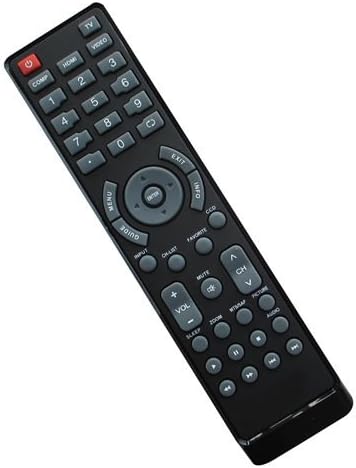
Foto 1: Azu view of the Easytry123 remote control with the battery compartment open, illustrating where to insert the two AAA batteries.
3. Ntuziaka ọrụ
Point the remote control directly towards the infrared receiver on your Dynex television. Ensure there are no obstructions between the remote and the TV.

Foto 2: N'ihu view of the Easytry123 remote control, displaying its button layout.
Ọrụ bọtịnụ:
- POWER (Red button): Gbanyụọ ma ọ bụ gbanyụọ igwe onyonyo.
- COMP, HDMI, VIDEO, 1-9, 0: Number buttons for direct channel selection and input source selection.
- NchNhr: Na-abanye na menu isi nke telivishọn.
- NDỤMỌDỤ: Displays the electronic program guide (if supported by your TV and service).
- ARROW buttons (Up, Down, Left, Right): Na-agagharị na menus na nhọrọ.
- Tinye: Na-akwado nhọrọ dị na menu.
- ỤZỌ ỌPỤPỤ: Na-apụ na menu ma ọ bụ ihuenyo dị ugbu a.
- Ozi: Na-egosi ozi gbasara mmemme ma ọ bụ ntinye dị ugbu a.
- DCC: Likely for Closed Captioning display.
- Ntinye: Cycles through available input sources (HDMI, Video, etc.).
- Ndepụta CH: Na-egosiputa ndepụta ọwa.
- IHE: Na-ewepụ ma ọ bụ na-ewepụ ụda olu telivishọn.
- Vol +/-: Na-edozi ọkwa olu.
- CH ^/v: Na-agbanwe ọwa telivishọn elu ma ọ bụ ala.
- MTMAP, PICTURE, AUDIO: Likely dedicated buttons for picture modes, audio settings, or other TV features.
- Mbugharị: Na-edozi ọkwa mbugharị ihuenyo.
- Ụra: Na-edozi oge ihi ụra maka ihe onyonyo.
- Playback Controls (Rewind, Play/Pause, Fast Forward, Stop, Record): For controlling connected media devices or TV's built-in media player.
Note: Some advanced functions or specific buttons may require your television to support those features. Refer to your television's original user manual for detailed information on its capabilities.
4. Nlekọta
Nlekọta na nlekọta kwesịrị ekwesị ga-agbatị ndụ nke njikwa ime gị.
- Nhicha: Use a soft, dry cloth to clean the remote control. For stubborn dirt, lightly dampen the cloth with water or a mild cleaning solution, then wipe dry immediately. Do not use abrasive cleaners or immerse the remote in liquids.
- Ngbanwe batrị: Replace batteries when the remote's response becomes sluggish or stops working. Always replace both batteries at the same time with new AAA batteries. Do not mix old and new batteries, or different types of batteries.
- Nchekwa: If the remote will not be used for an extended period, remove the batteries to prevent leakage, which can damage the remote.
5. Nchọpụta nsogbu
Ọ bụrụ na ị hụ nsogbu na njikwa remote gị, gbalịa usoro nchọpụta nsogbu ndị a:
- Remote anaghị aza:
- Ensure the remote is pointed directly at the TV's infrared sensor.
- Check if there are any obstructions between the remote and the TV.
- Dochie batrị ahụ na batrị AAA ọhụrụ.
- Verify that the TV is powered on.
- Ụfọdụ bọtịnụ anaghị arụ ọrụ:
- This replacement remote is designed to replicate the original remote's functions. However, some specific or advanced features of your TV might not be fully supported if they differ significantly from the original remote's design.
- Ensure your TV model is indeed one of the compatible models (Dynex DX-LCD37-09-02 or DX-LCD37-09-2).
- Ntinye aka:
- Strong light sources, especially fluorescent lights or direct sunlight, can interfere with infrared signals. Try operating the remote in different lighting conditions.
Ọ bụrụ na nsogbu ahụ dịgidere mgbe ịnwale usoro ndị a, biko kpọtụrụ nkwado ndị ahịa.
6. Nkọwapụta
| Nọmba nlereanya: | Easytry0400 |
| Akara: | Easytry123 |
| Teknụzụ Njikọta: | Infrared (IR) |
| Njikwa Type: | Njikwa bọtịnụ |
| Ngwa dakọtara: | Dynex DX-LCD37-09-02, Dynex DX-LCD37-09-2 LCD LED HDTVs |
| Batrị achọrọ: | 2 x AAA (anaghị etinye ya) |
| Njirimara Pụrụ Iche: | Ergonomic replacement design |
7. Nkwado ndị ahịa
For any questions, concerns, or troubleshooting assistance not covered in this manual, please contact the seller or Easytry123 customer support through the platform where the product was purchased. Please have your product model number (Easytry0400) and purchase details ready when contacting support.